Windows Update Error 80072EFE

huffman

New member
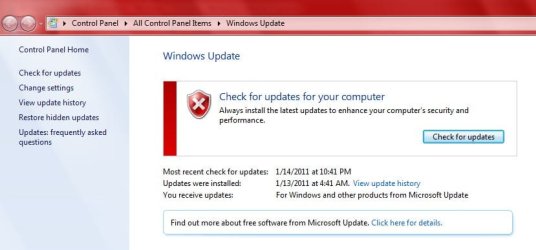
For the past few days when I try to update Windows 7 32 bit, (I am usings Microsoft Security Essentials as my AV) I get the following:
update1.jpg

This is not normally what I see, normally the updates are listed and I can just install them.

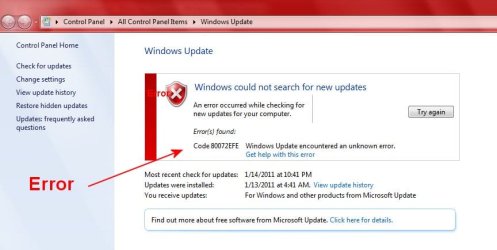
When I click on "Check for Updates" then I get the following:
update2.jpg

Note the error

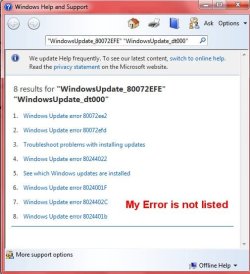
So then I click on "Get Help with this error" and get the following:
update3.jpg

Note that my error is NOT listed.

I have done extensive Google searches to solve the issue. There were several suggestions including some downloads One in particular (ParetoLogic PC Health Advisor) I downloaded and tried to install. After a half hour waiting for it to install I stopped the install. It really played hell with my PC. I ended up restoring my PC with an Acronis Image made 1/15/2011. I had hoped this would also fix my update error, which it did NOT.

Does anyone a freaking idea how to fix this issue? I am assuming even if I do a clean install the same issue will be there.

BTW I have run "Full Scans" twice with Malwarebytes and Microsoft Security Essentials and nothing was found.

Any help is greatly appreciated.
 

My Computer

OS
Windows 7 Pro
CPU
Intel(R) Pentium(R) Duel CPU E2200 2.20 Ghz
Motherboard
GA-G41M-ES2L
Memory
4 gb 2.96 Usable
Graphics Card(s)
Onboard
Sound Card
Onboard
Hard Drives
2 - 1TB WD Sata Drives
One of things shown is the firewall is blocking access.

Probably not the problem but to be sure try turning your firewall off temporarily then try checking for updates.
At least we will know one way or the other on that scenario.

Once that probably won't work I'll post some other ideas.
I'll get some screen shots together and post them for you.

Mike
........................................................................................
http://www.sevenforums.com/tutorials/91738-windows-update-reset.html

This is a tutorial on how to reset Windows Update. Should reset to default settings.
Try this first or below first.
All the updates shown in the middle picture below will no longer appear in the list.
They are still on the computer but won't show here after using the reset.
New updates will be added here in the future.
.................................................................................................
If the above doesn't work then open Win Update page.
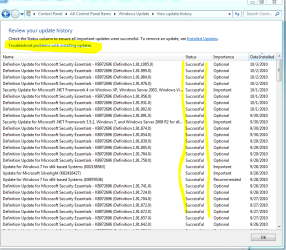
Click "View Update history" yellow marked in left picture below.
Middle picture click "Troubleshoot."
Right picture Click blue circled "Is there an easy way..."
Then click troubleshooter.

This opens a repair wizard.
Then follow prompts.
There are different listings to try so you may need to try this more than once to select different options.
Several people have used this with good results so it can work but not always.
Best I have for now.
Hope that helps and fixes things.
 

Attachments

  • Windows Update.PNG
    Windows Update.PNG
    72.7 KB · Views: 105
  • Updates.PNG
    Updates.PNG
    110.3 KB · Views: 122
  • Troubleshoot.PNG
    Troubleshoot.PNG
    89.4 KB · Views: 143
Last edited:

My Computer

Computer Manufacturer/Model Number
Hopalong/ Godzilla
OS
Windows7 Pro 64bit SP-1; Windows XP Pro 32bit
CPU
Intel Core i7-870 Lynnfield 2.93GHz LGA 1156 95W Quad-Core
Motherboard
ASUS P7P55D-E PRO
Memory
8GB@1400MHz Crucial Ballistix DDR3-1600 4x2GB
Graphics Card(s)
ASUS ENGTX460 DirectCU/2DI/1GD5 1GB 256-bit GDDR5
Sound Card
VIA Onboard
Monitor(s) Displays
Asus VS248H-P 24"; Samsung SyncMaster 941BW 19"ws
Screen Resolution
1920x1080; 1440x900
Hard Drives
Samsung 830 120GB SSD
Intel 320 120GB SSD
Western Digital Caviar Black WD7501AALS 750GB 7200 RPM SATA 3.0Gb/s
Western Digital Caviar Black WD6401AALS 640GB 7200 RPM SATA 3.0Gb/s
PSU
COOLER MASTER Silent Pro RS850-AMBAJ3-US 850W Modular
Case
COOLER MASTER HAF 932 RC-932-KKN5-GP Black
Cooling
Scythe "Mugen-2 Rev.B" (2 ScytheKaze-Jyuni PWM fans)
Keyboard
Logitech K-320
Mouse
Kensington
Antivirus
Avast Inernet Suite
Browser
IE 9 ; Chrome
The actual error code means:

Code:
C:\>err 80072efe
# as an HRESULT: Severity: FAILURE (1), Facility: 0x7, Code 0x2efe
# for hex 0x2efe / decimal 12030 :
  ERROR_INTERNET_CONNECTION_ABORTED                             inetmsg.h
  ERROR_INTERNET_CONNECTION_ABORTED                             wininet.h
# 2 matches found for "80072efe"
So, it is indeed some sort of network issue. Since WU uses WinHTTP and not WinINet, the error would be coming from inetmsg.h, but since they're the same it doesn't matter. Googling what you actually have as an error message and your problem, I found the very first link in the results might work. If you're still getting the errors after using a restore point to where it was working before, then you might want to consider the issue might not be *on* your box, but perhaps upstream - at your router, or your ISP, etc. It is usually local, but I've seen some issues here on SevenForums where user's DNS was pointing to incorrect servers for WU servers because of DNS cache poisoning, etc. It does happen.
 

My Computer

Computer type
PC/Desktop
Computer Manufacturer/Model Number
Custom
OS
Windows 10 Pro x64
CPU
Intel Core i7 4790K @ 4.5GHz
Motherboard
Asus Maximus Hero VII
Memory
32GB DDR3
Graphics Card(s)
Nvidia GeForce GTX970
Sound Card
Realtek HD Audio
Screen Resolution
1920x1200
Hard Drives
1x Samsung 250GB SSD
4x WD RE 2TB (RAIDZ)
PSU
Corsair AX760i
Case
Fractal Design Define R4
Cooling
Noctua NH-D15
I fixed a computer with the 80072EFE error, it was caused by a rootkit, google tsdkill and let it run.
 

My Computer

Computer type
PC/Desktop
OS
Microsoft Windows 10 Professional / Windows 7 Professional
CPU
Intel i5-3570
Motherboard
Lenovo Mahobay
Memory
16GB DDR3
Graphics Card(s)
AMD Radeon HD 7850 2GB
Sound Card
(1) Realtek HD Audio (2) AMD HD Audio
Monitor(s) Displays
LG LS192WS
Screen Resolution
1440 x 900 @ 32bit color
Hard Drives
(1) SUV300S37A/120G (2) ST3500413AS SATA Disk Device AHCI mode enabled.
PSU
Corsair HX620
Case
Thermaltake V4 Black Edition
Cooling
Cooler Master Hyper 212 + Artic Silver 5 on CPU/GPU
Keyboard
Dell SK-8115
Mouse
Razer Copperhead with MAPED mat (awesome!)
Internet Speed
100 Mbps up/down
Browser
Chrome
Thanks for all the replies.

I have reset my modem, router and Vonage. Do not know if that helped or not since after I did that Window 7 totally crashed and I can not even restore an Acronis image. :cry:

I am on Win XP at the moment (same computer as I have (or had) Win 7 installed). I had each OS installed on a different hard drive so it made it easy switch back to XP.

At any rate I went to install Win 7 (clean install) and everything was going fine until I put in the Product Code. It said I had an invalid Product Code (I bought Win 7 Pro through the student program offers so I know it is a valid copy of Win 7. Right now I am waiting for Microsoft Customer Care office to open so I can hopefully get the Product Code rectified. :shock:

I will let you know what is happening once I get Win 7 installed again.

BTW Win XP updates just fine with no issues.
 

My Computer

OS
Windows 7 Pro
CPU
Intel(R) Pentium(R) Duel CPU E2200 2.20 Ghz
Motherboard
GA-G41M-ES2L
Memory
4 gb 2.96 Usable
Graphics Card(s)
Onboard
Sound Card
Onboard
Hard Drives
2 - 1TB WD Sata Drives
After numerous calls to Microsoft I finally got the Product Code rectified.

Win 7 is now installed and fully updated as of today.

Other than resetting the modem, router and Vonage I can not think of anything else that may have fixed the Error 80072EFE.
 

My Computer

OS
Windows 7 Pro
CPU
Intel(R) Pentium(R) Duel CPU E2200 2.20 Ghz
Motherboard
GA-G41M-ES2L
Memory
4 gb 2.96 Usable
Graphics Card(s)
Onboard
Sound Card
Onboard
Hard Drives
2 - 1TB WD Sata Drives
Back
Top