Windows Update Error 80073712

9South

New member
Local time
3:38 PM
Messages
2
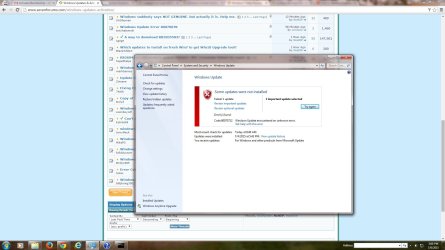
I get this error when trying to install SP1 update for Win 7 HP x64.
 

Attachments

  • sh1.jpg
    sh1.jpg
    138.7 KB · Views: 1

My Computer

Computer type
PC/Desktop
Computer Manufacturer/Model Number
Custom build
OS
Windows 7 Home Premium x64
CPU
AMD Phenom II 1090T x64
Motherboard
Gigabyte
Memory
8 GB Corsair DDR3 1333 MHz
Graphics Card(s)
Integrated
Hard Drives
WD Blue 160 GB
Browser
Google Chrome
The CheckSUR log shows the following summary...
Code:
Summary:
Seconds executed: 640
 Found 166 errors
 Fixed 160 errors
  CSI Manifest Missing Total count: 4
  Fixed: CSI Manifest Missing.  Total count: 4
  CSI Manifest and S256H Do Not Match Total count: 1
  CSI Missing Component Key Total count: 6
  Fixed: CSI Missing Component Key.  Total count: 6
  CSI Missing Pinned Component Key Total count: 6
  Fixed: CSI Missing Pinned Component Key.  Total count: 6
  CSI Missing Deployment Key Total count: 2
  CSI Missing Identity Total count: 23
  Fixed: CSI Missing Identity.  Total count: 23
  CSI Corrupt Identity Total count: 4
  Fixed: CSI Corrupt Identity.  Total count: 4
  CSI Missing C Mark Total count: 31
  Fixed: CSI Missing C Mark.  Total count: 31
  CSI C Mark Deployment Missing Total count: 2
  CSI Located Replacement: Invalid (S256H) Total count: 13
  CSI F Mark Value Wrong Total count: 1
  Fixed: CSI F Mark Value Wrong.  Total count: 1
  CSI F Mark Missing Total count: 91
  Fixed: CSI F Mark Missing.  Total count: 91
  CBS Registry Error Total count: 1
Unavailable repair files:
 winsxs\manifests\amd64_system.data.oracleclient_b77a5c561934e089_6.1.7600.16385_none_800ff37184f818a9.manifest

There are a large variety of errors there - much more than we normally see. It makes me wonder what could have caused them all.
I suspect that the root cause is a problem with RAM.
You need to test your RAM with MemTest86+ - http://www.sevenforums.com/tutorials/105647-ram-test-memtest86.html - run at least 3 full passes. Even one error means that there is a problem which must be addressed.

I don't think there's much point in attempting to fix this until we're sure that any fix is going to stay fixed ;)
 

My Computer

Computer type
Laptop
Computer Manufacturer/Model Number
Asus K52F or Lenovo B51-80
OS
Win 7 x64 Home Premium (and x86 VirtualBox VM)/Win10
CPU
i3 370M/i7 6500U
Motherboard
Asus/Lenovo
Memory
8GB - finally :)/8GB
Graphics Card(s)
it's an i3, dude!/dual Intel&nVidia
Sound Card
onboard
Monitor(s) Displays
15.6" built-in
Screen Resolution
1366x768/1920x1080
Hard Drives
750GB Seagate internal
Sundry external drives attached to other computers on the local network
1TB SSD on the Lenovo
PSU
n/a
Internet Speed
as much as I can get - usually on a dongle/phone, so <1MB/s
Antivirus
MSE/Defender
Browser
IE11/12/Edge/Chrome/FF(if I must)
I actually did have a RAM issue a couple days ago, tested all sticks individually with memtest and found a bad one, replaced it and my BSODs stopped. Could these errors be left over from that event?
 

My Computer

Computer type
PC/Desktop
Computer Manufacturer/Model Number
Custom build
OS
Windows 7 Home Premium x64
CPU
AMD Phenom II 1090T x64
Motherboard
Gigabyte
Memory
8 GB Corsair DDR3 1333 MHz
Graphics Card(s)
Integrated
Hard Drives
WD Blue 160 GB
Browser
Google Chrome
Very possibly - does the RAM test out OK now?
 

My Computer

Computer type
Laptop
Computer Manufacturer/Model Number
Asus K52F or Lenovo B51-80
OS
Win 7 x64 Home Premium (and x86 VirtualBox VM)/Win10
CPU
i3 370M/i7 6500U
Motherboard
Asus/Lenovo
Memory
8GB - finally :)/8GB
Graphics Card(s)
it's an i3, dude!/dual Intel&nVidia
Sound Card
onboard
Monitor(s) Displays
15.6" built-in
Screen Resolution
1366x768/1920x1080
Hard Drives
750GB Seagate internal
Sundry external drives attached to other computers on the local network
1TB SSD on the Lenovo
PSU
n/a
Internet Speed
as much as I can get - usually on a dongle/phone, so <1MB/s
Antivirus
MSE/Defender
Browser
IE11/12/Edge/Chrome/FF(if I must)
Back
Top