Solved Windows Update Error 80073712

lmbas

New member
Local time
7:58 PM
Messages
3
Hi,
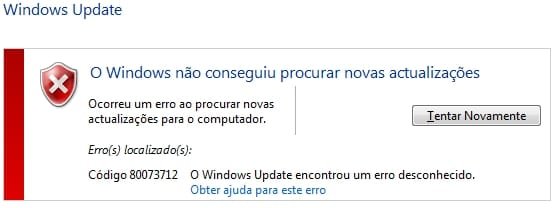
i'm getting error 80073712 in windows update.
ran sfc /scannow with no problem found
ran CheckSUR and the log shows some problems with 18 manifests
can you please help me with this?

thanks
 

Attachments

  • windows update error.jpg
    windows update error.jpg
    15.4 KB · Views: 18

My Computer

Computer type
Laptop
Computer Manufacturer/Model Number
Asus
OS
Windows 7 Home Premium 64 bits
CPU
AMD E2
Here's the errors from the CheckSUR log...
Code:
Summary:
Seconds executed: 1269
 Found 18 errors
  CSI Manifest All Zeros Total count: 18

Unavailable repair files:
	winsxs\manifests\amd64_microsoft-windows-w..ient-core.resources_31bf3856ad364e35_7.6.7600.320_en-us_2b6abab786297fc7.manifest
	winsxs\manifests\amd64_microsoft-windows-w..pdate-adm.resources_31bf3856ad364e35_7.6.7600.320_es-es_84ed48236adf37d2.manifest
	winsxs\manifests\amd64_microsoft-windows-w..client-ui.resources_31bf3856ad364e35_7.6.7600.320_en-us_3cc2c1c213d77748.manifest
	winsxs\manifests\amd64_microsoft-windows-w..pdate-adm.resources_31bf3856ad364e35_7.6.7600.320_el-gr_84c742d96aefa2f6.manifest
	winsxs\manifests\amd64_microsoft-windows-w..wsupdateclient-core_31bf3856ad364e35_7.6.7600.320_none_d5f64d30518fd000.manifest
	winsxs\manifests\amd64_microsoft-windows-w..client-ui.resources_31bf3856ad364e35_7.6.7600.320_he-il_23653c46ed3f803d.manifest
	winsxs\manifests\amd64_microsoft-windows-windowsupdate-adm_31bf3856ad364e35_7.6.7600.320_none_92880415bab4fe68.manifest
	winsxs\manifests\amd64_microsoft-windows-w..ient-core.resources_31bf3856ad364e35_7.6.7600.320_pt-pt_2de8c0a7f24ced42.manifest
	winsxs\manifests\amd64_microsoft-windows-w..ient-core.resources_31bf3856ad364e35_7.6.7600.320_he-il_120d353c5f9188bc.manifest
	winsxs\manifests\amd64_microsoft-windows-w..client-ui.resources_31bf3856ad364e35_7.6.7600.320_es-es_3c8e1ea613fe68ed.manifest
	winsxs\manifests\amd64_microsoft-windows-w..ient-core.resources_31bf3856ad364e35_7.6.7600.320_es-es_2b36179b8650716c.manifest
	winsxs\manifests\amd64_microsoft-windows-windowsupdateclient-ui_31bf3856ad364e35_7.6.7600.320_none_53a370daf19412b1.manifest
	winsxs\manifests\amd64_microsoft-windows-w..client-ui.resources_31bf3856ad364e35_7.6.7600.320_el-gr_3c68195c140ed411.manifest
	winsxs\manifests\amd64_microsoft-windows-w..pdate-adm.resources_31bf3856ad364e35_7.6.7600.320_he-il_6bc465c444204f22.manifest
	winsxs\manifests\amd64_microsoft-windows-w..ient-core.resources_31bf3856ad364e35_7.6.7600.320_el-gr_2b1012518660dc90.manifest
	winsxs\manifests\amd64_microsoft-windows-w..client-ui.resources_31bf3856ad364e35_7.6.7600.320_pt-pt_3f40c7b27ffae4c3.manifest
	winsxs\manifests\amd64_microsoft-windows-w..pdate-adm.resources_31bf3856ad364e35_7.6.7600.320_pt-pt_879ff12fd6dbb3a8.manifest
	winsxs\manifests\amd64_microsoft-windows-w..pdate-adm.resources_31bf3856ad364e35_7.6.7600.320_en-us_8521eb3f6ab8462d.manifest

I'll post a fix protocol a little later...
 

My Computer

Computer type
Laptop
Computer Manufacturer/Model Number
Asus K52F or Lenovo B51-80
OS
Win 7 x64 Home Premium (and x86 VirtualBox VM)/Win10
CPU
i3 370M/i7 6500U
Motherboard
Asus/Lenovo
Memory
8GB - finally :)/8GB
Graphics Card(s)
it's an i3, dude!/dual Intel&nVidia
Sound Card
onboard
Monitor(s) Displays
15.6" built-in
Screen Resolution
1366x768/1920x1080
Hard Drives
750GB Seagate internal
Sundry external drives attached to other computers on the local network
1TB SSD on the Lenovo
PSU
n/a
Internet Speed
as much as I can get - usually on a dongle/phone, so <1MB/s
Antivirus
MSE/Defender
Browser
IE11/12/Edge/Chrome/FF(if I must)
I've uploaded a file - ibsaa.zip - to my OneDrive at Noel's OneDrive
Please download and save it.
Right-click on the downloaded file, and select Extract all…
Extract to the default location - which will create a new folder ibsaa in the same place.
Open this folder - there should be one folder inside it (Manifests)

Copy the content of the manifests folder (.manifest files) into this folder:

C:\Windows\Temp\CheckSur\Winsxs\Manifests

Now run the CheckSUR tool again (it may take a while)

Post the new CheckSUR.log file, and the CheckSUR.persist.log file.
 

My Computer

Computer type
Laptop
Computer Manufacturer/Model Number
Asus K52F or Lenovo B51-80
OS
Win 7 x64 Home Premium (and x86 VirtualBox VM)/Win10
CPU
i3 370M/i7 6500U
Motherboard
Asus/Lenovo
Memory
8GB - finally :)/8GB
Graphics Card(s)
it's an i3, dude!/dual Intel&nVidia
Sound Card
onboard
Monitor(s) Displays
15.6" built-in
Screen Resolution
1366x768/1920x1080
Hard Drives
750GB Seagate internal
Sundry external drives attached to other computers on the local network
1TB SSD on the Lenovo
PSU
n/a
Internet Speed
as much as I can get - usually on a dongle/phone, so <1MB/s
Antivirus
MSE/Defender
Browser
IE11/12/Edge/Chrome/FF(if I must)
thank you for your help, but I can't access c:\windows\temp.
Message is "It has been denied permission to access this folder. To get access to this folder you have to use the Security Tab"
My user is administrator but still i can't set the permissions to that folder.
Can you help me with this also? Thanks
 

My Computer

Computer type
Laptop
Computer Manufacturer/Model Number
Asus
OS
Windows 7 Home Premium 64 bits
CPU
AMD E2
Interesting - what Anti-virus are you using?

Please open an Elevated Command Prompt, and run the following commands:

ICACLS C:\Windows\Temp
ICACLS C:\Windows\Temp\CheckSur

post the results
Here are some instructions to make life easier :)
1) To open an Elevated Command Prompt Window (the ECP window), click on Start, All Programs, Accessories – then right-click on Command Prompt, and select Run as Administrator. Accept the UAC prompt.
2) To run the commands easier, highlight the block of commands, and right-click on the highlight – select Copy. In the CP Window, click on the black/white icon at top left – select Paste. The commands will run but may not complete the last command, so hit the Enter Key once.
3) To copy the results... click on the Black/White icon in the top left, and select Edit... 'Select All', and hit the Enter key - then use Ctrl+V or r-click+Paste to paste it into your response.
 

My Computer

Computer type
Laptop
Computer Manufacturer/Model Number
Asus K52F or Lenovo B51-80
OS
Win 7 x64 Home Premium (and x86 VirtualBox VM)/Win10
CPU
i3 370M/i7 6500U
Motherboard
Asus/Lenovo
Memory
8GB - finally :)/8GB
Graphics Card(s)
it's an i3, dude!/dual Intel&nVidia
Sound Card
onboard
Monitor(s) Displays
15.6" built-in
Screen Resolution
1366x768/1920x1080
Hard Drives
750GB Seagate internal
Sundry external drives attached to other computers on the local network
1TB SSD on the Lenovo
PSU
n/a
Internet Speed
as much as I can get - usually on a dongle/phone, so <1MB/s
Antivirus
MSE/Defender
Browser
IE11/12/Edge/Chrome/FF(if I must)
First...here's the answers to your questions
Anti-virus is Avast
here's the output from commands you requested

C:\windows\system32>ICACLS C:\Windows\Temp
C:\Windows\Temp BUILTIN\Utilizadores:(CI)(S,WD,AD,X)
BUILTIN\Administradores:(F)
BUILTIN\Administradores:(OI)(CI)(IO)(F)
NT AUTHORITY\SYSTEM:(F)
NT AUTHORITY\SYSTEM:(OI)(CI)(IO)(F)
CREATOR OWNER:(OI)(CI)(IO)(F)

1 ficheiros processados com êxito; Falha ao processar 0 ficheiros

C:\windows\system32>ICACLS C:\Windows\Temp\CheckSur
C:\Windows\Temp\CheckSur BUILTIN\Utilizadores:(I)(CI)(S,WD,AD,X)
BUILTIN\Administradores:(I)(OI)(CI)(F)
NT AUTHORITY\SYSTEM:(I)(OI)(CI)(F)
CREATOR OWNER:(I)(OI)(CI)(IO)(F)
Asus-PC\Asus:(I)(OI)(CI)(F)

1 ficheiros processados com êxito; Falha ao processar 0 ficheiros

Second... The problem was solved
I noticed that with Elevated Command Prompt I could access the Directory Windows\Temp and also the subfolders
I could copy the 18 manifests that you sent me to the folder you suggested.
Run CheckSur and in the log say 18 errors fixed.
Tried to update Windows and it Worked!! THANK YOU!!
FYI first run installed 247 updates, second run 41, third run 1 update plus 8 optional and at forth run said there are no updates available.
So i'll mark this thread as solved. thank you for your help.
 

Attachments

My Computer

Computer type
Laptop
Computer Manufacturer/Model Number
Asus
OS
Windows 7 Home Premium 64 bits
CPU
AMD E2
CheckSUR is happy as well...
Code:
Summary:
Seconds executed: 943
 Found 18 errors
 Fixed 18 errors
  CSI Manifest All Zeros Total count: 18
  Fixed: CSI Manifest All Zeros.  Total count: 18


Good luck!
 

My Computer

Computer type
Laptop
Computer Manufacturer/Model Number
Asus K52F or Lenovo B51-80
OS
Win 7 x64 Home Premium (and x86 VirtualBox VM)/Win10
CPU
i3 370M/i7 6500U
Motherboard
Asus/Lenovo
Memory
8GB - finally :)/8GB
Graphics Card(s)
it's an i3, dude!/dual Intel&nVidia
Sound Card
onboard
Monitor(s) Displays
15.6" built-in
Screen Resolution
1366x768/1920x1080
Hard Drives
750GB Seagate internal
Sundry external drives attached to other computers on the local network
1TB SSD on the Lenovo
PSU
n/a
Internet Speed
as much as I can get - usually on a dongle/phone, so <1MB/s
Antivirus
MSE/Defender
Browser
IE11/12/Edge/Chrome/FF(if I must)
Back
Top
