Windows Update error 800B0100 and 8024200D

gercan63

New member
Local time
3:50 PM
Messages
36
Hello

Im having trouble updating my windows 7 ultimate x64

I tired System Update Readiness Tool (SURT)
and Sfc scan now
They were all good but still having an issue.

Untitled.jpg


I even tried some of those from this thread like " I think we need to reset the SoftwareDistribution folder..."
Still no help...

my cbs file is pretty big like 295mb
I will post CheckSUR.log for now if you need the whole file please let me know.

thank you for your help
 

Attachments

My Computer

Computer Manufacturer/Model Number
custom
OS
Windows 7 Ultimate x64
CPU
Intel(R) Core(TM) CPU i7 4790k
Motherboard
Gigabyte GA-X87Z-UD5H
Memory
8.00 GB ddr3 1600mhz
Graphics Card(s)
MSI GTX 970
Sound Card
(1) Realtek High Definition Audio (2) Logitech G930 Headse
Monitor(s) Displays
Samsung Syncmaster p2370
Screen Resolution
1920 x 1080
Hard Drives
(1) OCZ SSD 120gb
(2) WDC WD3200AAKS-00L9A0
PSU
Corsair tx850 watt
Keyboard
razer lycosa
Mouse
razer naga
Internet Speed
50mb
CheckSUR shows the following problems...
Code:
Unavailable repair files:
 winsxs\manifests\amd64_microsoft-windows-windowscodec_31bf3856ad364e35_7.1.7601.22922_none_e694f4645bcbeb2e.manifest
 winsxs\manifests\x86_microsoft-windows-windowscodec_31bf3856ad364e35_7.1.7601.22922_none_8a7658e0a36e79f8.manifest
 winsxs\manifests\amd64_microsoft-windows-windowscodec_31bf3856ad364e35_7.1.7601.18716_none_e61a26c742a297a8.manifest
 winsxs\manifests\x86_microsoft-windows-windowscodec_31bf3856ad364e35_7.1.7601.18716_none_89fb8b438a452672.manifest
 servicing\packages\Package_4_for_KB3029944~31bf3856ad364e35~amd64~~6.1.1.1.mum
 servicing\packages\Package_4_for_KB3029944~31bf3856ad364e35~amd64~~6.1.1.1.mum
 servicing\packages\Package_6_for_KB3029944~31bf3856ad364e35~amd64~~6.1.1.1.mum
 servicing\packages\Package_6_for_KB3029944~31bf3856ad364e35~amd64~~6.1.1.1.mum
 servicing\packages\Package_4_for_KB3029944~31bf3856ad364e35~amd64~~6.1.1.1.cat
 servicing\packages\Package_4_for_KB3029944~31bf3856ad364e35~amd64~~6.1.1.1.cat
 servicing\packages\Package_6_for_KB3029944~31bf3856ad364e35~amd64~~6.1.1.1.cat
 servicing\packages\Package_6_for_KB3029944~31bf3856ad364e35~amd64~~6.1.1.1.cat

I'll post a fix tomorrow (with luck - busy times!)
 

My Computer

Computer type
Laptop
Computer Manufacturer/Model Number
Asus K52F or Lenovo B51-80
OS
Win 7 x64 Home Premium (and x86 VirtualBox VM)/Win10
CPU
i3 370M/i7 6500U
Motherboard
Asus/Lenovo
Memory
8GB - finally :)/8GB
Graphics Card(s)
it's an i3, dude!/dual Intel&nVidia
Sound Card
onboard
Monitor(s) Displays
15.6" built-in
Screen Resolution
1366x768/1920x1080
Hard Drives
750GB Seagate internal
Sundry external drives attached to other computers on the local network
1TB SSD on the Lenovo
PSU
n/a
Internet Speed
as much as I can get - usually on a dongle/phone, so <1MB/s
Antivirus
MSE/Defender
Browser
IE11/12/Edge/Chrome/FF(if I must)

My Computer

Computer Manufacturer/Model Number
custom
OS
Windows 7 Ultimate x64
CPU
Intel(R) Core(TM) CPU i7 4790k
Motherboard
Gigabyte GA-X87Z-UD5H
Memory
8.00 GB ddr3 1600mhz
Graphics Card(s)
MSI GTX 970
Sound Card
(1) Realtek High Definition Audio (2) Logitech G930 Headse
Monitor(s) Displays
Samsung Syncmaster p2370
Screen Resolution
1920 x 1080
Hard Drives
(1) OCZ SSD 120gb
(2) WDC WD3200AAKS-00L9A0
PSU
Corsair tx850 watt
Keyboard
razer lycosa
Mouse
razer naga
Internet Speed
50mb
I've uploaded a file - g63aa.zip - to my OneDrive at Noel's OneDrive
Please download and save it.
Right-click on the downloaded file, and select Extract all…
Extract to the default location - which will create a new folder g63aa in the same place.
Open this folder - there should be two folders inside it (Manifests, and Packages)

Copy the content of the Packages folder to the folder
C:\Windows\Temp\CheckSur\Servicing\Packages

And the content of the manifests folder (.manifest files) into this folder:

C:\Windows\Temp\CheckSur\Winsxs\Manifests

Now run the CheckSUR tool again (it may take a while)

Post the new CheckSUR.log file, and the CheckSUR.persist.log file.
 

My Computer

Computer type
Laptop
Computer Manufacturer/Model Number
Asus K52F or Lenovo B51-80
OS
Win 7 x64 Home Premium (and x86 VirtualBox VM)/Win10
CPU
i3 370M/i7 6500U
Motherboard
Asus/Lenovo
Memory
8GB - finally :)/8GB
Graphics Card(s)
it's an i3, dude!/dual Intel&nVidia
Sound Card
onboard
Monitor(s) Displays
15.6" built-in
Screen Resolution
1366x768/1920x1080
Hard Drives
750GB Seagate internal
Sundry external drives attached to other computers on the local network
1TB SSD on the Lenovo
PSU
n/a
Internet Speed
as much as I can get - usually on a dongle/phone, so <1MB/s
Antivirus
MSE/Defender
Browser
IE11/12/Edge/Chrome/FF(if I must)
here you go
 

Attachments

My Computer

Computer Manufacturer/Model Number
custom
OS
Windows 7 Ultimate x64
CPU
Intel(R) Core(TM) CPU i7 4790k
Motherboard
Gigabyte GA-X87Z-UD5H
Memory
8.00 GB ddr3 1600mhz
Graphics Card(s)
MSI GTX 970
Sound Card
(1) Realtek High Definition Audio (2) Logitech G930 Headse
Monitor(s) Displays
Samsung Syncmaster p2370
Screen Resolution
1920 x 1080
Hard Drives
(1) OCZ SSD 120gb
(2) WDC WD3200AAKS-00L9A0
PSU
Corsair tx850 watt
Keyboard
razer lycosa
Mouse
razer naga
Internet Speed
50mb
Should I try windows update again?
Thank you
 

My Computer

Computer Manufacturer/Model Number
custom
OS
Windows 7 Ultimate x64
CPU
Intel(R) Core(TM) CPU i7 4790k
Motherboard
Gigabyte GA-X87Z-UD5H
Memory
8.00 GB ddr3 1600mhz
Graphics Card(s)
MSI GTX 970
Sound Card
(1) Realtek High Definition Audio (2) Logitech G930 Headse
Monitor(s) Displays
Samsung Syncmaster p2370
Screen Resolution
1920 x 1080
Hard Drives
(1) OCZ SSD 120gb
(2) WDC WD3200AAKS-00L9A0
PSU
Corsair tx850 watt
Keyboard
razer lycosa
Mouse
razer naga
Internet Speed
50mb
Do a check for updates and install only the oldest found. If it goes inok install the rest. Otherwise post back with the error code and kb number
 

My Computer

Computer type
Laptop
Computer Manufacturer/Model Number
Asus K52F or Lenovo B51-80
OS
Win 7 x64 Home Premium (and x86 VirtualBox VM)/Win10
CPU
i3 370M/i7 6500U
Motherboard
Asus/Lenovo
Memory
8GB - finally :)/8GB
Graphics Card(s)
it's an i3, dude!/dual Intel&nVidia
Sound Card
onboard
Monitor(s) Displays
15.6" built-in
Screen Resolution
1366x768/1920x1080
Hard Drives
750GB Seagate internal
Sundry external drives attached to other computers on the local network
1TB SSD on the Lenovo
PSU
n/a
Internet Speed
as much as I can get - usually on a dongle/phone, so <1MB/s
Antivirus
MSE/Defender
Browser
IE11/12/Edge/Chrome/FF(if I must)
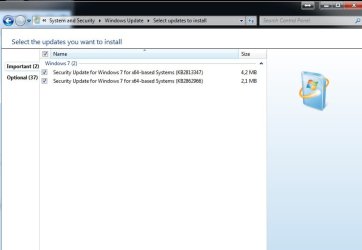
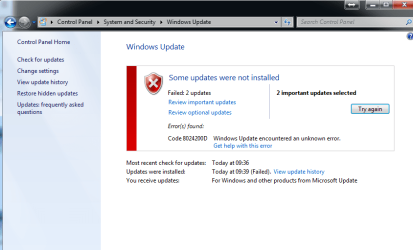
here you go. The issue insists I believe. however it went down to 2 failed and 1 error
 

Attachments

  • KB.jpg
    KB.jpg
    28.8 KB · Views: 4
  • kb 2.png
    kb 2.png
    29.5 KB · Views: 2

My Computer

Computer Manufacturer/Model Number
custom
OS
Windows 7 Ultimate x64
CPU
Intel(R) Core(TM) CPU i7 4790k
Motherboard
Gigabyte GA-X87Z-UD5H
Memory
8.00 GB ddr3 1600mhz
Graphics Card(s)
MSI GTX 970
Sound Card
(1) Realtek High Definition Audio (2) Logitech G930 Headse
Monitor(s) Displays
Samsung Syncmaster p2370
Screen Resolution
1920 x 1080
Hard Drives
(1) OCZ SSD 120gb
(2) WDC WD3200AAKS-00L9A0
PSU
Corsair tx850 watt
Keyboard
razer lycosa
Mouse
razer naga
Internet Speed
50mb
Here is my windowsupdate in case you need :)

thank you

My PC Specs If it helps;

SiSoftware Sandra

ID
Host Name : GokayErcan-PC
Workgroup : WORKGROUP

Computer
Model : GigaByte Z97X-Gaming 5
Serial Number : To be fille***********
Chassis : GigaByte Desktop
Mainboard : GigaByte Z97X-Gaming 5
Serial Number : To be fille***********
BIOS : AMI (OEM) F3 04/25/2014
Intel vPro : 9.01.00.1120
Total Memory : 13.9GB DIMM DDR3

Processors
Processor : Intel(R) Core(TM) i7-4790K CPU @ 4.00GHz (4C 8T 4.1GHz, 4GHz IMC, 4x 256kB L2, 8MB L3)
Socket/Slot : FC LGA1150

Chipset
Memory Controller : Gigabyte Core (Haswell) DRAM Controller 100MHz, 2x 7GB DIMM DDR3 1GHz 128-bit, Integrated Graphics

Memory Module(s)
Memory Module : Rockwell OCZ3P1866C9LV2G 2GB DIMM DDR3 PC3-8500U DDR3-1066
Memory Module : Rockwell BLS8G3D1609DS1S00. 8GB DIMM DDR3 PC3-8500U DDR3-1066
Memory Module : Rockwell OCZ3P1866C9LV2G 2GB DIMM DDR3 PC3-8500U DDR3-1066

Video System
Monitor/Panel : Samsung SyncMaster
(1920x1080, 23.0")
Video Adapter : NVIDIA GeForce GTX 970 (13CU 1664SP SM5.0 1.11GHz/1.46GHz, 1.8MB L2, 4GB 7GHz 256-bit, PCIe 3.00 x16)

Graphics Processor
CUDA GP Processor : NVIDIA GeForce GTX 970 (1664SP 13C 1.11GHz/1.46GHz, 1.8MB L2, 4GB 6GHz/7GHz 256-bit)
OpenCL GP Processor : NVIDIA GeForce GTX 970 (1664SP 13C 1.11GHz/1.46GHz, 1.8MB L2, 4GB 6GHz/7GHz 256-bit)
Compute Shader Processor : NVIDIA GeForce GTX 970 (1664SP 13C 1.11GHz/1.46GHz, 1.8MB L2, 4GB 6GHz/7GHz 256-bit)
Compute Shader Processor : Intel(R) HD Graphics 4600 (160SP 20C 600MHz/1.25GHz, 64MB DDR3 1GHz 128-bit, Integrated Graphics)

Storage Devices
WDC WD10EZEX-22BN5A0 (1TB, SATA600, 3.5", 7200rpm) : 932GB (G:)
OCZ-VERTEX v1.10 (32GB, SATA300, SSD, 32MB Cache) : 30GB (D:)
WDC WD3200AAKS-00L9A0 (320.1GB, SATA300, 3.5", 7200rpm, 16MB Cache) : 298GB (E:)
KINGSTON SV300S37A120G (120GB, SATA600, SSD) : 112GB (C:)
HL-DT-ST DVDRAM GH22NS50 (6.3MB, SATA150, DVD+-RW, CD-RW, 2MB Cache) : 6MB (F:)

Logical Storage Devices
New Volume (G:) : 932GB (NTFS) @ WDC WD10EZEX-22BN5A0 (1TB, SATA600, 3.5", 7200rpm)
Hard Disk (D:) : 30GB (NTFS) @ OCZ-VERTEX v1.10 (32GB, SATA300, SSD, 32MB Cache)
SLAVE (E:) : 298GB (NTFS) @ WDC WD3200AAKS-00L9A0 (320.1GB, SATA300, 3.5", 7200rpm, 16MB Cache)
System Reserved : 100MB (NTFS)
Hard Disk (C:) : 112GB (NTFS) @ KINGSTON SV300S37A120G (120GB, SATA600, SSD)
Bluebirds (F:) : 388kB (CDFS) @ HL-DT-ST DVDRAM GH22NS50 (6.3MB, SATA150, DVD+-RW, CD-RW, 2MB Cache)

Peripherals
LPC Hub Controller 1 : Gigabyte 9 Series Chipset Family Z97 LPC Controller
LPC Legacy Controller 1 : T2 86-20
Audio Device : Intel Core (Haswell) HD Audio Controller
Audio Codec : Intel 2807
Audio Device : Gigabyte 9 Series Chipset Family HD Audio Controller
Serial Port(s) : 1
Disk Controller : Gigabyte 9 Series Chipset Family SATA Controller [AHCI Mode]
USB Controller 1 : Gigabyte 9 Series Chipset Family USB xHCI Controller
USB Controller 2 : Gigabyte 9 Series Chipset Family USB EHCI Controller #2
USB Controller 3 : Gigabyte 9 Series Chipset Family USB EHCI Controller #1
SMBus/i2c Controller 1 : Intel ICH SMBus

Printers and Faxes
Printer : Microsoft XPS Document Writer (600x600, Colour)
Fax : Microsoft Shared Fax Driver (200x200)

Network Services
Network Adapter : Killer e2200 PCI-E Gigabit Ethernet Controller (NDIS 6.20) (Ethernet, 100Mbps)

Operating System
Windows System : Microsoft Windows 7 Ultimate 6.01.7601 (Service Pack 1)
Platform Compliance : x64

Windows Experience Index
Current System : 7.8

 
Last edited:

My Computer

Computer Manufacturer/Model Number
custom
OS
Windows 7 Ultimate x64
CPU
Intel(R) Core(TM) CPU i7 4790k
Motherboard
Gigabyte GA-X87Z-UD5H
Memory
8.00 GB ddr3 1600mhz
Graphics Card(s)
MSI GTX 970
Sound Card
(1) Realtek High Definition Audio (2) Logitech G930 Headse
Monitor(s) Displays
Samsung Syncmaster p2370
Screen Resolution
1920 x 1080
Hard Drives
(1) OCZ SSD 120gb
(2) WDC WD3200AAKS-00L9A0
PSU
Corsair tx850 watt
Keyboard
razer lycosa
Mouse
razer naga
Internet Speed
50mb

My Computer

Computer type
Laptop
Computer Manufacturer/Model Number
Asus K52F or Lenovo B51-80
OS
Win 7 x64 Home Premium (and x86 VirtualBox VM)/Win10
CPU
i3 370M/i7 6500U
Motherboard
Asus/Lenovo
Memory
8GB - finally :)/8GB
Graphics Card(s)
it's an i3, dude!/dual Intel&nVidia
Sound Card
onboard
Monitor(s) Displays
15.6" built-in
Screen Resolution
1366x768/1920x1080
Hard Drives
750GB Seagate internal
Sundry external drives attached to other computers on the local network
1TB SSD on the Lenovo
PSU
n/a
Internet Speed
as much as I can get - usually on a dongle/phone, so <1MB/s
Antivirus
MSE/Defender
Browser
IE11/12/Edge/Chrome/FF(if I must)
I uninstalled and installing back SP1
Wrong? :(
 

My Computer

Computer Manufacturer/Model Number
custom
OS
Windows 7 Ultimate x64
CPU
Intel(R) Core(TM) CPU i7 4790k
Motherboard
Gigabyte GA-X87Z-UD5H
Memory
8.00 GB ddr3 1600mhz
Graphics Card(s)
MSI GTX 970
Sound Card
(1) Realtek High Definition Audio (2) Logitech G930 Headse
Monitor(s) Displays
Samsung Syncmaster p2370
Screen Resolution
1920 x 1080
Hard Drives
(1) OCZ SSD 120gb
(2) WDC WD3200AAKS-00L9A0
PSU
Corsair tx850 watt
Keyboard
razer lycosa
Mouse
razer naga
Internet Speed
50mb
definitely no need for anything that drastic - it can also cause further problems. :(
If you've already started it, do NOT attempt to interrupt it - it can take a few hours to do the uninstall.
 

My Computer

Computer type
Laptop
Computer Manufacturer/Model Number
Asus K52F or Lenovo B51-80
OS
Win 7 x64 Home Premium (and x86 VirtualBox VM)/Win10
CPU
i3 370M/i7 6500U
Motherboard
Asus/Lenovo
Memory
8GB - finally :)/8GB
Graphics Card(s)
it's an i3, dude!/dual Intel&nVidia
Sound Card
onboard
Monitor(s) Displays
15.6" built-in
Screen Resolution
1366x768/1920x1080
Hard Drives
750GB Seagate internal
Sundry external drives attached to other computers on the local network
1TB SSD on the Lenovo
PSU
n/a
Internet Speed
as much as I can get - usually on a dongle/phone, so <1MB/s
Antivirus
MSE/Defender
Browser
IE11/12/Edge/Chrome/FF(if I must)
I already Uninstalled and Installed back :(
Now I have 130 updates available.. what do you suggest? Try to install all back?
 

My Computer

Computer Manufacturer/Model Number
custom
OS
Windows 7 Ultimate x64
CPU
Intel(R) Core(TM) CPU i7 4790k
Motherboard
Gigabyte GA-X87Z-UD5H
Memory
8.00 GB ddr3 1600mhz
Graphics Card(s)
MSI GTX 970
Sound Card
(1) Realtek High Definition Audio (2) Logitech G930 Headse
Monitor(s) Displays
Samsung Syncmaster p2370
Screen Resolution
1920 x 1080
Hard Drives
(1) OCZ SSD 120gb
(2) WDC WD3200AAKS-00L9A0
PSU
Corsair tx850 watt
Keyboard
razer lycosa
Mouse
razer naga
Internet Speed
50mb
First install all the Security Updates
reboot and run another Check for Updates
Then the ordinary Windows Updates (and any new Security updates)
reboot and run another Check for Updates
Then anything else, (and any others that failed/appeared)
 

My Computer

Computer type
Laptop
Computer Manufacturer/Model Number
Asus K52F or Lenovo B51-80
OS
Win 7 x64 Home Premium (and x86 VirtualBox VM)/Win10
CPU
i3 370M/i7 6500U
Motherboard
Asus/Lenovo
Memory
8GB - finally :)/8GB
Graphics Card(s)
it's an i3, dude!/dual Intel&nVidia
Sound Card
onboard
Monitor(s) Displays
15.6" built-in
Screen Resolution
1366x768/1920x1080
Hard Drives
750GB Seagate internal
Sundry external drives attached to other computers on the local network
1TB SSD on the Lenovo
PSU
n/a
Internet Speed
as much as I can get - usually on a dongle/phone, so <1MB/s
Antivirus
MSE/Defender
Browser
IE11/12/Edge/Chrome/FF(if I must)
Thank you so much NoelDP.
I was gettin really frustrated and thinking to format everything.
Finally I'm able make all of my updates successfully... :geek:
if anyone else having the same issue;
I had to use those 2 links at the end of first page. Those 2 were still giving error.
 

My Computer

Computer Manufacturer/Model Number
custom
OS
Windows 7 Ultimate x64
CPU
Intel(R) Core(TM) CPU i7 4790k
Motherboard
Gigabyte GA-X87Z-UD5H
Memory
8.00 GB ddr3 1600mhz
Graphics Card(s)
MSI GTX 970
Sound Card
(1) Realtek High Definition Audio (2) Logitech G930 Headse
Monitor(s) Displays
Samsung Syncmaster p2370
Screen Resolution
1920 x 1080
Hard Drives
(1) OCZ SSD 120gb
(2) WDC WD3200AAKS-00L9A0
PSU
Corsair tx850 watt
Keyboard
razer lycosa
Mouse
razer naga
Internet Speed
50mb
Back
Top