Solved Windows Update Error after restoring system

Seawindsail

New member
Local time
12:36 AM
Messages
10
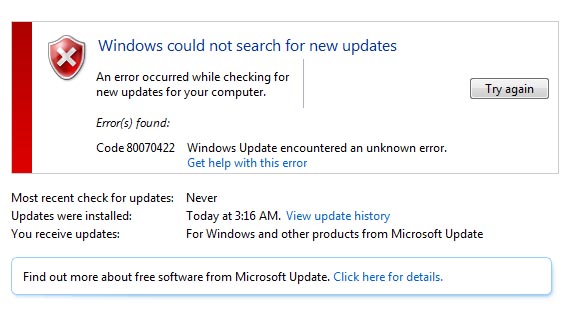
After a hard drive crash and system restore I'm getting error below after a brief update progress bar.
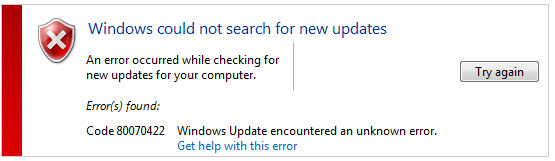
update.jpg

I've run the Update Repair tools many times, Manually stopped and started services. MERGED default version of BITs and Windows Update services.
Also ran Defender offline, use McAfee, System Mechanic and RegCurePro to keep system cleaned and tuned. I've fallen behind on updates and need to get this resolved. I've also moved on and can't go back to that restore point to retry. Looking for suggestions

Windows 7 Professional
Dell XPS
 

My Computer

Computer Manufacturer/Model Number
Dell XPS L501x
OS
Windows 7 Ultimate x64
CPU
Intel Core I7 Q740 @ 1.73GHz
Memory
6GB
Hello Swawindsail and welcome to the forums :party:

Firstly, I would like you to restore any changes made by System Mechanic and RegCurePro. Registry cleaners/optimisers in general are complete junk and should be avoided at great lengths. It's very hard for them to distinguish what should be removed and what should stay and more often than not, they will delete things they shouldn't. If you would like to see the sort of damage that they can do to Windows (especially Windows Update) then take a look here:

http://www.sevenforums.com/windows-updates-activation/260383-microsoft-updates-has-gone-crazy.html

It completely killed it. So restoring the changes made by these programs may in fact solve your problem. If it doesn't, follow these instructions:

http://www.sevenforums.com/windows-...4840-windows-update-posting-instructions.html

Tom
 

My Computer

Computer type
PC/Desktop
Computer Manufacturer/Model Number
Build #1
OS
Windows 8.1 Pro x64
CPU
Intel i7 3770K @4.5GHz
Motherboard
ASUS P8Z77-V PRO
Memory
Corsair Vengeance 2x4GB DDR3 1600MHz Low Profile (White)
Graphics Card(s)
Gigabyte Radeon HD 7850 (2GB GDDR5)
Sound Card
Integrated on motherboard
Monitor(s) Displays
23" LG LCD/LED IPS
Screen Resolution
1920*1080
Hard Drives
Samsung EVO 128GB SSD
Seagate Barracuda 2GB 7200rpm
2x Seagate FreeAgent [500gb]
PSU
Corsair TX650W V2 (80+ Bronze)
Case
NZXT Phantom 410 White
Cooling
Corsair H100 Water Cooler
Keyboard
Microsoft Desktop 2000 Wireless Keyboard
Mouse
Microsoft Desktop 2000 Wireless Mouse
Internet Speed
95 Mb/s Download 70 Mb/s Upload
Antivirus
MSE + MBAM Pro
Browser
Firefox
Not sure how I would roll back changes made by RegCure..

Also looked at the Update Readiness tool and see it requires Service Pack 1... My restore was prior to SP1 installation and now I can't get to updates.. Is there a way it install SP1 manually?

Thanks for your reply,
 

My Computer

Computer Manufacturer/Model Number
Dell XPS L501x
OS
Windows 7 Ultimate x64
CPU
Intel Core I7 Q740 @ 1.73GHz
Memory
6GB
If there isn't an obvious feature in the interface then just cross your fingers and hope it didn't do any harm! Only time will tell though.

The SURT is compatible for all versions of Windows 7 - SP1 or not :) Download and install (run) it, then upload the logs that the instructions ask for.
Tom
 

My Computer

Computer type
PC/Desktop
Computer Manufacturer/Model Number
Build #1
OS
Windows 8.1 Pro x64
CPU
Intel i7 3770K @4.5GHz
Motherboard
ASUS P8Z77-V PRO
Memory
Corsair Vengeance 2x4GB DDR3 1600MHz Low Profile (White)
Graphics Card(s)
Gigabyte Radeon HD 7850 (2GB GDDR5)
Sound Card
Integrated on motherboard
Monitor(s) Displays
23" LG LCD/LED IPS
Screen Resolution
1920*1080
Hard Drives
Samsung EVO 128GB SSD
Seagate Barracuda 2GB 7200rpm
2x Seagate FreeAgent [500gb]
PSU
Corsair TX650W V2 (80+ Bronze)
Case
NZXT Phantom 410 White
Cooling
Corsair H100 Water Cooler
Keyboard
Microsoft Desktop 2000 Wireless Keyboard
Mouse
Microsoft Desktop 2000 Wireless Mouse
Internet Speed
95 Mb/s Download 70 Mb/s Upload
Antivirus
MSE + MBAM Pro
Browser
Firefox
Okay, I've downloaded and installed Windows6.1-KB947821-v25-x64.msu
Based on system info below....

OS Name Microsoft Windows 7 Professional
Version 6.1.7600 Build 7600
Other OS Description Not Available
OS Manufacturer Microsoft Corporation
System Name LOWELLXPS-PC
System Manufacturer Dell Inc.
System Model XPS L501X
System Type x64-based PC
Processor Intel(R) Core(TM) i7 CPU Q 740 @ 1.73GHz, 1734 Mhz, 4 Core(s), 8 Logical Processor(s)
BIOS Version/Date Dell Inc. A07, 3/29/2011
SMBIOS Version 2.6
Windows Directory C:\Windows
System Directory C:\Windows\system32
Boot Device \Device\HarddiskVolume2
Locale United States
Hardware Abstraction Layer Version = "6.1.7600.16385"
User Name LowellXPS-PC\Lowell XPS
Time Zone US Mountain Standard Time
Installed Physical Memory (RAM) 6.00 GB
Total Physical Memory 5.93 GB
Available Physical Memory 3.73 GB
Total Virtual Memory 11.9 GB
Available Virtual Memory 8.83 GB
Page File Space 5.93 GB
Page File C:\pagefile.sys

It installed normally..

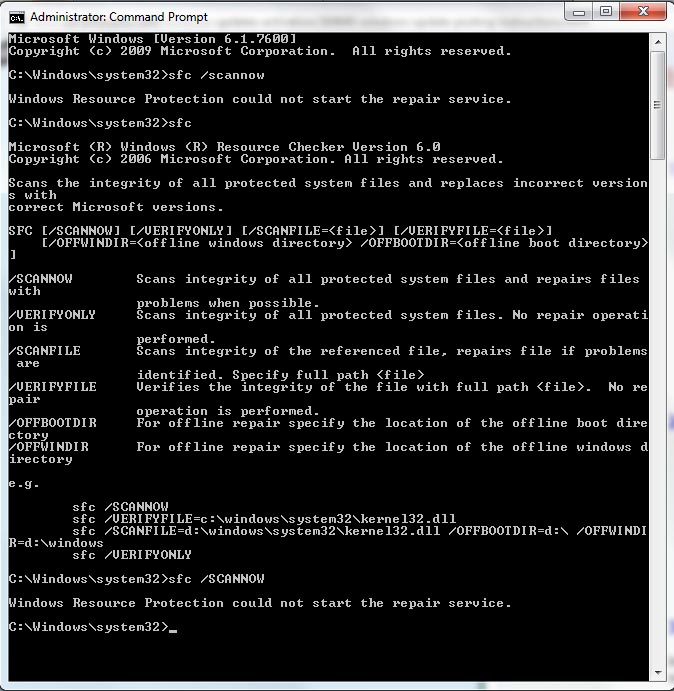
Then trying to run "sfc /scannow" I get the following.

cmd-1.jpg


Running with /scannow shows the program is installed but there seems to be a problem when the /scannow option is added.
Hope this info helps.
 

My Computer

Computer Manufacturer/Model Number
Dell XPS L501x
OS
Windows 7 Ultimate x64
CPU
Intel Core I7 Q740 @ 1.73GHz
Memory
6GB

My Computer

Computer type
PC/Desktop
Computer Manufacturer/Model Number
Build #1
OS
Windows 8.1 Pro x64
CPU
Intel i7 3770K @4.5GHz
Motherboard
ASUS P8Z77-V PRO
Memory
Corsair Vengeance 2x4GB DDR3 1600MHz Low Profile (White)
Graphics Card(s)
Gigabyte Radeon HD 7850 (2GB GDDR5)
Sound Card
Integrated on motherboard
Monitor(s) Displays
23" LG LCD/LED IPS
Screen Resolution
1920*1080
Hard Drives
Samsung EVO 128GB SSD
Seagate Barracuda 2GB 7200rpm
2x Seagate FreeAgent [500gb]
PSU
Corsair TX650W V2 (80+ Bronze)
Case
NZXT Phantom 410 White
Cooling
Corsair H100 Water Cooler
Keyboard
Microsoft Desktop 2000 Wireless Keyboard
Mouse
Microsoft Desktop 2000 Wireless Mouse
Internet Speed
95 Mb/s Download 70 Mb/s Upload
Antivirus
MSE + MBAM Pro
Browser
Firefox
update.jpg
 

My Computer

Computer Manufacturer/Model Number
Dell XPS L501x
OS
Windows 7 Ultimate x64
CPU
Intel Core I7 Q740 @ 1.73GHz
Memory
6GB

My Computer

Computer type
Laptop
Computer Manufacturer/Model Number
ACER ASPIRE 5742G
OS
Microsoft Windows 7 Home Premium 64-bits 7601 Multiprocessor Free Service Pack 1
CPU
Intel(R) Core(TM) i3 CPU M 370 @ 2.40GHz
Motherboard
Acer Aspire 5742G
Memory
4,00 GB
Graphics Card(s)
ATI Mobility Radeon HD 5400 Series
Sound Card
(1) AMD High Definition Audio Device (2) Realtek High Defi
Screen Resolution
1366 x 768 x 32 bits (4294967296 colors) @ 60 Hz
Hard Drives
WDC WD5000BEVT-22ZAT0
Windows Resource Protection could not start the repair service
sfc-err-1.png

This happens if the TrustedInstaller (Windows Modules Installer) service is disabled. Use these steps to reset the service startup type.
1. Click Start, type Services.msc
2. Double-click Windows Modules Installer
3. Set its Startup type to Manual
4. Click OK.
sfc-err-2.png

The TrustedInstaller service has full access to Windows Resource Protection (WRP) files and registry keys, and this services needs to be running in order to restore missing or corrupted WRP resources. The TrustedInstaller service starts on-demand when running the System File Checker.

Windows Modules Installer service startup type was manual? Can you start it succesfully?
 

My Computer

Computer type
Laptop
Computer Manufacturer/Model Number
ACER ASPIRE 5742G
OS
Microsoft Windows 7 Home Premium 64-bits 7601 Multiprocessor Free Service Pack 1
CPU
Intel(R) Core(TM) i3 CPU M 370 @ 2.40GHz
Motherboard
Acer Aspire 5742G
Memory
4,00 GB
Graphics Card(s)
ATI Mobility Radeon HD 5400 Series
Sound Card
(1) AMD High Definition Audio Device (2) Realtek High Defi
Screen Resolution
1366 x 768 x 32 bits (4294967296 colors) @ 60 Hz
Hard Drives
WDC WD5000BEVT-22ZAT0
Also check service Windows Management Instrumentation
Startup type=Automatic?
Can you start it (or is it already started?)?
 

My Computer

Computer type
Laptop
Computer Manufacturer/Model Number
ACER ASPIRE 5742G
OS
Microsoft Windows 7 Home Premium 64-bits 7601 Multiprocessor Free Service Pack 1
CPU
Intel(R) Core(TM) i3 CPU M 370 @ 2.40GHz
Motherboard
Acer Aspire 5742G
Memory
4,00 GB
Graphics Card(s)
ATI Mobility Radeon HD 5400 Series
Sound Card
(1) AMD High Definition Audio Device (2) Realtek High Defi
Screen Resolution
1366 x 768 x 32 bits (4294967296 colors) @ 60 Hz
Hard Drives
WDC WD5000BEVT-22ZAT0
I copied the logs to notepad++ and saw there were no errors noted??

I've noticed that some updates were installed overnight.. (some progress but still getting 80070422 error code)
update-1.jpg

I noted that updates were installed in the summary above

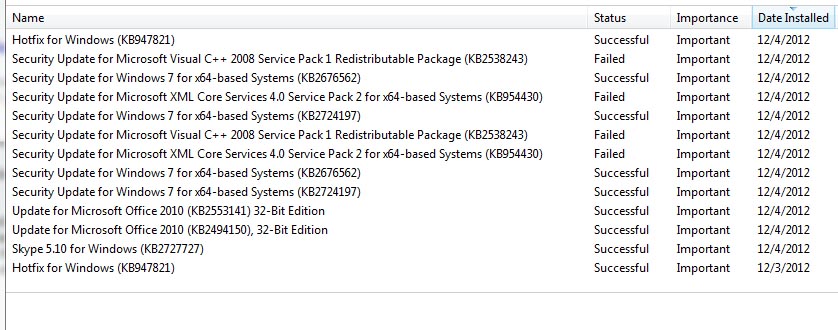
Here's what was installed.
history.jpg

Note I installed KB947821 a second time today. Wasn't sure it was installed last night.
Hope this helps.
 

My Computer

Computer Manufacturer/Model Number
Dell XPS L501x
OS
Windows 7 Ultimate x64
CPU
Intel Core I7 Q740 @ 1.73GHz
Memory
6GB
Plaese answer #9 and #10
 

My Computer

Computer type
Laptop
Computer Manufacturer/Model Number
ACER ASPIRE 5742G
OS
Microsoft Windows 7 Home Premium 64-bits 7601 Multiprocessor Free Service Pack 1
CPU
Intel(R) Core(TM) i3 CPU M 370 @ 2.40GHz
Motherboard
Acer Aspire 5742G
Memory
4,00 GB
Graphics Card(s)
ATI Mobility Radeon HD 5400 Series
Sound Card
(1) AMD High Definition Audio Device (2) Realtek High Defi
Screen Resolution
1366 x 768 x 32 bits (4294967296 colors) @ 60 Hz
Hard Drives
WDC WD5000BEVT-22ZAT0

My Computer

Computer type
Laptop
Computer Manufacturer/Model Number
ACER ASPIRE 5742G
OS
Microsoft Windows 7 Home Premium 64-bits 7601 Multiprocessor Free Service Pack 1
CPU
Intel(R) Core(TM) i3 CPU M 370 @ 2.40GHz
Motherboard
Acer Aspire 5742G
Memory
4,00 GB
Graphics Card(s)
ATI Mobility Radeon HD 5400 Series
Sound Card
(1) AMD High Definition Audio Device (2) Realtek High Defi
Screen Resolution
1366 x 768 x 32 bits (4294967296 colors) @ 60 Hz
Hard Drives
WDC WD5000BEVT-22ZAT0
Found that Windows Modules Installer was disabled.. Now Manual
Found that Windows Management Instrumentation was Automatic

scf /scannow now works and reports no integrity violations found.

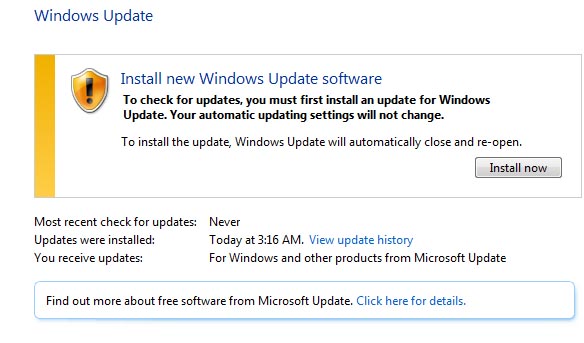
Now Check for Updates results in this message and note that some updates were installed last night
update-2.jpg

Here's the update that were installed.
history.jpg

Clicking the install button was successful resulting in a reboot now button.
I will report results after the reboot in the reply. Seems like progress.
 

My Computer

Computer Manufacturer/Model Number
Dell XPS L501x
OS
Windows 7 Ultimate x64
CPU
Intel Core I7 Q740 @ 1.73GHz
Memory
6GB
Windows Modules Installer was disabled

Windows Management Instrumentation was automatic

sfc /scannow now runs with no integrity issues noted.

Check for Updates now results in the following message and note that some updates were installed overnight.

update-2.jpg

Running the install now was successful resulting in a Reboot Now button.
After reboot updates are now being installed.

Now the question is what was the problem and what fixed it...

Was the
Windows Modules Installer disabled the problem??

Thanks for the help...

One more thing....
I did note that some of the updated downloaded last night did not install successfully. Any thoughts on that???
history.jpg


My Computer

Computer Manufacturer/Model Number
Dell XPS L501x
OS
Windows 7 Ultimate x64
CPU
Intel Core I7 Q740 @ 1.73GHz
Memory
6GB
Was the Windows Modules Installer disabled the problem?? =>yes it was that's why sfc did fail.
It most likely was also the cause of windows update failure. All updates install fine now?

Did you disable that service yourself?
Do you have restore points now?
 

My Computer

Computer type
Laptop
Computer Manufacturer/Model Number
ACER ASPIRE 5742G
OS
Microsoft Windows 7 Home Premium 64-bits 7601 Multiprocessor Free Service Pack 1
CPU
Intel(R) Core(TM) i3 CPU M 370 @ 2.40GHz
Motherboard
Acer Aspire 5742G
Memory
4,00 GB
Graphics Card(s)
ATI Mobility Radeon HD 5400 Series
Sound Card
(1) AMD High Definition Audio Device (2) Realtek High Defi
Screen Resolution
1366 x 768 x 32 bits (4294967296 colors) @ 60 Hz
Hard Drives
WDC WD5000BEVT-22ZAT0
Post your c:\windows\windowsupdate.log so I can see what went wrong. #13
 

My Computer

Computer type
Laptop
Computer Manufacturer/Model Number
ACER ASPIRE 5742G
OS
Microsoft Windows 7 Home Premium 64-bits 7601 Multiprocessor Free Service Pack 1
CPU
Intel(R) Core(TM) i3 CPU M 370 @ 2.40GHz
Motherboard
Acer Aspire 5742G
Memory
4,00 GB
Graphics Card(s)
ATI Mobility Radeon HD 5400 Series
Sound Card
(1) AMD High Definition Audio Device (2) Realtek High Defi
Screen Resolution
1366 x 768 x 32 bits (4294967296 colors) @ 60 Hz
Hard Drives
WDC WD5000BEVT-22ZAT0
No I didn't disable Windows Modules Installer.. Not sure how that happened.
I've installed 120 updates successfully so far.

Will get a restore point as soon as I have all updates and system seems stable.

Seems the failing updates worked when the new update module was installed.

I will reply with the final verdict. All looks great so far.
Thanks so much.... Lowell
 

My Computer

Computer Manufacturer/Model Number
Dell XPS L501x
OS
Windows 7 Ultimate x64
CPU
Intel Core I7 Q740 @ 1.73GHz
Memory
6GB
No I didn't disable Windows Modules Installer.. Not sure how that happened.
I've installed 120 updates successfully so far.

Will get a restore point as soon as I have all updates and system seems stable.

Seems the failing updates worked when the new update module was installed.

I will reply with the final verdict. All looks great so far.
Thanks so much.... Lowell
system restore point will be created automatically when you install a set of windows updates. At least if system protection has been turned on
http://www.sevenforums.com/tutorials/330-system-protection-turn-off.html
 

My Computer

Computer type
Laptop
Computer Manufacturer/Model Number
ACER ASPIRE 5742G
OS
Microsoft Windows 7 Home Premium 64-bits 7601 Multiprocessor Free Service Pack 1
CPU
Intel(R) Core(TM) i3 CPU M 370 @ 2.40GHz
Motherboard
Acer Aspire 5742G
Memory
4,00 GB
Graphics Card(s)
ATI Mobility Radeon HD 5400 Series
Sound Card
(1) AMD High Definition Audio Device (2) Realtek High Defi
Screen Resolution
1366 x 768 x 32 bits (4294967296 colors) @ 60 Hz
Hard Drives
WDC WD5000BEVT-22ZAT0
No I didn't disable Windows Modules Installer.. Not sure how that happened.
I've installed 120 updates successfully so far.

Will get a restore point as soon as I have all updates and system seems stable.

Seems the failing updates worked when the new update module was installed.

I will reply with the final verdict. All looks great so far.
Thanks so much.... Lowell
Windows Modules Installer service could be in disabled state due to a virus. You did an offline virus scan already... did you? Nothing found?
 

My Computer

Computer type
Laptop
Computer Manufacturer/Model Number
ACER ASPIRE 5742G
OS
Microsoft Windows 7 Home Premium 64-bits 7601 Multiprocessor Free Service Pack 1
CPU
Intel(R) Core(TM) i3 CPU M 370 @ 2.40GHz
Motherboard
Acer Aspire 5742G
Memory
4,00 GB
Graphics Card(s)
ATI Mobility Radeon HD 5400 Series
Sound Card
(1) AMD High Definition Audio Device (2) Realtek High Defi
Screen Resolution
1366 x 768 x 32 bits (4294967296 colors) @ 60 Hz
Hard Drives
WDC WD5000BEVT-22ZAT0
Back
Top