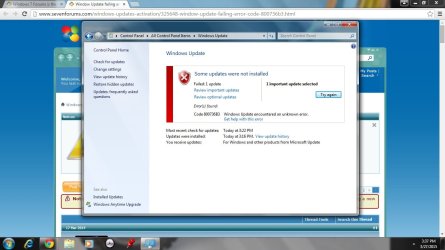
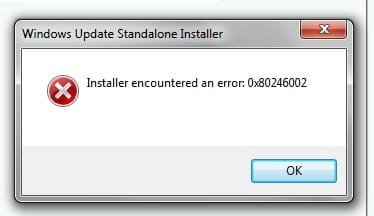
Hi I was wondering if anyone knows how to fix this windows update problem. The windows update window says Error code 490, I am also receiving error 800736B3 as noted below
Any help someone can lend is greatly appreciated
Thanks
Attachments
error 490.jpg
92.3 KB
· Views: 0
Last edited:
My Computer
Computer type
Laptop
Computer Manufacturer/Model Number
Toshiba Satellite A505
OS
Microsoft Windows 7 Home Premium 64-bit 7600 Multiprocessor Free
CPU
Intel(R) Core(TM) i3 CPU M 330 @ 2.13GHz
Motherboard
TOSHIBA Portable PC
Memory
4.00GB
Graphics Card(s)
Intel(R) Graphics Media Accelerator HD
Sound Card
(1) Realtek High Definition Audio (2) Intel(R) Display Aud
after successfully getting that update to install which I didn't think was the entire service pack, I rebooted and another update pops up for Win 7 SP1 and that one throws another error. 800736B3
Attachments
error 800736B3.jpg
94.8 KB
· Views: 0
My Computer
Computer type
Laptop
Computer Manufacturer/Model Number
Toshiba Satellite A505
OS
Microsoft Windows 7 Home Premium 64-bit 7600 Multiprocessor Free
CPU
Intel(R) Core(TM) i3 CPU M 330 @ 2.13GHz
Motherboard
TOSHIBA Portable PC
Memory
4.00GB
Graphics Card(s)
Intel(R) Graphics Media Accelerator HD
Sound Card
(1) Realtek High Definition Audio (2) Intel(R) Display Aud
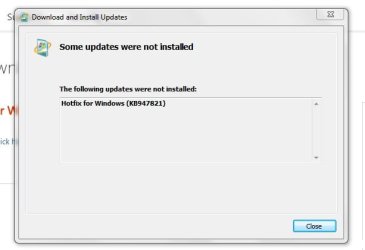
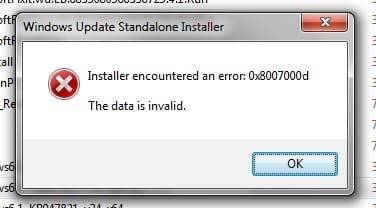
I receive an error when trying to run the System Update Readiness tool. When I try to run the tool a 2nd time I also receive an error. Screenshots are attached along with my CBS Log
Attachments
hotfix not installed.jpg
17.3 KB
· Views: 7
hotfix not installed 2nd time.jpg
11.2 KB
· Views: 7
Last edited:
My Computer
Computer type
Laptop
Computer Manufacturer/Model Number
Toshiba Satellite A505
OS
Microsoft Windows 7 Home Premium 64-bit 7600 Multiprocessor Free
CPU
Intel(R) Core(TM) i3 CPU M 330 @ 2.13GHz
Motherboard
TOSHIBA Portable PC
Memory
4.00GB
Graphics Card(s)
Intel(R) Graphics Media Accelerator HD
Sound Card
(1) Realtek High Definition Audio (2) Intel(R) Display Aud
I don't like to get to deep into Windows 7 Updates because of my lack of knowledge of the subject. I normally wait for a expert but I did find this from Microsoft. Take a read through this. Learn how to install Windows 7 Service Pack 1 (SP1)
My Computer
Computer type
PC/Desktop
Computer Manufacturer/Model Number
Home made Desktop
OS
Windows 10 Pro. 64/ version 1709 Windows 7 Pro/64
CPU
Intel i7-6800K @ 4.3
Motherboard
ASUS X-99 Deluxe II
Memory
Corsair Platinum 16 gig @2400
Graphics Card(s)
EVGA GTX 1070 OC
Monitor(s) Displays
Asus 27" LED LCD/VE278Q
Screen Resolution
1920-1080 or 1280-720 HDMI
Hard Drives
INTEL SSD 730-240 Gb Sata 3.0/
PSU
EVGA Platium 1200W
Case
Phanteks Luxe Tempered Glass 8 fans/ one radiator
Cooling
XSPC/ Water Cooled CPU
Keyboard
Das 4 Professional
Mouse
Logitech M705/MX Anywhere 2-S
Internet Speed
100 mbits
Antivirus
Microsoft Security Essentials/ Malwarebytes Premium 3.0/ SAS
Browser
I.E. 11 default/Firefox/ ISP Time Warner Cable/Spectrum
Other Info
LG BluRay Burner/
Sound system-KLipsch-THX/
Icy Dock ssd Hot Swap bays.
Thank you for your input. I have read that page and tried using the "recommended" way with Microsoft Update. no luck. I also tried manually downloading SP1 and installing it locally. No luck either
My Computer
Computer type
Laptop
Computer Manufacturer/Model Number
Toshiba Satellite A505
OS
Microsoft Windows 7 Home Premium 64-bit 7600 Multiprocessor Free
CPU
Intel(R) Core(TM) i3 CPU M 330 @ 2.13GHz
Motherboard
TOSHIBA Portable PC
Memory
4.00GB
Graphics Card(s)
Intel(R) Graphics Media Accelerator HD
Sound Card
(1) Realtek High Definition Audio (2) Intel(R) Display Aud
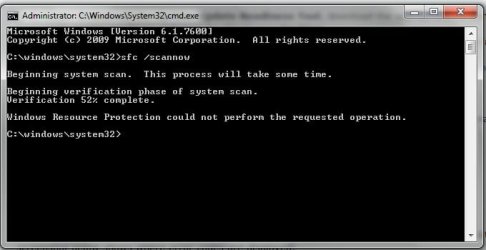
ok so I was finally able to get the SURT to run successfully (after 3000 reboots ) and then ran the sfc /scannow which only ran to 52% completion before saying "Windows Resource Protection could not preform the requested operation."...So here is another CBS log
Attachments
sfc.jpg
24.9 KB
· Views: 5
My Computer
Computer type
Laptop
Computer Manufacturer/Model Number
Toshiba Satellite A505
OS
Microsoft Windows 7 Home Premium 64-bit 7600 Multiprocessor Free
CPU
Intel(R) Core(TM) i3 CPU M 330 @ 2.13GHz
Motherboard
TOSHIBA Portable PC
Memory
4.00GB
Graphics Card(s)
Intel(R) Graphics Media Accelerator HD
Sound Card
(1) Realtek High Definition Audio (2) Intel(R) Display Aud



 ) and then ran the sfc /scannow which only ran to 52% completion before saying "Windows Resource Protection could not preform the requested operation."...So here is another CBS log