
Windows Update error message 80072ee2

sharkfin25

New member
Local time
6:58 AM
Messages
4
Hello,

My wife's laptop is showing the above error message when trying to download windows updates. This started recently, but I have a feeling it is related to my son downloading a bunch of programs and malware with Minecraft back in October of 2014. I ran Malwarebyes an cleaned all the infections, but this week we started getting this message. The internet is running very slowly as well. I am having to post on the site from a different computer because I can upload anything on the computer with the error.

I have run the System Update Readiness Tool and also the sfc /scannow tool. I'm still getting the same error message. My Windows log is posted below. Any help is appreciated.

Thank you
 

Attachments
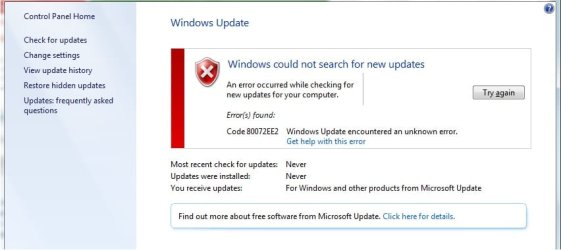
  • error message.jpg
    error message.jpg
    33.7 KB · Views: 0

My Computer My Computer

Computer type
Laptop
Computer Manufacturer/Model Number
HP
OS
Windows 7 Home Premium 64bit
CPU
AMD A8-4500 APU with Radeon HD Graphics 1.90 GHz
Memory
6GB
Hard Drives
250GB SSD
Antivirus
Microsoft Security Essentials
Browser
Google Chrome
Hello,

My wife's laptop is showing the above error message when trying to download windows updates. This started recently, but I have a feeling it is related to my son downloading a bunch of programs and malware with Minecraft back in October of 2014. I ran Malwarebyes an cleaned all the infections, but this week we started getting this message. The internet is running very slowly as well. I am having to post on the site from a different computer because I can upload anything on the computer with the error.

I have run the System Update Readiness Tool and also the sfc /scannow tool. I'm still getting the same error message. My Windows log is posted below. Any help is appreciated.

Thank you

I have an update to this. I disconnected the computer from my home wifi and connected it to a JetPack and all of a sudden I had 163 updates available. They are downloading now. Any idea why that worked but it won't work on my home wifi?

Thanks again for any help.
 

My Computer My Computer

Computer type
Laptop
Computer Manufacturer/Model Number
HP
OS
Windows 7 Home Premium 64bit
CPU
AMD A8-4500 APU with Radeon HD Graphics 1.90 GHz
Memory
6GB
Hard Drives
250GB SSD
Antivirus
Microsoft Security Essentials
Browser
Google Chrome
Possibly a firewall problem - either in the router, or your wirelss connection settings.
 

My Computer My Computer

Computer type
Laptop
Computer Manufacturer/Model Number
Asus K52F or Lenovo B51-80
OS
Win 7 x64 Home Premium (and x86 VirtualBox VM)/Win10
CPU
i3 370M/i7 6500U
Motherboard
Asus/Lenovo
Memory
8GB - finally :)/8GB
Graphics Card(s)
it's an i3, dude!/dual Intel&nVidia
Sound Card
onboard
Monitor(s) Displays
15.6" built-in
Screen Resolution
1366x768/1920x1080
Hard Drives
750GB Seagate internal
Sundry external drives attached to other computers on the local network
1TB SSD on the Lenovo
PSU
n/a
Internet Speed
as much as I can get - usually on a dongle/phone, so <1MB/s
Antivirus
MSE/Defender
Browser
IE11/12/Edge/Chrome/FF(if I must)
How would you troubleshoot that? I don't really have a clue.

Thanks!
 

My Computer My Computer

Computer type
Laptop
Computer Manufacturer/Model Number
HP
OS
Windows 7 Home Premium 64bit
CPU
AMD A8-4500 APU with Radeon HD Graphics 1.90 GHz
Memory
6GB
Hard Drives
250GB SSD
Antivirus
Microsoft Security Essentials
Browser
Google Chrome
Try resetting the router to default - see the manual for details.
 

My Computer My Computer

Computer type
Laptop
Computer Manufacturer/Model Number
Asus K52F or Lenovo B51-80
OS
Win 7 x64 Home Premium (and x86 VirtualBox VM)/Win10
CPU
i3 370M/i7 6500U
Motherboard
Asus/Lenovo
Memory
8GB - finally :)/8GB
Graphics Card(s)
it's an i3, dude!/dual Intel&nVidia
Sound Card
onboard
Monitor(s) Displays
15.6" built-in
Screen Resolution
1366x768/1920x1080
Hard Drives
750GB Seagate internal
Sundry external drives attached to other computers on the local network
1TB SSD on the Lenovo
PSU
n/a
Internet Speed
as much as I can get - usually on a dongle/phone, so <1MB/s
Antivirus
MSE/Defender
Browser
IE11/12/Edge/Chrome/FF(if I must)
I reset my router to default settings and I'm still getting the same issue on that machine. Every other machine in the house updates just fine. This is really getting frustrating.
 

My Computer My Computer

Computer type
Laptop
Computer Manufacturer/Model Number
HP
OS
Windows 7 Home Premium 64bit
CPU
AMD A8-4500 APU with Radeon HD Graphics 1.90 GHz
Memory
6GB
Hard Drives
250GB SSD
Antivirus
Microsoft Security Essentials
Browser
Google Chrome
Back
Top