
Windows Update Error

silvervman

New member
Local time
7:31 PM
Messages
11
Hello experts,

First and foremost, I hope this is where I should be asking these questions and if not, please forgive me as this is my first time using this forum.

I have a brand new Dell Studio xps 1645 with windows 7 64bit. As customary when I get a new computer, I try to do a windows update. However, for the first time ever (for me), I get an error whenever i try to update. It is error code 80072EE2.

Has anyone ever seen this error before, and if so, were you able to fix it?

Thanks for your time and help,

Alex
 

My Computer

Computer Manufacturer/Model Number
Dell Studio xps 1645
OS
windows 7 64bit
CPU
i7 740
Memory
8 gb ddr3
Graphics Card(s)
ati hd 5730

My Computer

Computer Manufacturer/Model Number
Hopalong/ Godzilla
OS
Windows7 Pro 64bit SP-1; Windows XP Pro 32bit
CPU
Intel Core i7-870 Lynnfield 2.93GHz LGA 1156 95W Quad-Core
Motherboard
ASUS P7P55D-E PRO
Memory
8GB@1400MHz Crucial Ballistix DDR3-1600 4x2GB
Graphics Card(s)
ASUS ENGTX460 DirectCU/2DI/1GD5 1GB 256-bit GDDR5
Sound Card
VIA Onboard
Monitor(s) Displays
Asus VS248H-P 24"; Samsung SyncMaster 941BW 19"ws
Screen Resolution
1920x1080; 1440x900
Hard Drives
Samsung 830 120GB SSD
Intel 320 120GB SSD
Western Digital Caviar Black WD7501AALS 750GB 7200 RPM SATA 3.0Gb/s
Western Digital Caviar Black WD6401AALS 640GB 7200 RPM SATA 3.0Gb/s
PSU
COOLER MASTER Silent Pro RS850-AMBAJ3-US 850W Modular
Case
COOLER MASTER HAF 932 RC-932-KKN5-GP Black
Cooling
Scythe "Mugen-2 Rev.B" (2 ScytheKaze-Jyuni PWM fans)
Keyboard
Logitech K-320
Mouse
Kensington
Antivirus
Avast Inernet Suite
Browser
IE 9 ; Chrome
Yeah, I tried the microsoft solutions but that ended in failure. This is easily the most frustrating thing I've had to deal with on a computer. Usually a quick google search is more than enough to deal with the problems that I've gotten in the past. Not for this though...
 

My Computer

Computer Manufacturer/Model Number
Dell Studio xps 1645
OS
windows 7 64bit
CPU
i7 740
Memory
8 gb ddr3
Graphics Card(s)
ati hd 5730
Niemiro is one of the top fixers in this area. Others may have some help also.
 

My Computer

Computer Manufacturer/Model Number
Hopalong/ Godzilla
OS
Windows7 Pro 64bit SP-1; Windows XP Pro 32bit
CPU
Intel Core i7-870 Lynnfield 2.93GHz LGA 1156 95W Quad-Core
Motherboard
ASUS P7P55D-E PRO
Memory
8GB@1400MHz Crucial Ballistix DDR3-1600 4x2GB
Graphics Card(s)
ASUS ENGTX460 DirectCU/2DI/1GD5 1GB 256-bit GDDR5
Sound Card
VIA Onboard
Monitor(s) Displays
Asus VS248H-P 24"; Samsung SyncMaster 941BW 19"ws
Screen Resolution
1920x1080; 1440x900
Hard Drives
Samsung 830 120GB SSD
Intel 320 120GB SSD
Western Digital Caviar Black WD7501AALS 750GB 7200 RPM SATA 3.0Gb/s
Western Digital Caviar Black WD6401AALS 640GB 7200 RPM SATA 3.0Gb/s
PSU
COOLER MASTER Silent Pro RS850-AMBAJ3-US 850W Modular
Case
COOLER MASTER HAF 932 RC-932-KKN5-GP Black
Cooling
Scythe "Mugen-2 Rev.B" (2 ScytheKaze-Jyuni PWM fans)
Keyboard
Logitech K-320
Mouse
Kensington
Antivirus
Avast Inernet Suite
Browser
IE 9 ; Chrome
Thanks for your help though! Much appreciated!
 

My Computer

Computer Manufacturer/Model Number
Dell Studio xps 1645
OS
windows 7 64bit
CPU
i7 740
Memory
8 gb ddr3
Graphics Card(s)
ati hd 5730
Check back in the morning if Niemiro doesn't come on line this evening.
I know that it is frustrating waiting but we are all volunteer. :D

Mike

I left Niemiro a message.
 

My Computer

Computer Manufacturer/Model Number
Hopalong/ Godzilla
OS
Windows7 Pro 64bit SP-1; Windows XP Pro 32bit
CPU
Intel Core i7-870 Lynnfield 2.93GHz LGA 1156 95W Quad-Core
Motherboard
ASUS P7P55D-E PRO
Memory
8GB@1400MHz Crucial Ballistix DDR3-1600 4x2GB
Graphics Card(s)
ASUS ENGTX460 DirectCU/2DI/1GD5 1GB 256-bit GDDR5
Sound Card
VIA Onboard
Monitor(s) Displays
Asus VS248H-P 24"; Samsung SyncMaster 941BW 19"ws
Screen Resolution
1920x1080; 1440x900
Hard Drives
Samsung 830 120GB SSD
Intel 320 120GB SSD
Western Digital Caviar Black WD7501AALS 750GB 7200 RPM SATA 3.0Gb/s
Western Digital Caviar Black WD6401AALS 640GB 7200 RPM SATA 3.0Gb/s
PSU
COOLER MASTER Silent Pro RS850-AMBAJ3-US 850W Modular
Case
COOLER MASTER HAF 932 RC-932-KKN5-GP Black
Cooling
Scythe "Mugen-2 Rev.B" (2 ScytheKaze-Jyuni PWM fans)
Keyboard
Logitech K-320
Mouse
Kensington
Antivirus
Avast Inernet Suite
Browser
IE 9 ; Chrome
Hello!

Hello!

Really sorry for the delay in replying. I have been ill, and still recovering my strenght. The cause? Stress and overwork :) I sit up really late every night as it is, but sitting up even later two nights in a row was too much. My body just gave up the ghost, and I became really ill :) Sorry that you pulled the short straw in getting a late reply.
Anyway, network error. Nightmare to fix! There isn't really a set list of things to do, unlike corruption related errors. Have you installed any anti-virus/firewall software yet? Which one? Do other computers in the house work? Can you access the internet from this computer?

Thanks!

Richard
 

My Computer

Computer Manufacturer/Model Number
Dell XPS 420
OS
Vista Home Premium x86 SP2
CPU
Intel Core 2 Quad Q9300 2.50GHz
Motherboard
Stock Dell 0TP406
Memory
4 gb (DDR2 800) 400MHz
Graphics Card(s)
ATI Radeon HD 3870 (512 MBytes)
Monitor(s) Displays
1 x Dell 2007FP and 1 x (old) Sonic flat screen
Screen Resolution
1600 x 1200 and 1280 x 1204
Hard Drives
1 x 640Gb (SATA 300) Western Digital: WDC WD6400AAKS-75A7B0 1 x 1Tb (SATA 600) Western Digital: Caviar Black, SATA 6GB/S, 64Mb cache, 8ms Western Digital: WDC WD1002FAEX-00Z3A0 ATA Device
Case
Dell XPS 420
Cooling
Stock Fan
Keyboard
Dell Bluetooth
Mouse
Advent Optical ADE-WG01 (colour change light up)
Internet Speed
Varies from 10kb/s to 170kb/s. So unreliable it is not funny
Other Info
ASUS USB 3.0 5Gbps/SATA 6Gbps - PCI-Express Combo Controller Card (U3S6)
Hello Richard, and thanks for the response!

Originally I had installed AVG free as my anti virus but after getting these errors, I tried switching it up and uninstalled AVG and used Avast free instead. Unfortunately, that didn't seem to help one bit. Also, I do have windows firewall installed. I do have access to the internet, fortunately. I live in an apartment complex and we have community internet. My roommate was able to check for updates so I guess it's not a problem with the internet?

I'm very happy to hear that this is a nightmare to fix lol. Hopefully it can be fixed. Such an annoying and frustrating error, considering that I just bought this laptop 2 weeks ago. I tried to argue with Dell but they told me this is a software issue and that my warranty does not cover it. They recommended me buying the software warranty for 125 dollars a year, but as a poor medical student, I can't afford that.

Thanks for your help!
 

My Computer

Computer Manufacturer/Model Number
Dell Studio xps 1645
OS
windows 7 64bit
CPU
i7 740
Memory
8 gb ddr3
Graphics Card(s)
ati hd 5730
Hello!

Thanks for your patience! How did you remove AVG? Did you use the removal tool, or via Add/Remove Programs? Either way, please use the removal tool here: AVG - Download tools

You are looking at the second link in the table, "AVG Remover(64bit) 2011
(avg_remover_stf_x64_2011_1184.exe)
"

After that, try updates again.

Give me a few more tries after this. If we are really getting absolutely nowhere, you can open a free support case with Microsoft, and have two of us trying. I will show you that if I get nowhere, but let us see how I do first :)

Thanks!

Richard
 

My Computer

Computer Manufacturer/Model Number
Dell XPS 420
OS
Vista Home Premium x86 SP2
CPU
Intel Core 2 Quad Q9300 2.50GHz
Motherboard
Stock Dell 0TP406
Memory
4 gb (DDR2 800) 400MHz
Graphics Card(s)
ATI Radeon HD 3870 (512 MBytes)
Monitor(s) Displays
1 x Dell 2007FP and 1 x (old) Sonic flat screen
Screen Resolution
1600 x 1200 and 1280 x 1204
Hard Drives
1 x 640Gb (SATA 300) Western Digital: WDC WD6400AAKS-75A7B0 1 x 1Tb (SATA 600) Western Digital: Caviar Black, SATA 6GB/S, 64Mb cache, 8ms Western Digital: WDC WD1002FAEX-00Z3A0 ATA Device
Case
Dell XPS 420
Cooling
Stock Fan
Keyboard
Dell Bluetooth
Mouse
Advent Optical ADE-WG01 (colour change light up)
Internet Speed
Varies from 10kb/s to 170kb/s. So unreliable it is not funny
Other Info
ASUS USB 3.0 5Gbps/SATA 6Gbps - PCI-Express Combo Controller Card (U3S6)
Ok, I tried using the AVG uninstaller but that didn't fix the problem. I took my computer to a local library to make sure that it wasn't my internet that was acting goofy, but no dice. Any other suggestions?
 

My Computer

Computer Manufacturer/Model Number
Dell Studio xps 1645
OS
windows 7 64bit
CPU
i7 740
Memory
8 gb ddr3
Graphics Card(s)
ati hd 5730
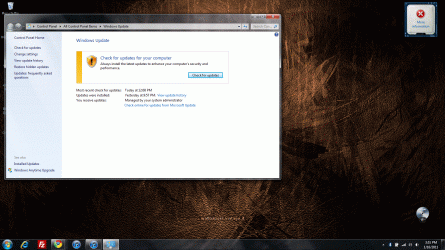
So I think I kind of figured out a solution. Instead of clicking on check for updates, I clicked on "Check online for updates from Microsoft Update" and for some reason, that seemed to work. I have no idea what the difference is between "check for updates" and what I clicked but it went through. As relieved as I am, by having to manually click to get updates, I can't set my computer to check for updates automatically as I've done in the past. I'll obviously take this over not having any updates but it would be nice to be able to set up an auto check for updates. I attached an image if anyone doesn't know what exactly I mean by "Check online for updates from Microsoft Update".

Does this "solution" ring any bells as to what could be the real reason for windows update not working properly?

Thanks for all your help!
 

Attachments

  • Windows update.gif
    Windows update.gif
    386.5 KB · Views: 13

My Computer

Computer Manufacturer/Model Number
Dell Studio xps 1645
OS
windows 7 64bit
CPU
i7 740
Memory
8 gb ddr3
Graphics Card(s)
ati hd 5730
If you're on a network where an administrator has configured a Windows Update Server to use rather than Microsoft's servers, then this could make sense (you are having issues with the WSUS or SCCM server hosting the updates on that server, but no problem to Microsoft's servers).
 

My Computer

Computer type
PC/Desktop
Computer Manufacturer/Model Number
Custom
OS
Windows 10 Pro x64
CPU
Intel Core i7 4790K @ 4.5GHz
Motherboard
Asus Maximus Hero VII
Memory
32GB DDR3
Graphics Card(s)
Nvidia GeForce GTX970
Sound Card
Realtek HD Audio
Screen Resolution
1920x1200
Hard Drives
1x Samsung 250GB SSD
4x WD RE 2TB (RAIDZ)
PSU
Corsair AX760i
Case
Fractal Design Define R4
Cooling
Noctua NH-D15
Is that common for most networks? I've tried on three different networks and I've had problems on all of them.
 

My Computer

Computer Manufacturer/Model Number
Dell Studio xps 1645
OS
windows 7 64bit
CPU
i7 740
Memory
8 gb ddr3
Graphics Card(s)
ati hd 5730
No, it's not - usually this is configured via group or local policy by a system administrator for a set network or domain. If you're seeing that on multiple machines, what do these machines have in common that you can think of other than you as a user and they're running Windows? Perhaps some software installed is causing it, or they all have network admins who use WSUS or SCCM for software updates?
 

My Computer

Computer type
PC/Desktop
Computer Manufacturer/Model Number
Custom
OS
Windows 10 Pro x64
CPU
Intel Core i7 4790K @ 4.5GHz
Motherboard
Asus Maximus Hero VII
Memory
32GB DDR3
Graphics Card(s)
Nvidia GeForce GTX970
Sound Card
Realtek HD Audio
Screen Resolution
1920x1200
Hard Drives
1x Samsung 250GB SSD
4x WD RE 2TB (RAIDZ)
PSU
Corsair AX760i
Case
Fractal Design Define R4
Cooling
Noctua NH-D15
Sorry for the confusion, but what I meant was that I took my computer to 3 different places and it didn't work in any of those places. I tried it at my parents place, my apartment and my library. Also, my roommates computer's updates work perfectly fine in our apartment.
 

My Computer

Computer Manufacturer/Model Number
Dell Studio xps 1645
OS
windows 7 64bit
CPU
i7 740
Memory
8 gb ddr3
Graphics Card(s)
ati hd 5730
If your computer is configured to connect to a WSUS or SCCM server and it can't contact it, then yes - that would make sense. Not sure why it would be, but the only time you'd get that link is if it was if memory serves.
 

My Computer

Computer type
PC/Desktop
Computer Manufacturer/Model Number
Custom
OS
Windows 10 Pro x64
CPU
Intel Core i7 4790K @ 4.5GHz
Motherboard
Asus Maximus Hero VII
Memory
32GB DDR3
Graphics Card(s)
Nvidia GeForce GTX970
Sound Card
Realtek HD Audio
Screen Resolution
1920x1200
Hard Drives
1x Samsung 250GB SSD
4x WD RE 2TB (RAIDZ)
PSU
Corsair AX760i
Case
Fractal Design Define R4
Cooling
Noctua NH-D15
Back
Top