Hi Problematic,
SUGGEST YOU PRINT THIS REPLY
Forget about the log file, You have a bigger problem,
Do you have access to a W7 iso or usb??
(if not could be a factory reset)
From the report
Licensing Data-->
C:\Windows\system32\slmgr.vbs(22, 1) Microsoft VBScript runtime error: ActiveX component can't create object: 'Scripting.Dictionary'
And
Windows Activation Technologies-->
HrOffline: 0x00000000
HrOnline: N/A
HealthStatus: 0x0000000000000000
Event Time Stamp: N/A
ActiveX: Not Registered - 0x80040154
Admin Service: Not Registered - 0x80040154
HealthStatus Bitmask Output:
And
File Scan Data-->
File Mismatch: C:\Windows\system32\wat\watadminsvc.exe[Hr = 0x80070003]
File Mismatch: C:\Windows\system32\wat\npwatweb.dll[Hr = 0x80070003]
File Mismatch: C:\Windows\system32\wat\watux.exe[Hr = 0x80070003]
File Mismatch: C:\Windows\system32\wat\watweb.dll[Hr = 0x80070003]
The first error is can be very awkward to fix,
and on most occassions the only recourse was a repair install, hence my earlier question
http://www.sevenforums.com/tutorials/3413-repair-install.html?ltr=R
We can try and sort it, but it could take some time, me being in England.
Hence the long post
For starters, and do it in order please
reset IE settings to default
Controlpanel >> internet options >> Advanced >> restore defaults, (box at bottom)
re-register script engine, from a run command
regsvr32 vbscript.dll
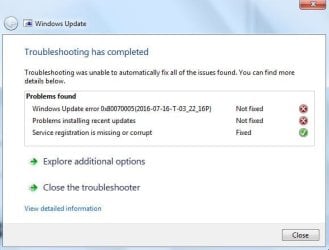
fix for errors 2,3
please run KB971033
REBOOT x2
rerun the tool
errors 2,3 should be gone, it may clear error ,1 but im not confident
IF the errors are gone try and update.
if not
open a Command Prompt and cut and paste the following:
reg query "HKEY_CLASSES_ROOT\CLSID\{B54F3741-5B07-11cf-A4B0-00AA004A55E8}"
Response should be:
HKEY_CLASSES_ROOT\CLSID\{B54F3741-5B07-11cf-A4B0-00AA004A55E8}
(Default) REG_SZ VB Script Language
reg query "HKEY_CLASSES_ROOT\CLSID\{B54F3741-5B07-11cf-A4B0-00AA004A55E8}\InprocServer32"
Response should be:
HKEY_CLASSES_ROOT\CLSID\{B54F3741-5B07-11cf-A4B0-00AA004A55E8}\InprocServer32
(Default) REG_SZ C:\Windows\system32\vbscript.dll
ThreadingModel REG_SZ Both
Any errors between the them are usually caused by
an over zealous AntiVirus install
Registry cleaners or optimiser programs.
OR MALWARE, have you been infected recently?
Before we get around to fixing these
IF an AV name is shown in the response to the query please un-install it with thier removal tool.
remove any optimiser program or registry cleaner
note if you use CCleaner uncheck the clean registry option.
If malware please post the log clearence details.
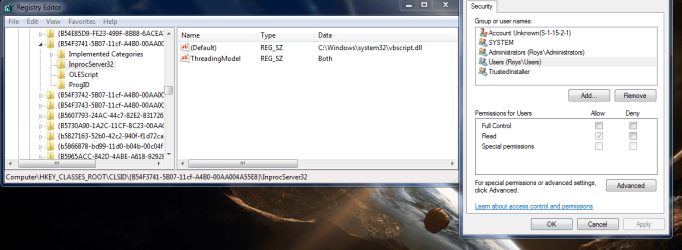
next using regedit navigate to, it should look like this(see screenshot)
note DO NOT WORRY ABOUT THE UNKNOWN ACCOUNT, MS have introduced this it relates to the APPStore
HKEY_CLASSES_ROOT\CLSID\{B54F3741-5B07-11cf-A4B0-00AA004A55E8}\InprocServer32
BEFORE DOING THE FOLLOWING,
please post the results of the previous actions, we may/may not have to do anything more
The final fix

complete a sytem restore and run ERUNT
ERUNT Download
now run this installer to reset permissions
http://www.sevenforums.com/attachme...d-vbscript-engine-visual_basic_script_fix.msi
REBOOT
Try updating
Roy