windows update errors

Mitooo

Banned
Local time
11:07 PM
Messages
23
Hello my friends,
i'm no longer able to download & install windows updates, i've last downloaded a successful update on 14 january, then, i didn't check for any updates since that time
2 days ago, i made a check for updates & i've found couple of updates to install, i selected them, but i always gets a failed to install errors, like this picture

b715qg.jpg


and this is the update history , a recent one, u can find that all is failed !

316s2sx.jpg


but i guess it's not a windows update issue, cause i tried to download & install updates from microsoft website, i downloaded the windows for games live v3.2 from microsoft's website & run the installer , it fails, & tells me that "an error occurred while installing the GFWLClient.msi"


help seriously needed guys,thanks in advance

i've attached CBS.log,CheckSur.log,firegenReport.htm and log from VistaSysInfo to the post

Best regards,
 

Attachments

My Computer

OS
Windows 7 Ultimate x64
I see you have rather problem with updates for MS programs not with updates for Windows 7.Do I have rigth?

First try this tool Description of the Patch Registration Cleanup Tool,you can try suggestions from posts 4 and 8 from this thread:http://www.sevenforums.com/windows-update/63139-windows-updates-fail-repeatedly.html,although I don't know method from post 8 will work for Office updates neverless you can try it-nothing to lose

If really nothing help I recommend reinstall Office,Silverlight and other things which you have problem
 

My Computer

Computer Manufacturer/Model Number
Custom made
OS
Windows 7 Professional x64 PL
CPU
AMD Athlon 4450e
Motherboard
Giga-Byte GA-MA69G-S3H
Memory
GoodRam DDR2 2x2048MB (FSB 800MHz)
Graphics Card(s)
nVidia GeForce 9600GT (G94-300) 1024 MB
Monitor(s) Displays
SAMSUNG SyncMaster HS2P301688
Hard Drives
Seagate ST3750330AS 750GB
PSU
Corsair 550W
Cooling
AeroCool ExtremeEngine 3T
you are right, i tried now to install another win7 security update & the process gone smoothly, but when i tried to re-download & install the above failed updates, still nothing !!
by the way, the microsoft fix it, doesn't work for me, it shows up the following error, check this image

1oowb9.jpg


i tried to install any optional language from windows update, but it also fails !!

i can't do the steps in post #8 , the temp/sand folder tip, cause the expand command doesn't work for me, cause all the failed updates are .exe not .msu, so i can't execute that command

so what to do next ?
 

My Computer

OS
Windows 7 Ultimate x64
Last edited:

My Computer

Computer Manufacturer/Model Number
Custom made
OS
Windows 7 Professional x64 PL
CPU
AMD Athlon 4450e
Motherboard
Giga-Byte GA-MA69G-S3H
Memory
GoodRam DDR2 2x2048MB (FSB 800MHz)
Graphics Card(s)
nVidia GeForce 9600GT (G94-300) 1024 MB
Monitor(s) Displays
SAMSUNG SyncMaster HS2P301688
Hard Drives
Seagate ST3750330AS 750GB
PSU
Corsair 550W
Cooling
AeroCool ExtremeEngine 3T
none of them managed to solve the issue, and the temp directory is already set to full control.
 

My Computer

OS
Windows 7 Ultimate x64
Mitoo,

Try this posting by Flavius. It has some interesting info on update errors and a file listed on the last page that may help you out

Code:
http://www.sevenforums.com/windows-update/62618-window-update-problem.html


SS
 
Last edited:

My Computer

OS
windows 7
i done all of those instructions SuperSlacker, but i got them from this link

Code:
http://www.sevenforums.com/windows-update/63139-windows-updates-fail-repeatedly.html

but still nothing, windows updates successfully installed, application updates fails
 

My Computer

OS
Windows 7 Ultimate x64
by the way, i tried to uninstall silverlight, game for windows live
i get the following error, check this image

fcsck0.jpg


is windows installer corrupted ? & this is the reason why the application updates are not being installed nor downloaded ?

i downloaded windows installer v3.1 , when i run it , a setup error pops up telling me "not enough storage is available to process this command"


My Computer

OS
Windows 7 Ultimate x64
Poeple says error 2203 by Windows Installer relate to issue with permissions,possibly not only for Temp folder,there is way easy way to check it.

1.Download & run Process Monitor Process Monitor

2.Go to Windows Update and try install any hotfix for Office or Silverlight,when WU will return error ,save log in process monitor in *.PML format,pack it and upload on RapidShare: 1-CLICK Web hosting - Easy Filehosting

(log from PM will be to big to attache here)
 

My Computer

Computer Manufacturer/Model Number
Custom made
OS
Windows 7 Professional x64 PL
CPU
AMD Athlon 4450e
Motherboard
Giga-Byte GA-MA69G-S3H
Memory
GoodRam DDR2 2x2048MB (FSB 800MHz)
Graphics Card(s)
nVidia GeForce 9600GT (G94-300) 1024 MB
Monitor(s) Displays
SAMSUNG SyncMaster HS2P301688
Hard Drives
Seagate ST3750330AS 750GB
PSU
Corsair 550W
Cooling
AeroCool ExtremeEngine 3T
OK.It will take some time.I'll answer tomorrow.
 

My Computer

Computer Manufacturer/Model Number
Custom made
OS
Windows 7 Professional x64 PL
CPU
AMD Athlon 4450e
Motherboard
Giga-Byte GA-MA69G-S3H
Memory
GoodRam DDR2 2x2048MB (FSB 800MHz)
Graphics Card(s)
nVidia GeForce 9600GT (G94-300) 1024 MB
Monitor(s) Displays
SAMSUNG SyncMaster HS2P301688
Hard Drives
Seagate ST3750330AS 750GB
PSU
Corsair 550W
Cooling
AeroCool ExtremeEngine 3T
TYT, just don't forget me :D
hope that you find something to work this out :)

Good Luck
 

My Computer

OS
Windows 7 Ultimate x64
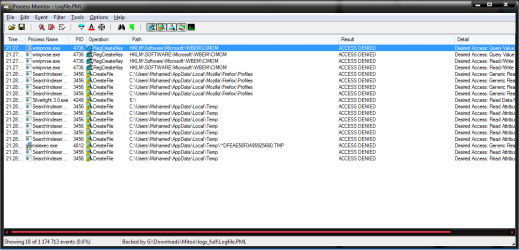
Are you absolutely sure you correct checked permissions for TEMP folder in your accout? This means for C:\Users\Mohamed\AppData\Local\Temp.Both you (Mohamed) ,Administrators group and SYSTEM account must have full control for this folder and for other subfolders in C:\Users\Mohamed.It's clear from this log you have issue with permissions to TEMP folder in your profile:
TempPer.png
Check it thoroughly again

//helpful lecture:Folder Permissions - Vista Forums
 

My Computer

Computer Manufacturer/Model Number
Custom made
OS
Windows 7 Professional x64 PL
CPU
AMD Athlon 4450e
Motherboard
Giga-Byte GA-MA69G-S3H
Memory
GoodRam DDR2 2x2048MB (FSB 800MHz)
Graphics Card(s)
nVidia GeForce 9600GT (G94-300) 1024 MB
Monitor(s) Displays
SAMSUNG SyncMaster HS2P301688
Hard Drives
Seagate ST3750330AS 750GB
PSU
Corsair 550W
Cooling
AeroCool ExtremeEngine 3T
ooooooooooh finally :D
thanks flavius :D but really i checked that yesterday & it was full control :D
anyway , everything is working smoothly right now :D
thanks again :D
 

My Computer

OS
Windows 7 Ultimate x64
I suspect any 3p program blocked you access to TEMP folder and thus you had false alert about not enough permissions to this folder,although permissions were OK. Anyway I glad to hear your problem has been resolved
 

My Computer

Computer Manufacturer/Model Number
Custom made
OS
Windows 7 Professional x64 PL
CPU
AMD Athlon 4450e
Motherboard
Giga-Byte GA-MA69G-S3H
Memory
GoodRam DDR2 2x2048MB (FSB 800MHz)
Graphics Card(s)
nVidia GeForce 9600GT (G94-300) 1024 MB
Monitor(s) Displays
SAMSUNG SyncMaster HS2P301688
Hard Drives
Seagate ST3750330AS 750GB
PSU
Corsair 550W
Cooling
AeroCool ExtremeEngine 3T
how can i add the solved icon beside the post ?
 

My Computer

OS
Windows 7 Ultimate x64
Click on report icon in the post that you want to report as being solved
 

My Computer

Computer Manufacturer/Model Number
Custom made
OS
Windows 7 Professional x64 PL
CPU
AMD Athlon 4450e
Motherboard
Giga-Byte GA-MA69G-S3H
Memory
GoodRam DDR2 2x2048MB (FSB 800MHz)
Graphics Card(s)
nVidia GeForce 9600GT (G94-300) 1024 MB
Monitor(s) Displays
SAMSUNG SyncMaster HS2P301688
Hard Drives
Seagate ST3750330AS 750GB
PSU
Corsair 550W
Cooling
AeroCool ExtremeEngine 3T
Back
Top