

Retta
New member
- Local time
- 3:25 PM
- Messages
- 1
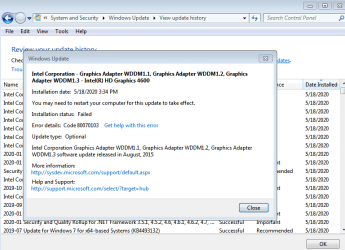
Hello - The Hotfix I downloaded from the SURT in the updating instructions fixed something and all of the other updates I was having an issue with installed correctly. This last one, however, keeps failing.
/scannow did not find any integrity violations
CBS.zip file:
CBS.zip - Google Drive
I think that is all asked for. Any help in getting this update to successfully install is appreciated!
/scannow did not find any integrity violations
CBS.zip file:
CBS.zip - Google Drive
I think that is all asked for. Any help in getting this update to successfully install is appreciated!
Attachments
My Computer
At a glance
Windows 7 Home Premium x64Intel Core i5-4670K 3.4 GHz Quad-Core ProcessorG.Skill Sniper Series 16 GB (4 x 4 GB) DDR3-1866EVGA GeForce GTX 770 2 GB ACX
- Computer type
- PC/Desktop
- Computer Manufacturer/Model Number
- Custom built
- OS
- Windows 7 Home Premium x64
- CPU
- Intel Core i5-4670K 3.4 GHz Quad-Core Processor
- Motherboard
- Asus Z87-Pro ATX LGA1150
- Memory
- G.Skill Sniper Series 16 GB (4 x 4 GB) DDR3-1866
- Graphics Card(s)
- EVGA GeForce GTX 770 2 GB ACX
- Monitor(s) Displays
- Asus VE248H 24.0" 1920x1080 Monitor
- Screen Resolution
- 1920x1080
- Hard Drives
- Samsung 840 EVO 120 GB 2.5" Solid State Drive
Western Digital Caviar Blue 1 TB 3.5" 7200RPM Internal Hard Drive
Seagate Barracuda 1 TB 3.5" 7200RPM Internal Hard Drive
- PSU
- Corsair Enthusiast 650 W 80+ Bronze Certified Semi-modular
- Case
- Fractal Design Arc Midi R2 (Black) ATX Mid Tower Case
- Keyboard
- Razer DeathStalker
- Mouse
- Razer Razer Naga 2014
- Browser
- Chrome



