
Windows Update - Hide or Restore Hidden Updates

How to Hide or Restore Hidden Windows Updates in Windows 7 and Windows 8

   Information
This tutorial will show you how to either hide or unhide Windows Updates to have them listed or not listed as available to install again in Windows 7 and Windows 8.


OPTION ONE

To Hide a Windows Update


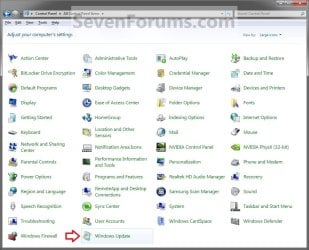
1. Open the Control Panel (icons view), and click/tap on the Windows Update icon. (see screenshot below)
Control_Panel.jpg

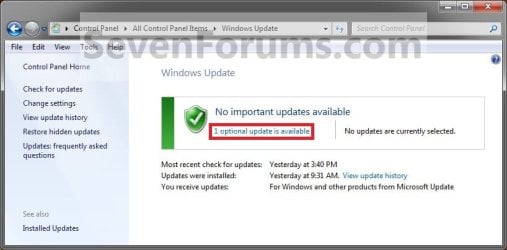
2. After you check for updates, click/tap on the .....update(s) is available link. (See screenshot below)
Step1.jpg
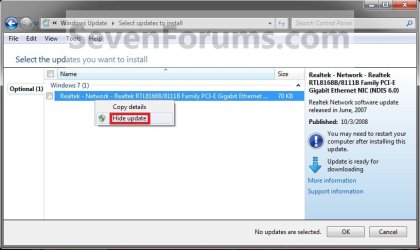
3. Right click or press and hold on a listed Windows Update that you want to hide, then click/tap on Hide Update. (See screenshot below)
Step2.jpg
4. If prompted by UAC, click/tap on Yes.

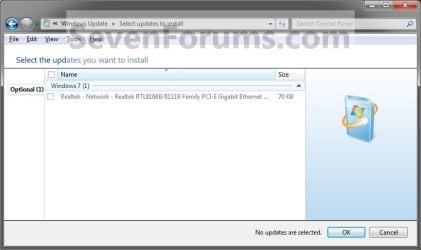
5. You will now notice that the now hidden Windows Update is grayed out. Repeat steps 3 and 4 if you want to hide another Windows Update. When done, click/tap on OK. (See screenshot below)
Step3A.jpg
6. You will now see this if you do not have any unhidden Windows Updates left to install. (See screenshot below)
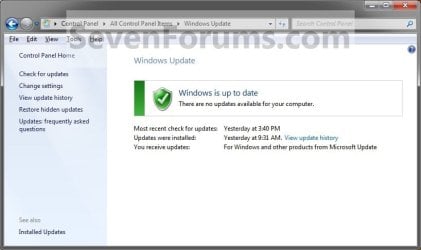
Step3B.jpg


OPTION TWO

To Restore a Hidden Windows Update


1. Open the Control Panel (icons view), and click/tap on the Windows Update icon. (See screenshot below)
Control_Panel.jpg
2. In the left pane, click/tap on Restore hidden updates. (See screenshot below)
Restore.jpg
3. Check all of the Windows Updates boxes that you want to restore, and click on the Restore button. (See screenshot below)
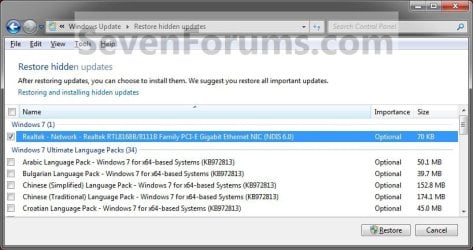
Restore2.jpg
4. If prompted by UAC, then click/tap on Yes or enter the administrator's password.

5. Windows Updates will now check for updates, then your restored update(s) will now be available to be installed. (See screenshots below)
NOTE: Some updates that you try to restore might not appear in the list of updates that Windows Update offers you. This happens only when Windows Update finds a more recent update, available or already installed, that addresses the same problem as the update you tried to restore.
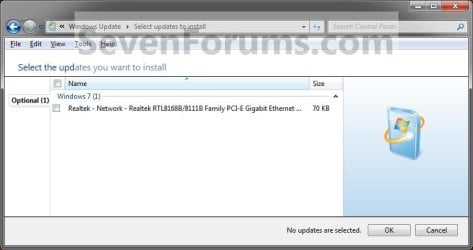
Step1.jpg

Restore3.jpg
That's it,
Shawn


Last edited:
I did both having seen the new reg key created as well as the upgrade policy disabled. The KB3035583 update is the one to hide for the Get 10 app once that shows up in the Optional updates on most systems. Right click on it to select hide and that won't reappear on you.
You cannot hide an update. You can only hide a version of an update. If a new version is issued, it might show up for you. There have been 6 versions of KB3035583

https://support.microsoft.com/en-us/kb/3035583

Article ID: 3035583 - Last Review: 10/05/2015 16:45:00 - Revision: 6.0
 

My Computer

Computer type
Laptop
Computer Manufacturer/Model Number
Employer provided Dell Latitude
OS
W7 Pro SP1 64bit
CPU
i7
Memory
8GB
Graphics Card(s)
Intel HD Graphics
Hard Drives
crappy SSD
Antivirus
Employer mandated Symantec Endpoint Protection
Browser
Pale Moon 64bit, IE11 64bit & Chrome 64bit
It just doesn't sit well with me when something I pay for with my hard earned money can be dictated to be used by the manufacturer in deciding what I can and cannot do with it .
If you rent a place to live, there are a number of things that you cannot legally do to/with the rental property.

When you "buy" an operating system from Microsoft, you are buying a license to use the OS. You don't own the OS and the license agreement comes with restrictions on what you can and cannot do to/with the OS.

I'm not defending MS. I'm just offering an analogy other than your Ford one.

Commercially you can't alter anything for sure! But experienced programmers will manage to tweak things? on their own regardless of the EULA on their own machines. MS can't control or actually say anything about that since they do not own the hardwares! Their concern has to remain with the things that do violate the terms of the licensing.

I did both having seen the new reg key created as well as the upgrade policy disabled. The KB3035583 update is the one to hide for the Get 10 app once that shows up in the Optional updates on most systems. Right click on it to select hide and that won't reappear on you.
You cannot hide an update. You can only hide a version of an update. If a new version is issued, it might show up for you. There have been 6 versions of KB3035583

https://support.microsoft.com/en-us/kb/3035583

Article ID: 3035583 - Last Review: 10/05/2015 16:45:00 - Revision: 6.0

It comes as no surprise actually! The number remains the same while the core element sees a slight change to allow it to simply arrive mixed in with the rest. So far I have only run into the first seeing the 10 app put on back in late June and suspect then and not in July and just this past week.

The second failed upgrade by 10 app was obviously an MS server's recall of the first when I knew the reserved copy would fail here after 10 was already on and I had added in two new larger storage drives to replace the first pair of which one was failing. That was the monkey wrench tossed into the works as far as seeing any automatic replacement of 7!

The page there is a good one however since I will be passing that along for others to see. The one thing I so far have yet to see would be the "Upgrade to Windows 10" item found in the Optional updates list already checked off which has been stirring the 10 controversy a bit from people not wanting but ending up seeing the upgrade take place when not fully understanding how MS is bringing 10 in! Some likely thought it was simply another service pack and clicked to find out otherwise!
 

My Computers

System One System Two

  • Computer type
    PC/Desktop
    Computer Manufacturer/Model Number
    Custom builds = 2
    OS
    W7 Ultimate x64/W10 Pro x64/W11 Pro Triple Boot - Main PC W7 Remote PC Micro ATX W7 Pro x64/W11 Pro
    CPU
    AMD Phenom II X4 975 Deneb 3.6ghz - 965 2nd remote pc
    Motherboard
    Gigabyte GA-790XTA-UD4-Gigabyte GA-880GM-D2H remote pc
    Memory
    Kingston Hyper X DDR3 1600 1.5v 16gb - Hyper X Fury 8gb 2nd
    Graphics Card(s)
    MSI HD Radeon 5750 1gb - MSI HD Radeon 6450 on mini tower
    Sound Card
    Creative Labs X-Fi Xtreme Audio P - Realtek onooard 2nd case
    Monitor(s) Displays
    ASUS VW199T-P 19" HP 2082a Main-HP 2082a 20" remote pc
    Screen Resolution
    Asus 1440x900 - HP 1600x900
    Hard Drives
    WD Black 1TB HD per OS W7, W10, and pending W11 presently on 500gb OS Drive - Pending Triple 1TB HDs for Spanned Storage/backup volume
    Single 2TB external USB enclosure, single 1TB System 7 Host/Boot drive, Pending 8TB external HD for system image b
    PSU
    Corsair 750TX - primary / Corsair CX600 - second
    Case
    Antec 900-2 - SSD compatible / NZXT Vulcan mini tower
    Cooling
    Zalman CNPS9900A
    Keyboard
    AZIO L70 Backlit Letters Gaming - ONN Cordless/USB
    Mouse
    MSI DS200 Programmable, Logitech Cordless
    Internet Speed
    30mbps upgrade - primary hard wired - mini tower usb WiFi
    Antivirus
    GFI VIPRE Internet Security 2014 on W7 2016 beta on W10,
    Browser
    Cyberfox, WaterFox 64bit FF variants, FireFox x64, Pale Moon
    Other Info
    Accomdata fan cooled usb 2.0 PIDE/Sata II, III external enclosure.
    Sambient usb/eSata PATA/Sata II, III external enclosure.
  • Computer type
    PC/Desktop
    System Manufacturer/Model Number
    CUSTOM ASSEMBLY
    OS
    W7 Pro x64/W11 Pro
    CPU
    AMD Deneb 3.6ghz - 965
    Motherboard
    Gigabyte GA-880GM-D2H remote pc
    Memory
    Kingston Hyper X Fury 8gb
    Graphics Card(s)
    MSI HD Radeon 6450 DVI Output
    Sound Card
    Realtek onooard Creative or Other separate PENDING
    Monitor(s) Displays
    VIZIO 32" LCD TV Separate LCD Pending
    Screen Resolution
    1600x1080
    Hard Drives
    WD 500GB OS Host/Boot WD Green 1TB Storage/Backup
    PSU
    Corsair 600W - THERMALTAKE 600W spare case
    Case
    NZXT Vulcan mini tower
    Cooling
    Twin 120mm Top Fans - 240mm Side Cover
    Keyboard
    ONN Cordless/USB Logitech Cordless
    Mouse
    ONN USB/Cordless - Logitech Cordless
    Internet Speed
    DSL 5G
    Browser
    MS Edge, FireFox, WaterFox x64, FireFox Nightly
    Other Info
    OS Testing-Remote Access to Main TeamViewer
I don't want to take this tutorial thread to far into W10, but I think that there should be one or more registry settings that would prevent W10 from being installed while allowing all updates to be applied (e.g not be hidden over and over). Perhaps one of these will work for all versions of Windows 7:
Code:
Windows Registry Editor Version 5.00

[HKEY_LOCAL_MACHINE\SOFTWARE\Policies\Microsoft\Windows\GWX]
"DisableGWX"=dword:00000001

[HKEY_LOCAL_MACHINE\SOFTWARE\Microsoft\Windows\CurrentVersion\WindowsUpdate\OSUpgrade]
"AllowOSUpgrade"=dword:00000000
"ReservationsAllowed"=dword:00000000

[HKEY_LOCAL_MACHINE\SOFTWARE\Policies\Microsoft\Windows\WindowsUpdate]
"DisableOSUpgrade"=dword:00000001
 

My Computer

Computer type
Laptop
Computer Manufacturer/Model Number
Employer provided Dell Latitude
OS
W7 Pro SP1 64bit
CPU
i7
Memory
8GB
Graphics Card(s)
Intel HD Graphics
Hard Drives
crappy SSD
Antivirus
Employer mandated Symantec Endpoint Protection
Browser
Pale Moon 64bit, IE11 64bit & Chrome 64bit
I copied and pasted that into a new NotePad file named "Windows 10 Block" with the "reg" file extension to see that merged with the 7 registry here easy enough. The updates setting to never check as well as having an additional storage drive plugged in however will cause any upgrade install attempt to fail.

The 10 installer gets confused on where to put boot files and temp install folders resulting in a failed upgrade! I wouldn't worry too much about any of this however as even if the upgrade does take place before MS fixes? their goof? it can be reverted back or if caught during the upgrade easily sabotaged even with a hard boot if necessary. Generally to finish the set up that would still require some user interaction or see the upgrade canceled out.

The main goal however for hiding and unhiding updates has always been more about problematic updates where when something goes on the existing Windows installation bugs out on you until the update is later removed. Once a system is corrected the update can then be unhidden for a normal install. That happens when a Windows Defender update interferes with the av program in some cases someone has on when the WD itself failed to go into it's own form of hibernation until no av program is present.
 

My Computers

System One System Two

  • Computer type
    PC/Desktop
    Computer Manufacturer/Model Number
    Custom builds = 2
    OS
    W7 Ultimate x64/W10 Pro x64/W11 Pro Triple Boot - Main PC W7 Remote PC Micro ATX W7 Pro x64/W11 Pro
    CPU
    AMD Phenom II X4 975 Deneb 3.6ghz - 965 2nd remote pc
    Motherboard
    Gigabyte GA-790XTA-UD4-Gigabyte GA-880GM-D2H remote pc
    Memory
    Kingston Hyper X DDR3 1600 1.5v 16gb - Hyper X Fury 8gb 2nd
    Graphics Card(s)
    MSI HD Radeon 5750 1gb - MSI HD Radeon 6450 on mini tower
    Sound Card
    Creative Labs X-Fi Xtreme Audio P - Realtek onooard 2nd case
    Monitor(s) Displays
    ASUS VW199T-P 19" HP 2082a Main-HP 2082a 20" remote pc
    Screen Resolution
    Asus 1440x900 - HP 1600x900
    Hard Drives
    WD Black 1TB HD per OS W7, W10, and pending W11 presently on 500gb OS Drive - Pending Triple 1TB HDs for Spanned Storage/backup volume
    Single 2TB external USB enclosure, single 1TB System 7 Host/Boot drive, Pending 8TB external HD for system image b
    PSU
    Corsair 750TX - primary / Corsair CX600 - second
    Case
    Antec 900-2 - SSD compatible / NZXT Vulcan mini tower
    Cooling
    Zalman CNPS9900A
    Keyboard
    AZIO L70 Backlit Letters Gaming - ONN Cordless/USB
    Mouse
    MSI DS200 Programmable, Logitech Cordless
    Internet Speed
    30mbps upgrade - primary hard wired - mini tower usb WiFi
    Antivirus
    GFI VIPRE Internet Security 2014 on W7 2016 beta on W10,
    Browser
    Cyberfox, WaterFox 64bit FF variants, FireFox x64, Pale Moon
    Other Info
    Accomdata fan cooled usb 2.0 PIDE/Sata II, III external enclosure.
    Sambient usb/eSata PATA/Sata II, III external enclosure.
  • Computer type
    PC/Desktop
    System Manufacturer/Model Number
    CUSTOM ASSEMBLY
    OS
    W7 Pro x64/W11 Pro
    CPU
    AMD Deneb 3.6ghz - 965
    Motherboard
    Gigabyte GA-880GM-D2H remote pc
    Memory
    Kingston Hyper X Fury 8gb
    Graphics Card(s)
    MSI HD Radeon 6450 DVI Output
    Sound Card
    Realtek onooard Creative or Other separate PENDING
    Monitor(s) Displays
    VIZIO 32" LCD TV Separate LCD Pending
    Screen Resolution
    1600x1080
    Hard Drives
    WD 500GB OS Host/Boot WD Green 1TB Storage/Backup
    PSU
    Corsair 600W - THERMALTAKE 600W spare case
    Case
    NZXT Vulcan mini tower
    Cooling
    Twin 120mm Top Fans - 240mm Side Cover
    Keyboard
    ONN Cordless/USB Logitech Cordless
    Mouse
    ONN USB/Cordless - Logitech Cordless
    Internet Speed
    DSL 5G
    Browser
    MS Edge, FireFox, WaterFox x64, FireFox Nightly
    Other Info
    OS Testing-Remote Access to Main TeamViewer
Yes I know what you mean mate but although as Night Hawk says the authorities can tap in any time they like I don't like the idea that Microsoft can do what they like if they so wish to do so - surely my data is MY business no one else's or otherwise I might just as well broadcast to the whole world what I ma doing and hey while I ma at it throw the AV stuff away.

I just think Microsoft have become so greedy and hell bent on a power trip that only they can control and it leaves me no choice to keep my own private matters to myself. I am the very wrong person to tell what to do and when to do it and how to do it.
Windows in my mind is slowly becoming Big Brother No2 and I for one don't like it. If their intentions and only IF are to stop counterfeiting their product then it would be ok but does it or would it stop there??
Ok a bit like the farmer who grows the chicken then wants to know how I cook and eat it and if I don't bend to his rules then I am stopped from doing it my way or prosecuted for it.

I am sorry for ranting but it seems to me that there are loads of people defending what Microsoft is doing either in the futile belief that they can do nothing about it or don't want to or couldn't care less.:huh:
 

My Computer

Computer type
PC/Desktop
Computer Manufacturer/Model Number
Own build (new) Desk1 / Asus ROG Win 7 / Desk2 1st build
OS
Desk1 7 Home Prem / Desk2 10 Pro / Main lap Asus ROG 10 Pro 2 laptop Toshiba 7 Pro Asus P2520 7 & 10
CPU
Desk1 i5 3750K / Laptop i7 GTX 860M / Desk2 i5 2500
Motherboard
Desk1 Asus P877-V / Desk2 Gigabyte H67 UD3H / Laptop ?
Memory
Desk1 8GB (1866) / Desk2 16GB (1333) / Laptop 8Gb DDR3
Graphics Card(s)
Desk 1& 2NVidia GTX 650 & Laptops on board Intel
Sound Card
Desk 1 & 2 -XONAR DG Realtek High Def audio Laptop
Monitor(s) Displays
Desk 1 Benq HD 2450 / Desk2 Philips 24" / Laptop 17.5"
Screen Resolution
1920x1080 D1 & D2 & Laptop 1
Hard Drives
Desk1 Samsung 120GB 830 SSD
Asus ROG 256GB 850 Pro SSD
Desk2 Samsung 840 256 SSD
Toshiba 120GB EVO
PSU
Desk 1 Corsair HX 1050/ Laptop ? / Desk 2 Corsair HX 650
Case
Desk 1 Cooler HAF XM ? Toshiba laptop / Desk2 Coolermaster
Cooling
Fans on all Desk1 -2 Desk2 - all Coolermasters 5 Laptop ?
Keyboard
Desk 1 MS Sidewinder X6 Desk 2 MS Sidewinder X 4
Mouse
Desk 1&2 - Gigabyte MS 900 gamer - laptop - Logitec wireless
Internet Speed
ADSL2+
Other Info
One other Desktop (tester) and spare Toshba laptop both with SSD's
Running Kaspersky 2016 ISS on all machines config'd identically
Logitec audio stereo systems on each machine (x3)
Canon MG5250MFC
Router/modem TP-Link running WPA2SK
Well by the direction MS has been taking you can tell BG is no longer running the show! He had stepped down as the CEO some years back with Steve Balmer taking the reins. Shortly after you saw 8 with Metro arrive and features being stripped out of Windows to the urk of many who obviously provided some negative feedback in addition to the authors who became the critics.

Now the new method for delivery in itself is actually intrusive since 10 has arrived to many as what appears to be just another "Optional" update but arrives already checked off ready to install?!That in itself was going to be a tough and go trial for MS since as suspected it did back fire on them! Now they have to set things straight.
 

My Computers

System One System Two

  • Computer type
    PC/Desktop
    Computer Manufacturer/Model Number
    Custom builds = 2
    OS
    W7 Ultimate x64/W10 Pro x64/W11 Pro Triple Boot - Main PC W7 Remote PC Micro ATX W7 Pro x64/W11 Pro
    CPU
    AMD Phenom II X4 975 Deneb 3.6ghz - 965 2nd remote pc
    Motherboard
    Gigabyte GA-790XTA-UD4-Gigabyte GA-880GM-D2H remote pc
    Memory
    Kingston Hyper X DDR3 1600 1.5v 16gb - Hyper X Fury 8gb 2nd
    Graphics Card(s)
    MSI HD Radeon 5750 1gb - MSI HD Radeon 6450 on mini tower
    Sound Card
    Creative Labs X-Fi Xtreme Audio P - Realtek onooard 2nd case
    Monitor(s) Displays
    ASUS VW199T-P 19" HP 2082a Main-HP 2082a 20" remote pc
    Screen Resolution
    Asus 1440x900 - HP 1600x900
    Hard Drives
    WD Black 1TB HD per OS W7, W10, and pending W11 presently on 500gb OS Drive - Pending Triple 1TB HDs for Spanned Storage/backup volume
    Single 2TB external USB enclosure, single 1TB System 7 Host/Boot drive, Pending 8TB external HD for system image b
    PSU
    Corsair 750TX - primary / Corsair CX600 - second
    Case
    Antec 900-2 - SSD compatible / NZXT Vulcan mini tower
    Cooling
    Zalman CNPS9900A
    Keyboard
    AZIO L70 Backlit Letters Gaming - ONN Cordless/USB
    Mouse
    MSI DS200 Programmable, Logitech Cordless
    Internet Speed
    30mbps upgrade - primary hard wired - mini tower usb WiFi
    Antivirus
    GFI VIPRE Internet Security 2014 on W7 2016 beta on W10,
    Browser
    Cyberfox, WaterFox 64bit FF variants, FireFox x64, Pale Moon
    Other Info
    Accomdata fan cooled usb 2.0 PIDE/Sata II, III external enclosure.
    Sambient usb/eSata PATA/Sata II, III external enclosure.
  • Computer type
    PC/Desktop
    System Manufacturer/Model Number
    CUSTOM ASSEMBLY
    OS
    W7 Pro x64/W11 Pro
    CPU
    AMD Deneb 3.6ghz - 965
    Motherboard
    Gigabyte GA-880GM-D2H remote pc
    Memory
    Kingston Hyper X Fury 8gb
    Graphics Card(s)
    MSI HD Radeon 6450 DVI Output
    Sound Card
    Realtek onooard Creative or Other separate PENDING
    Monitor(s) Displays
    VIZIO 32" LCD TV Separate LCD Pending
    Screen Resolution
    1600x1080
    Hard Drives
    WD 500GB OS Host/Boot WD Green 1TB Storage/Backup
    PSU
    Corsair 600W - THERMALTAKE 600W spare case
    Case
    NZXT Vulcan mini tower
    Cooling
    Twin 120mm Top Fans - 240mm Side Cover
    Keyboard
    ONN Cordless/USB Logitech Cordless
    Mouse
    ONN USB/Cordless - Logitech Cordless
    Internet Speed
    DSL 5G
    Browser
    MS Edge, FireFox, WaterFox x64, FireFox Nightly
    Other Info
    OS Testing-Remote Access to Main TeamViewer
Well by the direction MS has been taking you can tell BG is no longer running the show! He had stepped down as the CEO some years back with Steve Balmer taking the reins. Shortly after you saw 8 with Metro arrive and features being stripped out of Windows to the urk of many who obviously provided some negative feedback in addition to the authors who became the critics.

Now the new method for delivery in itself is actually intrusive since 10 has arrived to many as what appears to be just another "Optional" update but arrives already checked off ready to install?!That in itself was going to be a tough and go trial for MS since as suspected it did back fire on them! Now they have to set things straight.
Couldn't agree more mate it is going to the pack in my mind. WE have such a simple and easy to use system in 7 and they have got it going sideways in more ways than one.
I wonder where they find these "brilliant" people:sarc:
 

My Computer

Computer type
PC/Desktop
Computer Manufacturer/Model Number
Own build (new) Desk1 / Asus ROG Win 7 / Desk2 1st build
OS
Desk1 7 Home Prem / Desk2 10 Pro / Main lap Asus ROG 10 Pro 2 laptop Toshiba 7 Pro Asus P2520 7 & 10
CPU
Desk1 i5 3750K / Laptop i7 GTX 860M / Desk2 i5 2500
Motherboard
Desk1 Asus P877-V / Desk2 Gigabyte H67 UD3H / Laptop ?
Memory
Desk1 8GB (1866) / Desk2 16GB (1333) / Laptop 8Gb DDR3
Graphics Card(s)
Desk 1& 2NVidia GTX 650 & Laptops on board Intel
Sound Card
Desk 1 & 2 -XONAR DG Realtek High Def audio Laptop
Monitor(s) Displays
Desk 1 Benq HD 2450 / Desk2 Philips 24" / Laptop 17.5"
Screen Resolution
1920x1080 D1 & D2 & Laptop 1
Hard Drives
Desk1 Samsung 120GB 830 SSD
Asus ROG 256GB 850 Pro SSD
Desk2 Samsung 840 256 SSD
Toshiba 120GB EVO
PSU
Desk 1 Corsair HX 1050/ Laptop ? / Desk 2 Corsair HX 650
Case
Desk 1 Cooler HAF XM ? Toshiba laptop / Desk2 Coolermaster
Cooling
Fans on all Desk1 -2 Desk2 - all Coolermasters 5 Laptop ?
Keyboard
Desk 1 MS Sidewinder X6 Desk 2 MS Sidewinder X 4
Mouse
Desk 1&2 - Gigabyte MS 900 gamer - laptop - Logitec wireless
Internet Speed
ADSL2+
Other Info
One other Desktop (tester) and spare Toshba laptop both with SSD's
Running Kaspersky 2016 ISS on all machines config'd identically
Logitec audio stereo systems on each machine (x3)
Canon MG5250MFC
Router/modem TP-Link running WPA2SK
The problem is more with the new marketing strategy over the engineering aspects. "yeah we can find a way to get 10 on more machines alright! Just give us some space to work." was likely some quick brainstorm someone in marketing suggested to the engineering dept. "Under the Table of course" to keep MS from being liable by simply saying when caught "we made a goober we will now have to correct!" while that wasn't any goober?!

For the most part the only updates that would normally be checked off would fall under "Important" and when there's a good number to play catch up on you may find several not even checked off going by date of release since those may need others installed first. You would see typically with NetFramework when some program needed 2.0 and you already had 3.51 or something else newer on. You would have to remove the latest to see the early bird then installed in sequence.
 

My Computers

System One System Two

  • Computer type
    PC/Desktop
    Computer Manufacturer/Model Number
    Custom builds = 2
    OS
    W7 Ultimate x64/W10 Pro x64/W11 Pro Triple Boot - Main PC W7 Remote PC Micro ATX W7 Pro x64/W11 Pro
    CPU
    AMD Phenom II X4 975 Deneb 3.6ghz - 965 2nd remote pc
    Motherboard
    Gigabyte GA-790XTA-UD4-Gigabyte GA-880GM-D2H remote pc
    Memory
    Kingston Hyper X DDR3 1600 1.5v 16gb - Hyper X Fury 8gb 2nd
    Graphics Card(s)
    MSI HD Radeon 5750 1gb - MSI HD Radeon 6450 on mini tower
    Sound Card
    Creative Labs X-Fi Xtreme Audio P - Realtek onooard 2nd case
    Monitor(s) Displays
    ASUS VW199T-P 19" HP 2082a Main-HP 2082a 20" remote pc
    Screen Resolution
    Asus 1440x900 - HP 1600x900
    Hard Drives
    WD Black 1TB HD per OS W7, W10, and pending W11 presently on 500gb OS Drive - Pending Triple 1TB HDs for Spanned Storage/backup volume
    Single 2TB external USB enclosure, single 1TB System 7 Host/Boot drive, Pending 8TB external HD for system image b
    PSU
    Corsair 750TX - primary / Corsair CX600 - second
    Case
    Antec 900-2 - SSD compatible / NZXT Vulcan mini tower
    Cooling
    Zalman CNPS9900A
    Keyboard
    AZIO L70 Backlit Letters Gaming - ONN Cordless/USB
    Mouse
    MSI DS200 Programmable, Logitech Cordless
    Internet Speed
    30mbps upgrade - primary hard wired - mini tower usb WiFi
    Antivirus
    GFI VIPRE Internet Security 2014 on W7 2016 beta on W10,
    Browser
    Cyberfox, WaterFox 64bit FF variants, FireFox x64, Pale Moon
    Other Info
    Accomdata fan cooled usb 2.0 PIDE/Sata II, III external enclosure.
    Sambient usb/eSata PATA/Sata II, III external enclosure.
  • Computer type
    PC/Desktop
    System Manufacturer/Model Number
    CUSTOM ASSEMBLY
    OS
    W7 Pro x64/W11 Pro
    CPU
    AMD Deneb 3.6ghz - 965
    Motherboard
    Gigabyte GA-880GM-D2H remote pc
    Memory
    Kingston Hyper X Fury 8gb
    Graphics Card(s)
    MSI HD Radeon 6450 DVI Output
    Sound Card
    Realtek onooard Creative or Other separate PENDING
    Monitor(s) Displays
    VIZIO 32" LCD TV Separate LCD Pending
    Screen Resolution
    1600x1080
    Hard Drives
    WD 500GB OS Host/Boot WD Green 1TB Storage/Backup
    PSU
    Corsair 600W - THERMALTAKE 600W spare case
    Case
    NZXT Vulcan mini tower
    Cooling
    Twin 120mm Top Fans - 240mm Side Cover
    Keyboard
    ONN Cordless/USB Logitech Cordless
    Mouse
    ONN USB/Cordless - Logitech Cordless
    Internet Speed
    DSL 5G
    Browser
    MS Edge, FireFox, WaterFox x64, FireFox Nightly
    Other Info
    OS Testing-Remote Access to Main TeamViewer
Back
Top