
Windows Update, important update not selected

zx81

New member
Power User
Local time
12:42 PM
Messages
285
Location
Utrecht
Hello all

When executing Windows Update, I experienced that one important update is not automatically selected to download and install.
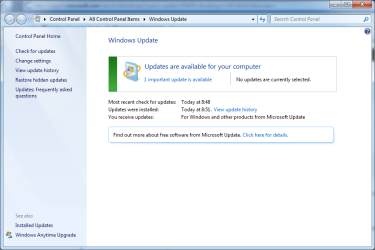
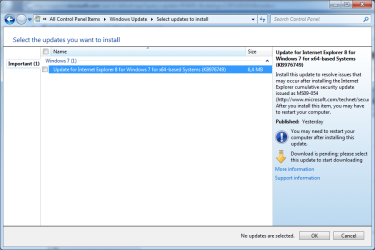
update-not-selected-screen1.png

update-important-not-selected1.png
I like to understand why this is?

Also I like to understand if I should always install all important updates, even the ones not by default selected?

In this example, the not selected update refers to MS09-054 security update. Is this a manual installed security update?
Does it not apply to me?

Thanks a lot in advance!

zx81
 

My Computer

Computer Manufacturer/Model Number
Dell Inpspiron 1720
OS
Windows 7 Home Premium x64
CPU
Intel 1720 Core 2 Duo 2.00GHz,800,2M
Memory
4GB 667MHz DDR2 SDRAM (2x2048)
Graphics Card(s)
NVIDIA Geforce Go 8600M GT 256MB DDR2
Sound Card
SigmaTel
Monitor(s) Displays
17.0" Widescreen WXGA+ (1440x900) TFT with TrueLife
Screen Resolution
1440x900
Hard Drives
2x160GB 5400RPM Serial ATA
Mouse
Logitech
Not all users experience the issue that this update resolves. MS is providing you the oportunity to use the "If it ain't broke, don't fix it" logic.

I applied the update even though I have no evidence that I need it. Yet.

Some updates will adversely affect some users. Not applying updates may adversely affect you.

What can you do? My advice - apply all updates. Unless you have a good reason not to.
 
ZX:

I just experienced the same issue with the exact same update you refer to.

That update is listed, but I couldn't figure out how to actually install it.

I thought maybe it was because I had gone to Window Update with Firefox and this is an IE update. So I went to Windows Update with IE and had the same experience. Not sure what is going on here.

Maybe it will be different the next time I get a notification.

I have Windows set to notify me, but not install. You have to be careful about blindly accepting everything marked "critical" or "important"--you can end up with a change you might not want--such as a new browser.
 

My Computer

Computer type
PC/Desktop
Computer Manufacturer/Model Number
Ignatz Special; 4 speed manual gearbox; factory air conditioning; one of one
OS
Windows 7 Home Premium SP1, 64-bit
CPU
Intel Skylake i5-6600K, not overclocked
Motherboard
AsRock Z170M Extreme 4, micro ATX
Memory
8 GB HyperX DDR4-2666 (2 x 4 GB)
Graphics Card(s)
none; graphics are integrated on CPU
Sound Card
onboard: Realtek ALC1150; external: USB Behringer UF0-202
Monitor(s) Displays
Dell S2340M 23 inch IPS
Screen Resolution
1600 x 900
Hard Drives
System: Crucial MX100 series SSD, 128 GB;
Data: Samsung Spinpoint 103SJ, 1 TB;
Backup: WD Caviar Green WD30EZRX-00D8PB0, 3 TB
PSU
Rosewill SilentNight 500 watt fanless, semi-modular
Case
Antec Solo II
Cooling
Noctua NH-U12S; Noctua F12 intake, Noctua S12A exhaust
Keyboard
Microsoft 200 6JH-00001 USB
Mouse
Dell or Microsoft optical wired; USB
Antivirus
Microsoft Security Essentials and Malwarebytes Premium
Browser
Pale Moon
Other Info
All fans PWM; speeds at idle: CPU circa 500 rpm; intake circa 600 rpm; exhaust circa 600 rpm; CPU temps 27 idle and 47 C load in a warm room (27 C/81 F) when running Intel Extreme Tuning Utility stress test.
Not all users experience the issue that this update resolves. MS is providing you the opportunity to use the "If it ain't broke, don't fix it" logic.

I applied the update even though I have no evidence that I need it. Yet.

Some updates will adversely affect some users. Not applying updates may adversely affect you.

What can you do? My advice - apply all updates. Unless you have a good reason not to.

Antman,

Thank you very much for your answer.

Was this specific update (KB976749) also unselected at your Windows Update?

zx81
 

My Computer

Computer Manufacturer/Model Number
Dell Inpspiron 1720
OS
Windows 7 Home Premium x64
CPU
Intel 1720 Core 2 Duo 2.00GHz,800,2M
Memory
4GB 667MHz DDR2 SDRAM (2x2048)
Graphics Card(s)
NVIDIA Geforce Go 8600M GT 256MB DDR2
Sound Card
SigmaTel
Monitor(s) Displays
17.0" Widescreen WXGA+ (1440x900) TFT with TrueLife
Screen Resolution
1440x900
Hard Drives
2x160GB 5400RPM Serial ATA
Mouse
Logitech
ZX:

I just experienced the same issue with the exact same update you refer to.

That update is listed, but I couldn't figure out how to actually install it.

I thought maybe it was because I had gone to Window Update with Firefox and this is an IE update. So I went to Windows Update with IE and had the same experience. Not sure what is going on here.

Maybe it will be different the next time I get a notification.

I have Windows set to notify me, but not install. You have to be careful about blindly accepting everything marked "critical" or "important"--you can end up with a change you might not want--such as a new browser.

ignatzatsonic,

Thank you very much for your answer.

One question, do you mean this update, KB976749, could not be installed?
Because in my case, the update is shown in Windows Update, but not selected automatically to be installed.
If I select to install it, I think it will be installed. (not yet tried).

zx81
 

My Computer

Computer Manufacturer/Model Number
Dell Inpspiron 1720
OS
Windows 7 Home Premium x64
CPU
Intel 1720 Core 2 Duo 2.00GHz,800,2M
Memory
4GB 667MHz DDR2 SDRAM (2x2048)
Graphics Card(s)
NVIDIA Geforce Go 8600M GT 256MB DDR2
Sound Card
SigmaTel
Monitor(s) Displays
17.0" Widescreen WXGA+ (1440x900) TFT with TrueLife
Screen Resolution
1440x900
Hard Drives
2x160GB 5400RPM Serial ATA
Mouse
Logitech
Yes, I am referring to the exact same update.

I can select it, but I can't install it.
 

My Computer

Computer type
PC/Desktop
Computer Manufacturer/Model Number
Ignatz Special; 4 speed manual gearbox; factory air conditioning; one of one
OS
Windows 7 Home Premium SP1, 64-bit
CPU
Intel Skylake i5-6600K, not overclocked
Motherboard
AsRock Z170M Extreme 4, micro ATX
Memory
8 GB HyperX DDR4-2666 (2 x 4 GB)
Graphics Card(s)
none; graphics are integrated on CPU
Sound Card
onboard: Realtek ALC1150; external: USB Behringer UF0-202
Monitor(s) Displays
Dell S2340M 23 inch IPS
Screen Resolution
1600 x 900
Hard Drives
System: Crucial MX100 series SSD, 128 GB;
Data: Samsung Spinpoint 103SJ, 1 TB;
Backup: WD Caviar Green WD30EZRX-00D8PB0, 3 TB
PSU
Rosewill SilentNight 500 watt fanless, semi-modular
Case
Antec Solo II
Cooling
Noctua NH-U12S; Noctua F12 intake, Noctua S12A exhaust
Keyboard
Microsoft 200 6JH-00001 USB
Mouse
Dell or Microsoft optical wired; USB
Antivirus
Microsoft Security Essentials and Malwarebytes Premium
Browser
Pale Moon
Other Info
All fans PWM; speeds at idle: CPU circa 500 rpm; intake circa 600 rpm; exhaust circa 600 rpm; CPU temps 27 idle and 47 C load in a warm room (27 C/81 F) when running Intel Extreme Tuning Utility stress test.
ignatzatsonic,

What happens when you select and install the (KB976749) update?

Best regards,

zx81
 

My Computer

Computer Manufacturer/Model Number
Dell Inpspiron 1720
OS
Windows 7 Home Premium x64
CPU
Intel 1720 Core 2 Duo 2.00GHz,800,2M
Memory
4GB 667MHz DDR2 SDRAM (2x2048)
Graphics Card(s)
NVIDIA Geforce Go 8600M GT 256MB DDR2
Sound Card
SigmaTel
Monitor(s) Displays
17.0" Widescreen WXGA+ (1440x900) TFT with TrueLife
Screen Resolution
1440x900
Hard Drives
2x160GB 5400RPM Serial ATA
Mouse
Logitech
I got it installed.

I thought I could install it by simply highlighting the update and selecting OK.

That doesn't work.

You have to also check the box next to the update.
 

My Computer

Computer type
PC/Desktop
Computer Manufacturer/Model Number
Ignatz Special; 4 speed manual gearbox; factory air conditioning; one of one
OS
Windows 7 Home Premium SP1, 64-bit
CPU
Intel Skylake i5-6600K, not overclocked
Motherboard
AsRock Z170M Extreme 4, micro ATX
Memory
8 GB HyperX DDR4-2666 (2 x 4 GB)
Graphics Card(s)
none; graphics are integrated on CPU
Sound Card
onboard: Realtek ALC1150; external: USB Behringer UF0-202
Monitor(s) Displays
Dell S2340M 23 inch IPS
Screen Resolution
1600 x 900
Hard Drives
System: Crucial MX100 series SSD, 128 GB;
Data: Samsung Spinpoint 103SJ, 1 TB;
Backup: WD Caviar Green WD30EZRX-00D8PB0, 3 TB
PSU
Rosewill SilentNight 500 watt fanless, semi-modular
Case
Antec Solo II
Cooling
Noctua NH-U12S; Noctua F12 intake, Noctua S12A exhaust
Keyboard
Microsoft 200 6JH-00001 USB
Mouse
Dell or Microsoft optical wired; USB
Antivirus
Microsoft Security Essentials and Malwarebytes Premium
Browser
Pale Moon
Other Info
All fans PWM; speeds at idle: CPU circa 500 rpm; intake circa 600 rpm; exhaust circa 600 rpm; CPU temps 27 idle and 47 C load in a warm room (27 C/81 F) when running Intel Extreme Tuning Utility stress test.
Back
Top