Windows Update Inconsistencies?

WyattWhiteEagle

Member
Member
VIP
Local time
10:46 AM
Messages
166
I know I downloaded and installed over 200 Windows Updates.

When I check for updates now, I get the "Windows is up to date" message even after restarting.

The output of "wmic qfe list" shows only 194 installed updates.

Viewing update history shows a number of failed updates. It looks more like a reflection of a log rather than a list of actual success or fail as some showing failed were successful at a later time.

Somebody please tell me what the problem is and how to correct it.
 

My Computer

Computer type
Laptop
Computer Manufacturer/Model Number
Acer Aspire E1-532
OS
Microsoft Windows 7 Home Premium 64-bit 7601 Multiprocessor Free Service Pack 1
CPU
Intel(R) Celeron(R) 2957U @ 1.40GHz
Motherboard
Acer EA50_HW
Memory
8.00 GB
Graphics Card(s)
Intel(R) HD Graphics
Sound Card
High Definition Audio Device
Screen Resolution
1366 x 768 x 32 bits (4294967296 colors) @ 59 Hz
Hard Drives
TOSHIBA MQ01ABD100 ATA Device
Something happened that caused me to redo the clean install.

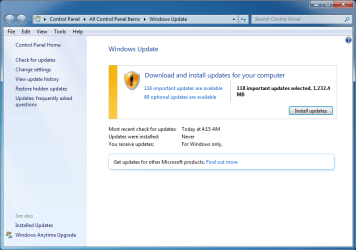
The 1st check for Windows Updates show 118 Important Updates, 60 Optional Updates and 118 important updates selected for install (see attached)

Before installing, I plan to sort through and hide, delete, or block those unwanted updates.
 

Attachments

  • WinUpdates.png
    WinUpdates.png
    111.9 KB · Views: 0

My Computer

Computer type
Laptop
Computer Manufacturer/Model Number
Acer Aspire E1-532
OS
Microsoft Windows 7 Home Premium 64-bit 7601 Multiprocessor Free Service Pack 1
CPU
Intel(R) Celeron(R) 2957U @ 1.40GHz
Motherboard
Acer EA50_HW
Memory
8.00 GB
Graphics Card(s)
Intel(R) HD Graphics
Sound Card
High Definition Audio Device
Screen Resolution
1366 x 768 x 32 bits (4294967296 colors) @ 59 Hz
Hard Drives
TOSHIBA MQ01ABD100 ATA Device
I haven't tried installing anything yet, but View Update History is showing some failed and 1 success.

Here's the output of the details in View Update History...

Code:
==========================================================

2020-01 Security and Quality Rollup for .NET Framework 3.5.1, 4.5.2, 4.6, 4.6.1, 4.6.2, 4.7, 4.7.1, 4.7.2, 4.8 for Windows 7 and Server 2008 R2 for x64 (KB4535102)

Installation date: ‎5/‎5/‎2020 4:59 AM

Installation status: Failed

Error details: Code 800B0109

Update type: Important

A security issue has been identified in a Microsoft software product that could affect your system. You can help protect your system by installing this update from Microsoft. For a complete listing of the issues that are included in this update, see the associated Microsoft Knowledge Base article. After you install this update, you may have to restart your system.

More information: 
http://support.microsoft.com/kb/4535102

Help and Support: 
http://support.microsoft.com

-----------------------------------------------------------

2020-01 Servicing Stack Update for Windows 7 for x64-based Systems (KB4536952)

Installation date: ‎5/‎5/‎2020 4:49 AM

Installation status: Failed

Error details: Code 800B0109

Update type: Important

Install this update to resolve issues in Windows. For a complete listing of the issues that are included in this update, see the associated Microsoft Knowledge Base article for more information. After you install this item, you may have to restart your computer.

More information: 
https://support.microsoft.com/help/4536952

Help and Support: 
https://support.microsoft.com/help/4536952

-----------------------------------------------------------

Windows Malicious Software Removal Tool x64 - March 2020 (KB890830)

Installation date: ‎5/‎5/‎2020 4:43 AM

Installation status: Failed

Error details: Code 800B0109

Update type: Important

After the download, this tool runs one time to check your computer for infection by specific, prevalent malicious software (including Blaster, Sasser, and Mydoom) and helps remove any infection that is found. If an infection is found, the tool will display a status report the next time that you start your computer. A new version of the tool will be offered every month. If you want to manually run the tool on your computer, you can download a copy from the Microsoft Download Center, or you can run an online version from microsoft.com. This tool is not a replacement for an antivirus product. To help protect your computer, you should use an antivirus product.

More information: 
http://support.microsoft.com/kb/890830

Help and Support: 
http://support.microsoft.com

-----------------------------------------------------------

Security Intelligence Update for Windows Defender Antivirus - KB915597 (Version 1.315.12.0)

Installation date: ‎5/‎5/‎2020 4:34 AM

Installation status: Failed

Error details: Code 800B0109

Update type: Important

Install this update to revise the files that are used to detect viruses, spyware, and other potentially unwanted software. Once you have installed this item, it cannot be removed.

More information: 
https://go.microsoft.com/fwlink/?linkid=2007160

Help and Support: 
https://go.microsoft.com/fwlink/?LinkId=52661

-----------------------------------------------------------

2019-09 Security Monthly Quality Rollup for Windows 7 for x64-based Systems (KB4516065)

Installation date: ‎5/‎5/‎2020 4:26 AM

Installation status: Failed

Error details: Code 800B0109

Update type: Important

A security issue has been identified in a Microsoft software product that could affect your system. You can help protect your system by installing this update from Microsoft. For a complete listing of the issues that are included in this update, see the associated Microsoft Knowledge Base article. After you install this update, you may have to restart your system.

More information: 
https://support.microsoft.com/help/4516065

Help and Support: 
https://support.microsoft.com/help/4516065

-----------------------------------------------------------

Windows Update Agent 7.6.7600.320

Installation date: ‎5/‎5/‎2020 4:05 AM

Installation status: Successful

Update type: Important

The Windows Update Agent enables your computer to search for and install updates from an update service.  The agent can automatically update itself as needed to communicate with the update service when Windows searches for new updates.

More information: 
http://go.microsoft.com/fwlink/?LinkID=118000

Help and Support: 
http://go.microsoft.com/fwlink/?LinkID=117301

==========================================================
 

My Computer

Computer type
Laptop
Computer Manufacturer/Model Number
Acer Aspire E1-532
OS
Microsoft Windows 7 Home Premium 64-bit 7601 Multiprocessor Free Service Pack 1
CPU
Intel(R) Celeron(R) 2957U @ 1.40GHz
Motherboard
Acer EA50_HW
Memory
8.00 GB
Graphics Card(s)
Intel(R) HD Graphics
Sound Card
High Definition Audio Device
Screen Resolution
1366 x 768 x 32 bits (4294967296 colors) @ 59 Hz
Hard Drives
TOSHIBA MQ01ABD100 ATA Device
I plan to sort through and hide, delete, or block those unwanted updates.


There is no need to muck around with that. Just run simplix updatepack. All the work has been done for you.
 

My Computers

System One System Two

  • Computer type
    PC/Desktop
    OS
    7 X64
    CPU
    i5 8400
    Motherboard
    gigabyte b365m ds3h
    Memory
    2x8gb 3200mhz
    Hard Drives
    various
    PSU
    pure power 11 400w cm
    Case
    Coolermaster
    Cooling
    cryorig m9i
  • Computer type
    PC/Desktop
    OS
    7x64
    CPU
    g5400
    Motherboard
    ga b365m ds3h
    Memory
    8gb ddr4 2400
    PSU
    xfx pro 450w
KB4474419 must be installed in order to prevent Code 800B0109.

KB4490628 must be installed in order to prevent Code 80092004.
 

My Computer

Computer type
PC/Desktop
OS
Windows 7 Home Premium
There is no need to muck around with that. Just run simplix updatepack. All the work has been done for you.

Um...all the work has been done for the user?

You know, it would be a big help if a small personal review and tips on configuring the system for the installation and use of a specific software when suggesting that software.

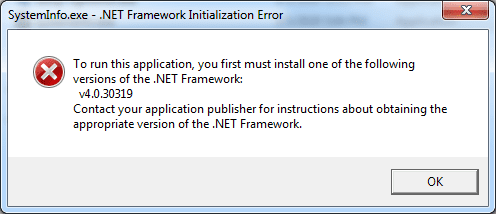
I get an error message after running Simplix.

The SystemInfo.exe in the error message is from Shawn's guide here on SevenForums.
System Info - See Your System Specs
 

Attachments

  • SystemInfoError.png
    SystemInfoError.png
    28 KB · Views: 16
Last edited:

My Computer

Computer type
Laptop
Computer Manufacturer/Model Number
Acer Aspire E1-532
OS
Microsoft Windows 7 Home Premium 64-bit 7601 Multiprocessor Free Service Pack 1
CPU
Intel(R) Celeron(R) 2957U @ 1.40GHz
Motherboard
Acer EA50_HW
Memory
8.00 GB
Graphics Card(s)
Intel(R) HD Graphics
Sound Card
High Definition Audio Device
Screen Resolution
1366 x 768 x 32 bits (4294967296 colors) @ 59 Hz
Hard Drives
TOSHIBA MQ01ABD100 ATA Device
I have been using simplix for years. Never seen that. There is something strange on your system.

Is it a completely fresh install?
 

My Computers

System One System Two

  • Computer type
    PC/Desktop
    OS
    7 X64
    CPU
    i5 8400
    Motherboard
    gigabyte b365m ds3h
    Memory
    2x8gb 3200mhz
    Hard Drives
    various
    PSU
    pure power 11 400w cm
    Case
    Coolermaster
    Cooling
    cryorig m9i
  • Computer type
    PC/Desktop
    OS
    7x64
    CPU
    g5400
    Motherboard
    ga b365m ds3h
    Memory
    8gb ddr4 2400
    PSU
    xfx pro 450w
I have been using simplix for years. Never seen that. There is something strange on your system.

Is it a completely fresh install?

Yes it is a fresh clean install with updated hardware drivers from the manufacturer.

I don't believe there is something strange on my system. I believe it is missing something or I may be missing something.

I just ran Simplix from the Downloads folder. Could that be causing the issue?


From the Simplix blog...
Набор обновлений UpdatePack7R2 для Windows 7 SP1 и Server 2008 R2 SP1 — simplix.info

====================================================

Additional functionality
Automatic installation of SP1 is possible if it is not installed in the system. To do this, place the files Windows6.1-KB976932-X86.exe and Windows6.1-KB976932-X64.exe in the same directory as the set.
If there is UpdatePack7R2Start.cmd next to the set, it will be executed before installing updates, UpdatePack7R2Finish.cmd after installation, UpdatePack7R2Wim.cmd after integration of updates. By default, console windows will be displayed. To hide them, the first line in the cmd-file must begin with ": hide" (without quotes). A set of updates tracks the exit code from cmd files, in case a reboot is necessary. This code is 3010 (exit 3010 command).
If you want to apply your tweaks after installing Internet Explorer 11 on a working system, place the ie11.reg file in the folder with the set and it will be imported automatically.
Some keys can be replaced by renaming the set file itself. So to install IE11, you can add the word “ie11” to any place in the set file name, “−−” for automatic reboot, and “++” for passive installation.
The integration of add-ons is supported: SmartFix , DirectX , .NET Framework , Visual C ++ . Add-on files must be located in the same folder as UpdatePack7R2.
Examples:

You need to automatically install the kit on a working system with IE11 and restart the computer:
rename UpdatePack7R2.exe to UpdatePack7R2 −− ie11 ++. Exe

This will be exactly the same as using the following keys: UpdatePack7R2.exe / ie11 / silent / reboot

----------------------------------------

12/19/12
Added KB4487345-x86-x64
Added KB4480063-x86-x64 (replaces KB4040980-x86-x64 and KB4470641-x86-x64)
Added KB4480970-x86-x64 with disabling telemetry and processor verification (replaces KB4471318-x86-x64)
Added integration of .NET Framework and DirectX add-ons from abbodi1406, if you place the files next to UpdatePack7R2.
The / Optimize = esd switch converts the wim file to an esd file.

====================================================
 

My Computer

Computer type
Laptop
Computer Manufacturer/Model Number
Acer Aspire E1-532
OS
Microsoft Windows 7 Home Premium 64-bit 7601 Multiprocessor Free Service Pack 1
CPU
Intel(R) Celeron(R) 2957U @ 1.40GHz
Motherboard
Acer EA50_HW
Memory
8.00 GB
Graphics Card(s)
Intel(R) HD Graphics
Sound Card
High Definition Audio Device
Screen Resolution
1366 x 768 x 32 bits (4294967296 colors) @ 59 Hz
Hard Drives
TOSHIBA MQ01ABD100 ATA Device
Do you not already have sp1?

I get an error message after running Simplix.

Not clear what this error is . What error message?

You posted an error message from a completeley separate program which requires net frame 4. Net frame 4 is an optional update and therefore not included in the pack. Optional updates ( if desired) can installed in several ways.

Most people just pick them up when offered by windows update. Or hide them if they don't want them.

Alternatively, some optionals can de downloaded manually from ms. Or abbodi ( among others ) make various add on type packs for wintoolkit etc.

Update your Win 7 installation media
 

My Computers

System One System Two

  • Computer type
    PC/Desktop
    OS
    7 X64
    CPU
    i5 8400
    Motherboard
    gigabyte b365m ds3h
    Memory
    2x8gb 3200mhz
    Hard Drives
    various
    PSU
    pure power 11 400w cm
    Case
    Coolermaster
    Cooling
    cryorig m9i
  • Computer type
    PC/Desktop
    OS
    7x64
    CPU
    g5400
    Motherboard
    ga b365m ds3h
    Memory
    8gb ddr4 2400
    PSU
    xfx pro 450w
Do you not already have sp1?


Not clear what this error is . What error message?

You posted an error message from a completeley separate program which requires net frame 4. Net frame 4 is an optional update and therefore not included in the pack. Optional updates ( if desired) can installed in several ways.

Most people just pick them up when offered by windows update. Or hide them if they don't want them.

Alternatively, some optionals can de downloaded manually from ms. Or abbodi ( among others ) make various add on type packs for wintoolkit etc.

Yes, I already have SP1.

Simplix shows no error messages. If Simplix does all the work, it seems as though Simplix assumes the user installs optional updates from Microsoft.

Will installing the optional NET Framework through Windows Update muck with Simplix or the Simplix installed updates?

After installing the NET Framework, will I need to re-run Simplix?

I'll try it and let ya know :)
 

My Computer

Computer type
Laptop
Computer Manufacturer/Model Number
Acer Aspire E1-532
OS
Microsoft Windows 7 Home Premium 64-bit 7601 Multiprocessor Free Service Pack 1
CPU
Intel(R) Celeron(R) 2957U @ 1.40GHz
Motherboard
Acer EA50_HW
Memory
8.00 GB
Graphics Card(s)
Intel(R) HD Graphics
Sound Card
High Definition Audio Device
Screen Resolution
1366 x 768 x 32 bits (4294967296 colors) @ 59 Hz
Hard Drives
TOSHIBA MQ01ABD100 ATA Device
Will installing the optional NET Framework through Windows Update muck with Simplix or the Simplix installed updates?

No

After installing the NET Framework, will I need to re-run Simplix?

No

Simplix will do the important critical and recommended without the telemetry junk.

Up to you if you want any of optionals windows update offers afterwards.
 

My Computers

System One System Two

  • Computer type
    PC/Desktop
    OS
    7 X64
    CPU
    i5 8400
    Motherboard
    gigabyte b365m ds3h
    Memory
    2x8gb 3200mhz
    Hard Drives
    various
    PSU
    pure power 11 400w cm
    Case
    Coolermaster
    Cooling
    cryorig m9i
  • Computer type
    PC/Desktop
    OS
    7x64
    CPU
    g5400
    Motherboard
    ga b365m ds3h
    Memory
    8gb ddr4 2400
    PSU
    xfx pro 450w
I checked for updates.

I unchecked all of them except the only NET Framework that appeared, which was NET Framework 4.8 under Important updates.

After it installed, I restarted just to make sure.

SystemInfo.exe completed successfully
 
Last edited:

My Computer

Computer type
Laptop
Computer Manufacturer/Model Number
Acer Aspire E1-532
OS
Microsoft Windows 7 Home Premium 64-bit 7601 Multiprocessor Free Service Pack 1
CPU
Intel(R) Celeron(R) 2957U @ 1.40GHz
Motherboard
Acer EA50_HW
Memory
8.00 GB
Graphics Card(s)
Intel(R) HD Graphics
Sound Card
High Definition Audio Device
Screen Resolution
1366 x 768 x 32 bits (4294967296 colors) @ 59 Hz
Hard Drives
TOSHIBA MQ01ABD100 ATA Device
Back
Top