
newdeafman
New member
- Local time
- 12:49 AM
- Messages
- 6
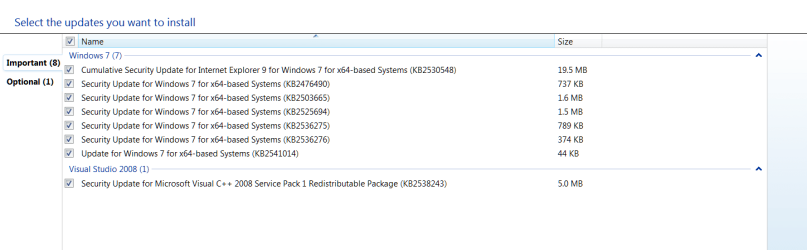
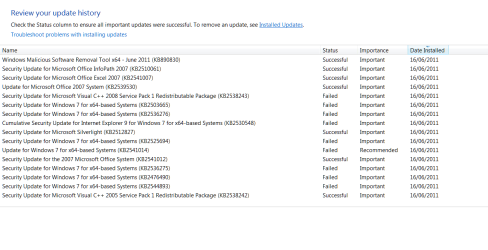
Sorry guys, but I feel I need to bump this issue as its now beginning to cause serious concerns. Last night WinUpdate informs me that 14 updates are available, I downloaded them, hit install, quelle surprise 7 or so wont install and return an error (screenshots below). I've tried manaul install on each but still no success.
I downloaded & ran the 'reset & re-register Windows Update components' & the 'reset update history' tools (thanks to Win7 Forums). I then reinstalled the updates but again some failed. Of further concern is that one of the updates that did install caused my APC Powerchute s/ware to fail.
Net result, I've carried out two system restores and thankfully my APC software is working again, but Windows Updates is still telling me that these updates are available. This issue has been ongoing since about March 2011 where 2 or so updates would not install but now its 7 failures and I'm becoming concerned that it may be my OS.
I'm about to begin writing my Masters Thesis but I'm really concerned that this error is a symptom of a growing instability with my OS. I've trawled through the Win7 forum reading a number of threads that highlight a similar problem with Auto Update but none appear to have a fix, & manual installation is not working for me.
I'd be grateful for any suggestions or even a pointer on how to get direct to an online MS support site from Ireland, beleive me I've looked. I've placed the screenshots of the errors below)
Thanks
Mike
I downloaded & ran the 'reset & re-register Windows Update components' & the 'reset update history' tools (thanks to Win7 Forums). I then reinstalled the updates but again some failed. Of further concern is that one of the updates that did install caused my APC Powerchute s/ware to fail.
Net result, I've carried out two system restores and thankfully my APC software is working again, but Windows Updates is still telling me that these updates are available. This issue has been ongoing since about March 2011 where 2 or so updates would not install but now its 7 failures and I'm becoming concerned that it may be my OS.
I'm about to begin writing my Masters Thesis but I'm really concerned that this error is a symptom of a growing instability with my OS. I've trawled through the Win7 forum reading a number of threads that highlight a similar problem with Auto Update but none appear to have a fix, & manual installation is not working for me.
I'd be grateful for any suggestions or even a pointer on how to get direct to an online MS support site from Ireland, beleive me I've looked. I've placed the screenshots of the errors below)
Thanks
Mike
Attachments

My Computer
- Computer Manufacturer/Model Number
- Dell Inspiron 575
- OS
- Win 7 Home Premium 64 bit


