
weescotsman
New member
- Local time
- 10:57 AM
- Messages
- 6
Folks,
Need some assistance with a Windows Update issue.
Done a clean install yesterday after having an problem which I was unable to resolve but the problem has been repeated.
As it's a clean install there are 100's of Windows Updates to be installed and at first these are downloaded and installed ok. After a while there are no more notifications of any, so I'm using the PC as normal. Come the end of the night, I'm notified that there are about 230 updates to be downloaded so I set them on their merry way as I've done countless times elsewhere.
After the downloads are done, I'm notified to power off to start installing them, again no big deal. After this, the PC reboots and starts to configure them. Gets to the end and this is where the trouble starts.
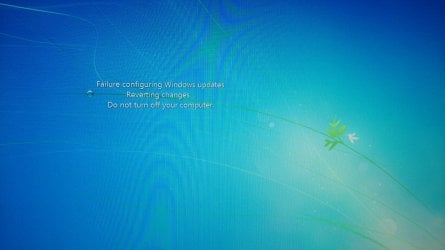
The first attached file has the following on screen message - Failure configuring Windows Updates, Reverting Changes, Do Not Switch Off your PC.
I've come on here and tried the various tips. Ran SFC /scannow in Admin mode and there are no errors reported. Been running the Windows Update Standalone Installer since midday, that found 1 missing update KB947821 which I installed ok. Read up on this on MS page and that was quite interesting, it can prevent some updates from being installed. Hallelujah I thought my problems were all about to be solved. But no, I was informed a reboot was necessary to now install 237 updates.... with the same result as previously.
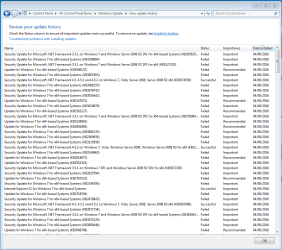
I've also attached a screenshot showing which updates worked and which ones failed but as the actual list is longer than my screen this is only a limited list. Also attached the CBS log file.
Assistance in resolving this annoying issue will be greatly appreciated.
rgds,
Brian
Need some assistance with a Windows Update issue.
Done a clean install yesterday after having an problem which I was unable to resolve but the problem has been repeated.
As it's a clean install there are 100's of Windows Updates to be installed and at first these are downloaded and installed ok. After a while there are no more notifications of any, so I'm using the PC as normal. Come the end of the night, I'm notified that there are about 230 updates to be downloaded so I set them on their merry way as I've done countless times elsewhere.
After the downloads are done, I'm notified to power off to start installing them, again no big deal. After this, the PC reboots and starts to configure them. Gets to the end and this is where the trouble starts.
The first attached file has the following on screen message - Failure configuring Windows Updates, Reverting Changes, Do Not Switch Off your PC.
I've come on here and tried the various tips. Ran SFC /scannow in Admin mode and there are no errors reported. Been running the Windows Update Standalone Installer since midday, that found 1 missing update KB947821 which I installed ok. Read up on this on MS page and that was quite interesting, it can prevent some updates from being installed. Hallelujah I thought my problems were all about to be solved. But no, I was informed a reboot was necessary to now install 237 updates.... with the same result as previously.
I've also attached a screenshot showing which updates worked and which ones failed but as the actual list is longer than my screen this is only a limited list. Also attached the CBS log file.
Assistance in resolving this annoying issue will be greatly appreciated.
rgds,
Brian
Attachments
My Computer
- Computer type
- PC/Desktop
- Computer Manufacturer/Model Number
- Custom build
- OS
- Win 7 Professional 64 bit
- CPU
- Core i3
- Motherboard
- Asus z170-E
- Memory
- 8 GB DDR4
- Hard Drives
- Lots...
- Browser
- Chrome, Firefox, Opera

