
Windows Update KB4019990 broke my Desktop Gadgets

Blake81

New member
Member
Local time
2:20 AM
Messages
55
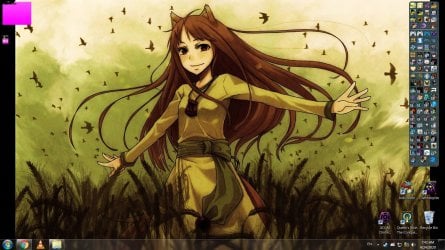
So, just had to install KB4019990 (to play XCOM: Chimera Squad, otherwise it didn't launch), but after I restarted my PC, half of my Desktop Gadgets now look like a bunch of magenta squares. I tried reinstalling them, but nothing changed.

Curiously, it wasn't all of them; my Icons Gadget (the one on the right) still works fine.

Does anyone know if there's any fix for this? I've been using those Gadgets for almost ten years now, and I'd hate to see them go...

Thanks in advance.
 

Attachments
  • Gadgets.jpg
    Gadgets.jpg
    257 KB · Views: 3

My Computer My Computer

At a glance

Windows 7 Ultimate SP1 x64Intel(R) Core(TM) i7-7700 CPU @ 3.60GHz32 GBNVIDIA GeForce RTX 2060
Computer type
PC/Desktop
OS
Windows 7 Ultimate SP1 x64
CPU
Intel(R) Core(TM) i7-7700 CPU @ 3.60GHz
Motherboard
Asrock Z279 Extreme 4
Memory
32 GB
Graphics Card(s)
NVIDIA GeForce RTX 2060

My Computer My Computer

At a glance

Win 10 x64, Linux Lite, Win 7 x64, BlackArch,...
Computer type
PC/Desktop
Computer Manufacturer/Model Number
HP Desktop & Compaq Laptop
OS
Win 10 x64, Linux Lite, Win 7 x64, BlackArch, & Kali
Hard Drives
Samsung 850 Pro 256Gb,
Hitachi HDD 1Tb,
Crucial MX SSD 250Gb
Segate 3Tb USB 3.0 Ext. Backup HDD
Internet Speed
150Mbps dn, 20Mbps up
Antivirus
Avast Free, Malwarebytes Anti-Exploit & Anti-Ransomware
Browser
Firefox, Chrome, Opera, & VPN
That's... weird. I've had my display on 125% since forever, and it's still on 125%. That said tho- I DID try changing it to 100%, and they remained the same.
 

My Computer My Computer

At a glance

Windows 7 Ultimate SP1 x64Intel(R) Core(TM) i7-7700 CPU @ 3.60GHz32 GBNVIDIA GeForce RTX 2060
Computer type
PC/Desktop
OS
Windows 7 Ultimate SP1 x64
CPU
Intel(R) Core(TM) i7-7700 CPU @ 3.60GHz
Motherboard
Asrock Z279 Extreme 4
Memory
32 GB
Graphics Card(s)
NVIDIA GeForce RTX 2060
Blake81,

Was worth a look, yes.
Maybe another member has idea/solutions?
 

My Computer My Computer

At a glance

Win 10 x64, Linux Lite, Win 7 x64, BlackArch,...
Computer type
PC/Desktop
Computer Manufacturer/Model Number
HP Desktop & Compaq Laptop
OS
Win 10 x64, Linux Lite, Win 7 x64, BlackArch, & Kali
Hard Drives
Samsung 850 Pro 256Gb,
Hitachi HDD 1Tb,
Crucial MX SSD 250Gb
Segate 3Tb USB 3.0 Ext. Backup HDD
Internet Speed
150Mbps dn, 20Mbps up
Antivirus
Avast Free, Malwarebytes Anti-Exploit & Anti-Ransomware
Browser
Firefox, Chrome, Opera, & VPN
I've started to wonder if it's due to how old they are; been using those Gadgets since my very first Win7 machine (back on 2011... when XP was still cool, and when Vista was crying in a corner). Maybe something changed that they can no longer render themselves.

The one on the right side, however, is much newer (2015-ish), and it's been working fine. Problem is, finding a place to download those Gadgets nowadays is like trying to find a VHS Store...

They're called "All CPU Meter", "Network Drive Meter" and "Drives Meter"
 

My Computer My Computer

At a glance

Windows 7 Ultimate SP1 x64Intel(R) Core(TM) i7-7700 CPU @ 3.60GHz32 GBNVIDIA GeForce RTX 2060
Computer type
PC/Desktop
OS
Windows 7 Ultimate SP1 x64
CPU
Intel(R) Core(TM) i7-7700 CPU @ 3.60GHz
Motherboard
Asrock Z279 Extreme 4
Memory
32 GB
Graphics Card(s)
NVIDIA GeForce RTX 2060
OK, so I've been looking deeper into this, and it seems like this Update came bundled with IE11, and apparently, that's the responsible for messing up my gadgets.

Is there any way to roll back that update to a previous one? I have no idea of what IE I had before (because I haven't used IE since Mozilla became a thing) so I'm not too sure of what to do...
 

My Computer My Computer

At a glance

Windows 7 Ultimate SP1 x64Intel(R) Core(TM) i7-7700 CPU @ 3.60GHz32 GBNVIDIA GeForce RTX 2060
Computer type
PC/Desktop
OS
Windows 7 Ultimate SP1 x64
CPU
Intel(R) Core(TM) i7-7700 CPU @ 3.60GHz
Motherboard
Asrock Z279 Extreme 4
Memory
32 GB
Graphics Card(s)
NVIDIA GeForce RTX 2060

My Computer My Computer

At a glance

Win 10 x64, Linux Lite, Win 7 x64, BlackArch,...
Computer type
PC/Desktop
Computer Manufacturer/Model Number
HP Desktop & Compaq Laptop
OS
Win 10 x64, Linux Lite, Win 7 x64, BlackArch, & Kali
Hard Drives
Samsung 850 Pro 256Gb,
Hitachi HDD 1Tb,
Crucial MX SSD 250Gb
Segate 3Tb USB 3.0 Ext. Backup HDD
Internet Speed
150Mbps dn, 20Mbps up
Antivirus
Avast Free, Malwarebytes Anti-Exploit & Anti-Ransomware
Browser
Firefox, Chrome, Opera, & VPN
OK, I reverted back to IE8... and something quite strange happened.

They still all open purple, but two of them, CPU and Drives, if I click on the little "settings" wrench, they go back to normal...-ish.

They get their aspect back, but no matter what I do in their options, they'll revert to default as soon as I close the settings window, and if I restart the PC, they vanish from the desktop and turn into purple squares again if I try adding them back. Also, can't change their opacity; I try setting it to 20% but nothing happens.

The Network one still doesn't work. But still, I can't make heads or tails of what's happening....
 

My Computer My Computer

At a glance

Windows 7 Ultimate SP1 x64Intel(R) Core(TM) i7-7700 CPU @ 3.60GHz32 GBNVIDIA GeForce RTX 2060
Computer type
PC/Desktop
OS
Windows 7 Ultimate SP1 x64
CPU
Intel(R) Core(TM) i7-7700 CPU @ 3.60GHz
Motherboard
Asrock Z279 Extreme 4
Memory
32 GB
Graphics Card(s)
NVIDIA GeForce RTX 2060
Back
Top