Windows Update KB4048957 were not installed

akluch

New member
Local time
3:22 PM
Messages
6
I tried to install KB4048957 both via Windows Update and running MSU and got same error: "KB4048957 were not installed."

I looked at CBS.log (attached) and there's one thing which brought my attention:

Code:
2017-11-17 08:20:59, Info                  CSI    TURE_AMD64 (9), Culture = [l:10{5}]"it-IT", VersionScope = 1 nonSxS, PublicKeyToken = {l:8 b:31bf3856ad364e35}, Type neutral, TypeName neutral, PublicKey neutral]) comp: (null) man: @0xa0c8248
  Stage (1): flags: 8 app: [Microsoft-Windows-InetRes-Adm.Resources, Version = 11.2.9600.18837, pA = PROCESSOR_ARCHITECTURE_IA32_ON_WIN64 (10), Culture = [l:10{5}]"it-IT", VersionScope = 1 nonSxS, PublicKeyToken = {l:8 b:31bf3856ad364e35}, Type neutral, TypeName neutral, PublicKey neutral]) comp: (null) man: @0xa0c8488
2017-11-17 08:20:59, Error                 CSI    000010ba@2017/11/17:16:20:59.454 (F) d:\w7rtm\base\wcp\componentstore\storelayout.cpp(11690): Store corruption detected in function ComponentStore::CRawStoreLayout::CheckFamilyIndexForDeadWinnerComponent expression: (null)
  MissingWinningComponentKey on resource [102]"[B]amd64_microsoft-windows-s..-jscript9.resources_31bf3856ad364e35_11.2.9600.18792_da-dk_1ddcf4529c7bc77e[/B]"[gle=0x80004005]
2017-11-17 08:21:00, Error                 CSI    000010bb (F) STATUS_SXS_COMPONENT_STORE_CORRUPT #2869927# from CCSDirectTransaction::OperateEnding at index 0 of 256 (0x0000000000000100) operations, disposition 0[gle=0xd015001a]
2017-11-17 08:21:00, Error                 CSI    000010bc (F) HRESULT_FROM_WIN32(14098) #2863156# from Windows::ServicingAPI::CCSITransaction::ICSITransaction2_AddComponents(Flags = 4, a = @0x32c4e10, mp = @0x32c5610, disp = 0)[gle=0x80073712]
2017-11-17 08:21:00, Info                  CBS    Failed to add one or more component [HRESULT = 0x80073712 - ERROR_SXS_COMPONENT_STORE_CORRUPT]
2017-11-17 08:21:00, Error                 CBS    Failed to complete component closure [HRESULT = 0x80073712 - ERROR_SXS_COMPONENT_STORE_CORRUPT]
2017-11-17 08:21:00, Info                  CSI    000010bd@2017/11/17:16:21:00.421 CSI Transaction @0x109b370 destroyed
2017-11-17 08:21:00, Info                  CBS    Perf: Resolve chain complete.
2017-11-17 08:21:00, Info                  CBS    Failed to resolve execution chain. [HRESULT = 0x80073712 - ERROR_SXS_COMPONENT_STORE_CORRUPT]
I looked for "amd64_microsoft-windows-s..-jscript9.resources_31bf3856ad364e35_11.2.9600.18792_da-dk_1ddcf4529c7bc77e" everywhere: in registry, files - can't find it.

I also ran CheckSur (SURT) tool - no issues

Appreciate your help, thank you very much in advance.
 

My Computer My Computer

Computer type
Laptop
Computer Manufacturer/Model Number
HP EliteBook 8570w
OS
Windows 7 Ultimate x64 SP1
CPU
Core i7-3840 QM
Memory
24 GB
Graphics Card(s)
Nvidia Quadro K2000M
Hard Drives
Crucial MX300 SSD (525 GB)
Browser
Google Chrome

My Computer My Computer

Computer type
PC/Desktop
Computer Manufacturer/Model Number
medionl/Aspire 6930G/acer x55a
OS
W7 home premium 32bit/W7HP 64bit/w10 tp insider ring
CPU
E5300 dual core
Motherboard
medion MS7366
Memory
3gb
Graphics Card(s)
Nvidia Geforce 7100 Nforce 630i
Monitor(s) Displays
avixc
Internet Speed
n (isp resticted to 72)
Antivirus
mse/pands
Browser
palemoon
Other Info
Belkin Fd7050 n USB using Railink RT2870 drivers, more upto date
Hi akluch,

that file is part of IE11.

there are other errors showing in the CBS folder.

please run this tool copy/paste the ouput.

http://go.microsoft.com/fwlink/?LinkID=52012

Roy

Hi Roy,
Thank you very much for your wish to help. Here's output from the tool:
Code:
Diagnostic Report (1.9.0027.0):
-----------------------------------------
Windows Validation Data-->

Validation Code: 0
Cached Online Validation Code: 0x0
Windows Product Key: *****-*****-WRX64-MFY8K-4XWWM
Windows Product Key Hash: VUKj0h5lw4WKqXgywe0rcT+woE8=
Windows Product ID: 00426-964-3878977-85736
Windows Product ID Type: 5
Windows License Type: Retail
Windows OS version: 6.1.7601.2.00010100.1.0.001
ID: {23E12180-CAED-444F-B9DE-A89FFD939CF8}(3)
Is Admin: Yes
TestCab: 0x0
LegitcheckControl ActiveX: Registered, 1.9.42.0
Signed By: Microsoft
Product Name: Windows 7 Ultimate
Architecture: 0x00000009
Build lab: 7601.win7sp1_ldr.170913-0600
TTS Error: 
Validation Diagnostic: 
Resolution Status: N/A

Vista WgaER Data-->
ThreatID(s): N/A, hr = 0x80070002
Version: N/A, hr = 0x80070002

Windows XP Notifications Data-->
Cached Result: N/A, hr = 0x80070002
File Exists: No
Version: N/A, hr = 0x80070002
WgaTray.exe Signed By: N/A, hr = 0x80070002
WgaLogon.dll Signed By: N/A, hr = 0x80070002

OGA Notifications Data-->
Cached Result: N/A, hr = 0x80070002
Version: N/A, hr = 0x80070002
OGAExec.exe Signed By: N/A, hr = 0x80070002
OGAAddin.dll Signed By: N/A, hr = 0x80070002

OGA Data-->
Office Status: 109 N/A
OGA Version: N/A, 0x80070002
Signed By: N/A, hr = 0x80070002
Office Diagnostics: B4D0AA8B-604-645_B4D0AA8B-604-645_B4D0AA8B-604-645_B4D0AA8B-604-645_B4D0AA8B-604-645_B4D0AA8B-604-645_B4D0AA8B-604-645_025D1FF3-364-80041010_025D1FF3-229-80041010_025D1FF3-230-1_025D1FF3-517-80040154_025D1FF3-237-80040154_025D1FF3-238-2_025D1FF3-244-80070002_025D1FF3-258-3

Browser Data-->
Proxy settings: N/A
User Agent: Mozilla/4.0 (compatible; MSIE 8.0; Win32)
Default Browser: C:\Program Files\Internet Explorer\iexplore.exe
Download signed ActiveX controls: Prompt
Download unsigned ActiveX controls: Disabled
Run ActiveX controls and plug-ins: Allowed
Initialize and script ActiveX controls not marked as safe: Disabled
Allow scripting of Internet Explorer Webbrowser control: Disabled
Active scripting: Allowed
Script ActiveX controls marked as safe for scripting: Allowed

File Scan Data-->

Other data-->
Office Details: <GenuineResults><MachineData><UGUID>{23E12180-CAED-444F-B9DE-A89FFD939CF8}</UGUID><Version>1.9.0027.0</Version><OS>6.1.7601.2.00010100.1.0.001</OS><Architecture>x64</Architecture><PKey>*****-*****-*****-*****-4XWWM</PKey><PID>00426-964-3878977-85736</PID><PIDType>5</PIDType><SID>S-1-5-21-2182798339-3262565001-225790407</SID><SYSTEM><Manufacturer>Hewlett-Packard</Manufacturer><Model>HP EliteBook 8570w</Model></SYSTEM><BIOS><Manufacturer>Hewlett-Packard</Manufacturer><Version>68IAV Ver. F.66</Version><SMBIOSVersion major="2" minor="7"/><Date>20170713000000.000000+000</Date></BIOS><HWID>95853E07018400FE</HWID><UserLCID>0409</UserLCID><SystemLCID>0409</SystemLCID><TimeZone>Pacific Standard Time(GMT-08:00)</TimeZone><iJoin>0</iJoin><SBID><stat>3</stat><msppid></msppid><name></name><model></model></SBID><OEM><OEMID>HPQOEM</OEMID><OEMTableID>SLIC-MPC</OEMTableID></OEM><GANotification/></MachineData><Software><Office><Result>109</Result><Products/><Applications/></Office></Software></GenuineResults>  

Spsys.log Content: 0x80070002

Licensing Data-->
Software licensing service version: 6.1.7601.17514

Name: Windows(R) 7, Ultimate edition
Description: Windows Operating System - Windows(R) 7, RETAIL channel
Activation ID: ac96e1a8-6cc4-4310-a4ff-332ce77fb5b8
Application ID: 55c92734-d682-4d71-983e-d6ec3f16059f
Extended PID: 00426-00170-964-387897-00-1033-7601.0000-1612017
Installation ID: 015365627751071366860225681980833751309192209566923484
Processor Certificate URL: [url="http://go.microsoft.com/fwlink/?LinkID=88338"]http://go.microsoft.com/fwlink/?LinkID=88338[/url]
Machine Certificate URL: [url="http://go.microsoft.com/fwlink/?LinkID=88339"]http://go.microsoft.com/fwlink/?LinkID=88339[/url]
Use License URL: [url="http://go.microsoft.com/fwlink/?LinkID=88341"]http://go.microsoft.com/fwlink/?LinkID=88341[/url]
Product Key Certificate URL: [url="http://go.microsoft.com/fwlink/?LinkID=88340"]http://go.microsoft.com/fwlink/?LinkID=88340[/url]
Partial Product Key: 4XWWM
License Status: Licensed
Remaining Windows rearm count: 5
Trusted time: 11/17/2017 5:11:28 PM

Windows Activation Technologies-->
HrOffline: 0x00000000
HrOnline: N/A
HealthStatus: 0x0000000000000000
Event Time Stamp: N/A
ActiveX: Registered, Version: 7.1.7600.16395
Admin Service: Registered, Version: 7.1.7600.16395
HealthStatus Bitmask Output:


HWID Data-->
HWID Hash Current: MgAAAAEAAQABAAEAAAACAAAABAABAAEA1gQCimosxM1kRMqh/hH21iKMTCy2+0SPlmM=

OEM Activation 1.0 Data-->
N/A

OEM Activation 2.0 Data-->
BIOS valid for OA 2.0: yes
Windows marker version: 0x20001
OEMID and OEMTableID Consistent: yes
BIOS Information: 
  ACPI Table Name	OEMID Value	OEMTableID Value
  APIC			HPQOEM		176B    
  FACP			HPQOEM		176B    
  HPET			HPQOEM		176B    
  MCFG			HPQOEM		176B    
  TCPA			HPQOEM		176B    
  SSDT			HPQOEM		SataAhci
  SSDT			HPQOEM		SataAhci
  SLIC			HPQOEM		SLIC-MPC
  FPDT			HPQOEM		176B    
  BGRT			HPQOEM		176B    
  SSDT			HPQOEM		SataAhci
  SSDT			HPQOEM		SataAhci
  SSDT			HPQOEM		SataAhci
  DMAR			INTEL 		SNB 
  ASF!			HPQOEM		176B
 
Last edited by a moderator:

My Computer My Computer

Computer type
Laptop
Computer Manufacturer/Model Number
HP EliteBook 8570w
OS
Windows 7 Ultimate x64 SP1
CPU
Core i7-3840 QM
Memory
24 GB
Graphics Card(s)
Nvidia Quadro K2000M
Hard Drives
Crucial MX300 SSD (525 GB)
Browser
Google Chrome
One more thing. I checked this file/folder in question from CBS.log - amd64_microsoft-windows-s..-jscript9.resources_31bf3856ad364e35_11.2.9600.18792_da-dk_1ddcf4529c7bc77e .
So I looked at this key: HKEY_LOCAL_MACHINE\SOFTWARE\Microsoft\Windows\CurrentVersion\SideBySide\Winners\amd64_microsoft-windows-s..-jscript9.resources_31bf3856ad364e35_da-dk_9b74a80231f3b424\11.2, two last REG_BINARY values there are:
11.2.9600.18449 and 11.2.9600.18792.
Now I looked at %SYSTEMROOT%\winsxs and found:
amd64_microsoft-windows-s..-jscript9.resources_31bf3856ad364e35_11.2.9600.18449_da-dk_1df7c32c9c68a85f - there
amd64_microsoft-windows-s..-jscript9.resources_31bf3856ad364e35_11.2.9600.18524_da-dk_1deb64949c72117d - there, but not it the registry key I mentioned above.
amd64_microsoft-windows-s..-jscript9.resources_31bf3856ad364e35_11.2.9600.18816_da-dk_1dc9c6f69c8b7f3b - there, but not it the registry key I mentioned above.
And there's no amd64_microsoft-windows-s..-jscript9.resources_31bf3856ad364e35_11.2.9600.18792_da-dk in winsxs, but there's corresponding value in HKEY_LOCAL_MACHINE\SOFTWARE\Microsoft\Windows\CurrentVersion\SideBySide\Winners\amd64_microsoft-windows-s..-jscript9.resources_31bf3856ad364e35_da-dk_9b74a80231f3b424\11.2, value 11.2.9600.18792, REG_BINARY 01. Also HKEY_LOCAL_MACHINE\SOFTWARE\Microsoft\Windows\CurrentVersion\SideBySide\Winners\amd64_microsoft-windows-s..-jscript9.resources_31bf3856ad364e35_da-dk_9b74a80231f3b424\11.2. value (Default) is 11.2.9600.18792
 

My Computer My Computer

Computer type
Laptop
Computer Manufacturer/Model Number
HP EliteBook 8570w
OS
Windows 7 Ultimate x64 SP1
CPU
Core i7-3840 QM
Memory
24 GB
Graphics Card(s)
Nvidia Quadro K2000M
Hard Drives
Crucial MX300 SSD (525 GB)
Browser
Google Chrome
Hi Akluch,

Lets try the easy steps first

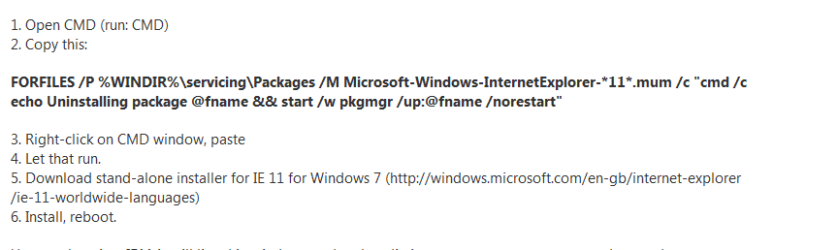
Uninstall then re-install
option1

from Control Panel >> programmes and features >> turn features on/off (top left)
anew smaller box will appear UNHECK IE11
REBOOT
now back to features RE check IE11
REBOOT

option2
completlely uninstall IE11, (note will rollback IE to last version)
see screenshot


Roy
 

Attachments

  • ie11 remove.PNG
    ie11 remove.PNG
    7.8 KB · Views: 2

My Computer My Computer

Computer type
PC/Desktop
Computer Manufacturer/Model Number
medionl/Aspire 6930G/acer x55a
OS
W7 home premium 32bit/W7HP 64bit/w10 tp insider ring
CPU
E5300 dual core
Motherboard
medion MS7366
Memory
3gb
Graphics Card(s)
Nvidia Geforce 7100 Nforce 630i
Monitor(s) Displays
avixc
Internet Speed
n (isp resticted to 72)
Antivirus
mse/pands
Browser
palemoon
Other Info
Belkin Fd7050 n USB using Railink RT2870 drivers, more upto date
Hi Roy,
I tried all that - unfortunately it didn't rollback to the previous (IE10/IE9/IE8) version. Also, those mum files are still there (and I run the exact command you quoted - as Administrator).
 

My Computer My Computer

Computer type
Laptop
Computer Manufacturer/Model Number
HP EliteBook 8570w
OS
Windows 7 Ultimate x64 SP1
CPU
Core i7-3840 QM
Memory
24 GB
Graphics Card(s)
Nvidia Quadro K2000M
Hard Drives
Crucial MX300 SSD (525 GB)
Browser
Google Chrome
Hi Akluch,

never heard of the CMD remove IE to fail before, possibly something else must be getting in the way.

can you please run the following
KB947821, a repair tool.

REBOOT

If that fails
then run this tool
http://www.sysnative.com/niemiro/apps/SFCFix.exe

copy/paste the output

Roy
 

My Computer My Computer

Computer type
PC/Desktop
Computer Manufacturer/Model Number
medionl/Aspire 6930G/acer x55a
OS
W7 home premium 32bit/W7HP 64bit/w10 tp insider ring
CPU
E5300 dual core
Motherboard
medion MS7366
Memory
3gb
Graphics Card(s)
Nvidia Geforce 7100 Nforce 630i
Monitor(s) Displays
avixc
Internet Speed
n (isp resticted to 72)
Antivirus
mse/pands
Browser
palemoon
Other Info
Belkin Fd7050 n USB using Railink RT2870 drivers, more upto date
Hi Akluch,

never heard of the CMD remove IE to fail before, possibly something else must be getting in the way.

can you please run the following
KB947821, a repair tool.

REBOOT

If that fails
then run this tool
http://www.sysnative.com/niemiro/apps/SFCFix.exe

copy/paste the output

Roy

Results from CheckSUR.log:
=================================
Checking System Update Readiness.
Binary Version 6.1.7601.22471
Package Version 26.0
2017-11-18 12:00

Checking Windows Servicing Packages

Checking Package Manifests and Catalogs

Checking Package Watchlist

Checking Component Watchlist

Checking Packages

Checking Component Store

Summary:
Seconds executed: 2125
No errors detected
Customer Experience report successfully uploaded. Thank you for participating. For more information, see the Microsoft Customer Experience Improvement Program on the Microsoft web site.
 

My Computer My Computer

Computer type
Laptop
Computer Manufacturer/Model Number
HP EliteBook 8570w
OS
Windows 7 Ultimate x64 SP1
CPU
Core i7-3840 QM
Memory
24 GB
Graphics Card(s)
Nvidia Quadro K2000M
Hard Drives
Crucial MX300 SSD (525 GB)
Browser
Google Chrome
SFCFix version 3.0.0.0 by niemiro.
Start time: 2017-11-18 13:07:20.564
Microsoft Windows 7 Service Pack 1 - amd64
Not using a script file.


AutoAnalysis::
SUMMARY: No corruptions were detected.
AutoAnalysis:: directive completed successfully.


Successfully processed all directives.
SFCFix version 3.0.0.0 by niemiro has completed.
Currently storing 0 datablocks.
Finish time: 2017-11-18 13:08:27.840
----------------------EOF-----------------------
 

My Computer My Computer

Computer type
Laptop
Computer Manufacturer/Model Number
HP EliteBook 8570w
OS
Windows 7 Ultimate x64 SP1
CPU
Core i7-3840 QM
Memory
24 GB
Graphics Card(s)
Nvidia Quadro K2000M
Hard Drives
Crucial MX300 SSD (525 GB)
Browser
Google Chrome
service

WritingPaperSucks is the first uncensored paper writing review site on the Internet. I do my own research on different writing services, place some orders there and share my feedback with you. If you looking best paper writing service welcome to WritingPaperSucks!
 

My Computer My Computer

Computer type
PC/Desktop
OS
Windows 7
Back
Top