
Hi all,
Recently we have a computer which keeps popping up the Windows update message box.
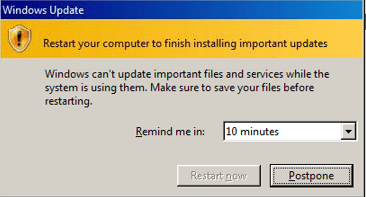
Weird things are:
1. Windows update shows that this computer is up-to-date and no failed updates in the update history
2. The "Restart now" button is greyed out, which does not seems like normal windows update message box
We tried restart the computer several times, still the box keeps popping up.
We also tried below items:
1. sfc /scannow
=> no errors found
2. install malwarebytes anti-malware and perform full scan
=> no malwares found
3. Run windows update reset online
=> Error "Service registration is missing or corrupt" and not fixed by the reset
=> Followed instructions in service-registration-is-missing-or-corrupt
4. Re-run windows update reset online
=> no more error "Service registration is missing or corrupt"
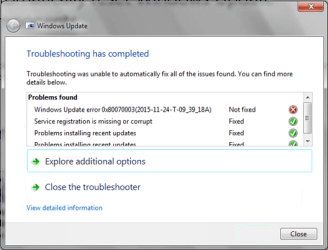
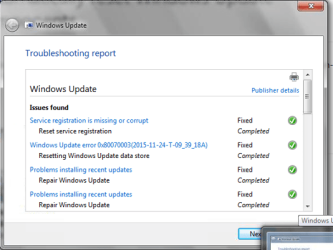
=> get new error Windows Update error 0x90070003(2015-11-24-T-09_39_18A)
=> But in the detail report, it says fixed
5. Find article auto-update-wants-to-restart-constantly
=> no folder "reboot required" found under that registry path
But none of them help.
Any more suggestions are appreciated. Thanks.
OS: Windows 7 SP1
Recently we have a computer which keeps popping up the Windows update message box.
Weird things are:
1. Windows update shows that this computer is up-to-date and no failed updates in the update history
2. The "Restart now" button is greyed out, which does not seems like normal windows update message box
We tried restart the computer several times, still the box keeps popping up.
We also tried below items:
1. sfc /scannow
=> no errors found
2. install malwarebytes anti-malware and perform full scan
=> no malwares found
3. Run windows update reset online
=> Error "Service registration is missing or corrupt" and not fixed by the reset
=> Followed instructions in service-registration-is-missing-or-corrupt
4. Re-run windows update reset online
=> no more error "Service registration is missing or corrupt"
=> get new error Windows Update error 0x90070003(2015-11-24-T-09_39_18A)
=> But in the detail report, it says fixed
5. Find article auto-update-wants-to-restart-constantly
=> no folder "reboot required" found under that registry path
But none of them help.
Any more suggestions are appreciated. Thanks.
OS: Windows 7 SP1
My Computer
- Computer type
- PC/Desktop
- OS
- Windows 7 Professional 64-bit SP1


