Windows Update messed up my computer?

ericcollegeodu

New member
Local time
2:18 AM
Messages
9
I was working on two huge research reports late into the night, then in the bottom right hand of the screen it tells me that windows updates needs to be installed and it will restart in ten mins. So i got to a perfect stopping point, laid down and let the computer update. When i woke up seven hours later, the computer is still trying to congigure the updates, i turn it off, and nothing has worked right since.
Everytime i log on i get one of four things. 1. It wont go past the welcome screen. 2. it will get past the welcome screen and then have a black screen for which i can do nothing about. 3. It will get past everything but then have an all black screen with the words in the bottom right saying "This copy of windows is not genuine build 7601 or 4. it will be like normal but i cant click on anything, it will highlight things but when you click on it nothing starts.
I have a gateway computer bought straight from best buy, nothing has been done to it, it has worked perfectly since last christmas of 2010. :mad::mad::mad:
 

My Computer

OS
Windows 7

My Computer

Computer type
PC/Desktop
Computer Manufacturer/Model Number
Custom Asus Build
OS
Microsoft Windows 8.1 Pro 64-bit
CPU
Intel(R) Core(TM) i3-4130 CPU @ 3.40GHz
Motherboard
B85M-E
Memory
8.00 GB
Graphics Card(s)
None
Sound Card
Realtek High Definition Audio
Monitor(s) Displays
Asus 23.6" Monitor
Screen Resolution
1920 x 1080 x 32 bits (4294967296 colors) @ 60 Hz
Hard Drives
INTEL SSDSC2BW180A4
Samsung SSD 840 PRO Series
PSU
Seasonic S12II-380Bronze
Case
Lian Li
Cooling
Fan, Passive
Keyboard
Logitech K120
Mouse
Microsoft Touch Mouse
Internet Speed
4ms Ping, 19.0 Mbps Download, 19.0 Mbps Upload
Antivirus
Eset Endpoint
Browser
Internet Explorer, Chrome
will that affect my files? and sorry about the double post i swear i clicked it once and it said i duplicated it...idk but ill try that
 

My Computer

OS
Windows 7

My Computer

Computer Manufacturer/Model Number
HP Pavilion Elite 495UK
OS
Windows 7 Ultimate SP1 64-Bit
CPU
Intel Core i7 870 @ 2.93GHz
Motherboard
MSI 2A9C (CPU1)
Memory
8Gb Dual-Channel DDR3 @ 664MHz
Graphics Card(s)
nVidia GeForce GTX 460 1024MB dedicated RAM
Sound Card
Realtek HD Audio
Monitor(s) Displays
HP2310i
Screen Resolution
1920 x 1080
Hard Drives
1x1954GB Hitachi HDS22020ALA 330 (RAID), 1x1954GB Hitachi External for backup and storage
PSU
460W
Case
HP Elite
Cooling
Air cooled
Keyboard
Logitech K750 solar-powered keyboard
Mouse
Logitech Wireless M180 mouse
Internet Speed
2Mb
Other Info
Pure Avanti Flow Internet Radio with iPod Dock, 64Gb iPod, HP USB Speakers, Sony MDR-V500 Headphones, Sony Vaio F-Series Laptop
Boot to Safe Mode, and run a System Restore back before the installations - if you still get a non-genuine notification,

To properly analyse and solve problems with Activation and Validation, we need to see a full copy of the report produced by the MGADiag tool
(download and save to desktop - http://go.microsoft.com/fwlink/?linkid=52012 )
Once saved, run the tool.
Click on the Continue button, which will produce the report.
To copy the report to your response, click on the Copy button in the tool (ignore any error messages at this point), and then paste (using either r-click/Paste, or Ctrl+V ) into your response.
- **in your own thread**, please
Please also state the Version and Edition of Windows quoted on your COA sticker (if you have one) on the case of your machine (or inside the battery compartment), but do NOT quote the Key on the sticker!
How to Tell
 

My Computer

Computer type
Laptop
Computer Manufacturer/Model Number
Asus K52F or Lenovo B51-80
OS
Win 7 x64 Home Premium (and x86 VirtualBox VM)/Win10
CPU
i3 370M/i7 6500U
Motherboard
Asus/Lenovo
Memory
8GB - finally :)/8GB
Graphics Card(s)
it's an i3, dude!/dual Intel&nVidia
Sound Card
onboard
Monitor(s) Displays
15.6" built-in
Screen Resolution
1366x768/1920x1080
Hard Drives
750GB Seagate internal
Sundry external drives attached to other computers on the local network
1TB SSD on the Lenovo
PSU
n/a
Internet Speed
as much as I can get - usually on a dongle/phone, so <1MB/s
Antivirus
MSE/Defender
Browser
IE11/12/Edge/Chrome/FF(if I must)
I never created a restore point :o how should i proceed from there
 

My Computer

OS
Windows 7
Just use the links in Noel's post, he is our resident expert on activation issues. :)
 

My Computer

Computer Manufacturer/Model Number
HP Pavilion Elite 495UK
OS
Windows 7 Ultimate SP1 64-Bit
CPU
Intel Core i7 870 @ 2.93GHz
Motherboard
MSI 2A9C (CPU1)
Memory
8Gb Dual-Channel DDR3 @ 664MHz
Graphics Card(s)
nVidia GeForce GTX 460 1024MB dedicated RAM
Sound Card
Realtek HD Audio
Monitor(s) Displays
HP2310i
Screen Resolution
1920 x 1080
Hard Drives
1x1954GB Hitachi HDS22020ALA 330 (RAID), 1x1954GB Hitachi External for backup and storage
PSU
460W
Case
HP Elite
Cooling
Air cooled
Keyboard
Logitech K750 solar-powered keyboard
Mouse
Logitech Wireless M180 mouse
Internet Speed
2Mb
Other Info
Pure Avanti Flow Internet Radio with iPod Dock, 64Gb iPod, HP USB Speakers, Sony MDR-V500 Headphones, Sony Vaio F-Series Laptop
Boot to Safe Mode, and run a System Restore back before the installations - if you still get a non-genuine notification,

To properly analyse and solve problems with Activation and Validation, we need to see a full copy of the report produced by the MGADiag tool
(download and save to desktop - http://go.microsoft.com/fwlink/?linkid=52012 )
Once saved, run the tool.
Click on the Continue button, which will produce the report.
To copy the report to your response, click on the Copy button in the tool (ignore any error messages at this point), and then paste (using either r-click/Paste, or Ctrl+V ) into your response.
- **in your own thread**, please
Please also state the Version and Edition of Windows quoted on your COA sticker (if you have one) on the case of your machine (or inside the battery compartment), but do NOT quote the Key on the sticker!
How to Tell


Code:
Diagnostic Report (1.9.0027.0):
-----------------------------------------
Windows Validation Data-->

Validation Code: 0
Cached Online Validation Code: N/A, hr = 0x8007043c
Windows Product Key: *****-*****-WJ2H8-R6B6D-7QJB7
Windows Product Key Hash: ckKNc+BBPDWmo1LUlOkraNjlQ34=
Windows Product ID: 00359-OEM-8992687-00006
Windows Product ID Type: 2
Windows License Type: OEM SLP
Windows OS version: 6.1.7601.2.00010300.1.0.003
ID: {B18C54E8-54B9-446A-82A2-0DD61AFB4E28}(3)
Is Admin: Yes
TestCab: 0x0
LegitcheckControl ActiveX: N/A, hr = 0x80070002
Signed By: N/A, hr = 0x80070002
Product Name: Windows 7 Home Premium
Architecture: 0x00000009
Build lab: 7601.win7sp1_gdr.111118-2330
TTS Error: 
Validation Diagnostic: 
Resolution Status: N/A

Vista WgaER Data-->
ThreatID(s): N/A, hr = 0x80070002
Version: N/A, hr = 0x80070002

Windows XP Notifications Data-->
Cached Result: N/A, hr = 0x80070002
File Exists: No
Version: N/A, hr = 0x80070002
WgaTray.exe Signed By: N/A, hr = 0x80070002
WgaLogon.dll Signed By: N/A, hr = 0x80070002

OGA Notifications Data-->
Cached Result: N/A, hr = 0x80070002
Version: N/A, hr = 0x80070002
OGAExec.exe Signed By: N/A, hr = 0x80070002
OGAAddin.dll Signed By: N/A, hr = 0x80070002

OGA Data-->
Office Status: 109 N/A
OGA Version: N/A, 0x80070002
Signed By: N/A, hr = 0x80070002
Office Diagnostics: 025D1FF3-364-80041010_025D1FF3-229-80041010_025D1FF3-230-1_025D1FF3-517-80040154_025D1FF3-237-80040154_025D1FF3-238-2_025D1FF3-244-80070002_025D1FF3-258-3

Browser Data-->
Proxy settings: N/A
User Agent: Mozilla/4.0 (compatible; MSIE 8.0; Win32)
Default Browser: C:\Users\Eric\AppData\Local\Google\Chrome\Application\chrome.exe
Download signed ActiveX controls: Prompt
Download unsigned ActiveX controls: Disabled
Run ActiveX controls and plug-ins: Allowed
Initialize and script ActiveX controls not marked as safe: Disabled
Allow scripting of Internet Explorer Webbrowser control: Disabled
Active scripting: Allowed
Script ActiveX controls marked as safe for scripting: Allowed

File Scan Data-->

Other data-->
Office Details: <GenuineResults><MachineData><UGUID>{B18C54E8-54B9-446A-82A2-0DD61AFB4E28}</UGUID><Version>1.9.0027.0</Version><OS>6.1.7601.2.00010300.1.0.003</OS><Architecture>x64</Architecture><PKey>*****-*****-*****-*****-7QJB7</PKey><PID>00359-OEM-8992687-00006</PID><PIDType>2</PIDType><SID>S-1-5-21-2046504874-1417695546-962716149</SID><SYSTEM><Manufacturer>Gateway</Manufacturer><Model>NV55C</Model></SYSTEM><BIOS><Manufacturer>Gateway</Manufacturer><Version>V1.05</Version><SMBIOSVersion major="2" minor="6"/><Date>20100824000000.000000+000</Date></BIOS><HWID>B73B3C07018400FC</HWID><UserLCID>0409</UserLCID><SystemLCID>0409</SystemLCID><TimeZone>Eastern Standard Time(GMT-05:00)</TimeZone><iJoin>0</iJoin><SBID><stat>3</stat><msppid></msppid><name></name><model></model></SBID><OEM><OEMID>ACRSYS</OEMID><OEMTableID>ACRPRDCT</OEMTableID></OEM><GANotification/></MachineData><Software><Office><Result>109</Result><Products/><Applications/></Office></Software></GenuineResults>  

Spsys.log Content: 0x80070002

Licensing Data-->
On a computer running Microsoft Windows non-core edition, run 'slui.exe 0x2a 0x8007043C' to display the error text.
Error: 0x8007043C 

Windows Activation Technologies-->
HrOffline: 0x00000000
HrOnline: 0x00000000
HealthStatus: 0x0000000000000000
Event Time Stamp: 1:18:2012 00:02
ActiveX: Registered, Version: 7.1.7600.16395
Admin Service: Not Registered - 0x8007043c
HealthStatus Bitmask Output:


HWID Data-->
HWID Hash Current: KAAAAAEAAQABAAEAAAAAAAAAAQABAAEAeqhedxwpoMSsjTIspq9cXQ==

OEM Activation 1.0 Data-->
N/A

OEM Activation 2.0 Data-->
BIOS valid for OA 2.0: yes
Windows marker version: 0x20001
OEMID and OEMTableID Consistent: yes
BIOS Information: 
  ACPI Table Name    OEMID Value    OEMTableID Value
  APIC            ACRSYS        ACRPRDCT
  FACP            ACRSYS        ACRPRDCT
  HPET            ACRSYS        ACRPRDCT
  BOOT            ACRSYS        ACRPRDCT
  MCFG            ACRSYS        ACRPRDCT
  ASF!            ACRSYS        ACRPRDCT
  SLIC            ACRSYS        ACRPRDCT
  ASPT            ACRSYS        ACRPRDCT
  SSDT            PmRef        CpuPm
  SSDT            PmRef        CpuPm
  SSDT            PmRef        CpuPm


Its windows 7 home premium
 

My Computer

OS
Windows 7
You ran that report from Safe Mode - there's not a lot I can read from such a report, as some of the services it relies on won't run there.
However, there is nothing in the report to indicate any serious problem with WGA - so we need to sort out the rest of your problems.

System Restore should have made backups at least once a week from the first time the system was booted - are you saying that there are no Restore points available at all? Please check - making sure that you have enabled the 'show points older than 5 days' option.
 

My Computer

Computer type
Laptop
Computer Manufacturer/Model Number
Asus K52F or Lenovo B51-80
OS
Win 7 x64 Home Premium (and x86 VirtualBox VM)/Win10
CPU
i3 370M/i7 6500U
Motherboard
Asus/Lenovo
Memory
8GB - finally :)/8GB
Graphics Card(s)
it's an i3, dude!/dual Intel&nVidia
Sound Card
onboard
Monitor(s) Displays
15.6" built-in
Screen Resolution
1366x768/1920x1080
Hard Drives
750GB Seagate internal
Sundry external drives attached to other computers on the local network
1TB SSD on the Lenovo
PSU
n/a
Internet Speed
as much as I can get - usually on a dongle/phone, so <1MB/s
Antivirus
MSE/Defender
Browser
IE11/12/Edge/Chrome/FF(if I must)
eric,
RESTORE TO A PREVIOUS SYSTEM RESTORE POINT
1) WIN | type SYSTEM RESTORE | ENTER | NEXT
|Choose a different restore point radio button
| NEXT


2) Show more restore points checkbox (lower left)


3) Highlight the desired restore point


4) Scan for affected programs (lower right)make a note of affected programs
5) CLOSE | NEXT | FINISH


WIN = key with the wavy Microsoft flag on top.
 

My Computer

Computer Manufacturer/Model Number
Toshiba Satellite S875D-S7239 laptop
OS
MS Windows 7 Ultimate SP1 64-bit
CPU
AMD A10-4600M
Motherboard
AMD Pumori (Socket FT1)
Memory
6.00 GB Dual-Channel DDR3 @ 798MHz (11-11-12-28)
Graphics Card(s)
AMD Radeon HD 7660G
Sound Card
High Definition Audio Device
Monitor(s) Displays
Generic PnP Monitor (1600x900@60Hz)
Screen Resolution
1600x900@60Hz
Hard Drives
SSD 119GB Corsair CSSD-V128GB2 ATA Device
Keyboard
Standard PS/2 Keyboard
Mouse
HP Wireless Optical Mobile Mouse Model FHA-3410
Internet Speed
What the local pub, local coffee shop offers.
Other Info
Optical Drive:MATSHITA BD-CMB UJ160B ATA Device


Also have an Asus ha1002xp netbook with Win 7 Ultimate installed.
eric,
RESTORE TO A PREVIOUS SYSTEM RESTORE POINT
1) WIN | type SYSTEM RESTORE | ENTER | NEXT
|Choose a different restore point radio button
| NEXT


2) Show more restore points checkbox (lower left)


3) Highlight the desired restore point


4) Scan for affected programs (lower right)make a note of affected programs
5) CLOSE | NEXT | FINISH


WIN = key with the wavy Microsoft flag on top.

Okay so i hit the win button, typed system restore, and it came up with the system restore button....clicked it, it said there was no restore points, there was no checked box either
 

My Computer

OS
Windows 7
seeing as there is no 'system restore' button, then do you want to try that again and tell me what you see.
 

My Computer

Computer Manufacturer/Model Number
Toshiba Satellite S875D-S7239 laptop
OS
MS Windows 7 Ultimate SP1 64-bit
CPU
AMD A10-4600M
Motherboard
AMD Pumori (Socket FT1)
Memory
6.00 GB Dual-Channel DDR3 @ 798MHz (11-11-12-28)
Graphics Card(s)
AMD Radeon HD 7660G
Sound Card
High Definition Audio Device
Monitor(s) Displays
Generic PnP Monitor (1600x900@60Hz)
Screen Resolution
1600x900@60Hz
Hard Drives
SSD 119GB Corsair CSSD-V128GB2 ATA Device
Keyboard
Standard PS/2 Keyboard
Mouse
HP Wireless Optical Mobile Mouse Model FHA-3410
Internet Speed
What the local pub, local coffee shop offers.
Other Info
Optical Drive:MATSHITA BD-CMB UJ160B ATA Device


Also have an Asus ha1002xp netbook with Win 7 Ultimate installed.
I hit the system restore button...it loads a window that looks like its about to start the restore, but then says something like there are no restore points saved on this computer, it then says to start one, you can go to >system protection<...and when I go there it just brings up a system properties window about my computer.
 

My Computer

OS
Windows 7
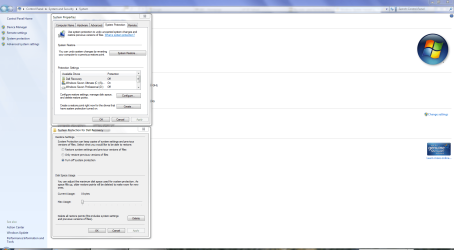
Have you checked to make sure system restore is activated? You need to select your operating system drive under Available Drives, and then click Configure and use which settings you prefer.

SysRes.PNG
 

My Computer

Computer Manufacturer/Model Number
HP Pavilion Elite 495UK
OS
Windows 7 Ultimate SP1 64-Bit
CPU
Intel Core i7 870 @ 2.93GHz
Motherboard
MSI 2A9C (CPU1)
Memory
8Gb Dual-Channel DDR3 @ 664MHz
Graphics Card(s)
nVidia GeForce GTX 460 1024MB dedicated RAM
Sound Card
Realtek HD Audio
Monitor(s) Displays
HP2310i
Screen Resolution
1920 x 1080
Hard Drives
1x1954GB Hitachi HDS22020ALA 330 (RAID), 1x1954GB Hitachi External for backup and storage
PSU
460W
Case
HP Elite
Cooling
Air cooled
Keyboard
Logitech K750 solar-powered keyboard
Mouse
Logitech Wireless M180 mouse
Internet Speed
2Mb
Other Info
Pure Avanti Flow Internet Radio with iPod Dock, 64Gb iPod, HP USB Speakers, Sony MDR-V500 Headphones, Sony Vaio F-Series Laptop
Unfortunately, i have all of those tabs EXCEPT the system restore one....i went ahead and wiped it clean, but now when it is trying to set up services it says "Windows could not complete the installation. To restall Windows on this computer, restart the installation" and of course i restart it and it leads back to the same message.
 

My Computer

OS
Windows 7

My Computer

Computer Manufacturer/Model Number
HP Pavilion Elite 495UK
OS
Windows 7 Ultimate SP1 64-Bit
CPU
Intel Core i7 870 @ 2.93GHz
Motherboard
MSI 2A9C (CPU1)
Memory
8Gb Dual-Channel DDR3 @ 664MHz
Graphics Card(s)
nVidia GeForce GTX 460 1024MB dedicated RAM
Sound Card
Realtek HD Audio
Monitor(s) Displays
HP2310i
Screen Resolution
1920 x 1080
Hard Drives
1x1954GB Hitachi HDS22020ALA 330 (RAID), 1x1954GB Hitachi External for backup and storage
PSU
460W
Case
HP Elite
Cooling
Air cooled
Keyboard
Logitech K750 solar-powered keyboard
Mouse
Logitech Wireless M180 mouse
Internet Speed
2Mb
Other Info
Pure Avanti Flow Internet Radio with iPod Dock, 64Gb iPod, HP USB Speakers, Sony MDR-V500 Headphones, Sony Vaio F-Series Laptop
Unfortunately, i have all of those tabs EXCEPT the system restore one....i went ahead and wiped it clean, but now when it is trying to set up services it says "Windows could not complete the installation. To restall Windows on this computer, restart the installation" and of course i restart it and it leads back to the same message.

Your use of the word "services" is non-standard. Please explain.
 

My Computer

Computer Manufacturer/Model Number
Toshiba Satellite S875D-S7239 laptop
OS
MS Windows 7 Ultimate SP1 64-bit
CPU
AMD A10-4600M
Motherboard
AMD Pumori (Socket FT1)
Memory
6.00 GB Dual-Channel DDR3 @ 798MHz (11-11-12-28)
Graphics Card(s)
AMD Radeon HD 7660G
Sound Card
High Definition Audio Device
Monitor(s) Displays
Generic PnP Monitor (1600x900@60Hz)
Screen Resolution
1600x900@60Hz
Hard Drives
SSD 119GB Corsair CSSD-V128GB2 ATA Device
Keyboard
Standard PS/2 Keyboard
Mouse
HP Wireless Optical Mobile Mouse Model FHA-3410
Internet Speed
What the local pub, local coffee shop offers.
Other Info
Optical Drive:MATSHITA BD-CMB UJ160B ATA Device


Also have an Asus ha1002xp netbook with Win 7 Ultimate installed.
I just want to thank everyone for all of their help

but unfortunately i did something else lol

so i decided to just wipe it clean, and restore it back to factory condition...eveything is going fine, its setting up services and everything

then a window pops up and says "Windows cannot complete the installation.To install windows on this computer, restart the installation"

the only thing you can click is "okay" and it loops back to that same window
 

My Computer

OS
Windows 7

My Computer

Computer type
PC/Desktop
Computer Manufacturer/Model Number
Custom Asus Build
OS
Microsoft Windows 8.1 Pro 64-bit
CPU
Intel(R) Core(TM) i3-4130 CPU @ 3.40GHz
Motherboard
B85M-E
Memory
8.00 GB
Graphics Card(s)
None
Sound Card
Realtek High Definition Audio
Monitor(s) Displays
Asus 23.6" Monitor
Screen Resolution
1920 x 1080 x 32 bits (4294967296 colors) @ 60 Hz
Hard Drives
INTEL SSDSC2BW180A4
Samsung SSD 840 PRO Series
PSU
Seasonic S12II-380Bronze
Case
Lian Li
Cooling
Fan, Passive
Keyboard
Logitech K120
Mouse
Microsoft Touch Mouse
Internet Speed
4ms Ping, 19.0 Mbps Download, 19.0 Mbps Upload
Antivirus
Eset Endpoint
Browser
Internet Explorer, Chrome
Back
Top