Windows Update stuck checking.

Requimatic

New member
Local time
1:34 PM
Messages
86
So we have this Acer laptop that, of course, came with all kinds of crap installed that starts up with it.

Getting tired of hearing about how slow the thing is, I disabled a half dozen things (MyWinLocker, LaunchManager, some other crap) that aren't essential, leaving a few things from Intel, MSSE, etc.

Having done that, I restarted it. All was well. Then I opened the Task Manager to kill the GWX process (I hadn't disabled it on that machine yet), and noticed two things:

1. TrustedInstaller.exe would eat a bunch of CPU power, then a large amount of memory, then go back to normal.
2. Immediately following that, one particular instance of svchost.exe starting using 50% of the CPU, and used a massive amount of memory (around 30%), and just stayed there.

So I started looking in to that problem. It shouldn't be sitting there idling at 50% CPU usage, for various reasons. I waited and waited, it would not go away.

One of the possible solutions I found was to disable Microsoft Update. I checked Windows Update settings, and MS Update was indeed enabled, so I disabled that, and also set Windows Update to NOT install anything automatically. The option to re-enable MS Update is now gone.

At this point, Windows Update thought I'd never updated the system, so I clicked "Check for updates" and that's where it sits. Also worth noting, there was a bunch of failed updates from yesterday, including the Upgrade to Windows 10 Home.

For obvious reasons, I'm waiting to decide whether or not I upgrade. That was the plan for that laptop, too, but because Windows Update was set to automatically download AND install stuff, apparently tried to upgrade, and it failed.

Also worth noting, Windows has started telling me that the product is not genuine, via WatUX. I'd actually poked around and found an old thread from these forums about a possible fix for that, which involves rebuilding the Licensing Store. I have not done this yet; I want to fix these other issues first. (However, the system properties show Windows as both activated, and genuine. No idea what's going on here.)

Anyway, does anyone have any suggestions here? I've sat and screwed with this thing for a good 1.5 hours now, and am fixing to send it in to orbit instead.

Edit: I'm also just now seeing the posting instructions for this particular forum. As far as downloading those utilities and collecting logs goes, I'll have to do that and amend my thread later, as the laptop in question is currently in use. I didn't notice any error codes for the failed updates from yesterday, either, as I can only see in the update history that they failed. (And didn't poke around as to why.) But I'm still certainly open to what people think I should do here.
 

My Computer

Computer type
PC/Desktop
OS
Windows 7 Home Premium
CPU
Intel Core i7 950 (Bloomfield)
Motherboard
EVGA X58 FTW3
Memory
6GB (3x2GB) G.Skill
Graphics Card(s)
EVGA SC-GTX760
Monitor(s) Displays
Acer 22"
Screen Resolution
1920x1080
Hard Drives
WDCB 500GB SATA2 @ 7200RPM
PSU
Corsair 850w
Case
Raidmax Smilodon (Blue)
Antivirus
Microsoft Security Essentials
Browser
Firefox w/ NoScript & AdBlock+
Update:

Posting from the laptop now. Windows Update quit having whatever problem it was having, and displayed found updates again. However, I just noticed they have failed.

Errors:

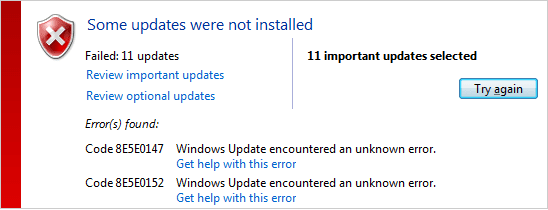
Code 8E5E0147
Code 8E5E0152

All 6 "Important" updates failed. They consist of one IE11 cumulative update, and five Windows 7 Security Updates.

Edit: Downloading the Windows Update Readiness Tool, and will run it once it's complete, followed by the other instructions in the Instructions thread.

Edit2: The Readiness Tool installed one update, and succeeded. After which, I ran sfc /scannow, which found some corrupted files and could not repair them. Now, normally, I'd be updating this post to include the zipped CBS.log... however, this particular instance of the log, crated today, right after that SFC, is 158MB. That seems... rather unusual, and I'm unsure what to do at this point, as I'm sure that's well beyond the upload limit here.

Meanwhile, the TrustedInstaller/svchost 50% CPU issue is still happening.
 
Last edited:

My Computer

Computer type
PC/Desktop
OS
Windows 7 Home Premium
CPU
Intel Core i7 950 (Bloomfield)
Motherboard
EVGA X58 FTW3
Memory
6GB (3x2GB) G.Skill
Graphics Card(s)
EVGA SC-GTX760
Monitor(s) Displays
Acer 22"
Screen Resolution
1920x1080
Hard Drives
WDCB 500GB SATA2 @ 7200RPM
PSU
Corsair 850w
Case
Raidmax Smilodon (Blue)
Antivirus
Microsoft Security Essentials
Browser
Firefox w/ NoScript & AdBlock+
The CBS log will compress to around an 8MB zip file using the built-in Windows compression -

Please follow the Windows Update Posting Instructions and post the requested data

If the file is too large (8MB compressed), remove the older CBSPersist cab files until the final file is below the limit - you can always post them separately after zipping them. (the forum doesn't allow the upload of bare CAB files, for a number of reasons)

Please also post the C:\Windows\windowsudpate.log file

(you could also upload the file to a fileshare site and post a link back here.)
 

My Computer

Computer type
Laptop
Computer Manufacturer/Model Number
Asus K52F or Lenovo B51-80
OS
Win 7 x64 Home Premium (and x86 VirtualBox VM)/Win10
CPU
i3 370M/i7 6500U
Motherboard
Asus/Lenovo
Memory
8GB - finally :)/8GB
Graphics Card(s)
it's an i3, dude!/dual Intel&nVidia
Sound Card
onboard
Monitor(s) Displays
15.6" built-in
Screen Resolution
1366x768/1920x1080
Hard Drives
750GB Seagate internal
Sundry external drives attached to other computers on the local network
1TB SSD on the Lenovo
PSU
n/a
Internet Speed
as much as I can get - usually on a dongle/phone, so <1MB/s
Antivirus
MSE/Defender
Browser
IE11/12/Edge/Chrome/FF(if I must)
I totally forgot I made this thread and I apologize for essentially abandoning it, and for this shameless necro.

However, said laptop is still having issues. I don't know what's wrong with it. The issues it's currently having are:

1. An instance of svchost.exe using 50% of the CPU at all times. When you log on to a user profile, svchost.exe does something, and appears to offload that to TrustedInstaller.exe, which then goes on to use a massive amount of memory, eat the CPU, and then stop. After this, that same instance of svchost.exe starts using a similar amount of memory, while eating 50% of the CPU. If I right-click it and "Go to Service(s)", it points to Windows Update.

2. Windows Update. It either fails to install updates (with 2+ error codes), or gets stuck checking.


In any event, some time tonight I'm going to fiddle with it some more, including uploading the necessary logs to here, if I can. There doesn't seem to be any kind of malware infection or other related problem. MSSE finds nothing, MBAM has found nothing, and I ran both RKill and TDSSKiller on it earlier, both of which came up clean.

If we can't figure out what's wrong with it here, I'm going to just offload any personal data, format it, and reinstall Windows 7 using the OEM disc I have, with the product key on the laptop. (Assuming this will work, anyway. I've read some stories about pre-built PCs/laptops having some kind of "dual key" setup, in which one can quit being valid.)

It was trying to tell me for a bit that the installation of Windows on it wasn't genuine, but I found an old thread on here that you'd posted in, Noel, and it fixed that problem.

Anyway! Again, my apologies. Later, when no one is trying to use the silly thing, I'll go take control of it and see what we can do, if anything.
 

My Computer

Computer type
PC/Desktop
OS
Windows 7 Home Premium
CPU
Intel Core i7 950 (Bloomfield)
Motherboard
EVGA X58 FTW3
Memory
6GB (3x2GB) G.Skill
Graphics Card(s)
EVGA SC-GTX760
Monitor(s) Displays
Acer 22"
Screen Resolution
1920x1080
Hard Drives
WDCB 500GB SATA2 @ 7200RPM
PSU
Corsair 850w
Case
Raidmax Smilodon (Blue)
Antivirus
Microsoft Security Essentials
Browser
Firefox w/ NoScript & AdBlock+
Bumpity bump.

I'm redownloading SURT right now to run it again; apparently I did something with the original file. However, I ran SFC earlier and it produced a log with a more acceptable size. Still corrupted things it can't fix, of course, but I can at least upload it now without worries. Here is both it and the Windows Update logs.

After the SURT download is finished, I'll run it again, do SFC once more, and see if the log it generates is able to be uploaded here or not.
 

Attachments

My Computer

Computer type
PC/Desktop
OS
Windows 7 Home Premium
CPU
Intel Core i7 950 (Bloomfield)
Motherboard
EVGA X58 FTW3
Memory
6GB (3x2GB) G.Skill
Graphics Card(s)
EVGA SC-GTX760
Monitor(s) Displays
Acer 22"
Screen Resolution
1920x1080
Hard Drives
WDCB 500GB SATA2 @ 7200RPM
PSU
Corsair 850w
Case
Raidmax Smilodon (Blue)
Antivirus
Microsoft Security Essentials
Browser
Firefox w/ NoScript & AdBlock+
Bump again, sorry!

SURT ran, found one update (like before), and after a long wait, finally installed it. Here's the CBS log after restarting, after SURT ran.
 

My Computer

Computer type
PC/Desktop
OS
Windows 7 Home Premium
CPU
Intel Core i7 950 (Bloomfield)
Motherboard
EVGA X58 FTW3
Memory
6GB (3x2GB) G.Skill
Graphics Card(s)
EVGA SC-GTX760
Monitor(s) Displays
Acer 22"
Screen Resolution
1920x1080
Hard Drives
WDCB 500GB SATA2 @ 7200RPM
PSU
Corsair 850w
Case
Raidmax Smilodon (Blue)
Antivirus
Microsoft Security Essentials
Browser
Firefox w/ NoScript & AdBlock+
I need the CheckSUR.log file please.

The new SFC scan shows no unexpected problems - the earlier one fixed a few, leaving only ones associated with well-known update problems, that will be fixed once you get Windows Update working again.
 

My Computer

Computer type
Laptop
Computer Manufacturer/Model Number
Asus K52F or Lenovo B51-80
OS
Win 7 x64 Home Premium (and x86 VirtualBox VM)/Win10
CPU
i3 370M/i7 6500U
Motherboard
Asus/Lenovo
Memory
8GB - finally :)/8GB
Graphics Card(s)
it's an i3, dude!/dual Intel&nVidia
Sound Card
onboard
Monitor(s) Displays
15.6" built-in
Screen Resolution
1366x768/1920x1080
Hard Drives
750GB Seagate internal
Sundry external drives attached to other computers on the local network
1TB SSD on the Lenovo
PSU
n/a
Internet Speed
as much as I can get - usually on a dongle/phone, so <1MB/s
Antivirus
MSE/Defender
Browser
IE11/12/Edge/Chrome/FF(if I must)
Ah, sorry, here you go.
 

Attachments

My Computer

Computer type
PC/Desktop
OS
Windows 7 Home Premium
CPU
Intel Core i7 950 (Bloomfield)
Motherboard
EVGA X58 FTW3
Memory
6GB (3x2GB) G.Skill
Graphics Card(s)
EVGA SC-GTX760
Monitor(s) Displays
Acer 22"
Screen Resolution
1920x1080
Hard Drives
WDCB 500GB SATA2 @ 7200RPM
PSU
Corsair 850w
Case
Raidmax Smilodon (Blue)
Antivirus
Microsoft Security Essentials
Browser
Firefox w/ NoScript & AdBlock+

My Computer

Computer type
Laptop
Computer Manufacturer/Model Number
Asus K52F or Lenovo B51-80
OS
Win 7 x64 Home Premium (and x86 VirtualBox VM)/Win10
CPU
i3 370M/i7 6500U
Motherboard
Asus/Lenovo
Memory
8GB - finally :)/8GB
Graphics Card(s)
it's an i3, dude!/dual Intel&nVidia
Sound Card
onboard
Monitor(s) Displays
15.6" built-in
Screen Resolution
1366x768/1920x1080
Hard Drives
750GB Seagate internal
Sundry external drives attached to other computers on the local network
1TB SSD on the Lenovo
PSU
n/a
Internet Speed
as much as I can get - usually on a dongle/phone, so <1MB/s
Antivirus
MSE/Defender
Browser
IE11/12/Edge/Chrome/FF(if I must)
Greetings! I downloaded the repair tool, and got to the point where it told me to leave the window open and to try updating again... all 11 updates failed once more. Sreenshot attached~
 

Attachments

  • WinUD.png
    WinUD.png
    6.1 KB · Views: 25

My Computer

Computer type
PC/Desktop
OS
Windows 7 Home Premium
CPU
Intel Core i7 950 (Bloomfield)
Motherboard
EVGA X58 FTW3
Memory
6GB (3x2GB) G.Skill
Graphics Card(s)
EVGA SC-GTX760
Monitor(s) Displays
Acer 22"
Screen Resolution
1920x1080
Hard Drives
WDCB 500GB SATA2 @ 7200RPM
PSU
Corsair 850w
Case
Raidmax Smilodon (Blue)
Antivirus
Microsoft Security Essentials
Browser
Firefox w/ NoScript & AdBlock+
Since updating at that point didn't work, I clicked "Next" on the repair tool to see if it had anything to say or do... it tried, but was unable to fix anything. However, it did produce a .cab file with all kinds of fun logs in it (cbs, winupdate, and logs from the tool itself) which I've zipped and attached to this post!
 

Attachments

My Computer

Computer type
PC/Desktop
OS
Windows 7 Home Premium
CPU
Intel Core i7 950 (Bloomfield)
Motherboard
EVGA X58 FTW3
Memory
6GB (3x2GB) G.Skill
Graphics Card(s)
EVGA SC-GTX760
Monitor(s) Displays
Acer 22"
Screen Resolution
1920x1080
Hard Drives
WDCB 500GB SATA2 @ 7200RPM
PSU
Corsair 850w
Case
Raidmax Smilodon (Blue)
Antivirus
Microsoft Security Essentials
Browser
Firefox w/ NoScript & AdBlock+
Yeurgh - it'll take me an age to go through this lot!
Might get lucky, though ;)
back later.
 

My Computer

Computer type
Laptop
Computer Manufacturer/Model Number
Asus K52F or Lenovo B51-80
OS
Win 7 x64 Home Premium (and x86 VirtualBox VM)/Win10
CPU
i3 370M/i7 6500U
Motherboard
Asus/Lenovo
Memory
8GB - finally :)/8GB
Graphics Card(s)
it's an i3, dude!/dual Intel&nVidia
Sound Card
onboard
Monitor(s) Displays
15.6" built-in
Screen Resolution
1366x768/1920x1080
Hard Drives
750GB Seagate internal
Sundry external drives attached to other computers on the local network
1TB SSD on the Lenovo
PSU
n/a
Internet Speed
as much as I can get - usually on a dongle/phone, so <1MB/s
Antivirus
MSE/Defender
Browser
IE11/12/Edge/Chrome/FF(if I must)
Haha, my apologies! I noticed that the particular instance of CBS.log was well over 300MB for some reason...

But no rush. I'm headed to bed myself but wanted to check this beforehand. I'll check back at random tomorrow, so again, no rush.

Also, thanks!
 

My Computer

Computer type
PC/Desktop
OS
Windows 7 Home Premium
CPU
Intel Core i7 950 (Bloomfield)
Motherboard
EVGA X58 FTW3
Memory
6GB (3x2GB) G.Skill
Graphics Card(s)
EVGA SC-GTX760
Monitor(s) Displays
Acer 22"
Screen Resolution
1920x1080
Hard Drives
WDCB 500GB SATA2 @ 7200RPM
PSU
Corsair 850w
Case
Raidmax Smilodon (Blue)
Antivirus
Microsoft Security Essentials
Browser
Firefox w/ NoScript & AdBlock+
The CBS.log is more revealing now...
The updates failing, listed by error code, are...

0x8e5e0147 JET_errBadPageLink
KB3074543
KB3046017
KB3078601
KB3087038
KB3078667
KB3087039
KB3078601

0x8e5e0152 JET_errBadParentPageLink
KB3083992
KB3080149
KB3060716
KB3071756

Both these errors appear to relate to a failure to install certificates properly, and seem to result from corruption in the SoftwareDownload folder.

Open an Elevated Command Prompt
Run the following commands
*
NET STOP WUAUSERV
REN C:\WINDOWS\SoftwareDistribution SDOLD
NET START WUAUSERV
*
reboot
then wait 10 minutes, and open Windows Updates, and run a Check for Updates.
*
Install only the oldest update found - and reboot once installed (hopefully!)
then go back to Windows updates and install the others.
If it doesn't install, post the new Windowsupdate.log file.
 

My Computer

Computer type
Laptop
Computer Manufacturer/Model Number
Asus K52F or Lenovo B51-80
OS
Win 7 x64 Home Premium (and x86 VirtualBox VM)/Win10
CPU
i3 370M/i7 6500U
Motherboard
Asus/Lenovo
Memory
8GB - finally :)/8GB
Graphics Card(s)
it's an i3, dude!/dual Intel&nVidia
Sound Card
onboard
Monitor(s) Displays
15.6" built-in
Screen Resolution
1366x768/1920x1080
Hard Drives
750GB Seagate internal
Sundry external drives attached to other computers on the local network
1TB SSD on the Lenovo
PSU
n/a
Internet Speed
as much as I can get - usually on a dongle/phone, so <1MB/s
Antivirus
MSE/Defender
Browser
IE11/12/Edge/Chrome/FF(if I must)
Aha! I'll get to that right now, thanks!
 

My Computer

Computer type
PC/Desktop
OS
Windows 7 Home Premium
CPU
Intel Core i7 950 (Bloomfield)
Motherboard
EVGA X58 FTW3
Memory
6GB (3x2GB) G.Skill
Graphics Card(s)
EVGA SC-GTX760
Monitor(s) Displays
Acer 22"
Screen Resolution
1920x1080
Hard Drives
WDCB 500GB SATA2 @ 7200RPM
PSU
Corsair 850w
Case
Raidmax Smilodon (Blue)
Antivirus
Microsoft Security Essentials
Browser
Firefox w/ NoScript & AdBlock+
Well, it's been sitting here checking for updates for about 10 minutes now.
 

My Computer

Computer type
PC/Desktop
OS
Windows 7 Home Premium
CPU
Intel Core i7 950 (Bloomfield)
Motherboard
EVGA X58 FTW3
Memory
6GB (3x2GB) G.Skill
Graphics Card(s)
EVGA SC-GTX760
Monitor(s) Displays
Acer 22"
Screen Resolution
1920x1080
Hard Drives
WDCB 500GB SATA2 @ 7200RPM
PSU
Corsair 850w
Case
Raidmax Smilodon (Blue)
Antivirus
Microsoft Security Essentials
Browser
Firefox w/ NoScript & AdBlock+
Let it check for at least 24 hours.
 

My Computer

Computer type
Laptop
Computer Manufacturer/Model Number
Employer provided Dell Latitude
OS
W7 Pro SP1 64bit
CPU
i7
Memory
8GB
Graphics Card(s)
Intel HD Graphics
Hard Drives
crappy SSD
Antivirus
Employer mandated Symantec Endpoint Protection
Browser
Pale Moon 64bit, IE11 64bit & Chrome 64bit
Let it check for at least 24 hours.

That seems pretty excessive.

But regardless, it found the same 11 updates that have been available for ~2 months now. There were multiple from 8/11/2015, so I selected one, clicked to install, and it failed instantly. Attached is the new Windows Update log.
 

Attachments

My Computer

Computer type
PC/Desktop
OS
Windows 7 Home Premium
CPU
Intel Core i7 950 (Bloomfield)
Motherboard
EVGA X58 FTW3
Memory
6GB (3x2GB) G.Skill
Graphics Card(s)
EVGA SC-GTX760
Monitor(s) Displays
Acer 22"
Screen Resolution
1920x1080
Hard Drives
WDCB 500GB SATA2 @ 7200RPM
PSU
Corsair 850w
Case
Raidmax Smilodon (Blue)
Antivirus
Microsoft Security Essentials
Browser
Firefox w/ NoScript & AdBlock+
Unfortunately, there are several threads about Windows Update checking "forever". Some forum members get the list of updates within 20 minutes; but more than one member reported that it took about 20 hours. Perhaps that will be fixed someday, but until then - letting it sit for at least 24 hours is my suggestion. I used to suggest leaving it overnight, but that was not long enough for some members.


As for the same updates: let's see what NoelDP finds.
 

My Computer

Computer type
Laptop
Computer Manufacturer/Model Number
Employer provided Dell Latitude
OS
W7 Pro SP1 64bit
CPU
i7
Memory
8GB
Graphics Card(s)
Intel HD Graphics
Hard Drives
crappy SSD
Antivirus
Employer mandated Symantec Endpoint Protection
Browser
Pale Moon 64bit, IE11 64bit & Chrome 64bit
Unfortunately, there are several threads about Windows Update checking "forever". Some forum members get the list of updates within 20 minutes; but more than one member reported that it took about 20 hours. Perhaps that will be fixed someday, but until then - letting it sit for at least 24 hours is my suggestion. I used to suggest leaving it overnight, but that was not long enough for some members.


As for the same updates: let's see what NoelDP finds.

Ouch, that's pretty intense. Thankfully it only took around 15-20 minutes for it to find the updates. However, one of the oldest instantly failed.

It also randomly tries to tell me that Windows isn't genuine, which is apparently a problem that can happen with pre-build PCs and laptops. I tried a solution that actually came from NoelDP in an ancient thread on these forums, and it seemed to work at first, but it's still popping up at random with the same thing saying it isn't genuine.

But I'll save that issue for later, unless it turns out the whole WUpdate thing is a mass crop of corruption that would best be remedied by a format/reinstall. I'd just need to know if the current product key would work or not; I've heard of folks running in to trouble trying to reinstall and use their pre-built's product key.
 

My Computer

Computer type
PC/Desktop
OS
Windows 7 Home Premium
CPU
Intel Core i7 950 (Bloomfield)
Motherboard
EVGA X58 FTW3
Memory
6GB (3x2GB) G.Skill
Graphics Card(s)
EVGA SC-GTX760
Monitor(s) Displays
Acer 22"
Screen Resolution
1920x1080
Hard Drives
WDCB 500GB SATA2 @ 7200RPM
PSU
Corsair 850w
Case
Raidmax Smilodon (Blue)
Antivirus
Microsoft Security Essentials
Browser
Firefox w/ NoScript & AdBlock+
Back
Top