Solved Windows Update Won't work after imaging new C: drive

rkl122

New member
Local time
4:59 PM
Messages
30
Hello all. First post here. My oem drive was failing under warranty. After replacement, I reimaged from an Acronis backup. Everything seemed fine for a day, then I noticed Windows Update is not working and my system recognizes the OS, in msconfig for example, as "Windows 7 Professional (recovered)". (How does it know it's recovered?)

I've spent hours already Googling, and tried the most common advice, notably, to rename the Windows\SoftwareDistribution directory, and to re-register the AU drivers. Nothing has worked.

I'll paste below the most recent lines from the WindowsUpdate log.

I'd be eternally grateful to anyone who could save me from having to reinstall the OS and all my software.

Many thanks, -Ron

2013-03-01 22:32:17:916 1772 7ec AU AU Restart required....
2013-03-01 22:32:17:917 1772 7ec AU ########### AU: Initializing Automatic Updates ###########
2013-03-01 22:32:17:917 1772 7ec AU AU setting next detection timeout to 2013-03-02 03:32:17
2013-03-01 22:32:17:917 1772 7ec AU AU setting next sqm report timeout to 2013-03-02 03:32:17
2013-03-01 22:32:17:920 1772 7ec DtaStor FATAL: Failed to initialize datastore, error = 0xC8000247
2013-03-01 22:32:17:920 1772 7ec Agent WARNING: GetServiceList failed with error 0xc8000247.
2013-03-01 22:32:17:920 1772 7ec AU WARNING: QueryRegisteredProvider failed with error 0xc8000247
2013-03-01 22:32:17:920 1772 7ec AU # Approval type: Pre-download notify (User preference)
2013-03-01 22:32:17:920 1772 7ec AU # Will interact with non-admins (Non-admins are elevated (User preference))
2013-03-01 22:32:17:920 1772 7ec AU # Will display featured software notifications (User preference)
2013-03-01 22:32:17:920 1772 7ec AU # Power management is turned off through policy
2013-03-01 22:32:17:923 1772 7ec DtaStor FATAL: Failed to initialize datastore, error = 0xC8000247
2013-03-01 22:32:17:923 1772 7ec AU FATAL: Failed to get session from datastore, error = 0xC8000247
2013-03-01 22:32:17:923 1772 7ec AU FATAL: Failed to Unserialize from data store, error = 0xC8000247
2013-03-01 22:32:17:923 1772 7ec AU # WARNING: Exit code = 0xC8000247
2013-03-01 22:32:17:923 1772 7ec AU ########### AU: Uninitializing Automatic Updates ###########
2013-03-01 22:32:17:923 1772 7ec AU WARNING: InitAUComponents Failed, will restart AU in 30 mins, error = 0xC8000247
2013-03-01 22:32:17:923 1772 7ec AU AU Restart required....
 

My Computer My Computer

Computer type
PC/Desktop
Computer Manufacturer/Model Number
Dell XPS 9000/435T
OS
Win 7 Pro x 64
CPU
Intell Core i7 920 @2.67GHz
Motherboard
Board: DELL Inc. 0X501H A02
Memory
8184 Megabytes Usable Installed Memory
Graphics Card(s)
ATI Radeon HD 5700 Series [Display adapter]
Hard Drives
ST1000DM003-1CH162 [Hard drive] (1000.20 GB) -- drive 0, s/n S1D7JSM1, SMART Status: Healthy
ST31000528AS [Hard drive] (1000.20 GB) -- drive 1, s/n 6VPAZ1H2, rev CC3E, SMART Status: Healthy
Antivirus
AVG
Browser
Firefox
Last edited:

My Computer My Computer

Computer type
PC/Desktop
Computer Manufacturer/Model Number
Dell XPS 9000/435T
OS
Win 7 Pro x 64
CPU
Intell Core i7 920 @2.67GHz
Motherboard
Board: DELL Inc. 0X501H A02
Memory
8184 Megabytes Usable Installed Memory
Graphics Card(s)
ATI Radeon HD 5700 Series [Display adapter]
Hard Drives
ST1000DM003-1CH162 [Hard drive] (1000.20 GB) -- drive 0, s/n S1D7JSM1, SMART Status: Healthy
ST31000528AS [Hard drive] (1000.20 GB) -- drive 1, s/n 6VPAZ1H2, rev CC3E, SMART Status: Healthy
Antivirus
AVG
Browser
Firefox
Has windows been activated on the new pc ?

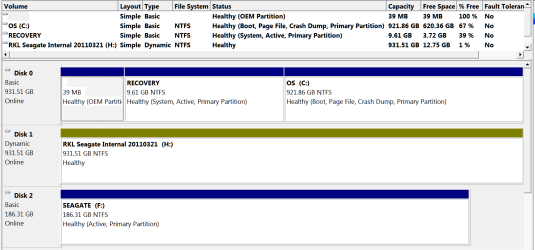
Why is Disk 1 Dynamic ??
 

My Computer My Computer

Computer type
PC/Desktop
Computer Manufacturer/Model Number
Skylake Special #666
OS
Windows 10 Pro x64
CPU
Intel Core i7 6700K
Motherboard
Asus Sabertooth Z170 Mark 1
Memory
GSkill TridentZ RGB 16GB 3600 16-16-16-36
Graphics Card(s)
EVGA GTX 980 Ti SC x2
Sound Card
Realtek High Definition
Monitor(s) Displays
AOC G2460PG
Screen Resolution
1920 x 1080 144Hz
Hard Drives
Samsung 860 Pro 256GB, Seagate Barracuda 4TB x2
PSU
EVGA 1000 P2, EVGA White Custom Braided Cables
Case
Corsair Vengeance C70 Gunmetal Black
Cooling
Corsair H100i v2, Corsair ML120 x2, Thermal Grizzly Kryonaut
Keyboard
Logitech G910 Orion Spectrum
Mouse
Logitech G700s
Internet Speed
Verizon Fios Quantum Gateway 75/75
Antivirus
Windows Defender, Malwarebytes Free 3.8.3
Browser
Chrome
Other Info
Corsair SP120 x4, LG Blu-ray Drive, Durabrand HT-395 100 Watt Dolby Digital Amp, Corsair H2100 Wireless 7.1 Headset
Has windows been activated on the new pc ?

Why is Disk 1 Dynamic ??
Not sure what you mean by activated. It's not a new PC, just a new hard drive to which I restored an Acronis .tib file which was an image of the original drive. Win 7 is running without any "not registered" error that I've noticed, if that's what you mean. I ran the restoration using the Acronis boot disk - ie. it was not done from Windows - and I simply accepted the settings in the restoration routine (which from my reading is what I was supposed to do). Was this a mistake? Note that Disk 1 is just another internal drive. I'm not booting from it. Do you think it is related to this problem? Should I put it "offline" and try WU again? Sorry for all questions, I'm a long time user but at the edge of competence here. Never messed with partitions before.

Any help appreciated. -Ron

Edit - Just remembered, that drive 1 had two partitions on it - I had created a second using Acronis but never used it - so after the restoration, I deleted it and expanded the original. Could this have changed the status of that partition? Don't see how this could be related to the problem, though.
 

My Computer My Computer

Computer type
PC/Desktop
Computer Manufacturer/Model Number
Dell XPS 9000/435T
OS
Win 7 Pro x 64
CPU
Intell Core i7 920 @2.67GHz
Motherboard
Board: DELL Inc. 0X501H A02
Memory
8184 Megabytes Usable Installed Memory
Graphics Card(s)
ATI Radeon HD 5700 Series [Display adapter]
Hard Drives
ST1000DM003-1CH162 [Hard drive] (1000.20 GB) -- drive 0, s/n S1D7JSM1, SMART Status: Healthy
ST31000528AS [Hard drive] (1000.20 GB) -- drive 1, s/n 6VPAZ1H2, rev CC3E, SMART Status: Healthy
Antivirus
AVG
Browser
Firefox
:orb:start/rightclick computer/properties

And check to see if windows is activated.


The Dynamic partition must be made Basic
 

My Computer My Computer

Computer type
PC/Desktop
Computer Manufacturer/Model Number
Skylake Special #666
OS
Windows 10 Pro x64
CPU
Intel Core i7 6700K
Motherboard
Asus Sabertooth Z170 Mark 1
Memory
GSkill TridentZ RGB 16GB 3600 16-16-16-36
Graphics Card(s)
EVGA GTX 980 Ti SC x2
Sound Card
Realtek High Definition
Monitor(s) Displays
AOC G2460PG
Screen Resolution
1920 x 1080 144Hz
Hard Drives
Samsung 860 Pro 256GB, Seagate Barracuda 4TB x2
PSU
EVGA 1000 P2, EVGA White Custom Braided Cables
Case
Corsair Vengeance C70 Gunmetal Black
Cooling
Corsair H100i v2, Corsair ML120 x2, Thermal Grizzly Kryonaut
Keyboard
Logitech G910 Orion Spectrum
Mouse
Logitech G700s
Internet Speed
Verizon Fios Quantum Gateway 75/75
Antivirus
Windows Defender, Malwarebytes Free 3.8.3
Browser
Chrome
Other Info
Corsair SP120 x4, LG Blu-ray Drive, Durabrand HT-395 100 Watt Dolby Digital Amp, Corsair H2100 Wireless 7.1 Headset
:orb:start/rightclick computer/properties

And check to see if windows is activated.


The Dynamic partition must be made Basic
Can't sleep, so back here. Yes, windows is activated and the product key is given.

However, on awakening the computer I have a "windows is not genuine..." window. What the....? Some quick searching and I see it may have to do with the usb drive I plugged in to transfer the files on that Disk 1 so that I can wipe that partition and change it as you say. But these usb drives didn't cause an issue as I was using them prior to the imaging of the new drive.

Oh boy... going back to bed.
 

My Computer My Computer

Computer type
PC/Desktop
Computer Manufacturer/Model Number
Dell XPS 9000/435T
OS
Win 7 Pro x 64
CPU
Intell Core i7 920 @2.67GHz
Motherboard
Board: DELL Inc. 0X501H A02
Memory
8184 Megabytes Usable Installed Memory
Graphics Card(s)
ATI Radeon HD 5700 Series [Display adapter]
Hard Drives
ST1000DM003-1CH162 [Hard drive] (1000.20 GB) -- drive 0, s/n S1D7JSM1, SMART Status: Healthy
ST31000528AS [Hard drive] (1000.20 GB) -- drive 1, s/n 6VPAZ1H2, rev CC3E, SMART Status: Healthy
Antivirus
AVG
Browser
Firefox
Sometimes during reimaging there is drive letter slippage which makes Win7 non-genuine. This is solved by Paragon Rescue -change drive letters.

However you have a more obvious problem: You're using customized drive recovery to recover to a HD that still has the factory Recovery partition marked Active - which if it was done at the factory is only meant to make it bootable, which you do not need if you are customizing recovery in this way.

So I would suggest you strongly consider getting a perfect Clean Reinstall - Factory OEM Windows 7 to the HD after wiping it first with Diskpart Clean Command to clear the boot sector and get the freshest start. Then after its set up and running fine capture your image to use going forward in place of reinstall.

An alternative is to wipe the HD and reimage only C partition to the full HD or space to the left closest to where the disk reader parks. Then Mark Partition C as Active (Method Two) and run Startup Repair - Run up to 3 Separate Times to write the System Boot files to C and start Win7. This may avoid the need to reinstall, although that is always preferable if you haven't gotten a perfect install to begin with - read the steps in Clean Reinstall - Factory OEM Windows 7 to see.

Do these operations with all other HD's unplugged. When you plug them back in, Convert dynamic disk to basic disk with Partition Wizard since Dynamic should only be used to span partitions across multiple HD's.
 
Thank you for response. I need to study it, but let me say immediately that was a blank disk to which I applied the restoration. The OEM partitions were *in the image.* I restored all partitions as they were on the original disk. Was this wrong?

Also, I have the OEM installation disks that Dell provided with the replacement drive, so if I need to do a complete reinstall, I'll use them. I was hoping to avoid this, due to the necessity of reinstalling a bunch of apps, but I suppose it's getting more and more like I need to.

First might as well try a couple other things. Lots of reading suggests this problem relates to an
Intel(R) Rapid Storage Technology (Intel(R) RST)

issue. Also to
MS update KB2661254


I'm trying to summon the nerve to run these patches. Guess it's getting to point where there is nothing to lose.


Will study your reply further. Thank you,


-Ron

EDIT: This is a recurring error in my Windows Applications log:

The Cryptographic Services service failed to initialize the Catalog Database. The ESENT error was: -583.

From my reading, I'm not the first with this problem.

EDIT: BTW, wiping and making the second drive basic does nothing to clear the WU problem.
 
Last edited:

My Computer My Computer

Computer type
PC/Desktop
Computer Manufacturer/Model Number
Dell XPS 9000/435T
OS
Win 7 Pro x 64
CPU
Intell Core i7 920 @2.67GHz
Motherboard
Board: DELL Inc. 0X501H A02
Memory
8184 Megabytes Usable Installed Memory
Graphics Card(s)
ATI Radeon HD 5700 Series [Display adapter]
Hard Drives
ST1000DM003-1CH162 [Hard drive] (1000.20 GB) -- drive 0, s/n S1D7JSM1, SMART Status: Healthy
ST31000528AS [Hard drive] (1000.20 GB) -- drive 1, s/n 6VPAZ1H2, rev CC3E, SMART Status: Healthy
Antivirus
AVG
Browser
Firefox
If you're customizing your recovery using a backup imaging program then it's not necessary or advisable to include the Recovery and OEM partitions. You should make your Recovery disks, wipe the HD to Clean Reinstall without the corrupting factory bloatware, then capture your image of System Reserved and C to use in place of Recovery.

Otherwise you're compromising the image integrity with a Recovery partition that isn't needed since it contains the worst possible install with all of the bloatware and useless duplicate utilities that throttle Win7. In your case this partition also contains the boot files and is booting Win7 which is dodgy to begin with when set up that way at factory so that Recovery will run from its hotkey.

I doubt whether Recovery will even run from its hotkey from a reimaged Recovery partition but you can try it if for some reason you want to preserve the corrupt Recovery image. If you haven't made your Recovery disks you can also try that since having them is always good in case you want to sell the PC.

I would wipe it and get a perfect Clean Reinstall - Factory OEM Windows 7without having the Recovery image tagging along which no tech enthusiast would use to begin with.
 
It seems I have fixed the problem. At least WU has been working now for a few hours. Here's how: I downloaded and installed the utility from this link:

Error Messages Appear During Windows Update, When Inserting Card or Using Live Mail | HP® Support

The executable is sp47845.exe . What this is is an installation package for the Intel Rapid Storage Technology, which you can read about here:

Intel® Chipset Software Installation Utility — Do I need the Intel® Chipset Software Installation Utility?

While Intel apparently makes this available, it was HP who constructed the most convenient package.

It took a lot of searching and futzing around before realizing that this solution had appeared in several prior threads/forums over the last couple years, and that the problems reported there were similar to mine, and presumably fundamentally the same. Typically, one restores an image to a new 1TB drive, or larger, or even does a straightforward initial installation, and the resulting install is faulty, not for any partition-related issues, but because there's something about a few dll's in Win 7 (and other versions) files - esent.dll appears to be the most notorious - that doesn't get along with the new drives running under the Intel controller chipset. I don't really understand technically what the issue is, but I'm posting these links in homage to the great folks whose prior discussions led me to that file. They and these forums are tremendous, and I hope this thread will help someone similarly afflicted in the future.

For future searchers, the drive to which the image was restored, and on which now resides this Intel Rapid Storage Technology (which, BTW, sits in the status bar and you can interact with it), is the first one listed in my profile.

I certainly appreciate the expertise/opinions of the posters above, but, with respect, I'm sure glad I didn't jump to a clean install, as I'd be reinstalling programs for days. Yes, my system does show signs of bloatware sponginess, but I'd rather deal with that than having to hunt through disks to reinstall complicated music software - not to mention a bunch other stuff - followed by downloaded upgrades and temperamental server-dependent licensing schemes.

I'll be reading about OEM partitions and the like, and hopefully gain some wisdom for the future. Thank you again. -Ron

Incidentally no one addressed my parenthetical question above. How does Windows - for example the boot tab of msconfig - know that the boot version of Win7 Pro is now "recovered." It was installed from an original image. I see where in the registry it is named with the "(recovery)" phrase appended, but that registry should have simply been another file in the image, no? How did Windows know to change the key? Inquiring obsessives want to know... ;)
 

My Computer My Computer

Computer type
PC/Desktop
Computer Manufacturer/Model Number
Dell XPS 9000/435T
OS
Win 7 Pro x 64
CPU
Intell Core i7 920 @2.67GHz
Motherboard
Board: DELL Inc. 0X501H A02
Memory
8184 Megabytes Usable Installed Memory
Graphics Card(s)
ATI Radeon HD 5700 Series [Display adapter]
Hard Drives
ST1000DM003-1CH162 [Hard drive] (1000.20 GB) -- drive 0, s/n S1D7JSM1, SMART Status: Healthy
ST31000528AS [Hard drive] (1000.20 GB) -- drive 1, s/n 6VPAZ1H2, rev CC3E, SMART Status: Healthy
Antivirus
AVG
Browser
Firefox
Glad you got it solved. As long as Win7 is always instantaneous, never hangs or hesitates, then you may be able to get by with just Clean Up Factory Bloatware.

However in almost all OEM's the factory preinstall is a corrupt install, possibly the worst WIn7 install one can have. Anyone with the abilities you exhibited here can handle it with few or no problems, plus you have us behind you as we've been for countless thousands of others who've never had a complaint.
 
Back
Top