
windows update

phenix

New member
Member
VIP
Local time
10:46 AM
Messages
254
Two computers: 1 64-bit windows 7 pro, 1 32-bit windows 7 pro
I am aware of Windows updates having updates to go to Windows 10.
I have not installed any of them to my knowledge.
I the past I have been doing manual updates on both computers.
Today I manually updated the 64-bit computer with no problems.

The update for the 32-bit computer does nothing.
I can no longer find a setting to turn off/on for windows updates.
I have been doing manual updates for this computer for years......
Any ideas would be appreciated.
 

My Computer

Computer type
PC/Desktop
Computer Manufacturer/Model Number
had the system built by PCsandParts
OS
windows 7 Pro 64 bit
CPU
mini tower
Motherboard
h110m-k (lga1151)
Memory
4g
Graphics Card(s)
nvidia geforce gt730 graphics card
Sound Card
high definition audio device
Monitor(s) Displays
19" dell ultra sharp
Screen Resolution
1280 x 800
Hard Drives
Kingston SSD
PSU
?
Case
?
Cooling
?
Keyboard
standard ps/2 keyboard
Mouse
ps/2 compatible optical
Internet Speed
fiber optics
Antivirus
ESET Smart Security
Browser
IE11
Other Info
no Wifi. Bose speakers, optical drive tsstcorp dvd+-RW
Surely others are having this problem with windows 7 pro 32-bit.
Can't believe there isn't a fix for it.....
 

My Computer

Computer type
PC/Desktop
Computer Manufacturer/Model Number
had the system built by PCsandParts
OS
windows 7 Pro 64 bit
CPU
mini tower
Motherboard
h110m-k (lga1151)
Memory
4g
Graphics Card(s)
nvidia geforce gt730 graphics card
Sound Card
high definition audio device
Monitor(s) Displays
19" dell ultra sharp
Screen Resolution
1280 x 800
Hard Drives
Kingston SSD
PSU
?
Case
?
Cooling
?
Keyboard
standard ps/2 keyboard
Mouse
ps/2 compatible optical
Internet Speed
fiber optics
Antivirus
ESET Smart Security
Browser
IE11
Other Info
no Wifi. Bose speakers, optical drive tsstcorp dvd+-RW
Please upload a screendump of what you're seeing on the 32-bit Windows Update screen
 

My Computer

Computer type
Laptop
Computer Manufacturer/Model Number
Asus K52F or Lenovo B51-80
OS
Win 7 x64 Home Premium (and x86 VirtualBox VM)/Win10
CPU
i3 370M/i7 6500U
Motherboard
Asus/Lenovo
Memory
8GB - finally :)/8GB
Graphics Card(s)
it's an i3, dude!/dual Intel&nVidia
Sound Card
onboard
Monitor(s) Displays
15.6" built-in
Screen Resolution
1366x768/1920x1080
Hard Drives
750GB Seagate internal
Sundry external drives attached to other computers on the local network
1TB SSD on the Lenovo
PSU
n/a
Internet Speed
as much as I can get - usually on a dongle/phone, so <1MB/s
Antivirus
MSE/Defender
Browser
IE11/12/Edge/Chrome/FF(if I must)
Thank you very much for replying.
The problem is now solved.
I did a fresh install of Windows 7 pro 32-bit.
Only one problem with that is that service pack 1 did not
generate with the fresh install.
 

My Computer

Computer type
PC/Desktop
Computer Manufacturer/Model Number
had the system built by PCsandParts
OS
windows 7 Pro 64 bit
CPU
mini tower
Motherboard
h110m-k (lga1151)
Memory
4g
Graphics Card(s)
nvidia geforce gt730 graphics card
Sound Card
high definition audio device
Monitor(s) Displays
19" dell ultra sharp
Screen Resolution
1280 x 800
Hard Drives
Kingston SSD
PSU
?
Case
?
Cooling
?
Keyboard
standard ps/2 keyboard
Mouse
ps/2 compatible optical
Internet Speed
fiber optics
Antivirus
ESET Smart Security
Browser
IE11
Other Info
no Wifi. Bose speakers, optical drive tsstcorp dvd+-RW
Good luck with the fresh install!
You will be offered SP1 once you've installed the necessary updates - so persevere...
Here's my preferred methodology for installing the 200+ windows Updates in Vista and Win7...

Note - between each of the below batches of updates, reboot at least once, even if the machine auto-rebooted during the updates. After teh update, do a new Check for Updates. Add any remaining updates or failed updates to the next batch.


1) Install all 'Security Update for Windows'
Reboot
Check for Updates
(some will have failed, and some new ones will have appeared)
2) Install the remaining/new 'Security Update for Windows'
Reboot
Check for Updates
3) Install all ordinary 'Update for Windows'
Reboot
Check for Updates
4) install updates for IE8 - but NOT IE 9/10/11
Reboot
Check for Updates
5) install all other updates EXCEPT .NET ones and IE9/10/11
Reboot
Check for Updates
repeat 5 until there's nothing left in the main window except the .NET and IE upgrades

6) Install all Security Updates for .NET - but nothing else
Reboot
Check for Updates
7) Install all other .NET updates
Reboot
Check for Updates
8) Install IE10 if offered - IE11 should wait if it's still an Optional update.
9) Install the IE10 updates, then install IE11 and update that.

Somewhere along the way, you'll be offered SP1 - take is and start again ;)
 

My Computer

Computer type
Laptop
Computer Manufacturer/Model Number
Asus K52F or Lenovo B51-80
OS
Win 7 x64 Home Premium (and x86 VirtualBox VM)/Win10
CPU
i3 370M/i7 6500U
Motherboard
Asus/Lenovo
Memory
8GB - finally :)/8GB
Graphics Card(s)
it's an i3, dude!/dual Intel&nVidia
Sound Card
onboard
Monitor(s) Displays
15.6" built-in
Screen Resolution
1366x768/1920x1080
Hard Drives
750GB Seagate internal
Sundry external drives attached to other computers on the local network
1TB SSD on the Lenovo
PSU
n/a
Internet Speed
as much as I can get - usually on a dongle/phone, so <1MB/s
Antivirus
MSE/Defender
Browser
IE11/12/Edge/Chrome/FF(if I must)
Still having problems with Windows Update.
I have windows set to run manually.
Running windows 7 pro 32-bit
Fresh copy of windows - then was able to update past sp1 and now have
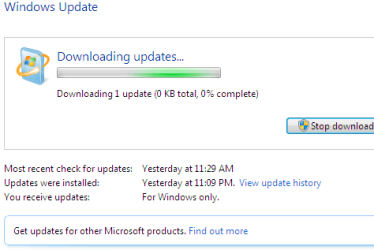
190+ updates that I can't do. I have included a screen shot.
It just hangs as shown in the screen shot.

I have tried Microsofts "windows6.1-kb947821-v34-x86" - this ran,
"reset_windows_update_history" - this ran
"microsoftfixit50202" - this hangs
Thanks for any help.....
 

Attachments

  • wuhang.png
    wuhang.png
    7.7 KB · Views: 15

My Computer

Computer type
PC/Desktop
Computer Manufacturer/Model Number
had the system built by PCsandParts
OS
windows 7 Pro 64 bit
CPU
mini tower
Motherboard
h110m-k (lga1151)
Memory
4g
Graphics Card(s)
nvidia geforce gt730 graphics card
Sound Card
high definition audio device
Monitor(s) Displays
19" dell ultra sharp
Screen Resolution
1280 x 800
Hard Drives
Kingston SSD
PSU
?
Case
?
Cooling
?
Keyboard
standard ps/2 keyboard
Mouse
ps/2 compatible optical
Internet Speed
fiber optics
Antivirus
ESET Smart Security
Browser
IE11
Other Info
no Wifi. Bose speakers, optical drive tsstcorp dvd+-RW
Check your network usage and the svchost and TrustedInstaller CPU usage in the Task Manager - it can take an hour or so for significant download to become apparent especially if there isn't a lot of RAM in the system or you are using an aggressive AV such as Norton.
 

My Computer

Computer type
Laptop
Computer Manufacturer/Model Number
Asus K52F or Lenovo B51-80
OS
Win 7 x64 Home Premium (and x86 VirtualBox VM)/Win10
CPU
i3 370M/i7 6500U
Motherboard
Asus/Lenovo
Memory
8GB - finally :)/8GB
Graphics Card(s)
it's an i3, dude!/dual Intel&nVidia
Sound Card
onboard
Monitor(s) Displays
15.6" built-in
Screen Resolution
1366x768/1920x1080
Hard Drives
750GB Seagate internal
Sundry external drives attached to other computers on the local network
1TB SSD on the Lenovo
PSU
n/a
Internet Speed
as much as I can get - usually on a dongle/phone, so <1MB/s
Antivirus
MSE/Defender
Browser
IE11/12/Edge/Chrome/FF(if I must)
I THINK I might have it solved!!!!
I did a complete new Install of windows 7 pro 32-bit.
Things now seem to be working.
Thanks for your help.
 

My Computer

Computer type
PC/Desktop
Computer Manufacturer/Model Number
had the system built by PCsandParts
OS
windows 7 Pro 64 bit
CPU
mini tower
Motherboard
h110m-k (lga1151)
Memory
4g
Graphics Card(s)
nvidia geforce gt730 graphics card
Sound Card
high definition audio device
Monitor(s) Displays
19" dell ultra sharp
Screen Resolution
1280 x 800
Hard Drives
Kingston SSD
PSU
?
Case
?
Cooling
?
Keyboard
standard ps/2 keyboard
Mouse
ps/2 compatible optical
Internet Speed
fiber optics
Antivirus
ESET Smart Security
Browser
IE11
Other Info
no Wifi. Bose speakers, optical drive tsstcorp dvd+-RW
Back
Top