Solved Windows updated Shell32.dll

Raiderman

New member
Local time
12:57 PM
Messages
24
For some reason, every time I try to edit shell32 my system gets an explorer crash at boot up. Windows update has recently updated it to 6.1.7106.23155. I use the same method I always have to edit the icons. Copy and paste system32, and syswow64 shell32 files into a folder, then edit them to how I want, take ownership of originals and rename to .bak, then copy the modified files to the respective directories. I have tried three times to edit them, and each time, I had to do a system restore, because explorer.exe failed to open properly and the system will reboot. I have also tried system file replacer and it also fails to work. Anyone else having the same issue?
 

My Computer

Computer type
Laptop
Computer Manufacturer/Model Number
Toshiba Qosmio
OS
Windows 7 Ultimate 64bit
CPU
Intel Core I7
I also use custom icons and used to do a similar trick with XP to add icons to the shell32.dll. With W7 I also ran into problems and so just stored all the extra icons in a new folder I created in the same directory. So when I want to customize, I just browse to the other folder. Takes a bit longer than scrolling through the default folder, but works.
 

My Computer

OS
Win 7 Ultimate 64-bit
Hi Raiderman, when did the problem start happening?
Have you recently installed this update?

https://support.microsoft.com/en-us/kb/3123862

Nobody knows what it actually does yet, other than vague details about upgrading to Windows 10, but the files it replaces are explorer.exe, explorerframe.dll, shell32.dll and authui.dll
If you have that update installed, then it could be that causing the issue.
 

My Computer

Computer type
PC/Desktop
Computer Manufacturer/Model Number
Custom Build
OS
Win 7 Ultimate, Win 8.1 Pro, Linux Mint 19 Cinnamon (All 64-Bit)
CPU
Intel i5 4690K
Motherboard
Gigabyte Z97X-UD3H
Memory
Corsair Vengeance LP 32GB DDR3
Graphics Card(s)
MSI GTX 1060 GAMING X 6GB
Sound Card
Onboard
Hard Drives
Samsung 850 EVO 250GB SSD (x2)
Samsung 860 EVO 1TB SSD (x2)
Crucial MX300 525GB SSD
WD Blue 2TB 5400rpm Intellipark Disabled (x2)
PSU
Corsair HX750i
Case
Phanteks Enthoo Pro
Cooling
CM Hyper 212 EVO on CPU, Noctua Redux NF-P14S 1500rpm (x6)
Keyboard
Corsair K70 RGB LUX
Mouse
Corsair Sabre RGB
Antivirus
Avast Free, MalwareBytes, SAS & CryptoPrevent
Browser
Chrome
Other Info
StarTech PEXESAT322I 2 Port PCI-E SATA Card
ASUS PCE-AC56 Dual-band AC1300 Wireless Card
Akasa FC.Six Manual Fan Controller
And a Partridge in a Pear Tree!
Hi Raiderman, when did the problem start happening?
Have you recently installed this update?

https://support.microsoft.com/en-us/kb/3123862

Nobody knows what it actually does yet, other than vague details about upgrading to Windows 10, but the files it replaces are explorer.exe, explorerframe.dll, shell32.dll and authui.dll
If you have that update installed, then it could be that causing the issue.


Bingo, thats the one! I thought it was some security update. Will be uninstalling, and hiding that update!

Edit: I cant find any update with those numbers installed on my machine. I know that is the problem though.
 
Last edited:

My Computer

Computer type
Laptop
Computer Manufacturer/Model Number
Toshiba Qosmio
OS
Windows 7 Ultimate 64bit
CPU
Intel Core I7
I cant find any update with those numbers installed on my machine.

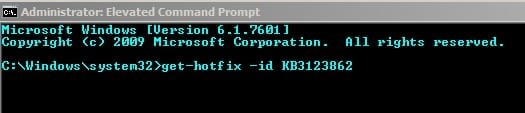
Try running:

get-hotfix -id KB3123862

in an Elevated Command Prompt:

Administrator_ Elevated Command Prompt.jpg

If found run:

wusa /uninstall /KB:3123862

Note: Include the colon.
 

My Computer

Computer type
Laptop
Computer Manufacturer/Model Number
ASUS
OS
Microsoft Windows 7 Home Premium 64-bit 7601 Multiprocessor Free Service Pack 1
CPU
AMD C-60 APU with Radeon(tm) HD Graphics
Motherboard
ASUSTeK COMPUTER INC. X501U
Memory
4.00 GB
Graphics Card(s)
AMD Radeon HD 6290 Graphics
Sound Card
(1) AMD High Definition Audio Device (2) Realtek High Defi
Screen Resolution
1366 x 768 x 32 bits (4294967296 colors) @ 60 Hz
Hard Drives
Hitachi HTS545050A7E380 SATA Disk Device
Antivirus
Comodo CIS & FW, SecureAplus App Whitelisting, Threatfire
Browser
Cyberfox 64bit, Opera 64bit, Airfox
Other Info
Spy-The-Spy, HitmanPro.Alert, Norton Connect Safe, MJRegWatcher, BitDefender TrafficLight, Voodoo Shield, Zemana AntiMalware
I did a clean install and will be watching for these little buggers. So, I was able to edit shell32 now. Thanks everyone for the help!

Edit: I have another issue, but I will open a new thread since this is marked solved.
 

My Computer

Computer type
Laptop
Computer Manufacturer/Model Number
Toshiba Qosmio
OS
Windows 7 Ultimate 64bit
CPU
Intel Core I7
Back
Top