Solved Windows Updates cannot run!

Luke14789

New member
Local time
10:00 PM
Messages
13
Hello, I am running on the RC 7100 Build and since yesterday I have been getting a slight problem.
When I try to run the Windows Updates I get this message.
Capture.jpg

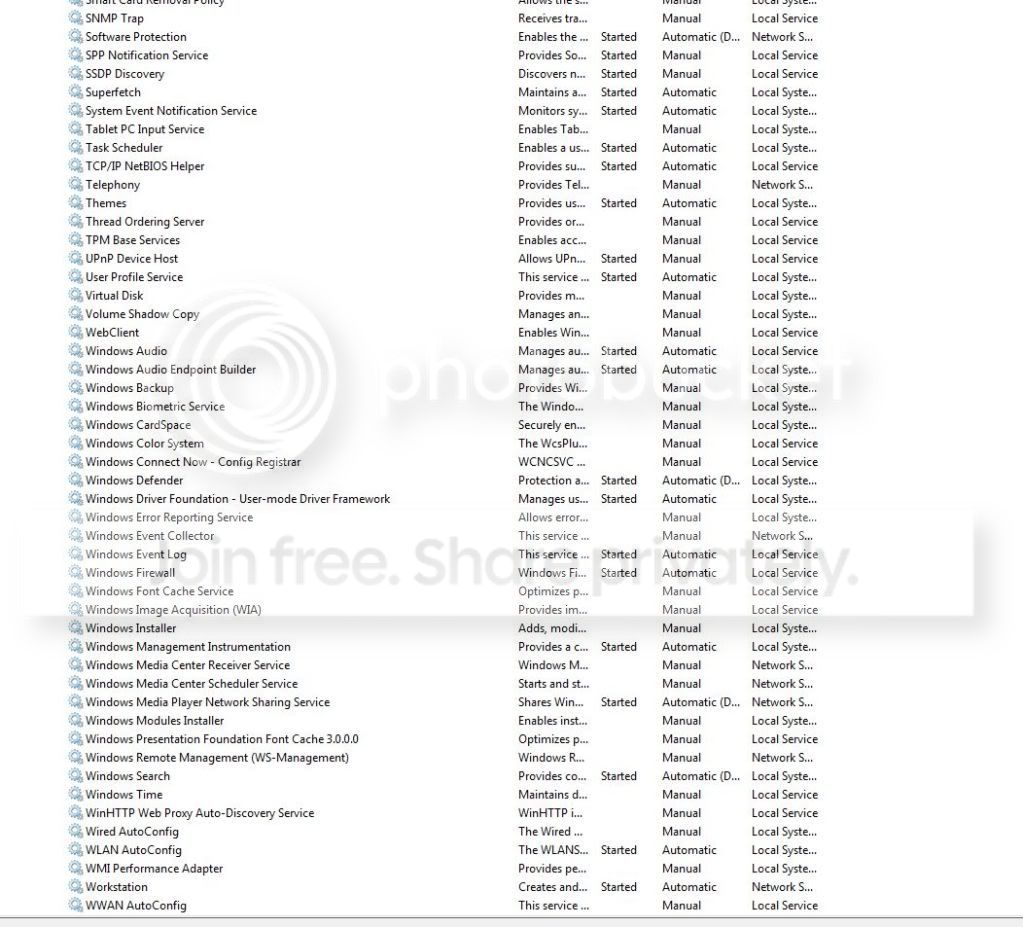
Which service in particular is that ? Because I don't have anything called "Automatic Updates" or "Windows Updates" in my list of services.
IS there a way to fix this ?
thank you
 

My Computer

OS
Windows 7 RTM (Build 7600)
Hi,make sure the windows update is turned on in services, as per the picture.
Capturew.PNG
 

My Computer

Computer Manufacturer/Model Number
Self Build 64bit
OS
Vista Ult64, Win7600
CPU
Intel Core 2 Quad Q6600 @ 2400 MHz 64bit OS
Motherboard
Asus P5E3 Deluxe WiFi @p 64 bit OS
Memory
4096 MB DDR3-SDRAM
Graphics Card(s)
ATI Radeon HD 3870 Series x2 Crossfired
Sound Card
Realtek on board
Monitor(s) Displays
Samsung SyncMaster - 23 inches
Screen Resolution
1680x1050 pixels at 60 Hz in True Colors
Hard Drives
Hitachi (250 GB)/Samsung 750 GB. /Barracuda 160 GB.
My Book 1 TB external..
PSU
Cooler Master 1000w
Case
Cooler Master Cosmos 1000.
Cooling
Fans and fresh air,
Keyboard
Wireless
Mouse
Wireless
Internet Speed
Never fast enough
Other Info
I use a Magnum.
and that is where the problem is.
I dont' have that in there:cry:
Capture-1.jpg


Tested for viruses with malwarebytes as well as AVG. - Nothing
 

My Computer

OS
Windows 7 RTM (Build 7600)
Is windows update in your control panel?
 

My Computer

Computer Manufacturer/Model Number
Self Build 64bit
OS
Vista Ult64, Win7600
CPU
Intel Core 2 Quad Q6600 @ 2400 MHz 64bit OS
Motherboard
Asus P5E3 Deluxe WiFi @p 64 bit OS
Memory
4096 MB DDR3-SDRAM
Graphics Card(s)
ATI Radeon HD 3870 Series x2 Crossfired
Sound Card
Realtek on board
Monitor(s) Displays
Samsung SyncMaster - 23 inches
Screen Resolution
1680x1050 pixels at 60 Hz in True Colors
Hard Drives
Hitachi (250 GB)/Samsung 750 GB. /Barracuda 160 GB.
My Book 1 TB external..
PSU
Cooler Master 1000w
Case
Cooler Master Cosmos 1000.
Cooling
Fans and fresh air,
Keyboard
Wireless
Mouse
Wireless
Internet Speed
Never fast enough
Other Info
I use a Magnum.
Did you install anything recently,and if so try to do a Windows System Restore to before the time that you did,just a thought.
 
Last edited:

My Computer

Computer Manufacturer/Model Number
Self Build 64bit
OS
Vista Ult64, Win7600
CPU
Intel Core 2 Quad Q6600 @ 2400 MHz 64bit OS
Motherboard
Asus P5E3 Deluxe WiFi @p 64 bit OS
Memory
4096 MB DDR3-SDRAM
Graphics Card(s)
ATI Radeon HD 3870 Series x2 Crossfired
Sound Card
Realtek on board
Monitor(s) Displays
Samsung SyncMaster - 23 inches
Screen Resolution
1680x1050 pixels at 60 Hz in True Colors
Hard Drives
Hitachi (250 GB)/Samsung 750 GB. /Barracuda 160 GB.
My Book 1 TB external..
PSU
Cooler Master 1000w
Case
Cooler Master Cosmos 1000.
Cooling
Fans and fresh air,
Keyboard
Wireless
Mouse
Wireless
Internet Speed
Never fast enough
Other Info
I use a Magnum.
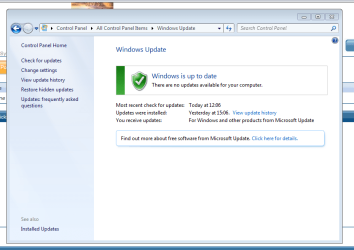
Here is what my Update page looks like compared to yours.
Capturebb.PNG
keep pressing "Check for updates" and if nothing happens, try a reboot,and see if there is any change.
 

My Computer

Computer Manufacturer/Model Number
Self Build 64bit
OS
Vista Ult64, Win7600
CPU
Intel Core 2 Quad Q6600 @ 2400 MHz 64bit OS
Motherboard
Asus P5E3 Deluxe WiFi @p 64 bit OS
Memory
4096 MB DDR3-SDRAM
Graphics Card(s)
ATI Radeon HD 3870 Series x2 Crossfired
Sound Card
Realtek on board
Monitor(s) Displays
Samsung SyncMaster - 23 inches
Screen Resolution
1680x1050 pixels at 60 Hz in True Colors
Hard Drives
Hitachi (250 GB)/Samsung 750 GB. /Barracuda 160 GB.
My Book 1 TB external..
PSU
Cooler Master 1000w
Case
Cooler Master Cosmos 1000.
Cooling
Fans and fresh air,
Keyboard
Wireless
Mouse
Wireless
Internet Speed
Never fast enough
Other Info
I use a Magnum.
Sorry to say that unless someone posts a method of actually downloading the Update service and installing into your system, you are going to have to reinstall Windows to get it. (Or follow JFar's advice to do a system restore. Maybe it will show up again.)

That is very strange. I have never seen this before.If you didn't command Windows to remove the service, or use Dameware to do so or something similar, than that only leaves the possibility of some malware or hacker doing this to you.

Windows always contains that particular service under all conditions.
 

My Computer

Computer Manufacturer/Model Number
self built
OS
7600.20510 x86
CPU
P4 550 3.4 GHz HT running at 3.5 GHz
Motherboard
MSI PM8M3-V (MS-7211 v1.x) Micro-ATX mainboard
Memory
OCZ 2 GB(2x1GB) DDR400mHz running @ 414 mHz
Graphics Card(s)
HIS Radeon HD 3850 IceQ 3 Turbo HDMI Dual DL-DVI AGP
Sound Card
MOTU Traveler firewire studio interface 192 kHz 24 bit
Monitor(s) Displays
22" widescreen Acer X223W LCD, 17" Compaq P75 CRT
Screen Resolution
1680x1050 and 1280x1024
Hard Drives
SATA I x2 WD, 400 GB and 120 GB, SATA 2 WD Caviar Black 1 TB
PSU
350W generic
Case
Cybertronpc, it glows blue
Cooling
stock cpu fan, Ice-Q 3 gpu and system, many case fans
Keyboard
Logitch Classical Keyboard 200
Mouse
Logitech Mediaplay cordless
Internet Speed
1792/448 kbits/sec
Other Info
SATA II PCI fake RAID adapter, 1 GB Readyboost, original ATI Remote Wonder (even works with WMC perfectly), Logitech Rumblepad 2 game controller x2
great, I have JUST installed fresh windows yesterday.
I actually did an update and the next day this happened.
System restore did nothing
 

My Computer

OS
Windows 7 RTM (Build 7600)

My Computer

Computer Manufacturer/Model Number
Self Build 64bit
OS
Vista Ult64, Win7600
CPU
Intel Core 2 Quad Q6600 @ 2400 MHz 64bit OS
Motherboard
Asus P5E3 Deluxe WiFi @p 64 bit OS
Memory
4096 MB DDR3-SDRAM
Graphics Card(s)
ATI Radeon HD 3870 Series x2 Crossfired
Sound Card
Realtek on board
Monitor(s) Displays
Samsung SyncMaster - 23 inches
Screen Resolution
1680x1050 pixels at 60 Hz in True Colors
Hard Drives
Hitachi (250 GB)/Samsung 750 GB. /Barracuda 160 GB.
My Book 1 TB external..
PSU
Cooler Master 1000w
Case
Cooler Master Cosmos 1000.
Cooling
Fans and fresh air,
Keyboard
Wireless
Mouse
Wireless
Internet Speed
Never fast enough
Other Info
I use a Magnum.
this happened to me once but it sorted itself out within a few minutes :D
 

My Computer

Computer Manufacturer/Model Number
Sony
OS
Main OS: Windows 7 64 bit, Secondary: Vista 32 bit
CPU
Intel Core 2 Duo P8400 @ 2.26 Ghz
Motherboard
Intel PM45
Memory
4GB DDR2
Graphics Card(s)
ATI Radeon Mobility HD3470
Sound Card
Integrated Realtek
Monitor(s) Displays
Integrated (Laptop) 16.4 inch
Screen Resolution
1600x900
Hard Drives
320 GB
Mouse
Logitech
Internet Speed
1 Mb/s
I SOLVED IT.
All that needed to be done was execute this command
regsvr32 wuaueng.dll

My updates are back and running.
Whoever said there is no way to fix this, GG
 
Last edited:

My Computer

OS
Windows 7 RTM (Build 7600)
Make sure you activate your copy of windows before doing an update. Microsoft checks for valid copy of windows before doing some updates and this happened to me. After I validated my copy over the internet, the update started working the way it should.
 

My Computer

OS
Win 7 RC1
Well, seems like you've successfully found a way to install it back on your system. That's what I said need to be done OR there's no way to fix it. Maybe just a misunderstanding, but cool, glad you fixed it up.

Having it missing from the service list, it was obvious it needed to be put back there somehow heh.
 

My Computer

Computer Manufacturer/Model Number
self built
OS
7600.20510 x86
CPU
P4 550 3.4 GHz HT running at 3.5 GHz
Motherboard
MSI PM8M3-V (MS-7211 v1.x) Micro-ATX mainboard
Memory
OCZ 2 GB(2x1GB) DDR400mHz running @ 414 mHz
Graphics Card(s)
HIS Radeon HD 3850 IceQ 3 Turbo HDMI Dual DL-DVI AGP
Sound Card
MOTU Traveler firewire studio interface 192 kHz 24 bit
Monitor(s) Displays
22" widescreen Acer X223W LCD, 17" Compaq P75 CRT
Screen Resolution
1680x1050 and 1280x1024
Hard Drives
SATA I x2 WD, 400 GB and 120 GB, SATA 2 WD Caviar Black 1 TB
PSU
350W generic
Case
Cybertronpc, it glows blue
Cooling
stock cpu fan, Ice-Q 3 gpu and system, many case fans
Keyboard
Logitch Classical Keyboard 200
Mouse
Logitech Mediaplay cordless
Internet Speed
1792/448 kbits/sec
Other Info
SATA II PCI fake RAID adapter, 1 GB Readyboost, original ATI Remote Wonder (even works with WMC perfectly), Logitech Rumblepad 2 game controller x2
oh yea, sorry if I came off kinda mean. The thought of reisntalling everything scared me and in reality all that needed to be done was execute that command.
5 second fix hehe
 

My Computer

OS
Windows 7 RTM (Build 7600)
I'm just curious ... was this a clean install or did you do an upgrade from either XP or Vista?
 

My Computer

Computer type
PC/Desktop
Computer Manufacturer/Model Number
Bruce ... somewhere in his 40's
OS
Windows 7 Ultimate 32bit SP1
CPU
Intel(R) Core(TM)2 Quad CPU @ 2.40GHz, 2400 MHz
Motherboard
INTEL/D975XBX2
Memory
4 GB
Graphics Card(s)
ATI Radeon HD 2600 Pro
Monitor(s) Displays
Samsung SyncMaster 914v
Screen Resolution
1280 x 1024
Hard Drives
2/500GB each ... ST3500630AS ATA Device.
One is not connected
PSU
Rocketfish 700 W
Case
G.Skill Gigabyte Chassis
Keyboard
Standard PS/2 Keyboard
Mouse
Microsoft PS/2 Mouse
Internet Speed
DSL
Antivirus
Avira Internet Security
Browser
IE 11
Other Info
ATI HDMI Audio
Just like to share with others, I actually having the same problem in the first post, but my Windows Update & BITS services is running without any problem.

Also did a lot of search in the net and tested with a lot of ways (eg. clean up the Windows\SoftwareDistributor folder, re-register windows update services, manual install patch, windows trobleshooting, etc) with no help.

In Windowsupdate log, it show error as follow:
DtaStor FATAL: Failed to initialize datastore, error = 0xC8000247
Agent * WARNING: Online service registration/service ID resolution failed, hr=0xC8000247
DtaStor FATAL: Failed to initialize datastore, error = 0xC8000247
Agent * WARNING: Exit code = 0xC8000247


This problem can be simulated with a clean installation of Windows 7 Pro 64 bit with the hardware drivers.

After few days searching and testing, finally found the problem - it was cause by "Intel Rapid Storage Technology (RST)" where it enhancement SATA disk performance. After I downloaded and install the latest version of this driver, the problem solved.

I also read somewhere that some third party driver which can cause the Windows Update problem.

Hope this can bring some hints to other people who encounter the same problem. First try to make sure all drivers are the latest.
 

My Computer

OS
Windows 7 Pro x64
Motherboard
GIGABYTE H55M-UD2H
"Intel Rapid Storage Technology (RST)" update fixed my problem thank you!
 

My Computer

OS
windows 7
Back
Top