Windows Updates Fail, repeatedly

prncess23

Banned
Local time
9:44 AM
Messages
8
Hello,

I have been having trouble with my HP dv6812nr laptop with windows 7 professional installing windows updates for about a month now. I never had this problem before. I have tried installing the updates over 30 times (i am not exaggerating) and every time they have failed. I have talk to hp tech support and they cant solve it either.

please help.

Updates started failing on 1/27/2009

here the updates that fail:

These two have failed over 30 times:

Update for Windows 7 (KB977074)
Update for Windows 7 (KB976972)

These updates were newly released that also failed:
Update for Internet Explorer 8 Compatibility View List for Windows 7 (KB978506)
Security Update for Windows 7 (KB977165)
Security Update for Windows 7 (KB971468)
Security Update for Windows 7 (KB975560)
Security Update for Windows 7 (KB978251)

please help.
 

My Computer

Computer Manufacturer/Model Number
Hp dv6812nr
OS
Windows 7 professional
I have bad feelings about it,which ones hotfixes you have problem,there are also here threads with these hotfixes unfortunately without solution

1.Run cmd.exe with administrative previlliges (right click on cmd.exe) as admin and type:

sfc /scannow

2.Run Readiness Tool Description of the System Update Readiness Tool for Windows Vista, for Windows Server 2008, for Windows 7, and for Windows Server 2008 R2
even if this tool don't solve problem it create CheckSur.log file in C:\Windows\Logs\CBS folder
3.Download firegenul Altair Technologies Ltd.
place firegenul.exe in C:\Windows\System32

next again run cmd.exe with admin previlliges and type:

firegenul

it creates report from WindowsUpdate.log and is saved to C:\Windows\System32 as FireGenReport.htm
4.Prepare log from VistaSysInfoTool VistaForums SysInfo Tool
5.Find CBS.log file in C:\Windows\Logs\CBS folder

all files CBS.log,CheckSur.log,firegenReport.htm and log from VistaSysInfo pack to ZIP format and attache to post
 

My Computer

Computer Manufacturer/Model Number
Custom made
OS
Windows 7 Professional x64 PL
CPU
AMD Athlon 4450e
Motherboard
Giga-Byte GA-MA69G-S3H
Memory
GoodRam DDR2 2x2048MB (FSB 800MHz)
Graphics Card(s)
nVidia GeForce 9600GT (G94-300) 1024 MB
Monitor(s) Displays
SAMSUNG SyncMaster HS2P301688
Hard Drives
Seagate ST3750330AS 750GB
PSU
Corsair 550W
Cooling
AeroCool ExtremeEngine 3T
here you go.
 

Attachments

My Computer

Computer Manufacturer/Model Number
Hp dv6812nr
OS
Windows 7 professional
Readiness Tool don't report any problems,but in you CBS.log are strange things:
examples:

2010-02-07 23:14:20, Info CBS SQM: Failed to start upload with file pattern: C:\Windows\servicing\sqm\*_std.sqm, flags: 0x2 [HRESULT = 0x80004005 - E_FAIL]
2010-02-07 23:14:20, Info CBS SQM: Failed to start standard sample upload. [HRESULT = 0x80004005 - E_FAIL]
You have some strange rubbish in C:\Windows\Servicing\SQM folder.I recommend empty this folder.

Other things:

2010-02-08 22:43:24, Info CBS SQM: Reporting package change for package: Package_for_KB976972~31bf3856ad364e35~x86~~6.1.1.0, current: Staged, pending: Default, start: Staged, applicable: Installed, target: Installed, limit: Installed, hotpatch status: DisabledBecauseNoHotpatchPackagesInitiated, status: 0x0, failure source: Not Applicable, reboot required: True, client id: WindowsUpdateAgent, initiated offline: False, execution sequence: 159, first merged sequence: 159
2010-02-08 22:43:47, Info CBS SQM: Reporting package change for package: Package_for_KB978506~31bf3856ad364e35~x86~~6.1.1.0, current: Staged, pending: Default, start: Staged, applicable: Installed, target: Installed, limit: Installed, hotpatch status: DisabledBecauseNoHotpatchPackagesInitiated, status: 0x0, failure source: Not Applicable, reboot required: True, client id: WindowsUpdateAgent, initiated offline: False, execution sequence: 161, first merged sequence: 159
2010-02-08 22:43:59, Info CBS SQM: Reporting package change for package: Package_for_KB977074~31bf3856ad364e35~x86~~6.1.1.1, current: Staged, pending: Default, start: Staged, applicable: Installed, target: Installed, limit: Installed, hotpatch status: DisabledBecauseNoHotpatchPackagesInitiated, status: 0x0, failure source: Not Applicable, reboot required: True, client id: WindowsUpdateAgent, initiated offline: False, execution sequence: 163, first merged sequence: 159
Possibly these components are corrupted although I'm not sure about this,we'll see later...

and this mysterious error

2010-02-09 22:07:02, Info CBS Failed to stage execution chain. [HRESULT = 0x800f0816 - CBS_E_DPX_JOB_STATE_SAVED]

+
2010-02-09 22:41:19, Info CBS SQM: Reporting package change completion for package: Package_for_KB979099~31bf3856ad364e35~x86~~6.1.1.0, current: Installed, original: Resolved, target: Installed, status: 0x0, failure source: Not Applicable, failure details: "(null)", client id: WindowsUpdateAgent, initiated offline: False, execution sequence: 183, first merged sequence: 183
2010-02-09 22:41:20, Info CBS Setting ExecuteState key to: CbsExecuteStateFailed
+
2010-02-12 19:10:17, Info CBS Failed to unload the COMPONENTS hive. [HRESULT = 0x80070005 - E_ACCESSDENIED]

At the beginning I recommend try some easy things:

1.Reregister WU components in aggressive mode How do I reset Windows Update components?
2.Reregister WU libraries Repair & Fix Windows Updates with Fix WU Utility | The Windows Club
3.Empty C:\Windows\Servicing\SQM folder,to do that follow below:

-.Go to C:\Windows\Servicing\SQM and add your account to have full control for this folder
-.Remove all files from this folder
-.Remove your account from permissions to SQM folder

//useful link how to do that:http://www.vistax64.com/tutorials/157304-folder-permissions.html

4.Verify security settings Rizone Security Restore 0.2.2.228 | Rizone Technologies

Next try again install hotfixes
 

My Computer

Computer Manufacturer/Model Number
Custom made
OS
Windows 7 Professional x64 PL
CPU
AMD Athlon 4450e
Motherboard
Giga-Byte GA-MA69G-S3H
Memory
GoodRam DDR2 2x2048MB (FSB 800MHz)
Graphics Card(s)
nVidia GeForce 9600GT (G94-300) 1024 MB
Monitor(s) Displays
SAMSUNG SyncMaster HS2P301688
Hard Drives
Seagate ST3750330AS 750GB
PSU
Corsair 550W
Cooling
AeroCool ExtremeEngine 3T
they still failed.

after installtion, it restarted and it didnt say, "updates failed, reverting changes" so i thought everything was good. Once the desktop was loaded, i went to windows update and the icon was green and said i had only 1 update to install. i clicked on update history and it said that they all failed. The icon then went from green to orange and asking me to download all 6 of them again.
 

My Computer

Computer Manufacturer/Model Number
Hp dv6812nr
OS
Windows 7 professional

My Computer

Computer Manufacturer/Model Number
Custom made
OS
Windows 7 Professional x64 PL
CPU
AMD Athlon 4450e
Motherboard
Giga-Byte GA-MA69G-S3H
Memory
GoodRam DDR2 2x2048MB (FSB 800MHz)
Graphics Card(s)
nVidia GeForce 9600GT (G94-300) 1024 MB
Monitor(s) Displays
SAMSUNG SyncMaster HS2P301688
Hard Drives
Seagate ST3750330AS 750GB
PSU
Corsair 550W
Cooling
AeroCool ExtremeEngine 3T
Try something another,probably any driver or application cause your problem

1.Create folders C:\Temp and C:\sandbox
2.Download all hotfixes which you have problem from Microsoft Download Center and place them in C:\Temp folder
3.Run cmd.exe with admin previlliges (right click on cmd.exe as admin) and unpack & install each one hotfix i.e for hotfix KB977074,full hotfix name Windows6.1-KB977074-x86.msu type followings commands:

cd /d C:\Temp

press ENTER

expand -f:* Windows6.1-KB977074-x86.msu C:\Temp

press ENTER

expand -f:* Windows6.1-KB977074-x86.cab C:\Temp

press ENTER,next install hotfix in cmd.exe type:

start /w pkgmgr /m:C:\Temp\Windows6.1-KB977074-x86.cab /ip /s:C:\Sandbox

press ENTER and wait patiently untill appear again cursor in cmd.exe,next restart computer and in the same way install other hotfixes
 
Last edited:

My Computer

Computer Manufacturer/Model Number
Custom made
OS
Windows 7 Professional x64 PL
CPU
AMD Athlon 4450e
Motherboard
Giga-Byte GA-MA69G-S3H
Memory
GoodRam DDR2 2x2048MB (FSB 800MHz)
Graphics Card(s)
nVidia GeForce 9600GT (G94-300) 1024 MB
Monitor(s) Displays
SAMSUNG SyncMaster HS2P301688
Hard Drives
Seagate ST3750330AS 750GB
PSU
Corsair 550W
Cooling
AeroCool ExtremeEngine 3T
that failed as well ....
 

My Computer

Computer Manufacturer/Model Number
Hp dv6812nr
OS
Windows 7 professional
Try combine method:

1.Empty C:\Windows\Temp and check permissions to ths folder:
you,Administrators group and System account should have full control
2.Disable all non-system services in msconfig(so-called clean boot How to Troubleshoot a Problem by Performing a Clean Startup in Windows 7 or Vista) + restart
2.Next open cmd.exe with administrative previlliges (right click on cmd.exe as admin)
3.Open task manager and disable process explorer.exe
4.Again try install hotfixes by using command prompt (my previous post).If you didn't clear C:\Temp, C:\Sandbox you need only type only this in console

start /w pkgmgr /m:<path to hotfix>.cab /ip /s:C:\Sandbox

i.e for KB977074

start /w pkgmgr /m:C:\Temp\Windows6.1-KB977074-x86.cab /ip /s:C:\Sandbox
 
Last edited by a moderator:

My Computer

Computer Manufacturer/Model Number
Custom made
OS
Windows 7 Professional x64 PL
CPU
AMD Athlon 4450e
Motherboard
Giga-Byte GA-MA69G-S3H
Memory
GoodRam DDR2 2x2048MB (FSB 800MHz)
Graphics Card(s)
nVidia GeForce 9600GT (G94-300) 1024 MB
Monitor(s) Displays
SAMSUNG SyncMaster HS2P301688
Hard Drives
Seagate ST3750330AS 750GB
PSU
Corsair 550W
Cooling
AeroCool ExtremeEngine 3T
that worked!!! the weird thing is though, that i just did the above procedure for KB977074, but when I resumed nromal startup services and retsarted the system...ALL of the updates were installed successfully.

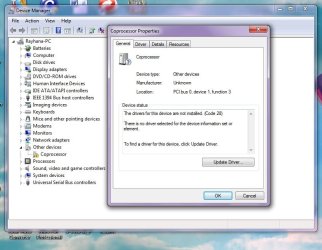
what could be the problem? my nVidia drivers? i have a yellow exclamation point next to co-processor in my device manager which i do not know how to get rid of...

could you help on me on that please?

thank you sooo much for this.
 

My Computer

Computer Manufacturer/Model Number
Hp dv6812nr
OS
Windows 7 professional
that worked!!! the weird thing is though, that i just did the above procedure for KB977074, but when I resumed nromal startup services and retsarted the system...ALL of the updates were installed successfully.
It's hard to say what was it.It could nVidia drivers - I saw some errors nVidia in your setupapi.dev.log but It was hard to guess it was serious or to ignore,it would be also any 3p application as well,please note many applications add *.dll modules under explorer.exe process and sometimes cannot disable these modules even on clean boot,so there is way some applications can cheat clean boot as well.

i have a yellow exclamation point next to co-processor in my device manager which i do not know how to get rid of...
Update all your drivers,to do that you can use also this application (freeware)Free Driver Update Software - Device Doctor
You can also check in Windows Update>>Check optional updates

If updating drivers will not solve problem,post screenshot from devicemanger
 

My Computer

Computer Manufacturer/Model Number
Custom made
OS
Windows 7 Professional x64 PL
CPU
AMD Athlon 4450e
Motherboard
Giga-Byte GA-MA69G-S3H
Memory
GoodRam DDR2 2x2048MB (FSB 800MHz)
Graphics Card(s)
nVidia GeForce 9600GT (G94-300) 1024 MB
Monitor(s) Displays
SAMSUNG SyncMaster HS2P301688
Hard Drives
Seagate ST3750330AS 750GB
PSU
Corsair 550W
Cooling
AeroCool ExtremeEngine 3T
i did the windows update check optional updates...it had one for my nVidia driver...installed it but failed. gonna try the freeware.
 

My Computer

Computer Manufacturer/Model Number
Hp dv6812nr
OS
Windows 7 professional
okay...i installed device doctor...it found 2 updates. i updated them and they were installed (i confirmed by re-scaning with device doctor). However, the coprocessor issue isnt solved.

i took a screen shot.
 

Attachments

  • devicemanager.jpg
    devicemanager.jpg
    70.3 KB · Views: 104

My Computer

Computer Manufacturer/Model Number
Hp dv6812nr
OS
Windows 7 professional
in "Coprocessor properties" click on "Details" tab next go to "property" and choose "Hardware Ids" and post here hardware ID
 

My Computer

Computer Manufacturer/Model Number
Custom made
OS
Windows 7 Professional x64 PL
CPU
AMD Athlon 4450e
Motherboard
Giga-Byte GA-MA69G-S3H
Memory
GoodRam DDR2 2x2048MB (FSB 800MHz)
Graphics Card(s)
nVidia GeForce 9600GT (G94-300) 1024 MB
Monitor(s) Displays
SAMSUNG SyncMaster HS2P301688
Hard Drives
Seagate ST3750330AS 750GB
PSU
Corsair 550W
Cooling
AeroCool ExtremeEngine 3T
I registered just to say thank you Flavius, I had almost the same exact problem as prncess23 and your solution helped me. Now that I'm here, I think I'll stick around.
 

My Computer

OS
Windows 7
CPU
Intel Core2 Quad Q9300 2.5GHz
Memory
4GB RAM
Graphics Card(s)
nVidia GeForce 9800 GTX
Sound Card
Creative SoundBlaster Audigy
Monitor(s) Displays
Dell 2005FPW
Hard Drives
Seagate 1.5TB x2
Case
Alienware
Thanks for the solutions.

-Update to the latest System Update Readiness Tool for Windows 7 "http://support.microsoft.com/kb/947821"
-Restart PC
-Run the windows update again (all failed update status now successful)

Good luck all this solution work for me.


I have bad feelings about it,which ones hotfixes you have problem,there are also here threads with these hotfixes unfortunately without solution

1.Run cmd.exe with administrative previlliges (right click on cmd.exe) as admin and type:

sfc /scannow

2.Run Readiness Tool Description of the System Update Readiness Tool for Windows Vista, for Windows Server 2008, for Windows 7, and for Windows Server 2008 R2
even if this tool don't solve problem it create CheckSur.log file in C:\Windows\Logs\CBS folder
3.Download firegenul Altair Technologies Ltd.
place firegenul.exe in C:\Windows\System32

next again run cmd.exe with admin previlliges and type:

firegenul

it creates report from WindowsUpdate.log and is saved to C:\Windows\System32 as FireGenReport.htm
4.Prepare log from VistaSysInfoTool VistaForums SysInfo Tool
5.Find CBS.log file in C:\Windows\Logs\CBS folder

all files CBS.log,CheckSur.log,firegenReport.htm and log from VistaSysInfo pack to ZIP format and attache to post
 

My Computer

OS
Windows 7
I had this same problem. But it turns out that it was all about my internet connection. It has to be an Ethernet connection and not a WIFI connection. Clearly because WIFI in many situations does a reset during the download and that causes errors during the update download. Temporarily changing to an Ethernet connection solved the problem...
 

My Computer

OS
Windows 7 Home Premium 32bit
Back
Top