
Windows updates will not install

roving

New member
Member
VIP
Local time
7:53 PM
Messages
98
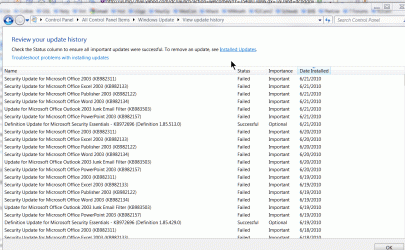
For many days now at shutdown i am notified that 6 updates will be installed. Finally today I took a moment to look at the update history and found, as shown on the attachment, that these 6 failed to install day after day. I did troubleshoot and it found no cause. Any suggestions? They are all security updates for the major components of Office 2003, only one of which I use, which is Word. Suggestions appreciated. Dick
 

Attachments
  • ScreenHunter_01 Jun. 21 19.37.gif
    ScreenHunter_01 Jun. 21 19.37.gif
    98.6 KB · Views: 343

My Computer

Computer type
PC/Desktop
Computer Manufacturer/Model Number
HP d4996t
OS
Windows 8 Pro
CPU
Intel Core 2 quad Q6600 2.4Ghz
Motherboard
Asustek
Memory
4 Ghz
Graphics Card(s)
Nvidia GeForce 8400GS
Sound Card
Soundblaster X-Fi Extreme Audio
Monitor(s) Displays
Hyundai 22" widescreen
Hard Drives
400 GB 279 G free
My suggestion would be do to a full virus scan and if you are infected.
 

My Computer

Computer Manufacturer/Model Number
Dell XPS
OS
Windows 7 Pro 64bit
CPU
Intel Core 2 Quad Q6600
Motherboard
Dell Inc 0PP150 (Socket 775)
Memory
4GB
Graphics Card(s)
1024MB GeForce GTS 250 (PNY)
Monitor(s) Displays
Dell 22in
Screen Resolution
1680x1050
Hard Drives
313GB Seagate ST332062 0AS SCSI Disk Device (SCSI)
733GB Western Digital WDC WD75 00AACS-00D6B SCSI Disk Device (SCSI)
Keyboard
Logitech G11
Mouse
Logitech G5
Internet Speed
3Mb/s
Other Info
And Acer Aspire One
I would try clearing the Windows Update history.

Paste this command to windows search.
%windir%\SoftwareDistribution\

Go into the datastore folder and delete the contents. Reboot and re-scan for updates.
 

My Computer

Computer Manufacturer/Model Number
Toshiba P300
OS
Windows 8 Pro
CPU
Intel Centrino Dual Core P7450 2.13GHz
Memory
4gb
Graphics Card(s)
ATI Mobility Raedon HD3650
Hard Drives
Toshiba MK3252GSX ATA
Internet Speed
Wish it were faster
For many days now at shutdown i am notified that 6 updates will be installed. Finally today I took a moment to look at the update history and found, as shown on the attachment, that these 6 failed to install day after day. I did troubleshoot and it found no cause. Any suggestions? They are all security updates for the major components of Office 2003, only one of which I use, which is Word. Suggestions appreciated. Dick

Here is a comprehensive list of fixes for Windows update problems that might help.
How do I reset Windows Update components?
 

My Computer

Computer type
PC/Desktop
Computer Manufacturer/Model Number
Home built
OS
Windows 7 Ult, Windows 8.1 Pro,
CPU
Q9650-4.275GHz, E8600 4.5GHz, E6750-3.8GHz
Motherboard
Evga 780i FTW
Memory
G.Skill PC2 9600 1200Mhz 5 5 5 15 2T
Graphics Card(s)
GTX480
Sound Card
Asus Xonar D2
Monitor(s) Displays
HannsG
Screen Resolution
1680X1050
Hard Drives
GSkill Phoenix Pro 120GB SSD
PSU
ThermalTake Toughpower 1000Watt modular
Case
ThermalTake XaserV
Cooling
Xigmatek S1283
Keyboard
Logitech G15
Mouse
Logitech G9
Internet Speed
T1
If all else fails, try reinstalling the office software.

Lucky
 

My Computer

Computer Manufacturer/Model Number
The HAFmeister (Custom)
OS
Windows 7 Ultimate x64 RTM + SP1
CPU
Intel Core i7 950 3.06GHZ (OC'd to 3.99Ghz)
Motherboard
Asus Rampage III Extreme x58 SATA 6GB & USB 3.0
Memory
6GB OCZ Reaper HPC Edition PC3-16000 (set 1606Mhz 8-8-8-26)
Graphics Card(s)
EVGA Nvidia Geforce GTX 570
Sound Card
Creative SB X-Fi Titanium Fatal1ty Professional Series
Monitor(s) Displays
Samsung SM2433BW 24" Widescreen Monitor
Screen Resolution
1920x1200
Hard Drives
Western Digital Caviar Black 500GB 32Mb Buffer SATA II
Western Digital Caviar Black 750GB 32Mb Buffer SATA II
Western Digital Caviar Blue 500GB 16Mb Buffer SATA II
Western Digital My Book Essential Edition 750GB USB
Samsung Spinpoint 2TB SATA II
PSU
Thermaltake Toughpower 1200w (Modular)
Case
CoolerMaster HAF-932
Cooling
Zalman Reserator XT and ZM-WB5 Plus - GPU uses Stock coolers
Keyboard
Logitech G510
Mouse
Logitech G9 Gaming Mouse
Internet Speed
3MB Profile - 350-400kbs (Real-Speed)
Other Info
IcyBox Hot-Swap Bay,
Logitech G27 Steering Wheel,
Xbox 360 Wirless Elite Controller with Microsoft Reciever and
Play & Charge Kit,
Belkin USB Wireless Adaptor,
GAME Generic Controller (Playstation Looky-Likey),
Epson SX125 All-in-One.
First, many thanks for information on how to clear the update history, and reset update, etc. It worked perfectly so is now saved for future use. BUT, I now have tried to install those six security updates for Office 2003 shown on my original attachment. They appear to download properly but the installation of each failed due to a 646 error. Troubleshooting that did no good. I also tried one-at-a-time, and that failed also for the same reason.

Isn't there a method of 'repairing' my Office 2003 installation? Should I try that and then try the updates again, or what do you suggest at this point? Very much appreciated!! Dick
 

My Computer

Computer type
PC/Desktop
Computer Manufacturer/Model Number
HP d4996t
OS
Windows 8 Pro
CPU
Intel Core 2 quad Q6600 2.4Ghz
Motherboard
Asustek
Memory
4 Ghz
Graphics Card(s)
Nvidia GeForce 8400GS
Sound Card
Soundblaster X-Fi Extreme Audio
Monitor(s) Displays
Hyundai 22" widescreen
Hard Drives
400 GB 279 G free
Have you tried to download the updates manually? If not, do so, then run as administrator.
 

My Computer

Computer Manufacturer/Model Number
Too many to describe...
OS
Windows 7 x64 pro/ Windows 7 x86 Pro/ XP SP3 x86
Thanks, Bill. I did go to the update site and select only one of the six to install. It tried and failed. Is that what you mean by "manual"?

Then I did select another update, which had to do with WGA. It downloaded quickly and installed successfully.

After that succeeded I went back and tried to download and install one of the security updates and it failed.

Still puzzled at this point.
 

My Computer

Computer type
PC/Desktop
Computer Manufacturer/Model Number
HP d4996t
OS
Windows 8 Pro
CPU
Intel Core 2 quad Q6600 2.4Ghz
Motherboard
Asustek
Memory
4 Ghz
Graphics Card(s)
Nvidia GeForce 8400GS
Sound Card
Soundblaster X-Fi Extreme Audio
Monitor(s) Displays
Hyundai 22" widescreen
Hard Drives
400 GB 279 G free
Yes, and it did what it was supposed to do, but they still won't install. Thanks.
 

My Computer

Computer type
PC/Desktop
Computer Manufacturer/Model Number
HP d4996t
OS
Windows 8 Pro
CPU
Intel Core 2 quad Q6600 2.4Ghz
Motherboard
Asustek
Memory
4 Ghz
Graphics Card(s)
Nvidia GeForce 8400GS
Sound Card
Soundblaster X-Fi Extreme Audio
Monitor(s) Displays
Hyundai 22" widescreen
Hard Drives
400 GB 279 G free
Yes, I tried the reset tool immediately after it was mentioned. Still no results.
 

My Computer

Computer type
PC/Desktop
Computer Manufacturer/Model Number
HP d4996t
OS
Windows 8 Pro
CPU
Intel Core 2 quad Q6600 2.4Ghz
Motherboard
Asustek
Memory
4 Ghz
Graphics Card(s)
Nvidia GeForce 8400GS
Sound Card
Soundblaster X-Fi Extreme Audio
Monitor(s) Displays
Hyundai 22" widescreen
Hard Drives
400 GB 279 G free
From what I read about this particular problem turning off UAC should allow you to install the Windows 7 updates for Msoft office. It may also help to download those updates after turning off UAC. You can turn UAC back on after the updates have been sucessfully installed. :)

The link below shows you how to turn off UAC.
Guided Help: Adjust User Account Control settings in Windows 7

Source:http://social.answers.microsoft.com/Forums/en/vistawu/thread/a98c87fe-5d60-4269-836a-f62654c12e95

If that doesn't work there is also a registry adjustment you can make that is supposed to work.
http://social.answers.microsoft.com...f60-c149-4eaf-b8e6-a2880cd7232b?prof=required

I would try turning off UAC first because it's already worked for others and it's easier than the registry adjustment.
 

My Computer

Computer type
PC/Desktop
Computer Manufacturer/Model Number
Home built
OS
Windows 7 Ult, Windows 8.1 Pro,
CPU
Q9650-4.275GHz, E8600 4.5GHz, E6750-3.8GHz
Motherboard
Evga 780i FTW
Memory
G.Skill PC2 9600 1200Mhz 5 5 5 15 2T
Graphics Card(s)
GTX480
Sound Card
Asus Xonar D2
Monitor(s) Displays
HannsG
Screen Resolution
1680X1050
Hard Drives
GSkill Phoenix Pro 120GB SSD
PSU
ThermalTake Toughpower 1000Watt modular
Case
ThermalTake XaserV
Cooling
Xigmatek S1283
Keyboard
Logitech G15
Mouse
Logitech G9
Internet Speed
T1
Chev65 has done it again, living up to his self-description of "relentless patience", as it paid off in the case of the Office 2003 updates that wouldn't install. Since last attempts yesterday I did a Office uninstall and re-install, followed by more update failures. Then I followed the advice and disabled UAC, and made two more failed attempts before doing a restart. Then I tried installing two small 'important' files and that worked. That left SP3 and one other. Both downloaded and installed smoothly and quickly. Thank you so much for the interest and tenacity! It is much appreciated. And thanks also to all of you who contributed with your valuable suggestions as they helped narrow things down. Roving
 

My Computer

Computer type
PC/Desktop
Computer Manufacturer/Model Number
HP d4996t
OS
Windows 8 Pro
CPU
Intel Core 2 quad Q6600 2.4Ghz
Motherboard
Asustek
Memory
4 Ghz
Graphics Card(s)
Nvidia GeForce 8400GS
Sound Card
Soundblaster X-Fi Extreme Audio
Monitor(s) Displays
Hyundai 22" widescreen
Hard Drives
400 GB 279 G free
Chev65 has done it again, living up to his self-description of "relentless patience", as it paid off in the case of the Office 2003 updates that wouldn't install. Since last attempts yesterday I did a Office uninstall and re-install, followed by more update failures. Then I followed the advice and disabled UAC, and made two more failed attempts before doing a restart. Then I tried installing two small 'important' files and that worked. That left SP3 and one other. Both downloaded and installed smoothly and quickly. Thank you so much for the interest and tenacity! It is much appreciated. And thanks also to all of you who contributed with your valuable suggestions as they helped narrow things down. Roving


I figured that would work because it's a fairly well known problem and turning off UAC has worked for other people with the same problem. Glad that you have those updates installed roving, happy computing.
smile.gif
 

My Computer

Computer type
PC/Desktop
Computer Manufacturer/Model Number
Home built
OS
Windows 7 Ult, Windows 8.1 Pro,
CPU
Q9650-4.275GHz, E8600 4.5GHz, E6750-3.8GHz
Motherboard
Evga 780i FTW
Memory
G.Skill PC2 9600 1200Mhz 5 5 5 15 2T
Graphics Card(s)
GTX480
Sound Card
Asus Xonar D2
Monitor(s) Displays
HannsG
Screen Resolution
1680X1050
Hard Drives
GSkill Phoenix Pro 120GB SSD
PSU
ThermalTake Toughpower 1000Watt modular
Case
ThermalTake XaserV
Cooling
Xigmatek S1283
Keyboard
Logitech G15
Mouse
Logitech G9
Internet Speed
T1
Back
Top