Solved Windows wants me to change my password

barend

New member
Member
VIP
Local time
5:27 PM
Messages
126
Since recently W7 wants me to change the pw of my homegroup very regularly.
Because I am the sole user of everything I don't want it to change: got the same one for 30 years now and it never harmed me...:sarc:

How do I let the nag disappear?

Thanks, Barend :D
 

My Computer My Computer

At a glance

Windows 7
OS
Windows 7
Are you sure that this is not a virus. Better scan a bit.
 

My Computer My Computer

At a glance

Vista, Windows7, Mint Mate, Zorin, Windows 8from 1.6GHz Duo to i7
Computer Manufacturer/Model Number
HP, Dell, Gateway, Toshiba - 4 laptops and 2 desktops
OS
Vista, Windows7, Mint Mate, Zorin, Windows 8
CPU
from 1.6GHz Duo to i7
Monitor(s) Displays
2x HP w2207
Hard Drives
5x HDD, 7x SSD, 12x Externals
Keyboard
with trackball - no mices
Mouse
Trackball mice
Internet Speed
DSL 6000
Since recently W7 wants me to change the pw of my homegroup very regularly.
Because I am the sole user of everything I don't want it to change: got the same one for 30 years now and it never harmed me...:sarc:

How do I let the nag disappear?

Thanks, Barend :D

The Homegroup doesn't seem to like user created passwords despite where it says you can make one they usually don't work at all or you get nagged to change it. It seems the windows generated password is the only one it wants to use.

Try using the windows generated password created with a new Homegroup and see if it sticks.
 

My Computer My Computer

At a glance

Windows 7 Ult, Windows 8.1 Pro,Q9650-4.275GHz, E8600 4.5GHz, E6750-3.8GHzG.Skill PC2 9600 1200Mhz 5 5 5 15 2TGTX480
Computer type
PC/Desktop
Computer Manufacturer/Model Number
Home built
OS
Windows 7 Ult, Windows 8.1 Pro,
CPU
Q9650-4.275GHz, E8600 4.5GHz, E6750-3.8GHz
Motherboard
Evga 780i FTW
Memory
G.Skill PC2 9600 1200Mhz 5 5 5 15 2T
Graphics Card(s)
GTX480
Sound Card
Asus Xonar D2
Monitor(s) Displays
HannsG
Screen Resolution
1680X1050
Hard Drives
GSkill Phoenix Pro 120GB SSD
PSU
ThermalTake Toughpower 1000Watt modular
Case
ThermalTake XaserV
Cooling
Xigmatek S1283
Keyboard
Logitech G15
Mouse
Logitech G9
Internet Speed
T1
  • Like
Reactions: whs
Every 4 months or so W7 wants wants me to change me to renew my pw for better protection.
Last time I did but entered the old one - still OK...
Isn't there some registry key to disable this?
 

My Computer My Computer

At a glance

Windows 7
OS
Windows 7
Every 4 months or so W7 wants wants me to change me to renew my pw for better protection.
Last time I did but entered the old one - still OK...
Isn't there some registry key to disable this?

Seriously have never heard of this in my life and I've been running a Homegroup since before win 7 was released and I've seen just about every problem with the Homegroup here in the networking part of the forum which is where I reside. Although I've heard plenty of problems trying to use a custom password for the Homegroup which never seems to work right.

Suggest you try using the Windows generated password. There isn't anything in the registry for this problem.
 

My Computer My Computer

At a glance

Windows 7 Ult, Windows 8.1 Pro,Q9650-4.275GHz, E8600 4.5GHz, E6750-3.8GHzG.Skill PC2 9600 1200Mhz 5 5 5 15 2TGTX480
Computer type
PC/Desktop
Computer Manufacturer/Model Number
Home built
OS
Windows 7 Ult, Windows 8.1 Pro,
CPU
Q9650-4.275GHz, E8600 4.5GHz, E6750-3.8GHz
Motherboard
Evga 780i FTW
Memory
G.Skill PC2 9600 1200Mhz 5 5 5 15 2T
Graphics Card(s)
GTX480
Sound Card
Asus Xonar D2
Monitor(s) Displays
HannsG
Screen Resolution
1680X1050
Hard Drives
GSkill Phoenix Pro 120GB SSD
PSU
ThermalTake Toughpower 1000Watt modular
Case
ThermalTake XaserV
Cooling
Xigmatek S1283
Keyboard
Logitech G15
Mouse
Logitech G9
Internet Speed
T1
I have never got a password other than the one Windows 7 generates work. Windows 7 like Windows 7 passwords.
 

My Computer My Computer

At a glance

Windows 10 Pro. 64/ version 1709 Windows 7 Pr...Intel i7-6800K @ 4.3Corsair Platinum 16 gig @2400EVGA GTX 1070 OC
Computer type
PC/Desktop
Computer Manufacturer/Model Number
Home made Desktop
OS
Windows 10 Pro. 64/ version 1709 Windows 7 Pro/64
CPU
Intel i7-6800K @ 4.3
Motherboard
ASUS X-99 Deluxe II
Memory
Corsair Platinum 16 gig @2400
Graphics Card(s)
EVGA GTX 1070 OC
Monitor(s) Displays
Asus 27" LED LCD/VE278Q
Screen Resolution
1920-1080 or 1280-720 HDMI
Hard Drives
INTEL SSD 730-240 Gb Sata 3.0/
PSU
EVGA Platium 1200W
Case
Phanteks Luxe Tempered Glass 8 fans/ one radiator
Cooling
XSPC/ Water Cooled CPU
Keyboard
Das 4 Professional
Mouse
Logitech M705/MX Anywhere 2-S
Internet Speed
100 mbits
Antivirus
Microsoft Security Essentials/ Malwarebytes Premium 3.0/ SAS
Browser
I.E. 11 default/Firefox/ ISP Time Warner Cable/Spectrum
Other Info
LG BluRay Burner/
Sound system-KLipsch-THX/
Icy Dock ssd Hot Swap bays.
I have never got a password other than the one Windows 7 generates work. Windows 7 like Windows 7 passwords.

That's right, I remember you had a problem with it as well.

I've seen a bunch of complaints about this but I can't seem to find a solution.
 

My Computer My Computer

At a glance

Windows 7 Ult, Windows 8.1 Pro,Q9650-4.275GHz, E8600 4.5GHz, E6750-3.8GHzG.Skill PC2 9600 1200Mhz 5 5 5 15 2TGTX480
Computer type
PC/Desktop
Computer Manufacturer/Model Number
Home built
OS
Windows 7 Ult, Windows 8.1 Pro,
CPU
Q9650-4.275GHz, E8600 4.5GHz, E6750-3.8GHz
Motherboard
Evga 780i FTW
Memory
G.Skill PC2 9600 1200Mhz 5 5 5 15 2T
Graphics Card(s)
GTX480
Sound Card
Asus Xonar D2
Monitor(s) Displays
HannsG
Screen Resolution
1680X1050
Hard Drives
GSkill Phoenix Pro 120GB SSD
PSU
ThermalTake Toughpower 1000Watt modular
Case
ThermalTake XaserV
Cooling
Xigmatek S1283
Keyboard
Logitech G15
Mouse
Logitech G9
Internet Speed
T1
Using W7 for many years now, and never saw this happen, my laptop (same pw) is not affected either.
Did a full startup av scan, and the reminder popped up this morning.
Got one member of my homegroup: USER.
Checked, but there's no option at all to use a W generated pw.
 

My Computer My Computer

At a glance

Windows 7
OS
Windows 7
Should have googled first...
Here
HOWTO: Turn off Password Expiration in Windows 7 | Breztech
are several options to do it.
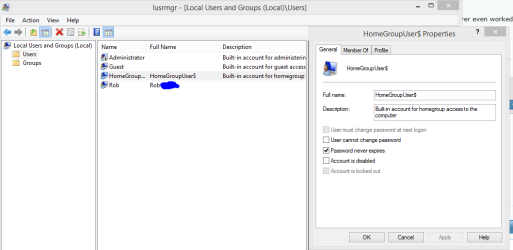
For me executing lusrmgr.msc worked.

Yes but how did it get unchecked in the first place? This is checked by default.

And I believe you on the no option to create a Homegroup password because that never even worked for me at all. Same with Layback Bear.

In fact how you ever got that to work is beyond me, must be a bug with this user created Homegroup password.

That link also shows the page for the User password settings not the Homegroup password which is just above the User page. I didn't even realize that the Homegroup also had an expiration setting for the password.
 

Attachments

  • Homegroup password NEVER EXPIRES.PNG
    Homegroup password NEVER EXPIRES.PNG
    16.4 KB · Views: 0

My Computer My Computer

At a glance

Windows 7 Ult, Windows 8.1 Pro,Q9650-4.275GHz, E8600 4.5GHz, E6750-3.8GHzG.Skill PC2 9600 1200Mhz 5 5 5 15 2TGTX480
Computer type
PC/Desktop
Computer Manufacturer/Model Number
Home built
OS
Windows 7 Ult, Windows 8.1 Pro,
CPU
Q9650-4.275GHz, E8600 4.5GHz, E6750-3.8GHz
Motherboard
Evga 780i FTW
Memory
G.Skill PC2 9600 1200Mhz 5 5 5 15 2T
Graphics Card(s)
GTX480
Sound Card
Asus Xonar D2
Monitor(s) Displays
HannsG
Screen Resolution
1680X1050
Hard Drives
GSkill Phoenix Pro 120GB SSD
PSU
ThermalTake Toughpower 1000Watt modular
Case
ThermalTake XaserV
Cooling
Xigmatek S1283
Keyboard
Logitech G15
Mouse
Logitech G9
Internet Speed
T1
Back
Top