Windows will not boot Error: required device inaccessible

mrsingh

New member
Local time
4:43 PM
Messages
6
Hi all

Hope someone can help me

My windows 7 hdd will not boot up. I get an error message saying:

The boot selection failed because a required device is inaccessible


Now I have tried startup recovery several times with no luck.

I have tried bootrec.exe and tried to rebuild it but no luck

I have tried to use the recovery disks I made when I first bought the laptop but it doesnt allow me to select the repair windows files and preserve files options. It allows me to select the fresh windows install option however when I do it it always fails and says a path cannot be found.


I have tried the chkdsk/r in command prompt to fix any problems and that was successful but still no luck.

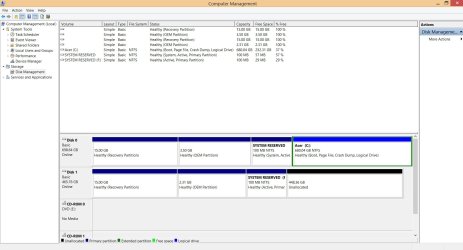
here is a screen shot of my disk management, it is disk 1

Untitled-1-1.jpg


I just need access to my files on there. I have tried to mount it via acronis so it works as an ordinary disk but it doesnt pick it up


Please could someone help

Thanks
 

My Computer

OS
Windows 7 home 64bit
Last edited:

My Computer

OS
ME/XP/Vista/Win7
Basically Disk 0 is a hybrid ssd I installed a while back to replace the original drive. So what I did was created an image off the original drive with windows 7 on and had put it onto Disk 1 before I recently upgraded Disk 0 to windows 8. so that is why I may have two system reserved partitions. ( Disk 1 is not normally installed, I just put it in to access some files)

So If I delete all the partitions on Disk 1, will that not delete all the my files that are on there?

Im not sure why Disk 0 C: is logical?


Thanks for your help
 

My Computer

OS
Windows 7 home 64bit
So If I delete all the partitions on Disk 1, will that not delete all the my files that are on there?

The C: partition of Disk 1, you have delete, therefore no files.
 

My Computer

OS
ME/XP/Vista/Win7
Basically Disk 0 is a hybrid ssd I installed a while back to replace the original drive. So what I did was created an image off the original drive with windows 7 on

You should have used the Recovery DVD's.


   Information
We always assume you have made your Recovery Disks using the OEM manufacturer's Recovery Media Creator app the first day you had your new PC.​

& made the Startup Repair CD.
startup repair disc-create


Did you make the OEM manufacturer's Recovery Disks?

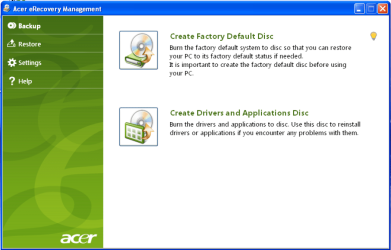
Manual how to use Acer eRecovery Management here:
ftp://ftp.support.acer-euro.com/notebook/empowering_technology/NB%20ET2%20user's%20guide/Acer%20eRecovery%20Management%20English.pdf

Acer001.PNG

You can Order Acer recovery disks from here:
https://secure.tx.acer.com/RCDB/Main.aspx?brand=acer
 
Last edited:

My Computer

OS
ME/XP/Vista/Win7
Is there no files on the disk 1 oem partition or the reserved and recovery partition then?

Yes I did make the recovery dvds and tried to use that to recover the hdd but it keeps failing when I try to do a fresh install and it doesnt allow me to select the option just to recover the windows files
 

My Computer

OS
Windows 7 home 64bit
Is there no files on the disk 1 oem partition or the reserved and recovery partition then?

Yes I did make the recovery dvds and tried to use that to recover the hdd but it keeps failing when I try to do a fresh install and it doesnt allow me to select the option just to recover the windows files

The Acer Recovery DVD's will do a clean install.
 

My Computer

OS
ME/XP/Vista/Win7
Yes I have tried but it keeps failing. It always saying invalid path.

Ill try deleting the partitions like you said and trying startup recovery again
 

My Computer

OS
Windows 7 home 64bit
Set Disk0 first to boot in BIOS setup.

If it still doesnt start unplug Disk 1 and run Startup Repair - Run up to 3 Separate Times. When Disk0 boots you can plug back in Disk1 making sure it is not set to boot first again.

There are no user files on Disk1. As you can see your OS partition is Unallocated meaning it has been deleted.

You can undelete partitions which have not been overwritten using Partition Wizard Partition Recovery Wizard - Video Help. Then you should be able to browse in from WIn7 to copy over your files to DIsk0, wipe Disk1 using Diskpart Clean Command to repartition in Disk Mgmt.
 
Back
Top