Windows will not install to 80 GB IDE

matt965

New member
Local time
1:54 PM
Messages
18
I had an HP Pavilion A805N that had 7 64-bit running on an 80 GB Western Digital IDE drive which was working perfectly... until the motherboard started locking up (due to blown capacitors). I got a new motherboard along with RAM and CPU. I am trying this hard drive on this new board and the BIOS does recognize the drive. When I go to setup, the drive is seen there. However, I cannot install windows for an unknown reason. I have tried changing to AHCI mode and the problem persists. I know this drive is good because it works on another computer. Is it possible to install 7 on this setup?

Specs of old build:
-CPU: Intel P4 3.4Ghz Hyperthreaded
-RAM: 4GB DDR1
-80GB IDE hard drive

Specs of new build:
-MoBo: MSI 760GM-E51 (FX)
-CPU: AMD Athlon II X2 255 3.1Ghz
-RAM: 4GB DDR3
-The same 80GB hard drive
 

My Computer My Computer

At a glance

Windows 7 Home Premium 64-bit
Computer type
PC/Desktop
Computer Manufacturer/Model Number
I have multiple computers
OS
Windows 7 Home Premium 64-bit
Browser
Firefox
Welcome matt965,

Did you erase, clean, & format the old 80gb HD and reformat it ? Or are you trying to use it as is ?
Is the jumper on the IDE in the correct position, if any other IDE devices are on the same cable ?

Could you describe the error messages you get in more detail as to why win7 will not install.
 

My Computer My Computer

At a glance

Win7 Enterprise, Win7 x86 (Ult 7600), Win7 x6...AMD fx8350 4ghz, AMD-32 2400mhz, AMD-64 3200m...2gb, 4gb on the Ult 7600, 4gb on Technet RTM,...Draw my own Graphics, several nVidia cards
Computer type
PC/Desktop
Computer Manufacturer/Model Number
Built them myself, Science Experiments !
OS
Win7 Enterprise, Win7 x86 (Ult 7600), Win7 x64 Ult 7600, TechNet RTM on AMD x64 (2.8Ghz)
CPU
AMD fx8350 4ghz, AMD-32 2400mhz, AMD-64 3200mhz, AMDx64 2.8G
Motherboard
SIS 755, ECS-K8M890M-M (Ult 7600), GigaByte & others
Memory
2gb, 4gb on the Ult 7600, 4gb on Technet RTM, 32gb on FX8350
Graphics Card(s)
Draw my own Graphics, several nVidia cards
Sound Card
on motherboard
Monitor(s) Displays
19" flat scr, 28" I-Inc widescr,22" Emprex Widescr, 23" Acer
Screen Resolution
1280 x 1024, 1440 x 900, 1920 x 1080
Hard Drives
6 pata Ide HD's & 2 Sata HD's
added 80gb external on Ult 7600 computer,
numerous extra 1tb, 2TB, 3Tb SATA HD's
A collection of ext HD Docks w/ HDs
PSU
430w, 550w, 600w, 700, 800, etc
Case
All Generic Full Towers
Cooling
Open Air & a few fans, some w/ colored LEDs
Keyboard
Compaq & Dell recycled from GoodWill
Mouse
Made in China Optical Wired Mouse
Internet Speed
Fast Cable InterNet
Antivirus
AVG Free on 24 different Desktops, NO Problems!
Browser
IE 8 is preferred, but use FireFox sometimes
Other Info
Linksys Routers, switches, & Hubs
Too Many USB Flash Drives to count, Biggest is 64GB !
Eight computers in my home network.
Sixteen computers at my business network.
Linked via TeamViewer !
Lots of old used spare computer parts everywhere!
Originally, I was trying to use it as is. Before I pulled the old board, I uninstalled all the drivers (graphics, Ethernet, etc.). When I tried booting, the PC acted like there wasn't a bootable volume anywhere. I then went to set-up, deleted the partition, and added a new one. Format doesn't do anything either.

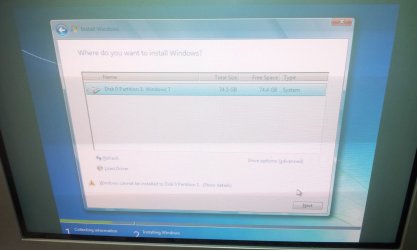
The message I see says "Windows cannot install to Disk 0 Partition 1 (Show details)"
When I click that message, a window says "Windows cannot be installed to this disk. This computer's hardware may not support booting to this disk. Ensure that the disk's controller is enabled in the computer's BIOS menu."

The jumpers are set correctly. Nothing has changed as far as disk setup goes.
 

My Computer My Computer

At a glance

Windows 7 Home Premium 64-bit
Computer type
PC/Desktop
Computer Manufacturer/Model Number
I have multiple computers
OS
Windows 7 Home Premium 64-bit
Browser
Firefox

My Computer My Computer

At a glance

Win7 Enterprise, Win7 x86 (Ult 7600), Win7 x6...AMD fx8350 4ghz, AMD-32 2400mhz, AMD-64 3200m...2gb, 4gb on the Ult 7600, 4gb on Technet RTM,...Draw my own Graphics, several nVidia cards
Computer type
PC/Desktop
Computer Manufacturer/Model Number
Built them myself, Science Experiments !
OS
Win7 Enterprise, Win7 x86 (Ult 7600), Win7 x64 Ult 7600, TechNet RTM on AMD x64 (2.8Ghz)
CPU
AMD fx8350 4ghz, AMD-32 2400mhz, AMD-64 3200mhz, AMDx64 2.8G
Motherboard
SIS 755, ECS-K8M890M-M (Ult 7600), GigaByte & others
Memory
2gb, 4gb on the Ult 7600, 4gb on Technet RTM, 32gb on FX8350
Graphics Card(s)
Draw my own Graphics, several nVidia cards
Sound Card
on motherboard
Monitor(s) Displays
19" flat scr, 28" I-Inc widescr,22" Emprex Widescr, 23" Acer
Screen Resolution
1280 x 1024, 1440 x 900, 1920 x 1080
Hard Drives
6 pata Ide HD's & 2 Sata HD's
added 80gb external on Ult 7600 computer,
numerous extra 1tb, 2TB, 3Tb SATA HD's
A collection of ext HD Docks w/ HDs
PSU
430w, 550w, 600w, 700, 800, etc
Case
All Generic Full Towers
Cooling
Open Air & a few fans, some w/ colored LEDs
Keyboard
Compaq & Dell recycled from GoodWill
Mouse
Made in China Optical Wired Mouse
Internet Speed
Fast Cable InterNet
Antivirus
AVG Free on 24 different Desktops, NO Problems!
Browser
IE 8 is preferred, but use FireFox sometimes
Other Info
Linksys Routers, switches, & Hubs
Too Many USB Flash Drives to count, Biggest is 64GB !
Eight computers in my home network.
Sixteen computers at my business network.
Linked via TeamViewer !
Lots of old used spare computer parts everywhere!
Does your new mobo have UEFI? If so you'll need to either reinstall to UEFI (Unified Extensible Firmware Interface) - Install Windows 7 with - Windows 7 Forums or enter BIOS setup to enable CSM or Legacy mode to either adjust your old Win7 to boot or Clean Install Windows 7 normally after deleting all partitions l as shown in Steps 7 and 8.

Before you wipe the drive you can try to Adjust Win7 to boot on new hardware with Paragon Adaptive Restore CD.

If it doesn't start after P2P Adjust, confirm the Partition Marked Active then run Startup Repair - Run 3 Separate Times from the Win7 disk.

Let us know how this goes as it may be necessary to proceed with Overcoming Windows 7 Installation Failures - Windows 7 Help Forums
 
@Doc
Partition Wizard completely erased the drive and formatted with success, but the installer still won't install.

@Greg
This MoBo does not have a UEFI option nor does it have a legacy boot option. I tried the formatting options in cmd off the setup DVD. The problem still persists.
 
Last edited:

My Computer My Computer

At a glance

Windows 7 Home Premium 64-bit
Computer type
PC/Desktop
Computer Manufacturer/Model Number
I have multiple computers
OS
Windows 7 Home Premium 64-bit
Browser
Firefox
I don't have a "custom install" option when trying to install. I went through the format partitioning part and the drive is now marked active, but windows still refuses to install.
 

My Computer My Computer

At a glance

Windows 7 Home Premium 64-bit
Computer type
PC/Desktop
Computer Manufacturer/Model Number
I have multiple computers
OS
Windows 7 Home Premium 64-bit
Browser
Firefox
Mumbles something about terabyte drives for 50 bucks.

Why deal with an outdated low capacity IDE drive when you can get a new SATA drive with more than ten times the capacity for 50 bucks.
 

My Computer My Computer

At a glance

Windows 7 Ult, Windows 8.1 Pro,Q9650-4.275GHz, E8600 4.5GHz, E6750-3.8GHzG.Skill PC2 9600 1200Mhz 5 5 5 15 2TGTX480
Computer type
PC/Desktop
Computer Manufacturer/Model Number
Home built
OS
Windows 7 Ult, Windows 8.1 Pro,
CPU
Q9650-4.275GHz, E8600 4.5GHz, E6750-3.8GHz
Motherboard
Evga 780i FTW
Memory
G.Skill PC2 9600 1200Mhz 5 5 5 15 2T
Graphics Card(s)
GTX480
Sound Card
Asus Xonar D2
Monitor(s) Displays
HannsG
Screen Resolution
1680X1050
Hard Drives
GSkill Phoenix Pro 120GB SSD
PSU
ThermalTake Toughpower 1000Watt modular
Case
ThermalTake XaserV
Cooling
Xigmatek S1283
Keyboard
Logitech G15
Mouse
Logitech G9
Internet Speed
T1
Please take pictures showing install screens. Impossible there would be no Custom choice if installer is booted and not modified somehow. Where did you get it?

Try a new installer from tutorial. Are you skipping any other steps? The skipped step is often the solution.
 
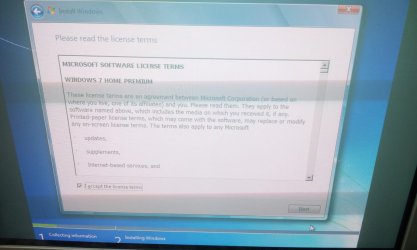
When it loads, I see the screen that asks for what language I'm using. Next it takes me to the license terms page. Then it goes to the list of devices to install Windows to, which is only the hard drive it doesn't like.
 

Attachments

  • IMG_20140622_130253.jpg
    IMG_20140622_130253.jpg
    180.5 KB · Views: 0
  • IMG_20140622_130311.jpg
    IMG_20140622_130311.jpg
    151 KB · Views: 0
  • IMG_20140622_130212.jpg
    IMG_20140622_130212.jpg
    141.6 KB · Views: 1

My Computer My Computer

At a glance

Windows 7 Home Premium 64-bit
Computer type
PC/Desktop
Computer Manufacturer/Model Number
I have multiple computers
OS
Windows 7 Home Premium 64-bit
Browser
Firefox
I think when I had this problem a long time ago, I used the bootable Partition Wizard CD to make the HD "raw" "unallocated". Then the win7 install saw it, and automaticly formated it during the install.
 

My Computer My Computer

At a glance

Win7 Enterprise, Win7 x86 (Ult 7600), Win7 x6...AMD fx8350 4ghz, AMD-32 2400mhz, AMD-64 3200m...2gb, 4gb on the Ult 7600, 4gb on Technet RTM,...Draw my own Graphics, several nVidia cards
Computer type
PC/Desktop
Computer Manufacturer/Model Number
Built them myself, Science Experiments !
OS
Win7 Enterprise, Win7 x86 (Ult 7600), Win7 x64 Ult 7600, TechNet RTM on AMD x64 (2.8Ghz)
CPU
AMD fx8350 4ghz, AMD-32 2400mhz, AMD-64 3200mhz, AMDx64 2.8G
Motherboard
SIS 755, ECS-K8M890M-M (Ult 7600), GigaByte & others
Memory
2gb, 4gb on the Ult 7600, 4gb on Technet RTM, 32gb on FX8350
Graphics Card(s)
Draw my own Graphics, several nVidia cards
Sound Card
on motherboard
Monitor(s) Displays
19" flat scr, 28" I-Inc widescr,22" Emprex Widescr, 23" Acer
Screen Resolution
1280 x 1024, 1440 x 900, 1920 x 1080
Hard Drives
6 pata Ide HD's & 2 Sata HD's
added 80gb external on Ult 7600 computer,
numerous extra 1tb, 2TB, 3Tb SATA HD's
A collection of ext HD Docks w/ HDs
PSU
430w, 550w, 600w, 700, 800, etc
Case
All Generic Full Towers
Cooling
Open Air & a few fans, some w/ colored LEDs
Keyboard
Compaq & Dell recycled from GoodWill
Mouse
Made in China Optical Wired Mouse
Internet Speed
Fast Cable InterNet
Antivirus
AVG Free on 24 different Desktops, NO Problems!
Browser
IE 8 is preferred, but use FireFox sometimes
Other Info
Linksys Routers, switches, & Hubs
Too Many USB Flash Drives to count, Biggest is 64GB !
Eight computers in my home network.
Sixteen computers at my business network.
Linked via TeamViewer !
Lots of old used spare computer parts everywhere!
@Greg
this is the first release of 7. No service packs. I'll give that lifeguard thing a go.
I pulled out my 60 gig ide drive that has XP. It is also behaving the same way. It is the only drive selected to boot from the list, yet the it is acting like nothing is installed on the drive. This has to be something in the BIOS.

@doc
That was the first thing I tried when I downloaded the partition ISO. It didn't affect anything.
 

My Computer My Computer

At a glance

Windows 7 Home Premium 64-bit
Computer type
PC/Desktop
Computer Manufacturer/Model Number
I have multiple computers
OS
Windows 7 Home Premium 64-bit
Browser
Firefox
Do you have any other HD's connected during the install ? Just the 80gb, right ?
 

My Computer My Computer

At a glance

Win7 Enterprise, Win7 x86 (Ult 7600), Win7 x6...AMD fx8350 4ghz, AMD-32 2400mhz, AMD-64 3200m...2gb, 4gb on the Ult 7600, 4gb on Technet RTM,...Draw my own Graphics, several nVidia cards
Computer type
PC/Desktop
Computer Manufacturer/Model Number
Built them myself, Science Experiments !
OS
Win7 Enterprise, Win7 x86 (Ult 7600), Win7 x64 Ult 7600, TechNet RTM on AMD x64 (2.8Ghz)
CPU
AMD fx8350 4ghz, AMD-32 2400mhz, AMD-64 3200mhz, AMDx64 2.8G
Motherboard
SIS 755, ECS-K8M890M-M (Ult 7600), GigaByte & others
Memory
2gb, 4gb on the Ult 7600, 4gb on Technet RTM, 32gb on FX8350
Graphics Card(s)
Draw my own Graphics, several nVidia cards
Sound Card
on motherboard
Monitor(s) Displays
19" flat scr, 28" I-Inc widescr,22" Emprex Widescr, 23" Acer
Screen Resolution
1280 x 1024, 1440 x 900, 1920 x 1080
Hard Drives
6 pata Ide HD's & 2 Sata HD's
added 80gb external on Ult 7600 computer,
numerous extra 1tb, 2TB, 3Tb SATA HD's
A collection of ext HD Docks w/ HDs
PSU
430w, 550w, 600w, 700, 800, etc
Case
All Generic Full Towers
Cooling
Open Air & a few fans, some w/ colored LEDs
Keyboard
Compaq & Dell recycled from GoodWill
Mouse
Made in China Optical Wired Mouse
Internet Speed
Fast Cable InterNet
Antivirus
AVG Free on 24 different Desktops, NO Problems!
Browser
IE 8 is preferred, but use FireFox sometimes
Other Info
Linksys Routers, switches, & Hubs
Too Many USB Flash Drives to count, Biggest is 64GB !
Eight computers in my home network.
Sixteen computers at my business network.
Linked via TeamViewer !
Lots of old used spare computer parts everywhere!
Right now I have the 80GB and a DVD/CD ROM hooked up to IDE. The hard drive is on Master and the DVD drive is on Slave.
 

My Computer My Computer

At a glance

Windows 7 Home Premium 64-bit
Computer type
PC/Desktop
Computer Manufacturer/Model Number
I have multiple computers
OS
Windows 7 Home Premium 64-bit
Browser
Firefox
So, if you boot from the Partition Wizard CD via your DVD drive, does it show the 80gb HD ?
Does it show only one partition, or more than one ?
 

My Computer My Computer

At a glance

Win7 Enterprise, Win7 x86 (Ult 7600), Win7 x6...AMD fx8350 4ghz, AMD-32 2400mhz, AMD-64 3200m...2gb, 4gb on the Ult 7600, 4gb on Technet RTM,...Draw my own Graphics, several nVidia cards
Computer type
PC/Desktop
Computer Manufacturer/Model Number
Built them myself, Science Experiments !
OS
Win7 Enterprise, Win7 x86 (Ult 7600), Win7 x64 Ult 7600, TechNet RTM on AMD x64 (2.8Ghz)
CPU
AMD fx8350 4ghz, AMD-32 2400mhz, AMD-64 3200mhz, AMDx64 2.8G
Motherboard
SIS 755, ECS-K8M890M-M (Ult 7600), GigaByte & others
Memory
2gb, 4gb on the Ult 7600, 4gb on Technet RTM, 32gb on FX8350
Graphics Card(s)
Draw my own Graphics, several nVidia cards
Sound Card
on motherboard
Monitor(s) Displays
19" flat scr, 28" I-Inc widescr,22" Emprex Widescr, 23" Acer
Screen Resolution
1280 x 1024, 1440 x 900, 1920 x 1080
Hard Drives
6 pata Ide HD's & 2 Sata HD's
added 80gb external on Ult 7600 computer,
numerous extra 1tb, 2TB, 3Tb SATA HD's
A collection of ext HD Docks w/ HDs
PSU
430w, 550w, 600w, 700, 800, etc
Case
All Generic Full Towers
Cooling
Open Air & a few fans, some w/ colored LEDs
Keyboard
Compaq & Dell recycled from GoodWill
Mouse
Made in China Optical Wired Mouse
Internet Speed
Fast Cable InterNet
Antivirus
AVG Free on 24 different Desktops, NO Problems!
Browser
IE 8 is preferred, but use FireFox sometimes
Other Info
Linksys Routers, switches, & Hubs
Too Many USB Flash Drives to count, Biggest is 64GB !
Eight computers in my home network.
Sixteen computers at my business network.
Linked via TeamViewer !
Lots of old used spare computer parts everywhere!
It does show the drive. Only 1 partition.
 

My Computer My Computer

At a glance

Windows 7 Home Premium 64-bit
Computer type
PC/Desktop
Computer Manufacturer/Model Number
I have multiple computers
OS
Windows 7 Home Premium 64-bit
Browser
Firefox
With Partition Wizard, did you delete the partition, and then Apply the new settings, and ReBoot ?
With NO CD or DVD in the drive you should get a message Operating system not found.
Then if you ReBoot again with the win7 DVD in the drive, it should start the install.
Or do you get the message Cannot install to this HD ?
 

My Computer My Computer

At a glance

Win7 Enterprise, Win7 x86 (Ult 7600), Win7 x6...AMD fx8350 4ghz, AMD-32 2400mhz, AMD-64 3200m...2gb, 4gb on the Ult 7600, 4gb on Technet RTM,...Draw my own Graphics, several nVidia cards
Computer type
PC/Desktop
Computer Manufacturer/Model Number
Built them myself, Science Experiments !
OS
Win7 Enterprise, Win7 x86 (Ult 7600), Win7 x64 Ult 7600, TechNet RTM on AMD x64 (2.8Ghz)
CPU
AMD fx8350 4ghz, AMD-32 2400mhz, AMD-64 3200mhz, AMDx64 2.8G
Motherboard
SIS 755, ECS-K8M890M-M (Ult 7600), GigaByte & others
Memory
2gb, 4gb on the Ult 7600, 4gb on Technet RTM, 32gb on FX8350
Graphics Card(s)
Draw my own Graphics, several nVidia cards
Sound Card
on motherboard
Monitor(s) Displays
19" flat scr, 28" I-Inc widescr,22" Emprex Widescr, 23" Acer
Screen Resolution
1280 x 1024, 1440 x 900, 1920 x 1080
Hard Drives
6 pata Ide HD's & 2 Sata HD's
added 80gb external on Ult 7600 computer,
numerous extra 1tb, 2TB, 3Tb SATA HD's
A collection of ext HD Docks w/ HDs
PSU
430w, 550w, 600w, 700, 800, etc
Case
All Generic Full Towers
Cooling
Open Air & a few fans, some w/ colored LEDs
Keyboard
Compaq & Dell recycled from GoodWill
Mouse
Made in China Optical Wired Mouse
Internet Speed
Fast Cable InterNet
Antivirus
AVG Free on 24 different Desktops, NO Problems!
Browser
IE 8 is preferred, but use FireFox sometimes
Other Info
Linksys Routers, switches, & Hubs
Too Many USB Flash Drives to count, Biggest is 64GB !
Eight computers in my home network.
Sixteen computers at my business network.
Linked via TeamViewer !
Lots of old used spare computer parts everywhere!
@Greg
this is the first release of 7. No service packs. I'll give that lifeguard thing a go.
I pulled out my 60 gig ide drive that has XP. It is also behaving the same way. It is the only drive selected to boot from the list, yet the it is acting like nothing is installed on the drive. This has to be something in the BIOS.

.


Then use the latest official installer with SP1 from Clean Reinstall - Factory OEM Windows 7, burned to disk using tool also provided.
 
Back
Top