Windows will not start - can't do a clean install

wmsully2006

New member
Local time
4:33 PM
Messages
18
Hi all:
I've been trying to figure this problem out for several days. I would appreciate any advice. My problem started after running Chkdsk overnight. It said I had some errors that it tried to fix. After I tried to reboot windows, It did not start. I got
PXE-E61: Media test failure, check cable
PXE-M0F: Exiting PXE ROM
No bootable device ----

So I googled this and saw that a lot of people have had this problem. So I went into BIOS checked the boot order, Then I tried to do start up repair. It would start loading window files, then nothing but a black screen and a large mouse pointer. I then tried safe mode, again a blank screen with the only the words safe mode showing and the large mouse pointer. I then tried to get into recovery, but I couldn't.
Next I removed the hard drive then re-installed it. Same thing. So I thought the hard drive failed, so I downloaded Parted Magic and made a bootable disk. I changed the boot order and it loaded it into ram and it worked fine. I used it to copy my data to a usb drive and then ran the hard drive test and it passed. The GSmartControl show that that there where errors that occurred at start up it. I then ran the System Stability Tester and everything seemed fine.
I then downloaded Mentest86+ and burned the iso too a disk. Again I booted from my cd/dvd drive and Mentest 86+ ran and the computer passed. So I figure that my hardware was ok.
So I downloaded a Windows 7 Home Premium iso and burned it with ImageBurn to a DVD then verified it. I figure I could try to use it to fix Windows or worse case re-install it. I put it in the optical drive restarted the laptop. It said loading Windows with a white progress bar along the bottom of screen, then nothing but the black screen with the mouse pointer. So I downloaded Rufus and made a bootable USB drive of the Windows 7 iso. Same as what happened with disk.
Anybody have any ideas? Should I wipe the drive the try to install Windows?
Thanks in advanced,
WM
 

My Computer

Computer type
Laptop
Computer Manufacturer/Model Number
Toshiba A505-S6005
OS
Windows 7 Home Premium x64
CPU
Intel I3 M330
Memory
4 Gig

My Computer

Computer type
PC/Desktop
Computer Manufacturer/Model Number
Golden Mk. I.4
OS
Windows 10 Pro x64 ; Xubuntu x64
CPU
Intel i7 860 @ 2.80 GHz O/C'ed to 4.0GHz
Motherboard
Gigabyte P55A-UD3R Rev.1. Award BIOS F13
Memory
16GB Corsair Vengance DDR3 @ 661 MHz Dual Channel (9-9-9-24)
Graphics Card(s)
EVGA NVidia GTX 560 1024MB
Sound Card
Realtek Integrated
Monitor(s) Displays
Dual Samsung SyncMaster 2494HS
Screen Resolution
1920*1080 and 1920*1080
Hard Drives
1*Samsung 840 EVO 120GB SSD;
1*OCZ Vertex 2 60GB SSD;
2*Samsung F3 SpinPoint 1TB in RAID0;
1*Samsung F1 SpinPoint 1TB;
2*Western Digital 1TB External USB 3.0
1*Western Digital 500GB External USB 3.0
1*Seagate 500GB External USB 2.0
PSU
Thermaltake ToughPower QFan 750W
Case
Thermaltake Element S VK60001W2Z
Cooling
Corsair H60 Water Cooling, 2*230mm and 2*80mm case fans
Keyboard
Logitech G110
Mouse
Logitech MX518
That sounds like your disk is shot. Put another disk in and try to install on that.
 

My Computer

Computer Manufacturer/Model Number
HP, Dell, Gateway, Toshiba - 4 laptops and 2 desktops
OS
Vista, Windows7, Mint Mate, Zorin, Windows 8
CPU
from 1.6GHz Duo to i7
Monitor(s) Displays
2x HP w2207
Hard Drives
5x HDD, 7x SSD, 12x Externals
Keyboard
with trackball - no mices
Mouse
Trackball mice
Internet Speed
DSL 6000
I got the Windows 7 link from PC magazine. I just wrote the iso to disk after it was downloaded, with ImageBurn. Was there anything else I needed to do to make it start? If my disk is shot why could I run Parted Magic? I was able to get my data off of it and the stress test had the system running hard.
 

My Computer

Computer type
Laptop
Computer Manufacturer/Model Number
Toshiba A505-S6005
OS
Windows 7 Home Premium x64
CPU
Intel I3 M330
Memory
4 Gig
Test the HD with the maker's HD Diagnostic extended CD scan, followed by a Disk Check from the Win7 installer's Command Line in System Recovery Options .

A checklist is here for everything else that can be done for Troubleshooting Windows 7 Failure to Start.

Everything needed is here to get and keep a perfect Clean Reinstall - Factory OEM Windows 7.

Use the latest official installer in Step 2 for your licensed version, burned to DVD or stick using tool in Step 2. If these still won't boot then reset your BIOS to defaults: Clear CMOS - 3 Ways to Clear the CMOS - Reset BIOS. If this doesn't work then unplug your HD to see if it's blocking OD and Flash stick boot.

If you have a UEFI BIOS you'll need to confirm the settings for UEFI, Legacy BIOS or CSM depending upon whether you installed to UEFI BIOS vs. Legacy BIOS.
 

My Computer

Computer type
PC/Desktop
Computer Manufacturer/Model Number
Golden Mk. I.4
OS
Windows 10 Pro x64 ; Xubuntu x64
CPU
Intel i7 860 @ 2.80 GHz O/C'ed to 4.0GHz
Motherboard
Gigabyte P55A-UD3R Rev.1. Award BIOS F13
Memory
16GB Corsair Vengance DDR3 @ 661 MHz Dual Channel (9-9-9-24)
Graphics Card(s)
EVGA NVidia GTX 560 1024MB
Sound Card
Realtek Integrated
Monitor(s) Displays
Dual Samsung SyncMaster 2494HS
Screen Resolution
1920*1080 and 1920*1080
Hard Drives
1*Samsung 840 EVO 120GB SSD;
1*OCZ Vertex 2 60GB SSD;
2*Samsung F3 SpinPoint 1TB in RAID0;
1*Samsung F1 SpinPoint 1TB;
2*Western Digital 1TB External USB 3.0
1*Western Digital 500GB External USB 3.0
1*Seagate 500GB External USB 2.0
PSU
Thermaltake ToughPower QFan 750W
Case
Thermaltake Element S VK60001W2Z
Cooling
Corsair H60 Water Cooling, 2*230mm and 2*80mm case fans
Keyboard
Logitech G110
Mouse
Logitech MX518
How do I knoww if I have a UEFI BIOS or a Legacy BIOS? I have a Toshiba Satallite A505-S6005 with an Intel I3 and a Mobile Intel HM55 Express chipset. I think I bought it in 2009.
 

My Computer

Computer type
Laptop
Computer Manufacturer/Model Number
Toshiba A505-S6005
OS
Windows 7 Home Premium x64
CPU
Intel I3 M330
Memory
4 Gig

My Computer

Computer type
PC/Desktop
Computer Manufacturer/Model Number
Golden Mk. I.4
OS
Windows 10 Pro x64 ; Xubuntu x64
CPU
Intel i7 860 @ 2.80 GHz O/C'ed to 4.0GHz
Motherboard
Gigabyte P55A-UD3R Rev.1. Award BIOS F13
Memory
16GB Corsair Vengance DDR3 @ 661 MHz Dual Channel (9-9-9-24)
Graphics Card(s)
EVGA NVidia GTX 560 1024MB
Sound Card
Realtek Integrated
Monitor(s) Displays
Dual Samsung SyncMaster 2494HS
Screen Resolution
1920*1080 and 1920*1080
Hard Drives
1*Samsung 840 EVO 120GB SSD;
1*OCZ Vertex 2 60GB SSD;
2*Samsung F3 SpinPoint 1TB in RAID0;
1*Samsung F1 SpinPoint 1TB;
2*Western Digital 1TB External USB 3.0
1*Western Digital 500GB External USB 3.0
1*Seagate 500GB External USB 2.0
PSU
Thermaltake ToughPower QFan 750W
Case
Thermaltake Element S VK60001W2Z
Cooling
Corsair H60 Water Cooling, 2*230mm and 2*80mm case fans
Keyboard
Logitech G110
Mouse
Logitech MX518
That is a normal (legacy) BIOS. In 2009 there was no UEFI - those were the happy days where life was easy.
 

My Computer

Computer Manufacturer/Model Number
HP, Dell, Gateway, Toshiba - 4 laptops and 2 desktops
OS
Vista, Windows7, Mint Mate, Zorin, Windows 8
CPU
from 1.6GHz Duo to i7
Monitor(s) Displays
2x HP w2207
Hard Drives
5x HDD, 7x SSD, 12x Externals
Keyboard
with trackball - no mices
Mouse
Trackball mice
Internet Speed
DSL 6000
Thank You! I will download the ISO from you link, then try the other suggestions tomorrow, for it's late now.
WM
 

My Computer

Computer type
Laptop
Computer Manufacturer/Model Number
Toshiba A505-S6005
OS
Windows 7 Home Premium x64
CPU
Intel I3 M330
Memory
4 Gig
:thumbsup:
 

My Computer

Computer type
PC/Desktop
Computer Manufacturer/Model Number
Golden Mk. I.4
OS
Windows 10 Pro x64 ; Xubuntu x64
CPU
Intel i7 860 @ 2.80 GHz O/C'ed to 4.0GHz
Motherboard
Gigabyte P55A-UD3R Rev.1. Award BIOS F13
Memory
16GB Corsair Vengance DDR3 @ 661 MHz Dual Channel (9-9-9-24)
Graphics Card(s)
EVGA NVidia GTX 560 1024MB
Sound Card
Realtek Integrated
Monitor(s) Displays
Dual Samsung SyncMaster 2494HS
Screen Resolution
1920*1080 and 1920*1080
Hard Drives
1*Samsung 840 EVO 120GB SSD;
1*OCZ Vertex 2 60GB SSD;
2*Samsung F3 SpinPoint 1TB in RAID0;
1*Samsung F1 SpinPoint 1TB;
2*Western Digital 1TB External USB 3.0
1*Western Digital 500GB External USB 3.0
1*Seagate 500GB External USB 2.0
PSU
Thermaltake ToughPower QFan 750W
Case
Thermaltake Element S VK60001W2Z
Cooling
Corsair H60 Water Cooling, 2*230mm and 2*80mm case fans
Keyboard
Logitech G110
Mouse
Logitech MX518
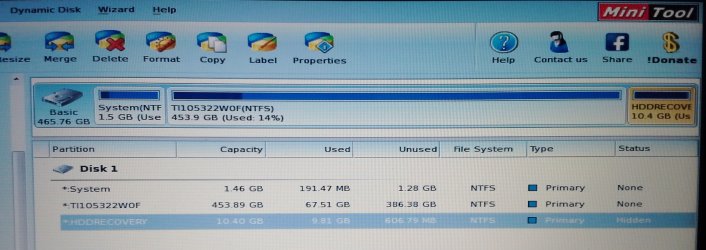
Ok, I ran Partition Wizard and none of my drives are active. So should I make all 3 active or just one of them? Should I right click on Disk 1 then rebuild the MBR or should I choose one of the subs? Should C be listed beside one of these?
Thanks,
WM
 

Attachments

  • Satellite Partion Shot.jpg
    Satellite Partion Shot.jpg
    257.3 KB · Views: 2

My Computer

Computer type
Laptop
Computer Manufacturer/Model Number
Toshiba A505-S6005
OS
Windows 7 Home Premium x64
CPU
Intel I3 M330
Memory
4 Gig
What were the results of the HD diagnostics? If you haven't run them yet then boot PW CD to run Partition Wizard Partition surface test.

The System partition should also hold the System boot files and be marked Active as you suggest. In Partition Wizard, rightclick on System partition to Modify>Set to Active, OK. Then highlight Disk 1, from Disk tab select Rebuild MBR, click OK, Apply both steps.
How to Set Active/Inactive partition -Partition Wizard Video Help.
Partition Wizard Rebuild MBR - Video Help.

Reboot to see if Win7 will now start. If not run Startup Repair - Run up to 3 Separate Times with reboots until Win7 starts, report back what it finds as root cause.

If these fail, then move the Active flag to C (the large partition), follow the same steps as above.

These steps along with all others that can be done to start unbootable Win7 are found in Troubleshooting Windows 7 Failure to Start
 
I ran Sea tools and it passed. I will try what you just suggested.
Thanks again
 

My Computer

Computer type
Laptop
Computer Manufacturer/Model Number
Toshiba A505-S6005
OS
Windows 7 Home Premium x64
CPU
Intel I3 M330
Memory
4 Gig
I set system to active, rebuilt MBR, restarted it and it gave me the option for start up repair, which it hasn't done since the very beginning. I selected it, got loading files, then the black screen with the large pointer. Should I see something else? How long should I wait?
 

My Computer

Computer type
Laptop
Computer Manufacturer/Model Number
Toshiba A505-S6005
OS
Windows 7 Home Premium x64
CPU
Intel I3 M330
Memory
4 Gig
Run Startup Repair - Run 3 Separate Times from the Win7 disk not the OS files which may be corrupt.

If it fails confirm the Win7 disk will boot and run Startup Repair in another Win7 PC.

Sometimes you may need to wait longer for disk to load, so wait awhile.
 
No luck. I put the Windows 7 ISO disk in my desktop, booted from it and it went to the blue screen that asks if you want to repair or install. On the laptop it just never gets to the blue screen. Previously you said "unplug your HD to see if it's blocking OD and Flash stick boot". So I remove my HD, then create a bootable Windows 7 USB drive, then see if the install will start to work with out the HD in the machine? Or can I use the DVD I already have?
 

My Computer

Computer type
Laptop
Computer Manufacturer/Model Number
Toshiba A505-S6005
OS
Windows 7 Home Premium x64
CPU
Intel I3 M330
Memory
4 Gig
With the hard Drive out it loads the install screen. So what now?
 

My Computer

Computer type
Laptop
Computer Manufacturer/Model Number
Toshiba A505-S6005
OS
Windows 7 Home Premium x64
CPU
Intel I3 M330
Memory
4 Gig
How are the Seatools and Partition Wizard CD's able to boot if others cannot? This points to a bad Win7 installer or Repair CD.

If you cannot boot a Win7 DVD burned with latest official installer ISO from Steps 1/2 of Clean Reinstall - Factory OEM Windows 7, try the flash stick option provided. Boot stick in BIOS Boot Menu under USB, Removable, or HD's - you may need to expand those listings to see it. Set HDD first to boot in BIOS setup.

If this fails you'll need to rescue your files by slaving the HD in another PC to copy them out, or try Paragon Rescue Kit Free Edition 11.0 Free ISO written to CD with Windows Image Burner.

then wipe the HD with Partition Wizard Wipe Disk - Video Help. to clear code which is interfering.

Then move the HD back to problem PC, follow these same steps to get and keep a perfect Clean Reinstall - Factory OEM Windows 7
 
Back
Top