
Windows won't detect headphones device.

typeslowly

New member
Local time
2:04 AM
Messages
2
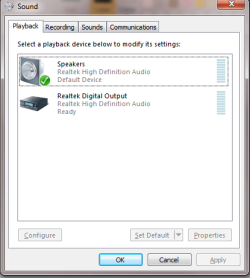
I have a Realtek ALC888 and I'm trying to get the front panel headphones to work as a separate device. Everything is set up correctly in the BIOS, as HD-Audio and I've reinstalled the drivers like 4 times now.

It detects when I plug anything into the front panel, but there is no Windows device that I can use independently from my speakers. The headphones are just a clone of the speakers. My front panel mic is detected and works perfectly, so I'm really confused what is going on.

I can "disable front panel jack detection" in Realtek and my speakers will shut off when I plug into the front panel, but I still don't get a separate device.

Can anyone point me in the right direction? I've been trying to fix this forever and haven't had any luck at all.
 

Attachments
  • Untitled.png
    Untitled.png
    12.7 KB · Views: 60

My Computer

OS
windows
You can stop trying as what you are trying to do isn't possible. If you want to be able to use speakers and headphones independently of each other, you're going to have to get another sound card. or a USB headset that will work independently of the sound card.
 

My Computer

Computer type
PC/Desktop
Computer Manufacturer/Model Number
Me
OS
Win 7 Ultimate x64
CPU
FX-8350 @ 4.6 GHz so far
Motherboard
Asus M5A97 EVO
Memory
ADATA XPG V1 Series Black 8GB DDR3 1600
Graphics Card(s)
Sapphire R9 270x Dual-X
Sound Card
Xonar DGX w/ Corsair Vengence 1300
Monitor(s) Displays
Acer S232HL Abid
Screen Resolution
1920x1080
Hard Drives
120 GB OCZ Vertex 3
500 GB Seagate 7200.12
PSU
Antec Earthwatts 650W Green
Case
Antec Three Hundred
Cooling
Cooler Master 212 EVO
Keyboard
Logitech G510
Mouse
Logitech G500s
Internet Speed
35000/3000
You can stop trying as what you are trying to do isn't possible. If you want to be able to use speakers and headphones independently of each other, you're going to have to get another sound card. or a USB headset that will work independently of the sound card.

You might want to revise that opinion in light of these new Realtek chips. Provided a compatible HD Audio front panel is installed they provide both 5(7).1 rear panel output as well as independent stereo for the front panel jack. I had to get a replacement front panel microboard for my case as my problem was the same as OPs -- I had an AC97 front panel microboard.
 

My Computer

Computer type
Laptop
Computer Manufacturer/Model Number
Apple
OS
El Capitan / Windows 10
CPU
i7-4980HQ
Memory
16GB
Graphics Card(s)
Iris 5200
I managed to get a separate device

I have a Realtek ALC888 and I'm trying to get the front panel headphones to work as a separate device. Everything is set up correctly in the BIOS, as HD-Audio and I've reinstalled the drivers like 4 times now.

It detects when I plug anything into the front panel, but there is no Windows device that I can use independently from my speakers. The headphones are just a clone of the speakers. My front panel mic is detected and works perfectly, so I'm really confused what is going on.

I can "disable front panel jack detection" in Realtek and my speakers will shut off when I plug into the front panel, but I still don't get a separate device.

Can anyone point me in the right direction? I've been trying to fix this forever and haven't had any luck at all.

I managed to separate front panel headphones jack and back speakers jack as separate devices. Since automatic detection doesn't work for me I have to switch "default device" manually :mad:

manager.jpg

The option is hidden behind that "device advanced settings" link, second option in first group box. I hope it helps, although you probably tried that already.

Cheers
 

My Computer

OS
Windows 7 Enterprise x64
CPU
Intel Core 2 Quad Q8400 @ 2.66 GHz
Motherboard
Gigabyte EP43-DS3L
Memory
Kingston 4 GB (2 x 2 GB) DDR2 @ 800 MHz
Graphics Card(s)
XFX NVidia GeForce GTX 260 core 216 @ stock
Sound Card
Realtek ALC888
Monitor(s) Displays
Samsung P2350
PSU
Coolermaster 500 W
I have a Realtek ALC888 and I'm trying to get the front panel headphones to work as a separate device. Everything is set up correctly in the BIOS, as HD-Audio and I've reinstalled the drivers like 4 times now.

It detects when I plug anything into the front panel, but there is no Windows device that I can use independently from my speakers. The headphones are just a clone of the speakers. My front panel mic is detected and works perfectly, so I'm really confused what is going on.

I can "disable front panel jack detection" in Realtek and my speakers will shut off when I plug into the front panel, but I still don't get a separate device.

Can anyone point me in the right direction? I've been trying to fix this forever and haven't had any luck at all.

I managed to separate front panel headphones jack and back speakers jack as separate devices. Since automatic detection doesn't work for me I have to switch "default device" manually :mad:

View attachment 99496

The option is hidden behind that "device advanced settings" link, second option in first group box. I hope it helps, although you probably tried that already.

Cheers

It's all about that damn front panel. If you're in the market for a new case, I'd make sure the next one you get has HD front audio inputs. If you're not and you have a spare 5.25" bay you could get this: Newegg.com - Koutech IO-FPM522 All-in-one USB 2.0 5.25" Front Panel Multi-format Card Reader with USB 2.0 / eSATA / HD Audio Ports
 

My Computer

Computer type
Laptop
Computer Manufacturer/Model Number
Apple
OS
El Capitan / Windows 10
CPU
i7-4980HQ
Memory
16GB
Graphics Card(s)
Iris 5200
Back
Top