
Windows won't do a system restore

PattiChati

Member
Local time
11:32 PM
Messages
422
I have written on this thread about my restore not restoring and now that is no longer an issue, but my system won't backup to a restore. I go to backup and restore, do the restore, so I think, and then I go to a restore point and it is not there. So how exactly do you restore on my internal hard drive C. I have an external hard drive, but I don't think it is restoring on that.
I downloaded something yesterday that I heard wreaks havoc on your machine and I want to go back to before I installed it, hence the need for a restore point. Thanks once again group! I just checked and it is NOT on my external hard drive, so what happened to it. After it was done it said backup was successful.
 
Last edited:

My Computer

Computer Manufacturer/Model Number
Vostro 220 Mini Tower Desktop Details | Dell
OS
Windows 7 Home Premium SP 1, 32-bit
CPU
Intel(R) Core(TM)2 Duo CPU E7400 @ 2.80GHz
Motherboard
Dell Inc. 0P301D
Memory
3.00 GB
Graphics Card(s)
(1) Intel(R) G45/G43 Express Chipset (2) Intel(R) G45/G43
Sound Card
(1) High Definition Audio Device (2) High Definition Audio
Monitor(s) Displays
Dell 22" wide E228WFP Analog flat panelq
Mouse
Dell optical usb mouse vostro
Other Info
OPTICAL READER, MOUSE,SPEAKERS, MONITOR, MODEM
I have written on this thread about my restore not restoring and now that is no longer an issue, but my system won't backup to a restore. I go to backup and restore, do the restore, so I think, and then I go to a restore point and it is not there. So how exactly do you restore on my internal hard drive C. I have an external hard drive, but I don't think it is restoring on that.
I downloaded something yesterday that I heard wreaks havoc on your machine and I want to go back to before I installed it, hence the need for a restore point. Thanks once again group! I just checked and it is NOT on my external hard drive, so what happened to it. After it was done it said backup was successful.

You are confusing me. You say that "my restore not restoring is no longer an issue". But in the next clause you say "my system won't backup to a restore".

System Restore has nothing to do with your external hard drive.


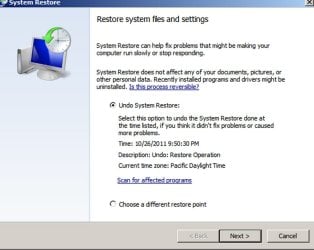
Type "system restore" into the start button search box and choose System Restore from the top of the list that pops up.

You should then see something like the first picture below.

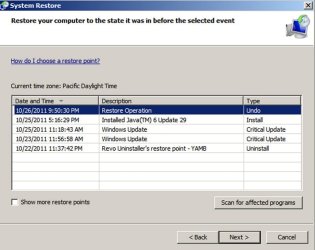
From that screen, select "choose a different restore point".

You should then see something like the second picture below.

If you don't see pictures similar to what is posted below, post a screen shot of what you DO see.

Either you have a list of restore points as shown in the second picture or you don't. Which is it?
 

Attachments

  • System Restore first screen.jpg
    System Restore first screen.jpg
    69.2 KB · Views: 7
  • System Restore second screen.jpg
    System Restore second screen.jpg
    72.5 KB · Views: 5

My Computer

Computer type
PC/Desktop
Computer Manufacturer/Model Number
Ignatz Special; 4 speed manual gearbox; factory air conditioning; one of one
OS
Windows 7 Home Premium SP1, 64-bit
CPU
Intel Skylake i5-6600K, not overclocked
Motherboard
AsRock Z170M Extreme 4, micro ATX
Memory
8 GB HyperX DDR4-2666 (2 x 4 GB)
Graphics Card(s)
none; graphics are integrated on CPU
Sound Card
onboard: Realtek ALC1150; external: USB Behringer UF0-202
Monitor(s) Displays
Dell S2340M 23 inch IPS
Screen Resolution
1600 x 900
Hard Drives
System: Crucial MX100 series SSD, 128 GB;
Data: Samsung Spinpoint 103SJ, 1 TB;
Backup: WD Caviar Green WD30EZRX-00D8PB0, 3 TB
PSU
Rosewill SilentNight 500 watt fanless, semi-modular
Case
Antec Solo II
Cooling
Noctua NH-U12S; Noctua F12 intake, Noctua S12A exhaust
Keyboard
Microsoft 200 6JH-00001 USB
Mouse
Dell or Microsoft optical wired; USB
Antivirus
Microsoft Security Essentials and Malwarebytes Premium
Browser
Pale Moon
Other Info
All fans PWM; speeds at idle: CPU circa 500 rpm; intake circa 600 rpm; exhaust circa 600 rpm; CPU temps 27 idle and 47 C load in a warm room (27 C/81 F) when running Intel Extreme Tuning Utility stress test.
  • Like
Reactions: JMH
I see exactly what your screenshots show, but not enough system restore points. I have one automatic restore point from 10-23, then 2 windows update and then no more. I made several system restore points, but none of them are showing up on the 2nd screen. When I say system restore works is because when I restored the one from 10-23, it said restore was successful, whereas before it gave that error message, remember?
 

My Computer

Computer Manufacturer/Model Number
Vostro 220 Mini Tower Desktop Details | Dell
OS
Windows 7 Home Premium SP 1, 32-bit
CPU
Intel(R) Core(TM)2 Duo CPU E7400 @ 2.80GHz
Motherboard
Dell Inc. 0P301D
Memory
3.00 GB
Graphics Card(s)
(1) Intel(R) G45/G43 Express Chipset (2) Intel(R) G45/G43
Sound Card
(1) High Definition Audio Device (2) High Definition Audio
Monitor(s) Displays
Dell 22" wide E228WFP Analog flat panelq
Mouse
Dell optical usb mouse vostro
Other Info
OPTICAL READER, MOUSE,SPEAKERS, MONITOR, MODEM
Did you choose "show more restore points" from the second screen shot??

If you did and the restore points you made were made more recently than 10-23, then either:

1: You did not in fact make restore points. You only thought you did.

or

2: System Restore does not make restore points when you properly attempt to make one.

The fact that the 10-23 restore point is there would imply that it is working correctly--at least for restore points made by Windows.

I have no idea why your self-made restore points, post 10-23, do not appear IF you have checked "show more restore points" on the second screen.

Make a restore point right now. Does it then appear on the list?

If not, you are back to square one with System Restore not working properly.

Since you have already done a repair install and that apparently did not "fix" System Restore, you may have run out of options other than a fresh install. But first confirm that a restore point you make now does not appear on the list.

Are you positive you know how to make a restore point?
 

My Computer

Computer type
PC/Desktop
Computer Manufacturer/Model Number
Ignatz Special; 4 speed manual gearbox; factory air conditioning; one of one
OS
Windows 7 Home Premium SP1, 64-bit
CPU
Intel Skylake i5-6600K, not overclocked
Motherboard
AsRock Z170M Extreme 4, micro ATX
Memory
8 GB HyperX DDR4-2666 (2 x 4 GB)
Graphics Card(s)
none; graphics are integrated on CPU
Sound Card
onboard: Realtek ALC1150; external: USB Behringer UF0-202
Monitor(s) Displays
Dell S2340M 23 inch IPS
Screen Resolution
1600 x 900
Hard Drives
System: Crucial MX100 series SSD, 128 GB;
Data: Samsung Spinpoint 103SJ, 1 TB;
Backup: WD Caviar Green WD30EZRX-00D8PB0, 3 TB
PSU
Rosewill SilentNight 500 watt fanless, semi-modular
Case
Antec Solo II
Cooling
Noctua NH-U12S; Noctua F12 intake, Noctua S12A exhaust
Keyboard
Microsoft 200 6JH-00001 USB
Mouse
Dell or Microsoft optical wired; USB
Antivirus
Microsoft Security Essentials and Malwarebytes Premium
Browser
Pale Moon
Other Info
All fans PWM; speeds at idle: CPU circa 500 rpm; intake circa 600 rpm; exhaust circa 600 rpm; CPU temps 27 idle and 47 C load in a warm room (27 C/81 F) when running Intel Extreme Tuning Utility stress test.
I had rebooted my machine a few times yesterday and nothing, and I did it again this morning and they were all there. I just did one now and it is there - go figure. I also notice there is an automatic system restore one of the times. Does Windows just do once every once in a while and then their were 2 window updates. So it looks good now except it is slow.....that little circle goes around and around, but at least it works and gues what - I am not optimizing it!!! See I did learn something from you great teacher :D
 

My Computer

Computer Manufacturer/Model Number
Vostro 220 Mini Tower Desktop Details | Dell
OS
Windows 7 Home Premium SP 1, 32-bit
CPU
Intel(R) Core(TM)2 Duo CPU E7400 @ 2.80GHz
Motherboard
Dell Inc. 0P301D
Memory
3.00 GB
Graphics Card(s)
(1) Intel(R) G45/G43 Express Chipset (2) Intel(R) G45/G43
Sound Card
(1) High Definition Audio Device (2) High Definition Audio
Monitor(s) Displays
Dell 22" wide E228WFP Analog flat panelq
Mouse
Dell optical usb mouse vostro
Other Info
OPTICAL READER, MOUSE,SPEAKERS, MONITOR, MODEM
Back
Top