JavaScript is disabled. For a better experience, please enable JavaScript in your browser before proceeding.
You are using an out of date browser. It may not display this or other websites correctly.
You should upgrade or use an
alternative browser .
Windows won't find any Bluetooth devices after driver update :(
Hey,
I have a Razer Blade 2013 with a Killer Wifi/BT card (BT chipset is Qualcomm Atheros AR3012), running Windows 7 Ultimate 64-bit.
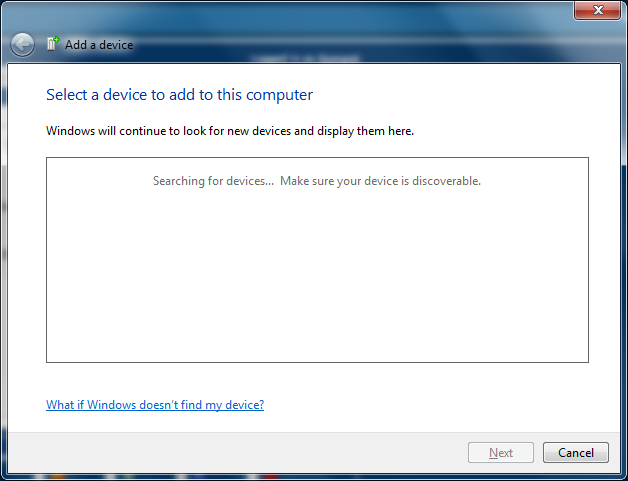
Last week I updated the drivers for the Bluetooth card... now, it just gets stuck at this screen when I try to pair my mouse, headphones, phone etc:
I can pair the devices quite easily with each other, and with my desktop. I guess the driver update broke something on the laptop?!
Things I have tried:
Completely deleted and reinstalled Killer drivers
Rolled back to previous drivers
Uninstalled adapter and let default MS drivers install
Removed all paired devices from the Devices/Printers list
Set Bluetooth Support service to automatic etc.
I'm at a loss, and pretty annoyed as I rely on Bluetooth a lot (I guess "if it ain't broke, don't fix it" applies here!).
Any help appreciated.
Cheers,
Su
Windows 7 Ultimate 64-bit Intel Core i7-4702HQ @ 2.20 GHz 8 GB DDR3L PC-12800 nVidia GTX765M 2 GB Laptop Razer Blade 14" (2013) Windows 7 Ultimate 64-bit Intel Core i7-4702HQ @ 2.20 GHz 8 GB DDR3L PC-12800 nVidia GTX765M 2 GB Dell U2913WM 29" Ultra-wide 2560 x 1080 Samsung 840 EVO 500 GB ESET EndPoint 5.0 Chrome Beta
computer support geek
Guru
VIP
The simplest thing i can think of at this point to try is if you have the resource disk for your system board if this is a custom built system; reinstall the drivers for the bluetooth hardware that came with your system. Doing that may solve the issue. It is possible the update that was put out for whatever reason was not meant for your system which could be why it is not working after updating even if it shows it should be. Ive discovered that some updates arent meant for certain systems even if they show that they are because either they wont install; or they will install but will cause a issue after being installed. So i would try reinstalling the original bluetooth drivers and see what happens.
Windows 7 ultimate 64-bit Intel I7 2600K 3.4ghz Corsair 16gb ddr3 1600mhz Nvidia Geforce gt 430 PC/Desktop custom built Windows 7 ultimate 64-bit Intel I7 2600K 3.4ghz Asus Evo P8P67 Corsair 16gb ddr3 1600mhz Nvidia Geforce gt 430 Sound Blaster Titanium x-fi pci express Dell E198WFP 1 western digital 2TB drive. Antec 1200 watt Inwin Dragon Rider 6 case supplied cooling fans logitech mk700 logitech m705 25-50mbps download; 10mbps upload(i think) avg free 2014 mozilla firefox Also have a pretty bad speaker setup which is a klipsch promedia 5.1 surround speaker setup with huge subwoofer and lg blu ray player/writer. Also a hp officejet pro 8600 plus wireless all in one and a logitech s7500 webcam.
New member
Thread Starter
Hey Matts,
Already tried reinstalling the original drivers as I mentioned
still not working.
I've done a lot of Googling, and I can see people have had similar problems, but I can't find a solution that actually works!
Cheers,
Su
Windows 7 Ultimate 64-bit Intel Core i7-4702HQ @ 2.20 GHz 8 GB DDR3L PC-12800 nVidia GTX765M 2 GB Laptop Razer Blade 14" (2013) Windows 7 Ultimate 64-bit Intel Core i7-4702HQ @ 2.20 GHz 8 GB DDR3L PC-12800 nVidia GTX765M 2 GB Dell U2913WM 29" Ultra-wide 2560 x 1080 Samsung 840 EVO 500 GB ESET EndPoint 5.0 Chrome Beta
Jedi Master (RET)
Staff member
Guru
Windows 11 Pro Ryzen 9 5900X 32GB G Skill DDR4-3600 EVGA RTX 3080 FTW 3 Ultra PC/Desktop ALWAYS UNDER CONSTRUCTION Windows 11 Pro Ryzen 9 5900X Asus X570 Crosshair Viii Hero 32GB G Skill DDR4-3600 EVGA RTX 3080 FTW 3 Ultra On Board/Sennheiser PC37X Headset 3 X Asus 27" 2560x1440 2 X 1 TB NVME drives EVGA 850 Phanteks Eclipse P400A EVGA 280 AIO Logitech G510s/ Logitech G13 Logitech G502 24/1 ESET/MBAM Pro/SAS Pro Chrome/ Firefox/ Edge
Windows 11 Pro Intel Ultra 9 288V 32 GB LPDDR5X 8533 Laptop Dell 16 Plus Windows 11 Pro Intel Ultra 9 288V 32 GB LPDDR5X 8533 16" Mini-LED HDR600 Touch 90 Hz 2560X1600 1 TB NVME
New member
Thread Starter
Windows 7 Ultimate 64-bit Intel Core i7-4702HQ @ 2.20 GHz 8 GB DDR3L PC-12800 nVidia GTX765M 2 GB Laptop Razer Blade 14" (2013) Windows 7 Ultimate 64-bit Intel Core i7-4702HQ @ 2.20 GHz 8 GB DDR3L PC-12800 nVidia GTX765M 2 GB Dell U2913WM 29" Ultra-wide 2560 x 1080 Samsung 840 EVO 500 GB ESET EndPoint 5.0 Chrome Beta


 still not working.
