Windows would not boot

Blurg

New member
Local time
6:38 PM
Messages
5
A little help please

I installed Win 7, dual booted with XP each on its own hard drive.
I ran win 7 for a week, then copied over boot files from xp drive to win 7 drive.
I followed a tutorial on disk partition (do not remember all steps)
I removed XP from the boot menu
I restarted and all was fine.
A few days later I then formatted the XP hard drive.
A week later i restarted the pc cos aero was acting up and got the following message
"No bootable devices-- strike F1 to retry boot, F2 for setup utility..."

I put my win 7 disc in to repair, get to the console and there is no OS to repair.
I click the locate drivers and can access my two drives, a boot drive and the dvd drive.
I could not find anything related to my sata drives, so I go to the repair options try them all, including start up repair over 3 times.
I then decide to install win 7 to the empty drive, it installs, restarts and sends me to the repair console with an os available.
I repair and on restart have a dual boot of win7 and win 7 ultimate recovered.
I enter the recovered and my first win 7 setup loads.

My question is what next?
I want to get rid of the second Win 7 OS and make sure everything is ok with the original install.
 

My Computer

OS
Windows 7 Ultimate x64
Sounds like you need to recover the System MBR back into original Win7.

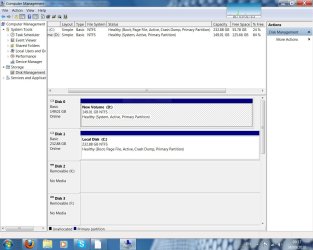
So that we can help you get it done right this time, please post back a screenshot of your full Disk Management drive map and listings, using SNiipping Tool in Start menu. Tell us what is where and what you want to keep.
 
Thanks Greg, the original Win 7 install is on C: Drive, the second install is on the D: Drive.
I want to keep the first OS on the C: Drive and use the D: Drive for storage.
 

Attachments

  • Capture.JPG
    Capture.JPG
    127.2 KB · Views: 9

My Computer

OS
Windows 7 Ultimate x64

My Computer

OS
ME/XP/Vista/Win7
Thanks, I tried that already, it will not boot when I swap drives.
The error message is "ntldr is missing", a hangover from the XP OS I believe...
 

My Computer

OS
Windows 7 Ultimate x64
Reboot into BIOS setup, set DISK1 C as first to boot (after DVD).

Boot Win7 DVD, press Shift F10 at first screen to open a Command Line, type:
DISKPART
LIS DISK
SEL DISK 0 (confirm from list this is unwanted D drive)
LIS PART
SEL PART 1 (for unwanted Win7 partition)
INACTIVE
DELETE PART OVERRIDE (Use this only if you want to delete unwanted Win7 partition now)
SEL DISK 1 (confirm from List this is C drive)
LIS PART
SEL PART 1 (confirm this is WIn7 part)
ACTIVE
EXIT
EXIT

Now reboot into DVD Repair console, click through to Recovery Tools list for http://www.sevenforums.com/tutorials/105541-startup-repair-run-3-separate-times.html

If Win7 will not boot after 3 separate repairs, then unplug DISK0 to try repairs again.
 
Last edited:
Thanks again for the reply,

The Bios menu (Dell) does not allow for selection of Disk 1 over disk 0,
i can select the order in terms of optical drive, hard drive, ide drive and usb drive. That's all.
I have the option to turn off the drive 0 in the Bios
 

My Computer

OS
Windows 7 Ultimate x64
Hello Blurg, welcome to Seven Forums!


You may have to disconnect the Disk 0 from the motherboard to get this accomplished.
 

My Computer

Computer Manufacturer/Model Number
* BFK Customs *
OS
W 7 64-bit Ultimate
CPU
Intel Q9550 Yorkfield
Motherboard
ASUS P5Q Pro
Memory
8GB Dominator 8500C5D
Graphics Card(s)
ATI : XFX 5870
Sound Card
Realtek HD Audio 7-1
Monitor(s) Displays
1x 47" LCD HDMI & 3x 26" LCD HDMI
Screen Resolution
1920x1080P & 1920x1200
Hard Drives
1x 80GB Intel X25-M G2 SSD : 1x 500GB & 1x 640GB WD Caviar Black(s)
PSU
Corsair 620HX
Case
Cooler Master RC-690
Cooling
Tuniq Tower 120, 2x 140mm and 3x 120mm case fans
Keyboard
Microsoft 500
Mouse
Razer Diamondback 3G
Internet Speed
14 Mb/s
Other Info
1x Koutech 3Gb/s SATA HDD Hot Swap Rack
I followed the rest of the instructions and got it to boot after removing disk 0 and doing start-up repair 3 times.

I reconnected disk 0 and downloaded EasyBCD and removed the unwanted version of windows from the boot menu.

I'm going to kill the unused drive when I've restarted a few times.

Thanks to Greg and the others for their assistance.
 

My Computer

OS
Windows 7 Ultimate x64
Glad you got it sorted and thanks for the update.
 

My Computer

Computer Manufacturer/Model Number
* BFK Customs *
OS
W 7 64-bit Ultimate
CPU
Intel Q9550 Yorkfield
Motherboard
ASUS P5Q Pro
Memory
8GB Dominator 8500C5D
Graphics Card(s)
ATI : XFX 5870
Sound Card
Realtek HD Audio 7-1
Monitor(s) Displays
1x 47" LCD HDMI & 3x 26" LCD HDMI
Screen Resolution
1920x1080P & 1920x1200
Hard Drives
1x 80GB Intel X25-M G2 SSD : 1x 500GB & 1x 640GB WD Caviar Black(s)
PSU
Corsair 620HX
Case
Cooler Master RC-690
Cooling
Tuniq Tower 120, 2x 140mm and 3x 120mm case fans
Keyboard
Microsoft 500
Mouse
Razer Diamondback 3G
Internet Speed
14 Mb/s
Other Info
1x Koutech 3Gb/s SATA HDD Hot Swap Rack
notic : unplug any usB device !!!!
 

My Computer

OS
Windows 7 Ultimate x86
Motherboard
M52L-S3
Graphics Card(s)
NVIDIA GeForce 9600 GT XFX
Hard Drives
180 GIG Samsung
Case
Green
Keyboard
Microfire
Mouse
Logitech G9
Internet Speed
150 kb
Back
Top