Windows XP/7 Dual Boot Issue

seanw

New member
Local time
2:02 AM
Messages
5
I installed Windowshttp://www.techsupportforum.com/# 7 on a partition without a hitch and the bootloader appeared to be working fine initially, but after trying to boot into XP I ran into some issues:

When trying to boot into XP, i get the error message that the file \ntldr is missing or corrupt. After researching for a little bit, it seems that booting from an XP disc in repair mode should fix the problem.

However, my second problem came up while trying to do that: any XP disc I try to boot from gives me this error: INF file txtsetup.sif is corrupt or missing, status 18. I've tried an SP3 CDhttp://www.techsupportforum.com/# as well as SP2 and SP3 from my thumb drive - all with the same error. I've checked each ISO and they all contain txtsetup.sif.

I'm running EasyBCD and I've tried every available combination of drive/operating system. I either end up having to fix 7 through bcdedit in the command prompt or booting 7 fine, but no access to XP no matter what I do.

I read all 13 pages of the dual boot sticky and nothing in there helped me.

Suggestions?
 

My Computer

OS
XP SP3/Win7
Hello seanw Welcome to the sevenforums!

Perhaps the one thing needed here the most would be how you went about installing XP assuming you may have installed XP after 7 or before? That along with some information on how the drive or drives were set up would be a help.

Are both on one drive or did you plan a dual boot across two separate drives? The effort to restore the XP mbr entries if successful would only trash those for 7. Adding to that Vista and 7 share a common boot loader that's different from that seen with XP.

If you had simply installed 7 following XP XP would be seen as "previous version of Windows" as well as "XP Home" or "XP Pro" in the boot opions menu once the 7 installation was finished.

For adding XP into the 7 BCD store the guide is correct in the need to unhide the protected system files and hidden folders in order to copy the XP boot.ini to the root on the 7 primary if both are on separate drives. The "ntldr is missing" error is seen when trying to boot into XP while the boot.ini is either not present on the newer version's root of C or was never edited to point the 7 boot loader to the correct XP primary partition ending up with a failed dual boot.

The thing to do now for the XP after 7 situation is verify all XP boot files are present at the root of the 7 C directory. Note Pad can be used to correct the copy of the boot.ini file if one was needed once you have unchecked the "read only" box in the right click properties screen for that.

Note "rdisk(0)partition(1)" would be the default for the original boot.ini file entries. For installation of XP on a second primary partition the entry under operating systems as well as the default OS above that in the boot.ini would be need to be changed to "rdisk(0)partition(2)" in order to then see XP load properly.

If XP is on a second drive the copy of that on the 7 drive would need to be changed to "rdisk(1)partition(1)". The rdisk value points out the correct drive while the parition entry points to which parition on what drive is where XP was installed to.
 

My Computers

System One System Two

  • Computer type
    PC/Desktop
    Computer Manufacturer/Model Number
    Custom builds = 2
    OS
    W7 Ultimate x64/W10 Pro x64/W11 Pro Triple Boot - Main PC W7 Remote PC Micro ATX W7 Pro x64/W11 Pro
    CPU
    AMD Phenom II X4 975 Deneb 3.6ghz - 965 2nd remote pc
    Motherboard
    Gigabyte GA-790XTA-UD4-Gigabyte GA-880GM-D2H remote pc
    Memory
    Kingston Hyper X DDR3 1600 1.5v 16gb - Hyper X Fury 8gb 2nd
    Graphics Card(s)
    MSI HD Radeon 5750 1gb - MSI HD Radeon 6450 on mini tower
    Sound Card
    Creative Labs X-Fi Xtreme Audio P - Realtek onooard 2nd case
    Monitor(s) Displays
    ASUS VW199T-P 19" HP 2082a Main-HP 2082a 20" remote pc
    Screen Resolution
    Asus 1440x900 - HP 1600x900
    Hard Drives
    WD Black 1TB HD per OS W7, W10, and pending W11 presently on 500gb OS Drive - Pending Triple 1TB HDs for Spanned Storage/backup volume
    Single 2TB external USB enclosure, single 1TB System 7 Host/Boot drive, Pending 8TB external HD for system image b
    PSU
    Corsair 750TX - primary / Corsair CX600 - second
    Case
    Antec 900-2 - SSD compatible / NZXT Vulcan mini tower
    Cooling
    Zalman CNPS9900A
    Keyboard
    AZIO L70 Backlit Letters Gaming - ONN Cordless/USB
    Mouse
    MSI DS200 Programmable, Logitech Cordless
    Internet Speed
    30mbps upgrade - primary hard wired - mini tower usb WiFi
    Antivirus
    GFI VIPRE Internet Security 2014 on W7 2016 beta on W10,
    Browser
    Cyberfox, WaterFox 64bit FF variants, FireFox x64, Pale Moon
    Other Info
    Accomdata fan cooled usb 2.0 PIDE/Sata II, III external enclosure.
    Sambient usb/eSata PATA/Sata II, III external enclosure.
  • Computer type
    PC/Desktop
    System Manufacturer/Model Number
    CUSTOM ASSEMBLY
    OS
    W7 Pro x64/W11 Pro
    CPU
    AMD Deneb 3.6ghz - 965
    Motherboard
    Gigabyte GA-880GM-D2H remote pc
    Memory
    Kingston Hyper X Fury 8gb
    Graphics Card(s)
    MSI HD Radeon 6450 DVI Output
    Sound Card
    Realtek onooard Creative or Other separate PENDING
    Monitor(s) Displays
    VIZIO 32" LCD TV Separate LCD Pending
    Screen Resolution
    1600x1080
    Hard Drives
    WD 500GB OS Host/Boot WD Green 1TB Storage/Backup
    PSU
    Corsair 600W - THERMALTAKE 600W spare case
    Case
    NZXT Vulcan mini tower
    Cooling
    Twin 120mm Top Fans - 240mm Side Cover
    Keyboard
    ONN Cordless/USB Logitech Cordless
    Mouse
    ONN USB/Cordless - Logitech Cordless
    Internet Speed
    DSL 5G
    Browser
    MS Edge, FireFox, WaterFox x64, FireFox Nightly
    Other Info
    OS Testing-Remote Access to Main TeamViewer
XP has been installed for a while now and I just installed 7 today. They are both on the same HDD, under separate partitions.

If you had simply installed 7 following XP XP would be seen as "previous version of Windows" as well as "XP Home" or "XP Pro" in the boot opions menu once the 7 installation was finished.
That is what I see, but I cannot access XP: I get the ntldr error.

For adding XP into the 7 BCD store the guide is correct in the need to unhide the protected system files and hidden folders in order to copy the XP boot.ini to the root on the 7 primary if both are on separate drives. The "ntldr is missing" error is seen when trying to boot into XP while the boot.ini is either not present on the newer version's root of C or was never edited to point the 7 boot loader to the correct XP primary partition ending up with a failed dual boot.
I can't seem to find the step in the guide that details this. Maybe I'm blind or maybe my eyes are just tired from searching for answers all day. :) Would you mind pointing me in the right direction?
 

My Computer

OS
XP SP3/Win7
Hi sean,

I assume you had XP installed first - it is on the first partition and you have one HD?

In that case, d/l this zip file, extract the contents onto the root of the ACTIVE partition.

Use Easybcd to remove the previous entries for XP you made, and create another - point it at the ACTIVE partition ( look in Disk Management to find the ACTIVE partition)

View attachment xpbootfiles.zip
 

My Computers

System One System Two

  • Computer type
    PC/Desktop
    OS
    7 X64
    CPU
    i5 8400
    Motherboard
    gigabyte b365m ds3h
    Memory
    2x8gb 3200mhz
    Hard Drives
    various
    PSU
    pure power 11 400w cm
    Case
    Coolermaster
    Cooling
    cryorig m9i
  • Computer type
    PC/Desktop
    OS
    7x64
    CPU
    g5400
    Motherboard
    ga b365m ds3h
    Memory
    8gb ddr4 2400
    PSU
    xfx pro 450w
Windows XP - NeoSmart Technologies Wiki The link there is for the EasyBCD wiki itself originally written for Vista while that will still apply to 7 since both share the same type of boot loader.

Hey SIW2 The 2.0 version is finally out in beta builds! Maybe that will no longer replace the 7 boot screen with the old Vista scroll bar! :D
 

My Computers

System One System Two

  • Computer type
    PC/Desktop
    Computer Manufacturer/Model Number
    Custom builds = 2
    OS
    W7 Ultimate x64/W10 Pro x64/W11 Pro Triple Boot - Main PC W7 Remote PC Micro ATX W7 Pro x64/W11 Pro
    CPU
    AMD Phenom II X4 975 Deneb 3.6ghz - 965 2nd remote pc
    Motherboard
    Gigabyte GA-790XTA-UD4-Gigabyte GA-880GM-D2H remote pc
    Memory
    Kingston Hyper X DDR3 1600 1.5v 16gb - Hyper X Fury 8gb 2nd
    Graphics Card(s)
    MSI HD Radeon 5750 1gb - MSI HD Radeon 6450 on mini tower
    Sound Card
    Creative Labs X-Fi Xtreme Audio P - Realtek onooard 2nd case
    Monitor(s) Displays
    ASUS VW199T-P 19" HP 2082a Main-HP 2082a 20" remote pc
    Screen Resolution
    Asus 1440x900 - HP 1600x900
    Hard Drives
    WD Black 1TB HD per OS W7, W10, and pending W11 presently on 500gb OS Drive - Pending Triple 1TB HDs for Spanned Storage/backup volume
    Single 2TB external USB enclosure, single 1TB System 7 Host/Boot drive, Pending 8TB external HD for system image b
    PSU
    Corsair 750TX - primary / Corsair CX600 - second
    Case
    Antec 900-2 - SSD compatible / NZXT Vulcan mini tower
    Cooling
    Zalman CNPS9900A
    Keyboard
    AZIO L70 Backlit Letters Gaming - ONN Cordless/USB
    Mouse
    MSI DS200 Programmable, Logitech Cordless
    Internet Speed
    30mbps upgrade - primary hard wired - mini tower usb WiFi
    Antivirus
    GFI VIPRE Internet Security 2014 on W7 2016 beta on W10,
    Browser
    Cyberfox, WaterFox 64bit FF variants, FireFox x64, Pale Moon
    Other Info
    Accomdata fan cooled usb 2.0 PIDE/Sata II, III external enclosure.
    Sambient usb/eSata PATA/Sata II, III external enclosure.
  • Computer type
    PC/Desktop
    System Manufacturer/Model Number
    CUSTOM ASSEMBLY
    OS
    W7 Pro x64/W11 Pro
    CPU
    AMD Deneb 3.6ghz - 965
    Motherboard
    Gigabyte GA-880GM-D2H remote pc
    Memory
    Kingston Hyper X Fury 8gb
    Graphics Card(s)
    MSI HD Radeon 6450 DVI Output
    Sound Card
    Realtek onooard Creative or Other separate PENDING
    Monitor(s) Displays
    VIZIO 32" LCD TV Separate LCD Pending
    Screen Resolution
    1600x1080
    Hard Drives
    WD 500GB OS Host/Boot WD Green 1TB Storage/Backup
    PSU
    Corsair 600W - THERMALTAKE 600W spare case
    Case
    NZXT Vulcan mini tower
    Cooling
    Twin 120mm Top Fans - 240mm Side Cover
    Keyboard
    ONN Cordless/USB Logitech Cordless
    Mouse
    ONN USB/Cordless - Logitech Cordless
    Internet Speed
    DSL 5G
    Browser
    MS Edge, FireFox, WaterFox x64, FireFox Nightly
    Other Info
    OS Testing-Remote Access to Main TeamViewer
Hi NH,

I have been playing with Easybcd v2 for a while - works very well.

Not sure why Mahmoud has MBRFIX and the Vista bootsect in the bin folder.

7 bootsect will replace both of them . ( I already did that on my copy of Easybcd v2)

Maybe he hasn't got permission from MS to redistribute that file yet.
 

My Computers

System One System Two

  • Computer type
    PC/Desktop
    OS
    7 X64
    CPU
    i5 8400
    Motherboard
    gigabyte b365m ds3h
    Memory
    2x8gb 3200mhz
    Hard Drives
    various
    PSU
    pure power 11 400w cm
    Case
    Coolermaster
    Cooling
    cryorig m9i
  • Computer type
    PC/Desktop
    OS
    7x64
    CPU
    g5400
    Motherboard
    ga b365m ds3h
    Memory
    8gb ddr4 2400
    PSU
    xfx pro 450w
That I couldn't answer. Once 7 is out next month that may all change since this was already brought up by others on previous occasions. But the 2.0 is still in beta for the time being where those last minute changes may be waiting.
 

My Computers

System One System Two

  • Computer type
    PC/Desktop
    Computer Manufacturer/Model Number
    Custom builds = 2
    OS
    W7 Ultimate x64/W10 Pro x64/W11 Pro Triple Boot - Main PC W7 Remote PC Micro ATX W7 Pro x64/W11 Pro
    CPU
    AMD Phenom II X4 975 Deneb 3.6ghz - 965 2nd remote pc
    Motherboard
    Gigabyte GA-790XTA-UD4-Gigabyte GA-880GM-D2H remote pc
    Memory
    Kingston Hyper X DDR3 1600 1.5v 16gb - Hyper X Fury 8gb 2nd
    Graphics Card(s)
    MSI HD Radeon 5750 1gb - MSI HD Radeon 6450 on mini tower
    Sound Card
    Creative Labs X-Fi Xtreme Audio P - Realtek onooard 2nd case
    Monitor(s) Displays
    ASUS VW199T-P 19" HP 2082a Main-HP 2082a 20" remote pc
    Screen Resolution
    Asus 1440x900 - HP 1600x900
    Hard Drives
    WD Black 1TB HD per OS W7, W10, and pending W11 presently on 500gb OS Drive - Pending Triple 1TB HDs for Spanned Storage/backup volume
    Single 2TB external USB enclosure, single 1TB System 7 Host/Boot drive, Pending 8TB external HD for system image b
    PSU
    Corsair 750TX - primary / Corsair CX600 - second
    Case
    Antec 900-2 - SSD compatible / NZXT Vulcan mini tower
    Cooling
    Zalman CNPS9900A
    Keyboard
    AZIO L70 Backlit Letters Gaming - ONN Cordless/USB
    Mouse
    MSI DS200 Programmable, Logitech Cordless
    Internet Speed
    30mbps upgrade - primary hard wired - mini tower usb WiFi
    Antivirus
    GFI VIPRE Internet Security 2014 on W7 2016 beta on W10,
    Browser
    Cyberfox, WaterFox 64bit FF variants, FireFox x64, Pale Moon
    Other Info
    Accomdata fan cooled usb 2.0 PIDE/Sata II, III external enclosure.
    Sambient usb/eSata PATA/Sata II, III external enclosure.
  • Computer type
    PC/Desktop
    System Manufacturer/Model Number
    CUSTOM ASSEMBLY
    OS
    W7 Pro x64/W11 Pro
    CPU
    AMD Deneb 3.6ghz - 965
    Motherboard
    Gigabyte GA-880GM-D2H remote pc
    Memory
    Kingston Hyper X Fury 8gb
    Graphics Card(s)
    MSI HD Radeon 6450 DVI Output
    Sound Card
    Realtek onooard Creative or Other separate PENDING
    Monitor(s) Displays
    VIZIO 32" LCD TV Separate LCD Pending
    Screen Resolution
    1600x1080
    Hard Drives
    WD 500GB OS Host/Boot WD Green 1TB Storage/Backup
    PSU
    Corsair 600W - THERMALTAKE 600W spare case
    Case
    NZXT Vulcan mini tower
    Cooling
    Twin 120mm Top Fans - 240mm Side Cover
    Keyboard
    ONN Cordless/USB Logitech Cordless
    Mouse
    ONN USB/Cordless - Logitech Cordless
    Internet Speed
    DSL 5G
    Browser
    MS Edge, FireFox, WaterFox x64, FireFox Nightly
    Other Info
    OS Testing-Remote Access to Main TeamViewer
I had so many issues when I was trying a tri boot with Win 7, Vista and XP. Here's how I got it to work:

1. Back up all your data on your HDD
2. Use a third party (From DOS) - Hiren's BOOT CD, MiniXp mode is very useful to format the HDD and create the # of partitions you require, slow format them.
3. Install XP on C: (Part1) but when asked leave drive as is (i.e. do not format again)
4. Install 7 on D: (Part2) do not create new partition or format - just install it and it should work.

It's lengthy but I know it worked for me.
 

My Computer

Computer Manufacturer/Model Number
Intel / Custom
OS
Windows 7 x64
CPU
Intel Core 2 Duo E4500 @2200 Mhz
Motherboard
Intel DG965WH
Memory
4GB (2x2) DDR 2 800
Graphics Card(s)
Geforce 8800 GTS 320 GDDR3
Sound Card
On Board IDT 7.1 Dolby
Monitor(s) Displays
Acer AL1717 / Philips 32PFL3403 (HDTV)
Screen Resolution
1280 * 1024 / 1280 * 768
Hard Drives
ST3250310AS Seagate Barracuda : 250 GB
SAMSUNG HD502HI Samsung SpinPoint F2EG : 500 GB
SAMSUNG HD502IJ SpinPoint F1 : 500 GB
WDC WD5000AAKS-22A7B0 : 500GB
PSU
500W
Case
Zebronics Peace Custom
Cooling
6 x Cooling Fans
Keyboard
Generic
Mouse
Generic - Profile Mouse
Internet Speed
Crap
Hi king,

That does seem lengthy.

If you have an older version of Windows installed first - 7 will pick that up and add it to bcd automatically during installation.

At least it will if no changes are made to the location of the Active flag.


Hi NH,

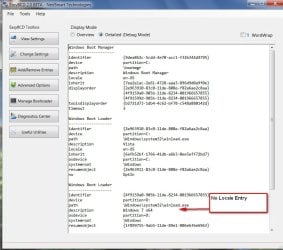
Easybcd v2.0 is not adding the locale entry for 7 - you get the rolling green bars.

EASYBCD-NOLOCALE-2009-09-06_172440.jpg

Only takes a second to add it by hand, though with

bcdedit /set {current} locale en-US
 

My Computers

System One System Two

  • Computer type
    PC/Desktop
    OS
    7 X64
    CPU
    i5 8400
    Motherboard
    gigabyte b365m ds3h
    Memory
    2x8gb 3200mhz
    Hard Drives
    various
    PSU
    pure power 11 400w cm
    Case
    Coolermaster
    Cooling
    cryorig m9i
  • Computer type
    PC/Desktop
    OS
    7x64
    CPU
    g5400
    Motherboard
    ga b365m ds3h
    Memory
    8gb ddr4 2400
    PSU
    xfx pro 450w
Hi sean,

I assume you had XP installed first - it is on the first partition and you have one HD?

In that case, d/l this zip file, extract the contents onto the root of the ACTIVE partition.

Use Easybcd to remove the previous entries for XP you made, and create another - point it at the ACTIVE partition ( look in Disk Management to find the ACTIVE partition)

View attachment 26682
I'm still receiving the same error message after putting those files in my active partition. EasyBCD is pointed at the correct partition, but I see no option to create a boot.ini file like the NeoSmart Wiki suggests. The boot.ini file that I received from you appears to be blank, but it is my understanding that it should look something like this:
Code:
[boot loader] 
timeout=30 
default=multi(0)disk(0)rdisk(0)partition(1)\WINDOWS 
[operating systems] 
multi(0)disk(0)rdisk(0)partition(1)\WINDOWS="Windows XP Professional" /fastdetect
multi(0)disk(0)rdisk(0)partition(2)\WINDOWS="Windows 7" /fastdetect
I'm going to put that in and give it a try, will update.

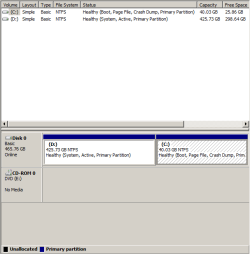
EDIT: No luck using that boot.ini, I receive the same error message. I've attached screenshots of my disk management and bcdedit, maybe you can pick out something that I am missing.

I had so many issues when I was trying a tri boot with Win 7, Vista and XP. Here's how I got it to work:

1. Back up all your data on your HDD
2. Use a third party (From DOS) - Hiren's BOOT CD, MiniXp mode is very useful to format the HDD and create the # of partitions you require, slow format them.
3. Install XP on C: (Part1) but when asked leave drive as is (i.e. do not format again)
4. Install 7 on D: (Part2) do not create new partition or format - just install it and it should work.

It's lengthy but I know it worked for me.
Formatting and re-installing is my last option at this point because I don't have any easy way to back up my data right now.
 

Attachments

  • management.PNG
    management.PNG
    8.1 KB · Views: 137
  • bcdedit.PNG
    bcdedit.PNG
    8.7 KB · Views: 238

My Computer

OS
XP SP3/Win7
You should be fine if you get bootini on the active partition set up right.

That is odd - I just downloaded the zip file I posted earlier, looked in boot.ini and it has the entries I put in there for you - i copied and pasted them here ( you may have inadvertently deleted them):

[boot loader]
timeout=30
default=multi(0)disk(0)rdisk(0)partition(1)\WINDOWS
[operating systems]
multi(0)disk(0)rdisk(0)partition(1)\WINDOWS="Windows XP" /fastdetect

is what it says. That should work fine. You can put "Windows XP Professional" if you prefer.


If still no joy, get rid of the Real Mode entry for ntldr, open an elevated cmd prompt, and type:

bcdedit /delete { put here the identifier- 36ac8764...etc}

Then press Enter. Should say it completed successfully.

Now type: (press enter after each command)

bcdedit /create {ntldr} /d “Windows XP Professional”
bcdedit /set {ntldr} device boot
bcdedit /set {ntldr} path ntldr
bcdedit /displayorder {ntldr} /addlast

You can put anything you like as the description between " ".
 
Last edited:

My Computers

System One System Two

  • Computer type
    PC/Desktop
    OS
    7 X64
    CPU
    i5 8400
    Motherboard
    gigabyte b365m ds3h
    Memory
    2x8gb 3200mhz
    Hard Drives
    various
    PSU
    pure power 11 400w cm
    Case
    Coolermaster
    Cooling
    cryorig m9i
  • Computer type
    PC/Desktop
    OS
    7x64
    CPU
    g5400
    Motherboard
    ga b365m ds3h
    Memory
    8gb ddr4 2400
    PSU
    xfx pro 450w
You need to put ntldr on D: partition, because that is where bcd is pointing.

perhaps try and copy ntldr and ntdetect.com off of your XP installation disc. They are in the I386 folder. Copy them to D: along side the already existing boot.ini

You do not need a Windows 7 entry in boot.ini
 

My Computer

Computer Manufacturer/Model Number
Too many to list.
OS
XP, Seven, 2008R2
CPU
AMD, Intel, VIA
Motherboard
Various
Memory
Corsair, Kingston, etc.
Graphics Card(s)
ATI, NVIDIA
Monitor(s) Displays
Samsung
Hard Drives
Maxtor, Western Digital
Keyboard
qwerty
Internet Speed
22 Mb/s @ home, 1 Gb/s @ server
Other Info
All of my systems still run fastest on XP 32-bit for the most part. Win7 is fun to play with, but I still prefer XP for raw speed, security, and functionality.
Just fixed it! All along I thought I had been running the most recent version of EasyBCD - I didn't realize that there was a beta version. I downloaded the beta version and used the automatic boot.ini repair and now I am able to boot into XP.

Thanks everyone for your time and assistance in this matter!
 

My Computer

OS
XP SP3/Win7
Glad you got it working, Sean.:D

Look in boot.ini - should be the same as the one I posted .
 

My Computers

System One System Two

  • Computer type
    PC/Desktop
    OS
    7 X64
    CPU
    i5 8400
    Motherboard
    gigabyte b365m ds3h
    Memory
    2x8gb 3200mhz
    Hard Drives
    various
    PSU
    pure power 11 400w cm
    Case
    Coolermaster
    Cooling
    cryorig m9i
  • Computer type
    PC/Desktop
    OS
    7x64
    CPU
    g5400
    Motherboard
    ga b365m ds3h
    Memory
    8gb ddr4 2400
    PSU
    xfx pro 450w
Yah, it sure is. Thank you again! Is it normal that I can't see my Windows 7 partition while in XP?
 

My Computer

OS
XP SP3/Win7
Yah, it sure is. Thank you again! Is it normal that I can't see my Windows 7 partition while in XP?

That's normal! 7 just like Vista would be the newer version of Windows. When booting into 7 and looking in the Disk Management tool XP should be seen as "Boot". That can be changed where you can mount the XP volume there by assigning a drive letter like D to it.

Glad to see the fix mbr option still works well. I was going to suggest that or booting off the 7 dvd if you saw 7 go on that way for the startup repair option. With 7 going on after XP there to a second primary you wouldn't need to copy any of the XP boot files over to the 7 primary.

If 7 had been installed on a second drive without the XP plugged you would then copy the XP files over and edit the boot.ini when adding XP into the 7 bcd there if the 7 drive was setup as the default boot device.

SIW2 I guess the #63 build still isn't far enough along quite yet to see that little problem corrected. The last one tried here was the #61 on the RC back in May where I then performed a repair install on the first 64bit RC installation when running into that.

To prevent the same problem later I simply used another tool called the BCD Editor found at System Tools - BCD Editor

The zip file you get there has both the 32bit and 64bit versions rolled up together where you simply extract the separate folders since both use the exact same name making that hard to tell them apart. For Vista and 7 that works well.
 

My Computers

System One System Two

  • Computer type
    PC/Desktop
    Computer Manufacturer/Model Number
    Custom builds = 2
    OS
    W7 Ultimate x64/W10 Pro x64/W11 Pro Triple Boot - Main PC W7 Remote PC Micro ATX W7 Pro x64/W11 Pro
    CPU
    AMD Phenom II X4 975 Deneb 3.6ghz - 965 2nd remote pc
    Motherboard
    Gigabyte GA-790XTA-UD4-Gigabyte GA-880GM-D2H remote pc
    Memory
    Kingston Hyper X DDR3 1600 1.5v 16gb - Hyper X Fury 8gb 2nd
    Graphics Card(s)
    MSI HD Radeon 5750 1gb - MSI HD Radeon 6450 on mini tower
    Sound Card
    Creative Labs X-Fi Xtreme Audio P - Realtek onooard 2nd case
    Monitor(s) Displays
    ASUS VW199T-P 19" HP 2082a Main-HP 2082a 20" remote pc
    Screen Resolution
    Asus 1440x900 - HP 1600x900
    Hard Drives
    WD Black 1TB HD per OS W7, W10, and pending W11 presently on 500gb OS Drive - Pending Triple 1TB HDs for Spanned Storage/backup volume
    Single 2TB external USB enclosure, single 1TB System 7 Host/Boot drive, Pending 8TB external HD for system image b
    PSU
    Corsair 750TX - primary / Corsair CX600 - second
    Case
    Antec 900-2 - SSD compatible / NZXT Vulcan mini tower
    Cooling
    Zalman CNPS9900A
    Keyboard
    AZIO L70 Backlit Letters Gaming - ONN Cordless/USB
    Mouse
    MSI DS200 Programmable, Logitech Cordless
    Internet Speed
    30mbps upgrade - primary hard wired - mini tower usb WiFi
    Antivirus
    GFI VIPRE Internet Security 2014 on W7 2016 beta on W10,
    Browser
    Cyberfox, WaterFox 64bit FF variants, FireFox x64, Pale Moon
    Other Info
    Accomdata fan cooled usb 2.0 PIDE/Sata II, III external enclosure.
    Sambient usb/eSata PATA/Sata II, III external enclosure.
  • Computer type
    PC/Desktop
    System Manufacturer/Model Number
    CUSTOM ASSEMBLY
    OS
    W7 Pro x64/W11 Pro
    CPU
    AMD Deneb 3.6ghz - 965
    Motherboard
    Gigabyte GA-880GM-D2H remote pc
    Memory
    Kingston Hyper X Fury 8gb
    Graphics Card(s)
    MSI HD Radeon 6450 DVI Output
    Sound Card
    Realtek onooard Creative or Other separate PENDING
    Monitor(s) Displays
    VIZIO 32" LCD TV Separate LCD Pending
    Screen Resolution
    1600x1080
    Hard Drives
    WD 500GB OS Host/Boot WD Green 1TB Storage/Backup
    PSU
    Corsair 600W - THERMALTAKE 600W spare case
    Case
    NZXT Vulcan mini tower
    Cooling
    Twin 120mm Top Fans - 240mm Side Cover
    Keyboard
    ONN Cordless/USB Logitech Cordless
    Mouse
    ONN USB/Cordless - Logitech Cordless
    Internet Speed
    DSL 5G
    Browser
    MS Edge, FireFox, WaterFox x64, FireFox Nightly
    Other Info
    OS Testing-Remote Access to Main TeamViewer
Back
Top