Solved Windows XP Dual Boot Not recognizing Hardware

Dominic Warden

New member
Member
VIP
Local time
12:06 AM
Messages
107
Hi, i recently dual booted my windows 7 with windows xp but xp is not recognizing my hardware. (Wireless adapter, Speakers, etc.) How do i make it recognize my hardware and drivers? When i plug in USB pen drives, it recognizes them no problem. What is Going On?
 

My Computer

Computer type
PC/Desktop
Computer Manufacturer/Model Number
Republic of Gamers
OS
Windows 8 Pro x64
CPU
Intel® Core™2 Quad Processor Q6600 2.40MHz
Memory
8GB DDR2
Graphics Card(s)
NVidia GeForce GT 440
Sound Card
Integrated Sound
Monitor(s) Displays
Packard Bell Visio 230Ws
Screen Resolution
1920x1080
Hard Drives
2 x 500Gb SATA
Case
Midi
Cooling
8 Fans
You are kind of light on details. You added XP to an existing W7? Did the XP ever recognize your hardware or never? If never, you need to get XP drivers for all your stuff if they exist. I'd look in Device Manager and get the make and model of all the stuff that doesn't work. Go to manufacturer's web page support page for driver downloads, for each device. See what they have for XP.

If they don't have an XP driver then chances are it ain't gonna' work.
 

My Computer

Computer Manufacturer/Model Number
HP Media Center
OS
Windows 7 32 bit
CPU
AMD 5200+ dual core
Memory
2 GB
Graphics Card(s)
NVidia GeForce 6150SE 128 MB
Monitor(s) Displays
CRT
Screen Resolution
1280x1024
Hard Drives
500 GB Sata internal :

SIIG USB 3.0 docking stations w/WD Caviar Black 6 Gb/s drives
Keyboard
PS/2
Mouse
PS/2 Wheel Mouse
Other Info
SIIG USB 3.0 PCIexpress card.
thanks for the reply.

my hardware is not showing up in device manager ether.
 

My Computer

Computer type
PC/Desktop
Computer Manufacturer/Model Number
Republic of Gamers
OS
Windows 8 Pro x64
CPU
Intel® Core™2 Quad Processor Q6600 2.40MHz
Memory
8GB DDR2
Graphics Card(s)
NVidia GeForce GT 440
Sound Card
Integrated Sound
Monitor(s) Displays
Packard Bell Visio 230Ws
Screen Resolution
1920x1080
Hard Drives
2 x 500Gb SATA
Case
Midi
Cooling
8 Fans
well i successfully dual booted now but i need to know why xp is doing this?
 

My Computer

Computer type
PC/Desktop
Computer Manufacturer/Model Number
Republic of Gamers
OS
Windows 8 Pro x64
CPU
Intel® Core™2 Quad Processor Q6600 2.40MHz
Memory
8GB DDR2
Graphics Card(s)
NVidia GeForce GT 440
Sound Card
Integrated Sound
Monitor(s) Displays
Packard Bell Visio 230Ws
Screen Resolution
1920x1080
Hard Drives
2 x 500Gb SATA
Case
Midi
Cooling
8 Fans
Dominic,

Since you have converted the partitions on that disk to dynamic, that is why the S: drive is not seen as an available option to install Windows to. They need to be a basic disk instead.

To fix this, you will most likely need to backup anything that you do not want to lose, and do a factory restore to reinstall Windows 7 since this is your system disk.


Restart the computer.

Keep tapping "F11" as the computer is loading.

Highlight "Recover PC" and press "Enter."

Press "Y" to confirm the restoration, at which time your computer will be automatically restored.

Did you?
 

My Computer

OS
ME/XP/Vista/Win7
No, because i followed a tutorial on another site to convert it to a basic disk.
 

My Computer

Computer type
PC/Desktop
Computer Manufacturer/Model Number
Republic of Gamers
OS
Windows 8 Pro x64
CPU
Intel® Core™2 Quad Processor Q6600 2.40MHz
Memory
8GB DDR2
Graphics Card(s)
NVidia GeForce GT 440
Sound Card
Integrated Sound
Monitor(s) Displays
Packard Bell Visio 230Ws
Screen Resolution
1920x1080
Hard Drives
2 x 500Gb SATA
Case
Midi
Cooling
8 Fans
Please post back a screenshot of your latest maximized Disk Management drive map with listings showing all columns. Use Snipping Tool in Start Menu.

Post another screenshot of the Xp Device manager with unknown devices expanded, using the Print Screen button then pasting into Paint to save and Upload. Screenshot with Paint

I would work from the Support Downloads webpage for the computer model to try to ascertain which drivers are missing, then install them if there are XP downloads to install, or search device make/model for XP drivers using Google.

To determine with certainty what exactly is an unknown Hardware Device in Dev Manager, use this tool to find the make/model and google it for XP driver, or post back for more help: Hardware Identification
 
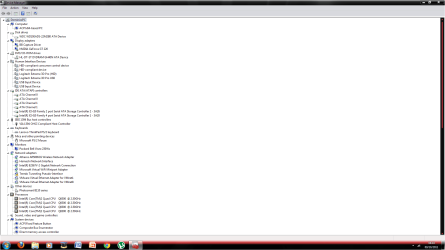
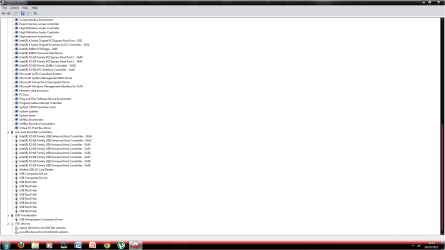
Picture1.pngPicture2.png
here is windows 7 device manager.
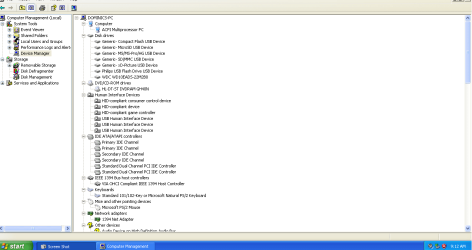
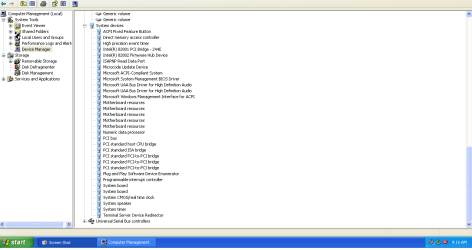
1.png2.png3.png
here is XP device manager
 

My Computer

Computer type
PC/Desktop
Computer Manufacturer/Model Number
Republic of Gamers
OS
Windows 8 Pro x64
CPU
Intel® Core™2 Quad Processor Q6600 2.40MHz
Memory
8GB DDR2
Graphics Card(s)
NVidia GeForce GT 440
Sound Card
Integrated Sound
Monitor(s) Displays
Packard Bell Visio 230Ws
Screen Resolution
1920x1080
Hard Drives
2 x 500Gb SATA
Case
Midi
Cooling
8 Fans
It looks like you need to install the chipset drivers specific to your motherboard for the XP system. They tend to be packaged with Ethernet and audio drivers which are also missing from your system.
 

My Computer

Computer type
PC/Desktop
Computer Manufacturer/Model Number
Custom-built
OS
Windows 7 Professional SP1 32-bit
CPU
Intel Core 2 Duo E6600 2.4GHz
Motherboard
Asus PL5D2
Memory
4GB DDR2-667 (4x1GB in dual-channel config)
Graphics Card(s)
nVidia GeForce 9800 GT
Sound Card
Creative X-Fi XtremeMusic
Monitor(s) Displays
Acer P236H
Screen Resolution
1920x1200 (DVI)
Hard Drives
OCZ SSD Vertex Plus 60GB SATA (Firmware 3.55), 64MB cache
Hitachi HD321KJ SATA, 320GB, 7200rpm, 16MB cache
PSU
Antec TruePower 2.0
Case
Cooler Master Centurion
Cooling
Too many fans
Keyboard
Standard
Mouse
Microsoft wireless optical mouse
Internet Speed
AT&T U-verse (18mbit/sec)
Antivirus
Microsoft Security Essentials
Browser
Firefox
Other Info
Other devices:
Compaq CQ-60 laptop
Google Nexus 7 (2012) tablet
Nvidia SHIELD tablet (US/LTE)
Hardkernel ODROID-XU single-board computer (Samsung Exynos 5420)
Agreed. The Chipset is not in the XP installer and needs to be imported from the computer or mobo's Support Downloads webpage for your exact model.
 
thanks so much, i have installed the drivers and it all works fine.
thanks for your help
 

My Computer

Computer type
PC/Desktop
Computer Manufacturer/Model Number
Republic of Gamers
OS
Windows 8 Pro x64
CPU
Intel® Core™2 Quad Processor Q6600 2.40MHz
Memory
8GB DDR2
Graphics Card(s)
NVidia GeForce GT 440
Sound Card
Integrated Sound
Monitor(s) Displays
Packard Bell Visio 230Ws
Screen Resolution
1920x1080
Hard Drives
2 x 500Gb SATA
Case
Midi
Cooling
8 Fans
Glad you got it goin'. :)
 

My Computer

Computer Manufacturer/Model Number
HP Media Center
OS
Windows 7 32 bit
CPU
AMD 5200+ dual core
Memory
2 GB
Graphics Card(s)
NVidia GeForce 6150SE 128 MB
Monitor(s) Displays
CRT
Screen Resolution
1280x1024
Hard Drives
500 GB Sata internal :

SIIG USB 3.0 docking stations w/WD Caviar Black 6 Gb/s drives
Keyboard
PS/2
Mouse
PS/2 Wheel Mouse
Other Info
SIIG USB 3.0 PCIexpress card.
Back
Top