
Windows XP fail on IntelDP35DP Quad Core

calvinstein

New member
Local time
4:20 PM
Messages
8
I was checking the threads and could not find one that could help me. I've installed Win 7 64 ultimate on my pc: IntelDP35DP / Core2Quad 2.4Ghz / 4GB ram. And saw that there was a Win XP virtualization I could install. Now, I've been able to install the windows virtual machines program but once I start virtual windows xp setup, after the automatic update window I get an error: "virtual windows XP could not be started because hardware-assisted virtualization is disabled. Please enable hardware virtualization in the BIOS settings and try again."

I've researched over google and some other forums as well and have found no advice on how to address this with my mother board. I've ran the securable app, see attached jpg.

I hope someone can give me advice on how to run the win xp virtualization properly on my unit.

Thanks in advance.
 

Attachments
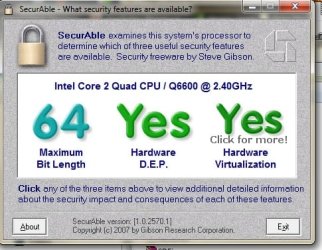
  • securable.jpg
    securable.jpg
    44.9 KB · Views: 586

My Computer My Computer

OS
Windows XP, Vista, & Ubuntu
Have you checked that virtualization is enabled in your BIOS?
 

My Computer My Computer

Computer type
PC/Desktop
Computer Manufacturer/Model Number
Systems by SmartEyeball
OS
8 Pro x64
CPU
i7 3770K 4.6GHz
Motherboard
ASUS P8Z77 WS
Memory
16GB G.Skill Trident X 2666mhz
Graphics Card(s)
x2 EVGA 780 Ti Superclocked SLI
Sound Card
SB X-FI Surround 5.1 PRO USB / ATH-AD900 Headphones
Monitor(s) Displays
x3 Dell U2410 / 58" Samsung
Screen Resolution
5760*1200/ 1920*1200
Hard Drives
2x Intel 520 240GB (RAID 0) * 2x WD Caviar Blacks 2TB (RAID 0) * 2TB WD Caviar Black * Sony Optirac DVD
PSU
Silverstone Strider Evolution 1200W
Case
Thermaltake Level 10 GT Snow Edition
Cooling
Noctua NH-D14
Keyboard
Topre Realforce // Ducky Shine MX Black // Filco Ninja TKL
Mouse
Thermaltake Theron (Highly Recommended) + Razer Imperator
Antivirus
MSE
Browser
IE, FF, WaterFox
Other Info
GT Extreme V2 Sim Racing Cockpit + 40" LCD and K/B Mouse stand ▼
Fanatec CSR Elite Wheel + Clubsport V1 Pedals + CSR shifter/7G-H ▼Saitek X52 Pro ▼ TrackIR 5 Pro
Buttkicker v2 Seat Rumbler with Dedicated 5.1 and Sub Woofer attached to frame ▼
=
Bloody Big Grin
I was checking the threads and could not find one that could help me. I've installed Win 7 64 ultimate on my pc: IntelDP35DP / Core2Quad 2.4Ghz / 4GB ram. And saw that there was a Win XP virtualization I could install. Now, I've been able to install the windows virtual machines program but once I start virtual windows xp setup, after the automatic update window I get an error: "virtual windows XP could not be started because hardware-assisted virtualization is disabled. Please enable hardware virtualization in the BIOS settings and try again."

I've researched over google and some other forums as well and have found no advice on how to address this with my mother board. I've ran the securable app, see attached jpg.

I hope someone can give me advice on how to run the win xp virtualization properly on my unit.

Thanks in advance.

the above post is correct,
you have to enable virtualization in your BIOS. What type of motherboard do you have? go into BIOS and check all the settings, go through them one by one. You will find the option to enable it. also remember once you enable it and save the bios settings, shut you PC down first then boot up again.
 

My Computer My Computer

Computer Manufacturer/Model Number
HP XW6600
OS
Windows 7 X64 Build 7100
CPU
Intel Xeon E5410 @ 22333MHz
Motherboard
HP 0A9Ch
Memory
10GB DDR2 PC2-5300
Graphics Card(s)
Nvidia GeForce 9600 GSO 384MB
Sound Card
OnBoard Sound
Monitor(s) Displays
Dell E248WFP & Dell E228WFP
Screen Resolution
1900x1200 & 1620x1200
Hard Drives
Seagate Barracuda 7200.10 - 250GB
Western Digital Caviar 2nd Gen - 250GB
PSU
STOCK HP
Case
STOCK HP Workstation Case
Cooling
STOCK HP
Keyboard
Saitek Gamer Backlit K/B
Mouse
Logitech G5
Internet Speed
11.21Mb/s Download - 2.17Mb/s Upload
I have an intel DP35DP, and I've checked there seems to be no option there to enable the virtualization. Unless I missed an option.
 

My Computer My Computer

OS
Windows XP, Vista, & Ubuntu
what motherboard do you have? if you tell us that maybe we could find the option online.
 

My Computer My Computer

Computer Manufacturer/Model Number
HP XW6600
OS
Windows 7 X64 Build 7100
CPU
Intel Xeon E5410 @ 22333MHz
Motherboard
HP 0A9Ch
Memory
10GB DDR2 PC2-5300
Graphics Card(s)
Nvidia GeForce 9600 GSO 384MB
Sound Card
OnBoard Sound
Monitor(s) Displays
Dell E248WFP & Dell E228WFP
Screen Resolution
1900x1200 & 1620x1200
Hard Drives
Seagate Barracuda 7200.10 - 250GB
Western Digital Caviar 2nd Gen - 250GB
PSU
STOCK HP
Case
STOCK HP Workstation Case
Cooling
STOCK HP
Keyboard
Saitek Gamer Backlit K/B
Mouse
Logitech G5
Internet Speed
11.21Mb/s Download - 2.17Mb/s Upload
I think he just told you what sort of motherboard you have and if you cant find such an option in your bios I dont think you have the virtualization enabled then. I know Dell has an overly restrictive bios and makes things horrible.
 

My Computer My Computer

OS
Windows 7 x64 Pro
CPU
Intel 990X
Motherboard
Asus P6T Deluxe V2
Memory
CORSAIR XMS3 6GB SDRAM DDR3 1600 (7-7-7-20)
Graphics Card(s)
2 x BFG 285 GTX OCXs in SLI
Sound Card
X-fi Elite Pro
Monitor(s) Displays
HP LP 3065
Screen Resolution
2560 x 1600
Hard Drives
2 x 150 gb Velociraptors RAID 0
PSU
PC Power & Cooling 750W
Case
CM Stacker 832
Cooling
Stock cooler
Keyboard
Saitek Eclipse II
Mouse
Logitech MX Revolution
Try looking for a BIOS update, that may/may not help.
 

My Computer My Computer

Computer Manufacturer/Model Number
Dell Laptop Studio 1537
OS
Windows 7 x64 7229
CPU
Intel Core 2 Duo CPU T6400
Memory
4 GB
Graphics Card(s)
Mobile Intel 45 Chipset
i'd have to agree with Copyright, look for a bios update. i can't find anything on where to turn it on.
 

My Computer My Computer

Computer Manufacturer/Model Number
HP XW6600
OS
Windows 7 X64 Build 7100
CPU
Intel Xeon E5410 @ 22333MHz
Motherboard
HP 0A9Ch
Memory
10GB DDR2 PC2-5300
Graphics Card(s)
Nvidia GeForce 9600 GSO 384MB
Sound Card
OnBoard Sound
Monitor(s) Displays
Dell E248WFP & Dell E228WFP
Screen Resolution
1900x1200 & 1620x1200
Hard Drives
Seagate Barracuda 7200.10 - 250GB
Western Digital Caviar 2nd Gen - 250GB
PSU
STOCK HP
Case
STOCK HP Workstation Case
Cooling
STOCK HP
Keyboard
Saitek Gamer Backlit K/B
Mouse
Logitech G5
Internet Speed
11.21Mb/s Download - 2.17Mb/s Upload
Last edited:

My Computer My Computer

Computer Manufacturer/Model Number
POS
OS
OS3.5
CPU
celery
Motherboard
Good Question ...Unknown
Memory
memory never forgets
Graphics Card(s)
OB
Sound Card
OB
Monitor(s) Displays
HUGE
Screen Resolution
168000000x105000000
Hard Drives
full
PSU
OEM 65watt
Case
N/A
Cooling
OB
Keyboard
OB
Mouse
mouse
Internet Speed
1 Trillion MBps
Other Info
Still An Awesome Forum!
I'm running windows 7 with virtual windows xp mode on my Intel DP35DPM...I'm having some issues with the virtual pc getting a "login connect fails" but that just started because of a program I'm trying to install....I swore the bios has virtualization question on main screen...will check and reply back
 

My Computer My Computer

OS
windows 7 enterprise RC trial
sorry I only have dual not quad.
 

Attachments

My Computer My Computer

OS
windows 7 enterprise RC trial
Back
Top