
Hi
Followed the tutorial 'Dual Boot Installation with Windows 7 and XP". I have windows 7 already installed trying to install windows xp in the empty partition. But everytime i get to step 5 on the windows xp installation i have problems. the installer does not SEE the separate partitions on the C drive and just list it as unknown.
. . . . . . please advise.
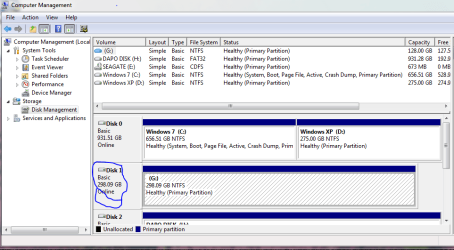
Below is a screen shot of my disk management, per request.
Followed the tutorial 'Dual Boot Installation with Windows 7 and XP". I have windows 7 already installed trying to install windows xp in the empty partition. But everytime i get to step 5 on the windows xp installation i have problems. the installer does not SEE the separate partitions on the C drive and just list it as unknown.
. . . . . . please advise.
Below is a screen shot of my disk management, per request.
Attachments
Last edited:
My Computer
At a glance
Windows 7 Home Premium 32bit.
- OS
- Windows 7 Home Premium 32bit.
- Hard Drives
- 2
