Windows xp mode in w7 help use usb device

bobalazs

Banned
Local time
1:18 PM
Messages
6
Location
Hungary
Hi.

I have this problem, that windows 7 does not support my Aiptek Slim 3000 photo/cam device. I was able to use it back in windows xp.
So i downloaded and installed windows xp mode, all is well.
However, windows 7 can not use the device, is it possible to use it in windows xp mode?
Any help is appreciated.
 

My Computer

Computer Manufacturer/Model Number
Abit IB9
OS
Windows 7 Ultimate
CPU
E6300
Motherboard
Abit IB9
Memory
2 Gb Kingmax DDRII
Graphics Card(s)
Gigabyte 9600GT
Sound Card
Realtek HD
Monitor(s) Displays
F173
Screen Resolution
1280x1024
Hard Drives
Samsung 401LJ
PSU
FSP 80+ eff.
Case
Homemade plex
Cooling
Stock
Keyboard
102 key UK
Mouse
Microsoft
Internet Speed
20 mbits/10mbits
Other Info
I'm your planet wide support, ask away
Hi there
You've discovered one of the many limitations of XP mode. USB support doesn't work in XP mode.

I would download VBOX or vmware server or player (all FREE) and install a full XP virtual machine -- this will have complete USB support.

You'll need an XP install disc however to go this route.

Cheers
jimbo
 

My Computer

Computer type
PC/Desktop
Computer Manufacturer/Model Number
Custom built, several laptops HP/ASUS
OS
Linux CENTOS 7 / various Windows OS'es and servers
CPU
Intel i7 Intel i5
Memory
8GB, 16GB
Graphics Card(s)
On Motherboard
Sound Card
Realtek HD audio
Monitor(s) Displays
Apple Cinema display, Samsung LCD
Screen Resolution
1920 X 1080
Hard Drives
4 X 1TB SATA
Mouse
Toshiba wireless laser
Internet Speed
> 20MB up
Hi there
You've discovered one of the many limitations of XP mode. USB support doesn't work in XP mode.

I would download VBOX or vmware server or player (all FREE) and install a full XP virtual machine -- this will have complete USB support.

You'll need an XP install disc however to go this route.

Cheers
jimbo

Thank you very much.
Now you say that it's 100 percent that would work, i.e. on vmware?
 

My Computer

Computer Manufacturer/Model Number
Abit IB9
OS
Windows 7 Ultimate
CPU
E6300
Motherboard
Abit IB9
Memory
2 Gb Kingmax DDRII
Graphics Card(s)
Gigabyte 9600GT
Sound Card
Realtek HD
Monitor(s) Displays
F173
Screen Resolution
1280x1024
Hard Drives
Samsung 401LJ
PSU
FSP 80+ eff.
Case
Homemade plex
Cooling
Stock
Keyboard
102 key UK
Mouse
Microsoft
Internet Speed
20 mbits/10mbits
Other Info
I'm your planet wide support, ask away
I installed windows xp on virtualbox, and spent the last two hours trying to make this work. It doesnt. The device does not even show up in device manager. I already added the usb filters.
Now the only way it would work if i dual booted with windows 7 but i don't want to do that. I don't give up easily though. :sarc:
Another weird thing i noticed is that in windows 7 when i install the driver (the windows xp driver) it shows up as 2 devices. I suppose because it's a "photocam" and a "webcam" as well.
When i was using xp it showed up as only one device.
In reply to Jimbo45, I have to say, that using xp in virtualbox in this manner, it does not solve the problem.
 
Last edited:

My Computer

Computer Manufacturer/Model Number
Abit IB9
OS
Windows 7 Ultimate
CPU
E6300
Motherboard
Abit IB9
Memory
2 Gb Kingmax DDRII
Graphics Card(s)
Gigabyte 9600GT
Sound Card
Realtek HD
Monitor(s) Displays
F173
Screen Resolution
1280x1024
Hard Drives
Samsung 401LJ
PSU
FSP 80+ eff.
Case
Homemade plex
Cooling
Stock
Keyboard
102 key UK
Mouse
Microsoft
Internet Speed
20 mbits/10mbits
Other Info
I'm your planet wide support, ask away
Okay case closed. I solved the problem by deleting the device in win7 dev. manager, rebooted, and in vbox i reinstalled the driver. Voila! Worked!
tongue.gif
 

My Computer

Computer Manufacturer/Model Number
Abit IB9
OS
Windows 7 Ultimate
CPU
E6300
Motherboard
Abit IB9
Memory
2 Gb Kingmax DDRII
Graphics Card(s)
Gigabyte 9600GT
Sound Card
Realtek HD
Monitor(s) Displays
F173
Screen Resolution
1280x1024
Hard Drives
Samsung 401LJ
PSU
FSP 80+ eff.
Case
Homemade plex
Cooling
Stock
Keyboard
102 key UK
Mouse
Microsoft
Internet Speed
20 mbits/10mbits
Other Info
I'm your planet wide support, ask away
Hi there
You've discovered one of the many limitations of XP mode. USB support doesn't work in XP mode.
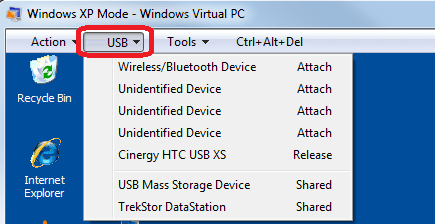
Bobalatz, just to correct the wrong information given to you: USB support works quite well in XP Mode:

XPM_USB.png

Anyway, it's nice you found a working solution.

Kari
 

My Computer

Computer type
Laptop
Computer Manufacturer/Model Number
HP ENVY 17-1150eg
OS
Windows 10 Pro x64 EN-GB
CPU
1.6 GHz Intel Core i7-720QM Processor
Memory
6 GB
Graphics Card(s)
ATI Mobility Radeon HD 5850 Graphics
Sound Card
Beats sound system with integrated subwoofer
Monitor(s) Displays
17" laptop display, 22" LED and 32" Full HD TV through HDMI
Screen Resolution
1600*900 (1), 1920*1080 (2&3)
Hard Drives
Internal: 2 x 500 GB SATA Hard Disk Drive 7200 rpm
External: 2TB for backups, 3TB USB3 network drive for media
Cooling
As Envy runs a bit warm, I have it on a Cooler Master pad
Keyboard
Logitech diNovo Media Desktop Laser (bluetooth)
Mouse
Logitech Performance Mouse MX
Internet Speed
50/10 Mbps VDSL
Antivirus
Windows Defender 4.3.9431.0
Browser
Maxthon 3.5.2., IE11
Hi Kari

I'll correct my original info -- XP mode used to have MEGA problems with USB drives unless you "switched off" the Integration feature in which case Virtual PC behaved more like "bog standard" virtual machine software such as VBOX / VMWARE--- looks like the latest incarnation of XP mode has fixed this problem.

I still think however that XP mode is much more hobbled than it needed to have been however. The Idea was great but execution IMO flawed.

Note also that to get the XP mode as a Free download you need to have a version of W7 > Home premium and you need to have the VT feature enabled -- which again IMO is rather strange since some businesses (presumably this is the intended audience for XP mode) might be using rather older hardware than typical users on these type of Forums.

Thanks for the info.

Cheers
jimbo
 

My Computer

Computer type
PC/Desktop
Computer Manufacturer/Model Number
Custom built, several laptops HP/ASUS
OS
Linux CENTOS 7 / various Windows OS'es and servers
CPU
Intel i7 Intel i5
Memory
8GB, 16GB
Graphics Card(s)
On Motherboard
Sound Card
Realtek HD audio
Monitor(s) Displays
Apple Cinema display, Samsung LCD
Screen Resolution
1920 X 1080
Hard Drives
4 X 1TB SATA
Mouse
Toshiba wireless laser
Internet Speed
> 20MB up
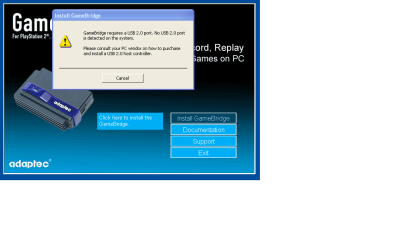
Nice to see you found a solution to your prob. Tho I still can't get my gamebridge to work in XP mode (dose not detect a USB 2.0 port)
 

My Computer

Computer Manufacturer/Model Number
custom build
OS
Windows 7 Pro X64
CPU
AMD Phenom II X4 975 Black Edition
Motherboard
MSI 870A-G54 (FX)
Memory
CORSAIR Vengeance 8GB (2 x 4GB) 240-Pin DDR3 SDRAM DDR3 1600
Graphics Card(s)
ASUS EN9800GT HB/HTDI/512M GeForce 9800 GT 512MB 256-bit GDD
Sound Card
Realtek ALC892
Monitor(s) Displays
Viewsonic 19' 16:10
Screen Resolution
1680X1050
Hard Drives
Western Digital Caviar Black WD6401AALS 640GB 7200 RPM SATA,
Western Digital Caviar Black 1TB 7200RPM SATA
PSU
Thermaltake Purepower W0100RU 500W ATX 12V
Case
COOLER MASTER Elite RC-331-KKN1-GP Black SECC ATX Mid Tower
Cooling
Nothing beyond what etch part came with
Keyboard
Logitech G11
Mouse
USB Logitech gaming mouse
Internet Speed
Cable
Other Info
New CPU, Motherboard, and Ram installed 02/2012

Logitech G35 Headset
Smsff7, do you not see it on the USB device list (see my post above)? When driver is not installed, it can be shown as Unidentified Device. Try to attach these one at a time and see if you can find the right one to start installing drivers.

This extract from XP Mode Help file:
Windows XP Mode Help said:
Windows Virtual PC supports the use of USB 2.0 devices by sharing the device or by redirecting it to the virtual machine. The method to use depends on the type of USB device. When the Integration Components package is installed in the guest operating system, printers, storage devices, and smart card readers that are attached to the host are automatically shared with virtual machines. When drivers are installed in both the host and guest, no additional steps are required to use these types of USB devices, except for printers. For more information about configuring and sharing printers, see the Windows Virtual PC content (Windows Virtual PC Evaluation Guide).

A redirected USB device can be used by only one operating system at a time, as mentioned in the following steps.

To redirect a USB device to a virtual machine:
  • Attach the device to the physical computer and turn on the device.
  • From the virtual machine window, click USB and then click Attach device name. Windows looks for and tries to install the device driver in the guest operating system. You also can install the driver from the Internet or from a CD.
  • After the driver is installed, you can use the USB device from within the virtual machine the same way as you would on a physical computer. However, USB devices that are connected using these steps are not shared, so they must be released from one operating system to be available for use on the other operating system.
  • To make the USB device available on the host operating system, release it from the virtual machine. From the virtual machine window, click USB and then click Release device name.

To redirect a USB device to a virtual application, attach the device and turn it on, right-click the virtual application icon in the task bar of the host, and then click Manage USB devices. Then, choose the device.

Kari
 

My Computer

Computer type
Laptop
Computer Manufacturer/Model Number
HP ENVY 17-1150eg
OS
Windows 10 Pro x64 EN-GB
CPU
1.6 GHz Intel Core i7-720QM Processor
Memory
6 GB
Graphics Card(s)
ATI Mobility Radeon HD 5850 Graphics
Sound Card
Beats sound system with integrated subwoofer
Monitor(s) Displays
17" laptop display, 22" LED and 32" Full HD TV through HDMI
Screen Resolution
1600*900 (1), 1920*1080 (2&3)
Hard Drives
Internal: 2 x 500 GB SATA Hard Disk Drive 7200 rpm
External: 2TB for backups, 3TB USB3 network drive for media
Cooling
As Envy runs a bit warm, I have it on a Cooler Master pad
Keyboard
Logitech diNovo Media Desktop Laser (bluetooth)
Mouse
Logitech Performance Mouse MX
Internet Speed
50/10 Mbps VDSL
Antivirus
Windows Defender 4.3.9431.0
Browser
Maxthon 3.5.2., IE11
Smsff7, do you not see it on the USB device list (see my post above)? When driver is not installed, it can be shown as Unidentified Device. Try to attach these one at a time and see if you can find the right one to start installing drivers.

This extract from XP Mode Help file:
Windows XP Mode Help said:
Windows Virtual PC supports the use of USB 2.0 devices by sharing the device or by redirecting it to the virtual machine. The method to use depends on the type of USB device. When the Integration Components package is installed in the guest operating system, printers, storage devices, and smart card readers that are attached to the host are automatically shared with virtual machines. When drivers are installed in both the host and guest, no additional steps are required to use these types of USB devices, except for printers. For more information about configuring and sharing printers, see the Windows Virtual PC content (Windows Virtual PC Evaluation Guide).

A redirected USB device can be used by only one operating system at a time, as mentioned in the following steps.

To redirect a USB device to a virtual machine:
  • Attach the device to the physical computer and turn on the device.
  • From the virtual machine window, click USB and then click Attach device name. Windows looks for and tries to install the device driver in the guest operating system. You also can install the driver from the Internet or from a CD.
  • After the driver is installed, you can use the USB device from within the virtual machine the same way as you would on a physical computer. However, USB devices that are connected using these steps are not shared, so they must be released from one operating system to be available for use on the other operating system.
  • To make the USB device available on the host operating system, release it from the virtual machine. From the virtual machine window, click USB and then click Release device name.

To redirect a USB device to a virtual application, attach the device and turn it on, right-click the virtual application icon in the task bar of the host, and then click Manage USB devices. Then, choose the device.

Kari
I know about that. XP can see it and knows what it is, but the problem is that when I try to install the device with the disk it can't see any USB 2.0 ports and I can install the pprogram to run it because it can't find the device
 

Attachments

  • Error.png
    Error.png
    25.3 KB · Views: 124

My Computer

Computer Manufacturer/Model Number
custom build
OS
Windows 7 Pro X64
CPU
AMD Phenom II X4 975 Black Edition
Motherboard
MSI 870A-G54 (FX)
Memory
CORSAIR Vengeance 8GB (2 x 4GB) 240-Pin DDR3 SDRAM DDR3 1600
Graphics Card(s)
ASUS EN9800GT HB/HTDI/512M GeForce 9800 GT 512MB 256-bit GDD
Sound Card
Realtek ALC892
Monitor(s) Displays
Viewsonic 19' 16:10
Screen Resolution
1680X1050
Hard Drives
Western Digital Caviar Black WD6401AALS 640GB 7200 RPM SATA,
Western Digital Caviar Black 1TB 7200RPM SATA
PSU
Thermaltake Purepower W0100RU 500W ATX 12V
Case
COOLER MASTER Elite RC-331-KKN1-GP Black SECC ATX Mid Tower
Cooling
Nothing beyond what etch part came with
Keyboard
Logitech G11
Mouse
USB Logitech gaming mouse
Internet Speed
Cable
Other Info
New CPU, Motherboard, and Ram installed 02/2012

Logitech G35 Headset
Hey Guys, got it to install in Win 7.
Yes it works after some pre-install tweaking.
You have to go into the install disc and enable compatibility mode for XPsp3 and Run as administrator, for every single exe file in all main and subfolders.
Reboot and install from the "software" folder..
I'm running Win7 Ultimate 32bit. It works great
 

My Computer

Computer Manufacturer/Model Number
Dell
OS
Win7 Ul32bit, XPsp3, LinuxMint8
CPU
2.o Core2Duo
Motherboard
Dell
Memory
2.0GB
Graphics Card(s)
ATI x1400
Sound Card
SigmaTel
loading XP Mode image into WMware works (mostly)

I have a Gamebridge (1410?) and Windows 7 Professional 64 bit. I was unable to install the software due to the USB 2.0 issues in XP Mode. However, following the advice here, I downloaded VMware (freeware) and loaded the XP Mode image into VMware (VMware has really easy instructions for this). I was able to install the Adaptec/Intervideo software. It works great on the component connection from a PS2. The TV tuner mostly works - it scans the channels but crashes halfway through (so I can't get to any higher channels), which it doesn't do on my hardware XP box. Thanks for the help, previous posters.
 

My Computer

OS
Windows 7 Professional 64-bit
I have a Gamebridge (1410?) and Windows 7 Professional 64 bit. I was unable to install the software due to the USB 2.0 issues in XP Mode. However, following the advice here, I downloaded VMware (freeware) and loaded the XP Mode image into VMware (VMware has really easy instructions for this). I was able to install the Adaptec/Intervideo software. It works great on the component connection from a PS2. The TV tuner mostly works - it scans the channels but crashes halfway through (so I can't get to any higher channels), which it doesn't do on my hardware XP box. Thanks for the help, previous posters.

Thanks. I'm trying the VMware option now.

...and I think you mean "composite" (composed chroma and luma in a single yellow connector) instead of "component" (red, green, and blue connections).
 

My Computer

OS
Windows 7 Ultimate 64bit
It's still flawed. I can't get my printer(Laserjet 1000 series, no 7 drivers, only xp) to show up in the usb dropdown of the VP window("no devices found, don't know why"), and without that there is no chance to install drivers in the virtual xp machine. Does not matter if I have the integration feature enabled or not. Major fail by Microsoft in my eyes... So now I am downloading vmware server, I am confident that their technology will work.
 

My Computer

OS
Windows 7 Professional 64bit
I know this thread is very old, but the VMWare option seems to be the correct solution with the GameBridge AVC-1410. I was going nuts with Google trying to find this solution, so I'll insert the text of the error message here for the search bots' sakes: GameBridge requires a USB 2.0 port. No USB 2.0 port is detected on the system. Please consult your PC vendor on how to purchase and install a USB 2.0 host controller.
 

My Computer

Computer type
PC/Desktop
OS
Win 7 Pro 64-bit
Back
Top