Windows XP Mode more faster

Sorry which shortcuts exactly?
 

My Computer

Computer Manufacturer/Model Number
Desktop
OS
Windows 7 Ultimate x64
CPU
Intel(R) Core(TM)2 CPU 6600 @ 2.40GHz
Motherboard
ASUSTeK Computer INC. P5B-Deluxe
Memory
6,00 GB
Graphics Card(s)
ATI Radeon HD 3600 Series
Sound Card
SoundMAX Integrated
Screen Resolution
1280x1024 60Hz
Hard Drives
ST3120022A ATA Device
on your host, select Start > VMLite Workstation > VMLite XP Mode Applications, right click, choose Explore

it will open up a folder, you can delete "VMLite XP Mode Applications" folder

usually inside this folder:

C:\Users\your-user-id\AppData\Roaming\Microsoft\Windows\Start Menu\Programs\VMLite Workstation
 

My Computer

OS
windows 7
OK Done it.
Now what to do?
 

My Computer

Computer Manufacturer/Model Number
Desktop
OS
Windows 7 Ultimate x64
CPU
Intel(R) Core(TM)2 CPU 6600 @ 2.40GHz
Motherboard
ASUSTeK Computer INC. P5B-Deluxe
Memory
6,00 GB
Graphics Card(s)
ATI Radeon HD 3600 Series
Sound Card
SoundMAX Integrated
Screen Resolution
1280x1024 60Hz
Hard Drives
ST3120022A ATA Device
did you see shortcuts when you start vm? vmlite should recreate those links for you.

post a screenshot of the Start menu
 

My Computer

OS
windows 7
Yes,
here it is
 

Attachments

  • Start Menu Windows 7.png
    Start Menu Windows 7.png
    52.6 KB · Views: 5

My Computer

Computer Manufacturer/Model Number
Desktop
OS
Windows 7 Ultimate x64
CPU
Intel(R) Core(TM)2 CPU 6600 @ 2.40GHz
Motherboard
ASUSTeK Computer INC. P5B-Deluxe
Memory
6,00 GB
Graphics Card(s)
ATI Radeon HD 3600 Series
Sound Card
SoundMAX Integrated
Screen Resolution
1280x1024 60Hz
Hard Drives
ST3120022A ATA Device
try to shutdown xp vm from inside, then restart it. Make sure your vm is completely shutdown, then restart.

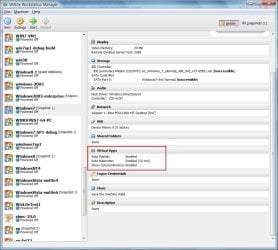
can you check the settings? open vmlite workstation, see attached image. make sure virtual apps are enabled.
 

Attachments

  • vmlite1.jpg
    vmlite1.jpg
    165.2 KB · Views: 17

My Computer

OS
windows 7
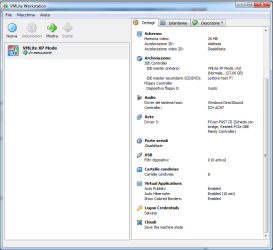
This is my one how i see it
 

Attachments

  • Workstation.png
    Workstation.png
    62 KB · Views: 9

My Computer

Computer Manufacturer/Model Number
Desktop
OS
Windows 7 Ultimate x64
CPU
Intel(R) Core(TM)2 CPU 6600 @ 2.40GHz
Motherboard
ASUSTeK Computer INC. P5B-Deluxe
Memory
6,00 GB
Graphics Card(s)
ATI Radeon HD 3600 Series
Sound Card
SoundMAX Integrated
Screen Resolution
1280x1024 60Hz
Hard Drives
ST3120022A ATA Device
did you shutdown the vm completely? by default, it's hibernated. So you need to go to Start menu in xp vm, click Shutdown, next time, when you start vm, the shortcut folder is supposed to be auto populated again.

Did you see any shortcut before? I mean immediately after the vm was first created.
 

My Computer

OS
windows 7
Yes i did shutdown completly the VM by start shutdown.
where should isee shortcut and which ones?
 

My Computer

Computer Manufacturer/Model Number
Desktop
OS
Windows 7 Ultimate x64
CPU
Intel(R) Core(TM)2 CPU 6600 @ 2.40GHz
Motherboard
ASUSTeK Computer INC. P5B-Deluxe
Memory
6,00 GB
Graphics Card(s)
ATI Radeon HD 3600 Series
Sound Card
SoundMAX Integrated
Screen Resolution
1280x1024 60Hz
Hard Drives
ST3120022A ATA Device
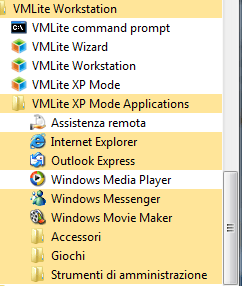
There should be a lot of shortcuts under VMLite Workstation > VMLite XP Mode Applications

can you do this? inside xp mode vm, kill VMLiteGuestControl.exe, then start it again using command line.

You may want to re-create a new xp mode vm, and check if you see any shortcuts after creation. The shortcuts on host are same as you see inside vm.
 

My Computer

OS
windows 7
This is what i see in Windows 7
 

Attachments

  • VmLite.png
    VmLite.png
    14.9 KB · Views: 89

My Computer

Computer Manufacturer/Model Number
Desktop
OS
Windows 7 Ultimate x64
CPU
Intel(R) Core(TM)2 CPU 6600 @ 2.40GHz
Motherboard
ASUSTeK Computer INC. P5B-Deluxe
Memory
6,00 GB
Graphics Card(s)
ATI Radeon HD 3600 Series
Sound Card
SoundMAX Integrated
Screen Resolution
1280x1024 60Hz
Hard Drives
ST3120022A ATA Device
yes, those shortcuts seem to be right. Now, you can try to add a shortcut to the Start menu inside xp vm, if the shortcut appears inside xp, it should appear on host Start menu too.
 

My Computer

OS
windows 7
i use VirtualBox with VPCs and custom install windows 98se/XP SP3 and you can make it like another taskbar in the host windows and comes with its own drivers for more features! here is a sample screen shot from 2008
186.jpg
 

My Computer

Computer Manufacturer/Model Number
build it myself
OS
Windows 8 X64 M3 8102 / Windows 7 Ultimate X64
CPU
Core i7 2600K @3.7ghz
Motherboard
GA-Z68XP-UD3R
Memory
32GB DDR-3 1866mhz
Graphics Card(s)
AMD Radeon 6990 + Geforce GTX560
Sound Card
SB Xfi Fatality
Monitor(s) Displays
4x 23" + 30" Dell
Screen Resolution
4x 1920x1080 + Main 2560x1600 Dell
Hard Drives
2x OCZ Agility 3 120gb SATA3
1x Kingston 120gb SATA3
1x Corsair 120gb SATA3
1x Intel 512gb SATA3 (STEAM)
5x 3TB SATA 3 WD Black (Storage)
PSU
Antec 1300W HC
Case
HAF X (USB3)
Cooling
Swiftech H20-320 Edge Liquid Cooling Kit
Keyboard
Optimus Maximus replaced G19
Mouse
Saitek Cyborg R.A.T. 7 Replaced Sidewinder X5
Internet Speed
Internode 1TB Cap ADSL2+ (NBN Optic)
Hi there
are people STILL pushing vmlite
where's a WORKING link.
I don't think that having to register either is a good idea -- but so far I;ve NEVER seen a working link to this "product".

cheers
jimbo
 

My Computer

Computer type
PC/Desktop
Computer Manufacturer/Model Number
Custom built, several laptops HP/ASUS
OS
Linux CENTOS 7 / various Windows OS'es and servers
CPU
Intel i7 Intel i5
Memory
8GB, 16GB
Graphics Card(s)
On Motherboard
Sound Card
Realtek HD audio
Monitor(s) Displays
Apple Cinema display, Samsung LCD
Screen Resolution
1920 X 1080
Hard Drives
4 X 1TB SATA
Mouse
Toshiba wireless laser
Internet Speed
> 20MB up
Back
Top