
windows xp mode not running

vikrantsjs

New member
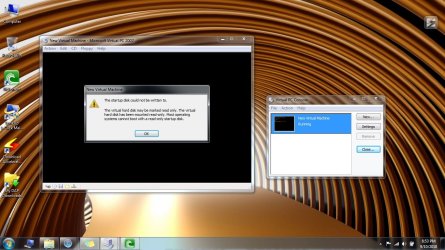
windows xp mode not running on my compaq cq62 laptop
my laptop config.
i5
320gb
2gb ram
 

Attachments

  • Untitled.jpg
    Untitled.jpg
    299.6 KB · Views: 23

My Computer

Computer Manufacturer/Model Number
compaq cq62
OS
windows 7
CPU
2.3
Memory
2 GB DDR3
Monitor(s) Displays
15.6"
Screen Resolution
1366*768
Hard Drives
320 GB
Internet Speed
BROADBAND
Other Info
PROCESSOR - I5, 320 GB HDD
That's not XP Mode. That's Microsoft Virtual PC 2007. Did you set up a virtual disk to be written to? Additionally, if you want XP Mode, have you tried downloading from here: Download Windows XP Mode
 

My Computer

OS
Windows 7 Ultimate x64 SP1
CPU
Intel Core i3 530 2.93 Ghz Clarkdale
Motherboard
ASRock P55 PRO/USB3 LGA 1156
Memory
4 GB OCZ DDR3 1600 (PC12800) Low Voltage Desktop Memory
Graphics Card(s)
Nvidia GeForce GTX 550 Ti with 1 GB of RAM
Sound Card
Realtek HD ALC892
Monitor(s) Displays
20'' eMachines E202HDbmd Glare Panel Widescreen
Screen Resolution
1600 x 900
Hard Drives
Western Digital 1 TB Caviar Black Edition (7200 RPM) SATA
Hitachi Deskstar 500 GB (7200 RPM) SATA
Samsung SpinPoint 400 GB (7200 RPM) SATA
PSU
Rosewill Xtreme Series RX750-D-B ATX12V v2.2 & EPS12V (750W)
Case
Cooler Master Centurion 534 RC-534-KKN2-GP Mid-Tower
Cooling
Standard Case Fans and Stock CPU Heatsink
Keyboard
Microsoft Wireless Optical Desktop Elite
Mouse
Microsoft Wireless Optical Desktop Elite
Internet Speed
7.1 Mbps Verizon DSL
Which application is that anyhow? Curious?
 

My Computers

System One System Two

  • Computer type
    PC/Desktop
    Computer Manufacturer/Model Number
    PowerSpec G164
    OS
    WIN10
    CPU
    AMD Ryzen 5 3600 6-Core Processor 3.59 GHz
    Memory
    16.0 GB
    Internet Speed
    VERY FAST>>>!!!
  • Antivirus
    ESET Security Premium
Hello Vikrantsjs,

You have Microsoft Virtual PC 2007 installed. You will need to uninstall that, and install Windows Virtual PC instead to be able to install XP Mode afterwards. You will only be able to do this if you have either the Windows 7 Professional, Enterprise, or Ultimate edition installed. See the tutorial below for more on this.

http://www.sevenforums.com/tutorials/8247-windows-xp-mode-install-setup.html

Hope this helps,
Shawn
 
Last edited:

My Computer

Computer type
PC/Desktop
Computer Manufacturer/Model Number
Self built custom
OS
64-bit Windows 11 Pro for Workstations
CPU
Intel i7-8700K OC'd to 5 GHz
Motherboard
ASUS ROG Maximus XI Formula Z390
Memory
64 GB (4x16GB) G.SKILL TridentZ RGB DDR4 3600 MHz
Graphics Card(s)
ASUS ROG-STRIX-GTX1080TI-O11G-GAMING
Sound Card
Integrated
Monitor(s) Displays
2 x Samsung Odyssey G7 27"
Screen Resolution
2560x1440
Hard Drives
1TB Samsung 990 PRO M.2,
4TB Samsung 990 PRO PRO M.2,
TerraMaster F8 SSD Plus NAS
PSU
Seasonic Prime Titanium 850W
Case
Thermaltake Core P3
Cooling
Corsair Hydro H115i
Keyboard
Logitech wireless K800
Mouse
Logitech MX Master 4
Internet Speed
2 Gb/s Download and 100 Mb/s Upload
Antivirus
Malwarebyte Anti-Malware Premium
Browser
Google Chrome
Other Info
Logitech Z625 speaker system,
Logitech BRIO 4K Pro webcam,
HP Color LaserJet Pro MFP M477fdn,
APC SMART-UPS RT 1000 XL - SURT1000XLI,
Galaxy S23 Plus phone
Last edited by a moderator:

My Computer

Computer Manufacturer/Model Number
compaq cq62
OS
windows 7
CPU
2.3
Memory
2 GB DDR3
Monitor(s) Displays
15.6"
Screen Resolution
1366*768
Hard Drives
320 GB
Internet Speed
BROADBAND
Other Info
PROCESSOR - I5, 320 GB HDD

My Computer

Computer Manufacturer/Model Number
compaq cq62
OS
windows 7
CPU
2.3
Memory
2 GB DDR3
Monitor(s) Displays
15.6"
Screen Resolution
1366*768
Hard Drives
320 GB
Internet Speed
BROADBAND
Other Info
PROCESSOR - I5, 320 GB HDD
Hello Vikrantsjs,

You have Microsoft Virtual PC 2007 installed. You will need to uninstall that, and install Windows Virtual PC instead to be able to install XP Mode afterwards. You will only be able to do this if you have either the Windows 7 Professional, Enterprise, or Ultimate edition installed. See the tutorial below for more on this.

http://www.sevenforums.com/tutorials/8247-windows-xp-mode-install-setup.html

Hope this helps,
Shawn

can i install vmware

You can install VMWare, VirtualBox, Microsoft Virtual PC 2007, Windows Virtual PC. These are virtualization programs, as long as your hardware supports it!

If you want to use Windows XP Mode, you have to have either Windows 7 Pro, Enterprise or Ultimate.

You don't have to run Windows XP Mode, under Windows Virtual PC, it will work in VMWare Player, but you still need one of those versions ABOVE! And hardware that supports virtualization.
 

My Computers

System One System Two

  • Computer type
    PC/Desktop
    Computer Manufacturer/Model Number
    PowerSpec G164
    OS
    WIN10
    CPU
    AMD Ryzen 5 3600 6-Core Processor 3.59 GHz
    Memory
    16.0 GB
    Internet Speed
    VERY FAST>>>!!!
  • Antivirus
    ESET Security Premium
Back
Top