Windows XP Mode

TJR357

New member
Local time
5:55 PM
Messages
86
I've gone through the installation of Virtual PC and Windows XP mode, however this message pops up:

[FONT=&quot]Windows Virtual PC cannot start because this computer does not support hardware-assisted virtualization.[/FONT]
I'm running Pro 64 bit.

The processor is an Intel duo core T5870 @ 2GHzThis machine is not that old, it should allow for virtualization.
[FONT=&quot][/FONT]
 

My Computer

OS
Windows 7 Pro 64 bit

My Computer

Computer Manufacturer/Model Number
HP Touchsmart IQ771.uk
OS
Windows 7 Ultimate x64
CPU
AMD Turion(tm) 64 X2 Mobile Technology TL-56
Motherboard
ASUS Pheonix
Memory
3GB Nanya PC2-6400 DDR2-SDRAM SO-DIM (400MHz)
Graphics Card(s)
NVIDIA GeForce Go 7600 256MB GDDR3 SDRAM
Sound Card
High Definition Intergrated NVIDIA MCP51
Monitor(s) Displays
46" Sony Bravia HDTV
Screen Resolution
1600x1200
Hard Drives
1.5TB Samsug
320GB Seagate ST3320820AS - SATA 3Gb/s 8MB
500GB Maxtor Basics STM305003EHD301-RK
Internet Speed
↓6.32 Mb/s ↑0.35 Mb/s ↔26ms
Other Info
BIOS - American Megatrends Inc. 5.07
Ethernet Port - NVIDIA nForce 10/100/1000 Mbps
DVD Drive - TSSTcorp DVDR/RW TS-T632L
The processor is an Intel duo core T5870 @ 2GHzThis machine is not that old, it should allow for virtualization.

Unfortunately, even though your CPU is not that old, it doesn't support Intel Virtualization Technology.
Intel® Core?2 Duo Processor T5870 (2M Cache, 2.00 GHz, 800 MHz FSB) with SPEC Code(s)

Look at right hand column, under Advanced Technologies and you will see that Intel Virtualization is not checked as enabled/available.

You will have to use a product which doesn't require this like VMWare, Sun VirtualBox or Microsoft Virtual PC 2007.
 

My Computer

Computer Manufacturer/Model Number
Self-Built in July 2009
OS
Windows 7 Ultimate x64
CPU
Intel Q9550 2.83Ghz OC'd to 3.40Ghz
Motherboard
Gigabyte GA-EP45-UD3R rev. 1.1, F12 BIOS
Memory
8GB G.Skill PI DDR2-800, 4-4-4-12 timings
Graphics Card(s)
EVGA 1280MB Nvidia GeForce GTX570
Sound Card
Realtek ALC899A 8 channel onboard audio
Monitor(s) Displays
23" Acer x233H
Screen Resolution
1920x1080
Hard Drives
Intel X25-M 80GB Gen 2 SSD
Western Digital 1TB Caviar Black, 32MB cache. WD1001FALS
PSU
Corsair 620HX modular
Case
Antec P182
Cooling
stock
Keyboard
ABS M1 Mechanical
Mouse
Logitech G9 Laser Mouse
Internet Speed
15/2 cable modem
Other Info
Windows and Linux enthusiast. Logitech G35 Headset.
The processor is an Intel duo core T5870 @ 2GHzThis machine is not that old, it should allow for virtualization.

Unfortunately, even though your CPU is not that old, it doesn't support Intel Virtualization Technology.
Intel® Core?2 Duo Processor T5870 (2M Cache, 2.00 GHz, 800 MHz FSB) with SPEC Code(s)

Look at right hand column, under Advanced Technologies and you will see that Intel Virtualization is not checked as enabled/available.

You will have to use a product which doesn't require this like VMWare, Sun VirtualBox or Microsoft Virtual PC 2007.
Okay, I'm going to try Microsoft Virtual PC 2007 and see how that works out.
 

My Computer

OS
Windows 7 Pro 64 bit
The processor is an Intel duo core T5870 @ 2GHzThis machine is not that old, it should allow for virtualization.

Unfortunately, even though your CPU is not that old, it doesn't support Intel Virtualization Technology.
Intel® Core?2 Duo Processor T5870 (2M Cache, 2.00 GHz, 800 MHz FSB) with SPEC Code(s)

Look at right hand column, under Advanced Technologies and you will see that Intel Virtualization is not checked as enabled/available.

You will have to use a product which doesn't require this like VMWare, Sun VirtualBox or Microsoft Virtual PC 2007.
Okay, I'm going to try Microsoft Virtual PC 2007 and see how that works out.
Nope, not compatible with Windows 7, according to the program.
 

My Computer

OS
Windows 7 Pro 64 bit

My Computer

Computer Manufacturer/Model Number
HP Touchsmart IQ771.uk
OS
Windows 7 Ultimate x64
CPU
AMD Turion(tm) 64 X2 Mobile Technology TL-56
Motherboard
ASUS Pheonix
Memory
3GB Nanya PC2-6400 DDR2-SDRAM SO-DIM (400MHz)
Graphics Card(s)
NVIDIA GeForce Go 7600 256MB GDDR3 SDRAM
Sound Card
High Definition Intergrated NVIDIA MCP51
Monitor(s) Displays
46" Sony Bravia HDTV
Screen Resolution
1600x1200
Hard Drives
1.5TB Samsug
320GB Seagate ST3320820AS - SATA 3Gb/s 8MB
500GB Maxtor Basics STM305003EHD301-RK
Internet Speed
↓6.32 Mb/s ↑0.35 Mb/s ↔26ms
Other Info
BIOS - American Megatrends Inc. 5.07
Ethernet Port - NVIDIA nForce 10/100/1000 Mbps
DVD Drive - TSSTcorp DVDR/RW TS-T632L
If you cannot get the MS software to work out for you, Sun VirtualBox is a great little easy to use application. VirtualBox. That's what I use for my home virtualization needs and I have been very happy. I'm an extensive user of VMWare Server and VMWare ESX and ESXi at work...so i've got loads of experience with VM products.
 

My Computer

Computer Manufacturer/Model Number
Self-Built in July 2009
OS
Windows 7 Ultimate x64
CPU
Intel Q9550 2.83Ghz OC'd to 3.40Ghz
Motherboard
Gigabyte GA-EP45-UD3R rev. 1.1, F12 BIOS
Memory
8GB G.Skill PI DDR2-800, 4-4-4-12 timings
Graphics Card(s)
EVGA 1280MB Nvidia GeForce GTX570
Sound Card
Realtek ALC899A 8 channel onboard audio
Monitor(s) Displays
23" Acer x233H
Screen Resolution
1920x1080
Hard Drives
Intel X25-M 80GB Gen 2 SSD
Western Digital 1TB Caviar Black, 32MB cache. WD1001FALS
PSU
Corsair 620HX modular
Case
Antec P182
Cooling
stock
Keyboard
ABS M1 Mechanical
Mouse
Logitech G9 Laser Mouse
Internet Speed
15/2 cable modem
Other Info
Windows and Linux enthusiast. Logitech G35 Headset.
All I need is to get one program running that we utilize in our shop; it's called E2 Shop System 7.1. When I try to run it natively in Windows 7, it freezes the whole computer and I have to do a "hard" reboot.
This is the only reason I require XP mode; everything else work-related works wonderfully.
 

My Computer

OS
Windows 7 Pro 64 bit
Have you tried running it in compatibility mode?
 

My Computer

Computer Manufacturer/Model Number
HP Touchsmart IQ771.uk
OS
Windows 7 Ultimate x64
CPU
AMD Turion(tm) 64 X2 Mobile Technology TL-56
Motherboard
ASUS Pheonix
Memory
3GB Nanya PC2-6400 DDR2-SDRAM SO-DIM (400MHz)
Graphics Card(s)
NVIDIA GeForce Go 7600 256MB GDDR3 SDRAM
Sound Card
High Definition Intergrated NVIDIA MCP51
Monitor(s) Displays
46" Sony Bravia HDTV
Screen Resolution
1600x1200
Hard Drives
1.5TB Samsug
320GB Seagate ST3320820AS - SATA 3Gb/s 8MB
500GB Maxtor Basics STM305003EHD301-RK
Internet Speed
↓6.32 Mb/s ↑0.35 Mb/s ↔26ms
Other Info
BIOS - American Megatrends Inc. 5.07
Ethernet Port - NVIDIA nForce 10/100/1000 Mbps
DVD Drive - TSSTcorp DVDR/RW TS-T632L
Have you tried running it in compatibility mode?
Well, I right clicked on the icon and it advised me to run it in XP service pack 2 mode, and that's why I started down the path of getting Virtual PC/XP mode installed on my computer.
Is there another way in which I could do this, to successfully get it to work?
 
Last edited:

My Computer

OS
Windows 7 Pro 64 bit
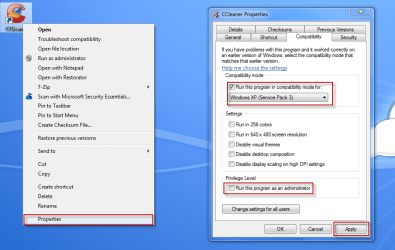
The compatibility tab isn't to be confusd with XP-Mode (Virtual PC).
Right click on your program's shortcut icon, choose properties.
Click the compatibility tab and check Run this program in compatibility mode for: and choose either XP SP2/XP SP3.
Sometimes i've found running as administrator works but not always.
Hit apply and then try and run the program again.

09-11-2009 15-57-45.png
 

My Computer

Computer Manufacturer/Model Number
HP Touchsmart IQ771.uk
OS
Windows 7 Ultimate x64
CPU
AMD Turion(tm) 64 X2 Mobile Technology TL-56
Motherboard
ASUS Pheonix
Memory
3GB Nanya PC2-6400 DDR2-SDRAM SO-DIM (400MHz)
Graphics Card(s)
NVIDIA GeForce Go 7600 256MB GDDR3 SDRAM
Sound Card
High Definition Intergrated NVIDIA MCP51
Monitor(s) Displays
46" Sony Bravia HDTV
Screen Resolution
1600x1200
Hard Drives
1.5TB Samsug
320GB Seagate ST3320820AS - SATA 3Gb/s 8MB
500GB Maxtor Basics STM305003EHD301-RK
Internet Speed
↓6.32 Mb/s ↑0.35 Mb/s ↔26ms
Other Info
BIOS - American Megatrends Inc. 5.07
Ethernet Port - NVIDIA nForce 10/100/1000 Mbps
DVD Drive - TSSTcorp DVDR/RW TS-T632L
The compatibility tab isn't to be confusd with XP-Mode (Virtual PC).
Right click on your program's shortcut icon, choose properties.
Click the compatibility tab and check Run this program in compatibility mode for: and choose either XP SP2/XP SP3.
Sometimes i've found running as administrator works but not always.
Hit apply and then try and run the program again.

View attachment 35838
Okay, thanks. I think that's going to work once I'm able to establish privileged user access. As of now it's blanked out (probably because the program needs to access our server database).
Our IT guy can probably help with this.
 

My Computer

OS
Windows 7 Pro 64 bit
Let us know how you get on. :)
 

My Computer

Computer Manufacturer/Model Number
HP Touchsmart IQ771.uk
OS
Windows 7 Ultimate x64
CPU
AMD Turion(tm) 64 X2 Mobile Technology TL-56
Motherboard
ASUS Pheonix
Memory
3GB Nanya PC2-6400 DDR2-SDRAM SO-DIM (400MHz)
Graphics Card(s)
NVIDIA GeForce Go 7600 256MB GDDR3 SDRAM
Sound Card
High Definition Intergrated NVIDIA MCP51
Monitor(s) Displays
46" Sony Bravia HDTV
Screen Resolution
1600x1200
Hard Drives
1.5TB Samsug
320GB Seagate ST3320820AS - SATA 3Gb/s 8MB
500GB Maxtor Basics STM305003EHD301-RK
Internet Speed
↓6.32 Mb/s ↑0.35 Mb/s ↔26ms
Other Info
BIOS - American Megatrends Inc. 5.07
Ethernet Port - NVIDIA nForce 10/100/1000 Mbps
DVD Drive - TSSTcorp DVDR/RW TS-T632L
If you cannot get the MS software to work out for you, Sun VirtualBox is a great little easy to use application. VirtualBox. That's what I use for my home virtualization needs and I have been very happy. I'm an extensive user of VMWare Server and VMWare ESX and ESXi at work...so i've got loads of experience with VM products.
So to get Windows XP working in Windows 7 Pro 64 bit, what would you recommend, VirtualBox or VMWare?
 

My Computer

OS
Windows 7 Pro 64 bit
Last edited:

My Computer

Computer Manufacturer/Model Number
HP Touchsmart IQ771.uk
OS
Windows 7 Ultimate x64
CPU
AMD Turion(tm) 64 X2 Mobile Technology TL-56
Motherboard
ASUS Pheonix
Memory
3GB Nanya PC2-6400 DDR2-SDRAM SO-DIM (400MHz)
Graphics Card(s)
NVIDIA GeForce Go 7600 256MB GDDR3 SDRAM
Sound Card
High Definition Intergrated NVIDIA MCP51
Monitor(s) Displays
46" Sony Bravia HDTV
Screen Resolution
1600x1200
Hard Drives
1.5TB Samsug
320GB Seagate ST3320820AS - SATA 3Gb/s 8MB
500GB Maxtor Basics STM305003EHD301-RK
Internet Speed
↓6.32 Mb/s ↑0.35 Mb/s ↔26ms
Other Info
BIOS - American Megatrends Inc. 5.07
Ethernet Port - NVIDIA nForce 10/100/1000 Mbps
DVD Drive - TSSTcorp DVDR/RW TS-T632L
Are you sure you tried SP1?
 

My Computer

Computer Manufacturer/Model Number
HP Touchsmart IQ771.uk
OS
Windows 7 Ultimate x64
CPU
AMD Turion(tm) 64 X2 Mobile Technology TL-56
Motherboard
ASUS Pheonix
Memory
3GB Nanya PC2-6400 DDR2-SDRAM SO-DIM (400MHz)
Graphics Card(s)
NVIDIA GeForce Go 7600 256MB GDDR3 SDRAM
Sound Card
High Definition Intergrated NVIDIA MCP51
Monitor(s) Displays
46" Sony Bravia HDTV
Screen Resolution
1600x1200
Hard Drives
1.5TB Samsug
320GB Seagate ST3320820AS - SATA 3Gb/s 8MB
500GB Maxtor Basics STM305003EHD301-RK
Internet Speed
↓6.32 Mb/s ↑0.35 Mb/s ↔26ms
Other Info
BIOS - American Megatrends Inc. 5.07
Ethernet Port - NVIDIA nForce 10/100/1000 Mbps
DVD Drive - TSSTcorp DVDR/RW TS-T632L
Glad to see my second & sixth post wasn't a complete waste of time. :p
 

My Computer

Computer Manufacturer/Model Number
HP Touchsmart IQ771.uk
OS
Windows 7 Ultimate x64
CPU
AMD Turion(tm) 64 X2 Mobile Technology TL-56
Motherboard
ASUS Pheonix
Memory
3GB Nanya PC2-6400 DDR2-SDRAM SO-DIM (400MHz)
Graphics Card(s)
NVIDIA GeForce Go 7600 256MB GDDR3 SDRAM
Sound Card
High Definition Intergrated NVIDIA MCP51
Monitor(s) Displays
46" Sony Bravia HDTV
Screen Resolution
1600x1200
Hard Drives
1.5TB Samsug
320GB Seagate ST3320820AS - SATA 3Gb/s 8MB
500GB Maxtor Basics STM305003EHD301-RK
Internet Speed
↓6.32 Mb/s ↑0.35 Mb/s ↔26ms
Other Info
BIOS - American Megatrends Inc. 5.07
Ethernet Port - NVIDIA nForce 10/100/1000 Mbps
DVD Drive - TSSTcorp DVDR/RW TS-T632L
Back
Top