Windows XP Mode

squid13

New member
Member
VIP
Local time
6:14 PM
Messages
215
Location
Cantonment, Florida
I have undo disk selected in my XP mode and when I close it only has as a option to disregard the changes. How can I set XP mode to ask me to save or disregard the changes when I shut down? I read the instructions so I must have a mental block cause I don't see what there talking about. I can't find what there asking you to do, I can't find it/
 
Last edited:

My Computer

Computer type
PC/Desktop
Computer Manufacturer/Model Number
HP Pavilion Elite d5200t ATX PC
OS
Windows 7 Professional SP1 64 bit
CPU
Intel(R)Core(TM)2Quad procQ9550(2.83GHZ)
Motherboard
Pegatron
Memory
8 GB
Graphics Card(s)
768MB NVIDIA GEFORCE GT610
Sound Card
Creative Sound Blaster X-Fi Xtreme
Monitor(s) Displays
Samsung S24D300
Screen Resolution
1440x900
Hard Drives
640GB 7200RPM Sata 3Gb/s
PSU
HP
Case
HP
Cooling
2 Fans
Keyboard
Microsoft Internet Keyboard
Mouse
MicroSoft IntelliMouse Optical
Internet Speed
Cox Cable
Antivirus
Norton
Browser
FireFox
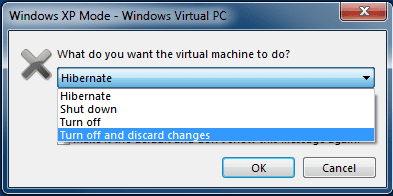
When Undo disks feature is turned on, the changes can be applied only when the virtual machine is turned off or hibernated. When closing the virtual machine, it's still on and running when the dialog asks what the user wants to do, therefore only giving an option to discard changes. To apply changes is possible only from virtual machines settings.

So, this is how Undo disks works:
  • When a Virtual PC virtual machine is running, you can not apply or discard changes.
  • When you want to close a virtual machine (Undo disks enabled), you can hibernate, shut down or turn off keeping the changes until applying or discarding them later, or you can turn virtual machine off discarding the changes. Applying changes is at this point possible because virtual machine can not be running when changes are applied; discarding changes when virtual machine is running is only possible when the vm is hard reseted, turned completely off. (Complicated but logical ;))

    XPM_Undo_2.png
    .
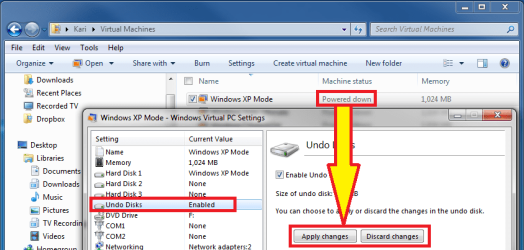
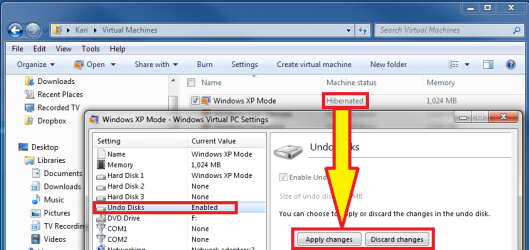
  • To apply changes, virtual machine must be powered down (shut down or turned off) or hibernated.

    XPM_Undo_1.png
    XPM_Undo.png
    .
  • To enable or disable the Undo disks feature, virtual machine must be powered down.

Kari
 
Last edited:

My Computer

Computer type
Laptop
Computer Manufacturer/Model Number
HP ENVY 17-1150eg
OS
Windows 10 Pro x64 EN-GB
CPU
1.6 GHz Intel Core i7-720QM Processor
Memory
6 GB
Graphics Card(s)
ATI Mobility Radeon HD 5850 Graphics
Sound Card
Beats sound system with integrated subwoofer
Monitor(s) Displays
17" laptop display, 22" LED and 32" Full HD TV through HDMI
Screen Resolution
1600*900 (1), 1920*1080 (2&3)
Hard Drives
Internal: 2 x 500 GB SATA Hard Disk Drive 7200 rpm
External: 2TB for backups, 3TB USB3 network drive for media
Cooling
As Envy runs a bit warm, I have it on a Cooler Master pad
Keyboard
Logitech diNovo Media Desktop Laser (bluetooth)
Mouse
Logitech Performance Mouse MX
Internet Speed
50/10 Mbps VDSL
Antivirus
Windows Defender 4.3.9431.0
Browser
Maxthon 3.5.2., IE11
Thank you Kari for that information it explains it very nicely. Is there anyway to make a short cut to the virtual machine settings?
 

My Computer

Computer type
PC/Desktop
Computer Manufacturer/Model Number
HP Pavilion Elite d5200t ATX PC
OS
Windows 7 Professional SP1 64 bit
CPU
Intel(R)Core(TM)2Quad procQ9550(2.83GHZ)
Motherboard
Pegatron
Memory
8 GB
Graphics Card(s)
768MB NVIDIA GEFORCE GT610
Sound Card
Creative Sound Blaster X-Fi Xtreme
Monitor(s) Displays
Samsung S24D300
Screen Resolution
1440x900
Hard Drives
640GB 7200RPM Sata 3Gb/s
PSU
HP
Case
HP
Cooling
2 Fans
Keyboard
Microsoft Internet Keyboard
Mouse
MicroSoft IntelliMouse Optical
Internet Speed
Cox Cable
Antivirus
Norton
Browser
FireFox
You are welcome.

As far as I know it's not possible to create a shortcut to settings.
 

My Computer

Computer type
Laptop
Computer Manufacturer/Model Number
HP ENVY 17-1150eg
OS
Windows 10 Pro x64 EN-GB
CPU
1.6 GHz Intel Core i7-720QM Processor
Memory
6 GB
Graphics Card(s)
ATI Mobility Radeon HD 5850 Graphics
Sound Card
Beats sound system with integrated subwoofer
Monitor(s) Displays
17" laptop display, 22" LED and 32" Full HD TV through HDMI
Screen Resolution
1600*900 (1), 1920*1080 (2&3)
Hard Drives
Internal: 2 x 500 GB SATA Hard Disk Drive 7200 rpm
External: 2TB for backups, 3TB USB3 network drive for media
Cooling
As Envy runs a bit warm, I have it on a Cooler Master pad
Keyboard
Logitech diNovo Media Desktop Laser (bluetooth)
Mouse
Logitech Performance Mouse MX
Internet Speed
50/10 Mbps VDSL
Antivirus
Windows Defender 4.3.9431.0
Browser
Maxthon 3.5.2., IE11
Back
Top