
Windows XP No-Support Deadline Has Arrived -- Ignore At Your Peril

Hi there.

The several hundred thousand "Ma and Pa Kettle" types won't be on the Internet at any one time -- if you are committing Fraud on any "sensible" scale you want to do it quickly -- In and out and get away with a reasonable "profit" before anybody catches you.

A few dollars here and there might be interesting if you are say working in a Bank and can process 100,000's of transactions in a short time but it's just not worth the effort to "the average criminal".

Most businesses whether on XP or not usually have fairly restrictive Internet Access policies anyway -- you have to be fairly high up or have a reasonably responsible position before you get "Un-controlled" Internet access - and if you are one of these types you are likely to get newer gear before anybody else in the organisation.

While people like Dutch and UK Gov'ts are paying for continued XP support -- Hope the taxpayers of those countries remember that at their Next elections - why this sort of money is being spent when there was 6 YEARS WARNING !! that XP would be discontinued I still think the threat is more imagined than real - especially as a lot of the old "Ma and Pa Kettle's" will never have installed any AV software in the first place.

Surf sensibly, don't download anything unless you know EXACTLY what you are looking for-- a lot of downloads are hidden with extra green arrows for downloading anything except the software you want, uncheck any toolbars etc and NEVER EVER open any email attachments unless you know EXACTLY who it comes from -- and a few sites now masquerade as "official one's" such as UK HRMC Tax revenue service - don't click on any links on those emails either.

99.9999% of people will get de-frauded NOT because of computer Viruses but simply by falling foul to Internet activities and bad computer practices which no AV software can prevent.

(I'm in no way suggesting that you shouldn't protect your machine BTW -- that's not the point of this post !!).

Cheers
jimbo

Fraud isn't the issue. The issue is using security holes to get into people's computer's where viruses can be planted to capture login passwords and account numbers which can then be used to drain bank account balances, run up fraudulent charges, etc. As long as an unprotected machine is connected to the internet, the bad guys can get in no matter how carefully the victim surfs. Just opening up a browser—any browser—on an unprotected machine can allow a virus to be planted on the machine. In fact, it's not really necessary to even open a browser for an unprotected machine to be exposed to viruses, key loggers, etc. (for example, M$ can put updates or notifications of updates on a machine without a browser being opened; programs can check for updates and even download and install them without a browser being opened). And not all hackers are big time crooks looking for big scores. Same as you have bank robbers who go for the big hauls and small time punks who knock over convenience stores that keep no more than $50 cash on hand at any one time, there are some cyber crooks that go only after the big hauls and others that go for whatever amount they can easily get, no matter how paltry.
 

My Computer My Computer

At a glance

Win 7 Ultimate 64 bitIntel i7-3930KKingston HyperX Genesis 32GB Kit (8x4GB Modul...MSI R7850 Twin Frozr 2GD5/OC Radeon HD 7850 2...
Computer type
PC/Desktop
Computer Manufacturer/Model Number
Custom Build
OS
Win 7 Ultimate 64 bit
CPU
Intel i7-3930K
Motherboard
ASUS P9X79 WS
Memory
Kingston HyperX Genesis 32GB Kit (8x4GB Modules) 1600MHz DDR
Graphics Card(s)
MSI R7850 Twin Frozr 2GD5/OC Radeon HD 7850 2GB 256-bit GDDR
Sound Card
Asus Xonar Essence STX
Monitor(s) Displays
3x Asus VG248QE 24", Vizio 32" TV
Screen Resolution
1920 x 1080, ?
Hard Drives
Samsung 128GB 840 Pro SSD (1),
Samsung 4TB 850 EVO SSDs (4)
Samsung 4TB 850 EVO SSDs (16) external backup drives used in 2.5" hot swap bays in the computer.
PSU
Corsair HX750w
Case
Antec Two Hundred v2 (modified)
Cooling
Cooler Master GeminII S524 120mm (fan replaced with a 140mm)
Keyboard
Logitech G510s
Mouse
Logitech M525 (two in use)
Internet Speed
=< 32Mbps down, 8Mbps up
Antivirus
AVAST!, MBAM, SAS, Spybot S&D (all but MBAM free) Glary Util
Browser
IE11
Other Info
LSI 9211-8i HBA card (8 SATA III ports), 2.5" & 3.5" Hot Swap Bays, HooToo HT-CR001 PCI-E to USB 3.0 Internal Hub + 6 Slot Card Reader, and LG Model CH12LS28 BD-ROM Optical Drive. Also, ScanSnap S1500 ADF duplexing scanner, Canon 9000F flat bed scanner, Corsair SP2500 2.1 speakers, Samsung CLP 415nw laser color printer, Cyberpower PP2200SW UPS
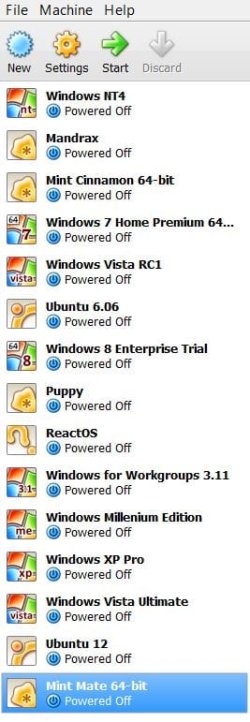
My XP isn't going anywhere at all.

At worst, it will remain in V-Box along with some of my other older OSes.

The older ones are never net-enabled, although I've been online once or twice using NT4.

Yes, I know what I'm doing, and no, I'm not worried about 'threats'.


Wenda.

EDIT: Sitting here pondering the similarities between this and the Y2K furphy.
 

Attachments

  • My VM.JPG
    My VM.JPG
    45.1 KB · Views: 3

My Computer My Computer

At a glance

Windows 7 Ultimate SP1 32-bit; Windows 7 Home...Intel T6500 Core 2 Duo@2Ghz.3GB DDR2Intel 4500MHD
Computer type
Laptop
Computer Manufacturer/Model Number
Acer AS5735
OS
Windows 7 Ultimate SP1 32-bit; Windows 7 Home Premium 64-bit (VM).
CPU
Intel T6500 Core 2 Duo@2Ghz.
Motherboard
Acer
Memory
3GB DDR2
Graphics Card(s)
Intel 4500MHD
Sound Card
Realtek onboard
Monitor(s) Displays
Built-in, no touch
Screen Resolution
1366x768
Hard Drives
250GB SATA in two equal partitions.
PSU
Stock
Case
Laptop
Cooling
Stock
Keyboard
Full 101-key
Mouse
USB cordless IR
Antivirus
MSE
Browser
IE9, Firefox.
Other Info
A top little machine that hasn't let me down once since the day I removed it from its packaging over four years ago. It's done everything I could want, and more, all without a single issue. 10/10, Acer!!
<snip> As long as an unprotected machine is connected to the internet, the bad guys can get in no matter how carefully the victim surfs. Just opening up a browser—any browser—on an unprotected machine can allow a virus to be planted on the machine. In fact, it's not really necessary to even open a browser for an unprotected machine to be exposed to viruses, key loggers, etc.
What do you see as an "unprotected machine"? I've seen many using Windows Vista, 7, 8, and now 8.1...
 

My Computer My Computer

At a glance

Windows 7 Ultimate 32bit SP1Intel(R) Core(TM)2 Quad CPU @ 2.40GHz, 2400 MHz4 GBATI Radeon HD 2600 Pro
Computer type
PC/Desktop
Computer Manufacturer/Model Number
Bruce ... somewhere in his 40's
OS
Windows 7 Ultimate 32bit SP1
CPU
Intel(R) Core(TM)2 Quad CPU @ 2.40GHz, 2400 MHz
Motherboard
INTEL/D975XBX2
Memory
4 GB
Graphics Card(s)
ATI Radeon HD 2600 Pro
Monitor(s) Displays
Samsung SyncMaster 914v
Screen Resolution
1280 x 1024
Hard Drives
2/500GB each ... ST3500630AS ATA Device.
One is not connected
PSU
Rocketfish 700 W
Case
G.Skill Gigabyte Chassis
Keyboard
Standard PS/2 Keyboard
Mouse
Microsoft PS/2 Mouse
Internet Speed
DSL
Antivirus
Avira Internet Security
Browser
IE 11
Other Info
ATI HDMI Audio
<snip> As long as an unprotected machine is connected to the internet, the bad guys can get in no matter how carefully the victim surfs. Just opening up a browser—any browser—on an unprotected machine can allow a virus to be planted on the machine. In fact, it's not really necessary to even open a browser for an unprotected machine to be exposed to viruses, key loggers, etc.
What do you see as an "unprotected machine"? I've seen many using Windows Vista, 7, 8, and now 8.1...

Seriously? Any machine not receiving M$ security updates and/or not running AVs, etc. is unprotected. XP will be receiving no more security updates so any machine running XP will be unprotected. While other OSes can also be unprotected, the topic of this thread is XP.
 

My Computer My Computer

At a glance

Win 7 Ultimate 64 bitIntel i7-3930KKingston HyperX Genesis 32GB Kit (8x4GB Modul...MSI R7850 Twin Frozr 2GD5/OC Radeon HD 7850 2...
Computer type
PC/Desktop
Computer Manufacturer/Model Number
Custom Build
OS
Win 7 Ultimate 64 bit
CPU
Intel i7-3930K
Motherboard
ASUS P9X79 WS
Memory
Kingston HyperX Genesis 32GB Kit (8x4GB Modules) 1600MHz DDR
Graphics Card(s)
MSI R7850 Twin Frozr 2GD5/OC Radeon HD 7850 2GB 256-bit GDDR
Sound Card
Asus Xonar Essence STX
Monitor(s) Displays
3x Asus VG248QE 24", Vizio 32" TV
Screen Resolution
1920 x 1080, ?
Hard Drives
Samsung 128GB 840 Pro SSD (1),
Samsung 4TB 850 EVO SSDs (4)
Samsung 4TB 850 EVO SSDs (16) external backup drives used in 2.5" hot swap bays in the computer.
PSU
Corsair HX750w
Case
Antec Two Hundred v2 (modified)
Cooling
Cooler Master GeminII S524 120mm (fan replaced with a 140mm)
Keyboard
Logitech G510s
Mouse
Logitech M525 (two in use)
Internet Speed
=< 32Mbps down, 8Mbps up
Antivirus
AVAST!, MBAM, SAS, Spybot S&D (all but MBAM free) Glary Util
Browser
IE11
Other Info
LSI 9211-8i HBA card (8 SATA III ports), 2.5" & 3.5" Hot Swap Bays, HooToo HT-CR001 PCI-E to USB 3.0 Internal Hub + 6 Slot Card Reader, and LG Model CH12LS28 BD-ROM Optical Drive. Also, ScanSnap S1500 ADF duplexing scanner, Canon 9000F flat bed scanner, Corsair SP2500 2.1 speakers, Samsung CLP 415nw laser color printer, Cyberpower PP2200SW UPS
<snip> As long as an unprotected machine is connected to the internet, the bad guys can get in no matter how carefully the victim surfs. Just opening up a browser—any browser—on an unprotected machine can allow a virus to be planted on the machine. In fact, it's not really necessary to even open a browser for an unprotected machine to be exposed to viruses, key loggers, etc.
What do you see as an "unprotected machine"? I've seen many using Windows Vista, 7, 8, and now 8.1...

Seriously? Any machine not receiving M$ security updates and/or not running AVs, etc. is unprotected. XP will be receiving no more security updates so any machine running XP will be unprotected. While other OSes can also be unprotected, the topic of this thread is XP.

Lighten up, it was a valid question from a security expert.
 

My Computer My Computer

At a glance

Win 10 Pro x64Intel I5-2500K @3.3GHz16GB G.Skill Ripjaws X (4x4GB)EVGA GeForce 750 Ti SC 2GB
Computer type
PC/Desktop
Computer Manufacturer/Model Number
Self Built
OS
Win 10 Pro x64
CPU
Intel I5-2500K @3.3GHz
Motherboard
Asrock P67 Extreme4
Memory
16GB G.Skill Ripjaws X (4x4GB)
Graphics Card(s)
EVGA GeForce 750 Ti SC 2GB
Sound Card
ASUS Xonar DG 5.1 Channels 24-bit 96KHz PCI Interface Sound
Monitor(s) Displays
auria eq2367
Screen Resolution
1920 x 1080
Hard Drives
250GB Samsung 850 EVO SSD
1TB WD Blue
1TB Hitachi
PSU
SeaSonic X 650W 80 Plus Gold
Case
Corsair Obsidian 750D
Cooling
Corsair H60, Three 140mm case fans
Keyboard
Logitech Wireless Keyboard K520
Mouse
Logitech Wireless Mouse M310
Internet Speed
Wave Broadband ~ 100 dn 5 up
Antivirus
Windows Defender, Malwarebytes Premium
Browser
Edge, IE11, Chrome
Other Info
Laptop specs: HP g7-1365dx /
CPU: AMD A6-3420M APU with Radeon(tm) HD Graphics /
RAM: Crucial 8Gb (2x4Gb) /
SSD: Crucial M4-CT128M4SSD2 ATA Device/ FW 000F /
GFX: AMD Radeon HD 6520G /
OS: Windows 10 Pro x64
Hi there
Like all things "caveat Emptor" -- I still believe that a lot of people won't have any problem at all using XP for a while yet if they operate their devices safely and surf wisely.

The REDICULOUS thing is that some BANKING applications refuse for example to allow me to login to online banking because it doesn't recognize OPERA or KONQUEROR as valid browsers from a LINUX system -- in EVERY WAY ZILLIONS of percent more secure than XP or even Windows 8.1 - so you can see sometimes what I feel about "So called security experts". To access online Banking I have to fire up a Windows VM !!!!!! -- and perhaps Banks could push people off XP by also blocking online banking for XP systems.

The strange thing is that this SAME BANK has mobile phone apps for Android that work from PUBLIC Wi-Fi systems !!!!-- infinitely more "hackable" than a secure decent desktop Linux.

Using a public Wi-Fi system exposes your system far more than almost anything else -- especially since typical data is transmitted un-encrypted until it reaches the remote login screens - so anybody with a data scope type of device can get your passwords in plaintext. !!

Still I'm sure we all have particular feelings about the Banks after the recent debacle in most of the developed world's financial markets in recent years.

(BTW the XP in ATM's is Embedded XP -- a different OS to the desktop model).


Cheers
jimbo
 

My Computer My Computer

At a glance

Linux CENTOS 7 / various Windows OS'es and se...Intel i7 Intel i58GB, 16GBOn Motherboard
Computer type
PC/Desktop
Computer Manufacturer/Model Number
Custom built, several laptops HP/ASUS
OS
Linux CENTOS 7 / various Windows OS'es and servers
CPU
Intel i7 Intel i5
Memory
8GB, 16GB
Graphics Card(s)
On Motherboard
Sound Card
Realtek HD audio
Monitor(s) Displays
Apple Cinema display, Samsung LCD
Screen Resolution
1920 X 1080
Hard Drives
4 X 1TB SATA
Mouse
Toshiba wireless laser
Internet Speed
> 20MB up
What do you see as an "unprotected machine"? I've seen many using Windows Vista, 7, 8, and now 8.1...

Seriously? Any machine not receiving M$ security updates and/or not running AVs, etc. is unprotected. XP will be receiving no more security updates so any machine running XP will be unprotected. While other OSes can also be unprotected, the topic of this thread is XP.

Lighten up, it was a valid question from a security expert.
No chance. The Fitz simply has no "lighten-up" mode.
 

My Computer My Computer

At a glance

Windows 10 x64i7-7700K16 GB 2400 MHzGTX 1060
Computer type
PC/Desktop
Computer Manufacturer/Model Number
Dell
OS
Windows 10 x64
CPU
i7-7700K
Memory
16 GB 2400 MHz
Graphics Card(s)
GTX 1060
Sound Card
Integrated, plus external Presonus Audiobox USB
Monitor(s) Displays
2x AOC 27"
Screen Resolution
1920x1080
Hard Drives
512 GB M.2 SSD
2 TB 7200 RPM disk
Internet Speed
110 Mbps
Browser
Firefox
Sorry, But I have to agree with the Fitz on this one.

The thread is about xp, its kind of a silly question to ask what they meant about what machine they see as unprotected. They are referring to specifically how xp stops getting updates from Microsoft, no amount of security software will save you. Antiviruses cannot stop vulnerabilities in the software they are protecting. Security software cannot patch holes in the Operating system. Using those vulnerabilities malware can hide itself from the anti-malware itself and never be discovered.

You can say XP is safe to use all you want, but the reality is your xp machine can become part of a botnet and you would never know. Which I believe is going to be the main theme when these xp users still have not left. They will become one large botnet and hackers will use these PC's for spamming email and hacking other websites/etc. The most common malware no longer shows itself or lets its presence be known. This is 2014, not 2006. Malware hides itself on purpose, and tries to not slow a computer down so it will not be suspected of infection. Botnets are very tricky and use whatever means necessary to hide themselves.

It's dangerous to think that Xp can be safe once support ends, which it has. Opening a web browser can get you infected the second you open it, depending on what your homepage is. But the reality is with windows xp, just having it connected to the internet, is a risk. Even if you never use the web browser. The windows xp firewall or hardware firewall from your router is not going to save you.

If you think you are smart enough to avoid infection, think again.
It's a lot different when your Operating system is no longer getting patches.

If its off the internet, then yes its relatively safe.


I think their was just some miscommunication on what was said and meant. And maybe just a little to much fired up.
 

My Computer My Computer

At a glance

Windows 10 ProAMD Ryzen 5 2400G Processor with Radeon RX Ve...G.SKILL Ripjaws V Series 16GB (2 x 8GB) 288-P...2047MB NVIDIA GeForce GTX 1060 6GB (EVGA)
Computer type
PC/Desktop
Computer Manufacturer/Model Number
Custom Built
OS
Windows 10 Pro
CPU
AMD Ryzen 5 2400G Processor with Radeon RX Vega 11 Graphics
Motherboard
ASRock X470 Master SLI/AC AM4 AMD Promontory X470 SATA 6Gb/s
Memory
G.SKILL Ripjaws V Series 16GB (2 x 8GB) 288-Pin DDR4 SDRAM D
Graphics Card(s)
2047MB NVIDIA GeForce GTX 1060 6GB (EVGA)
Sound Card
Motherboard Built in
Monitor(s) Displays
Acer R240HY bidx 23.8-Inch IPS HDMI DVI VGA (1920 x 1080) Wi
Screen Resolution
1920 x 1080
Hard Drives
1TB Sandisk SSD PLUS (Main drive)
500 GB Seagate 7200 RPM (Games)
500 GB Western Digital 7200 RPM (Virtual Machines)
PSU
CORSAIR TX Series TX650M 650W 80+ Gold Modular Power Supply
Case
CORSAIR CARBIDE SPEC-02 Mid-Tower Gaming Case, Red LED Fan
Cooling
220mm, two 120mm, and four 60mm fans
Keyboard
Wired Dell keyboard
Mouse
Wireless Logitech mouse
Internet Speed
250mb down, 30mb up
Antivirus
Panda Cloud Antivirus
Browser
Chrome-ish x64
Other Info
Your awesome for reading this.
Hi there
Yet again people haven't understood --NOT ALL MACHINES need to be connected to the Internet - so the idea of a Virus or a Botnet just doesn't apply.

Keep the machine isolated --then it's quite SAFE !!! and sometimes is more fit for purpose than modern machines riddled with crap and trial ware when they come out of the store.

As in all things -- use the appropriate tool for the job -- just ensure its used correctly and within known limits --and don't just willy nilly upgrade because some stupid security chief thinks you ought to. Upgrade when YOU want to not when Ms tells you to.

I've never yet heard of a botnet being transmitted by an ISOLATED Machine not on a network or connected to the internet.

There are some XP machines out their controlling various factory processes -- the hardware has life cycles of may be 50 years or more -- so keeping the old XP machine running specialized taks makes sense -- upgrading the hardware might cost several HUNDRED THOUSAND DOLLARS !! - if you could even find it.

A lot of this type of kit in any case isn't usually "upgradeable" -- often the original manufacturer has long since gone out of business or stopped making the relevant hardware - so no point in getting new computers which won't support the kit.

Cheers
jimbo
 

My Computer My Computer

At a glance

Linux CENTOS 7 / various Windows OS'es and se...Intel i7 Intel i58GB, 16GBOn Motherboard
Computer type
PC/Desktop
Computer Manufacturer/Model Number
Custom built, several laptops HP/ASUS
OS
Linux CENTOS 7 / various Windows OS'es and servers
CPU
Intel i7 Intel i5
Memory
8GB, 16GB
Graphics Card(s)
On Motherboard
Sound Card
Realtek HD audio
Monitor(s) Displays
Apple Cinema display, Samsung LCD
Screen Resolution
1920 X 1080
Hard Drives
4 X 1TB SATA
Mouse
Toshiba wireless laser
Internet Speed
> 20MB up
I don't disagree with you, jimbo; what you said is absolutely correct. One very acceptable way to protect a machine from malware is to completely isolate it from the internet and make sure no nasties can piggyback in on things like USB flash drives, etc. The machines being discussed here as being at risk are ones that are being used by individuals and businesses that are NOT being isolated from the internet.
 

My Computer My Computer

At a glance

Win 7 Ultimate 64 bitIntel i7-3930KKingston HyperX Genesis 32GB Kit (8x4GB Modul...MSI R7850 Twin Frozr 2GD5/OC Radeon HD 7850 2...
Computer type
PC/Desktop
Computer Manufacturer/Model Number
Custom Build
OS
Win 7 Ultimate 64 bit
CPU
Intel i7-3930K
Motherboard
ASUS P9X79 WS
Memory
Kingston HyperX Genesis 32GB Kit (8x4GB Modules) 1600MHz DDR
Graphics Card(s)
MSI R7850 Twin Frozr 2GD5/OC Radeon HD 7850 2GB 256-bit GDDR
Sound Card
Asus Xonar Essence STX
Monitor(s) Displays
3x Asus VG248QE 24", Vizio 32" TV
Screen Resolution
1920 x 1080, ?
Hard Drives
Samsung 128GB 840 Pro SSD (1),
Samsung 4TB 850 EVO SSDs (4)
Samsung 4TB 850 EVO SSDs (16) external backup drives used in 2.5" hot swap bays in the computer.
PSU
Corsair HX750w
Case
Antec Two Hundred v2 (modified)
Cooling
Cooler Master GeminII S524 120mm (fan replaced with a 140mm)
Keyboard
Logitech G510s
Mouse
Logitech M525 (two in use)
Internet Speed
=< 32Mbps down, 8Mbps up
Antivirus
AVAST!, MBAM, SAS, Spybot S&D (all but MBAM free) Glary Util
Browser
IE11
Other Info
LSI 9211-8i HBA card (8 SATA III ports), 2.5" & 3.5" Hot Swap Bays, HooToo HT-CR001 PCI-E to USB 3.0 Internal Hub + 6 Slot Card Reader, and LG Model CH12LS28 BD-ROM Optical Drive. Also, ScanSnap S1500 ADF duplexing scanner, Canon 9000F flat bed scanner, Corsair SP2500 2.1 speakers, Samsung CLP 415nw laser color printer, Cyberpower PP2200SW UPS
Oh bugger it, I'm going back to windows 3.11, DOS and the good ol' reliable dial-up. Never had all these problems with security and the like then......................................
Now, where did I put that floppy with the ping pong game on it?
 

My Computer My Computer

At a glance

Windows 7 home premium 64bitintel Core i7 4790 3.6Ghz16Gb G.Skill SniperNvidia GTX 760
Computer type
PC/Desktop
Computer Manufacturer/Model Number
Self built
OS
Windows 7 home premium 64bit
CPU
intel Core i7 4790 3.6Ghz
Motherboard
Gigabyte H97-D3H
Memory
16Gb G.Skill Sniper
Graphics Card(s)
Nvidia GTX 760
Sound Card
Realtek ALC1150 115dB SNR HD Audio
Monitor(s) Displays
LG 32" TV as monitor
Screen Resolution
1920 x 1080
Hard Drives
Samsung 840 PRO series SATA3 256Gb SSD.
Western Digital Black SATA3 -1Tb.
Western Digital external HDD-1TB.

Pioneer DVD-RW.
PSU
Antec HCG 620w
Case
Thermaltake A41
Cooling
Stock fans x 3. After market Arctic Freezer i11 cpu cooler
Keyboard
Logitech M520r wireless
Mouse
Logitech M310t wireless
Internet Speed
Fair to middlin'
Antivirus
Avast free
Browser
Firefox
Other Info
MBAM Pro
SuperAntiSpyware free edition
AdwCleaner
Ccleaner
Revo uninstaller Pro
I'm just wondering what people will do if there PC will run XP and not 7 or 8 because of driver issues or hardware problems?
 

My Computer My Computer

At a glance

windows 7AMD8 gigs Kinkston hyper x9800 GTX
Computer Manufacturer/Model Number
self built
OS
windows 7
CPU
AMD
Motherboard
Gagabyte
Memory
8 gigs Kinkston hyper x
Graphics Card(s)
9800 GTX
Hard Drives
80 gig ssd
PSU
corsar
I'm just wondering what people will do if there PC will run XP and not 7 or 8 because of driver issues or hardware problems?
They will probably just buy new PCs or switch to Linux (if they know how to switch).
 

My Computer My Computer

At a glance

Windows 7 Professional x64 Service Pack 1AMD Athlon X4 6456GB DDR3 1066Sapphire Radeon HD 5670 512MB GDDR5
Computer type
PC/Desktop
Computer Manufacturer/Model Number
HP Pavilion P7-1010
OS
Windows 7 Professional x64 Service Pack 1
CPU
AMD Athlon X4 645
Motherboard
Foxxcon N-Alvorix RS880
Memory
6GB DDR3 1066
Graphics Card(s)
Sapphire Radeon HD 5670 512MB GDDR5
Sound Card
Realtek Integrated Audio
Monitor(s) Displays
HP 2011x
Screen Resolution
1600x900
Hard Drives
1. Crucial M4 128GB SSD
2. 1TB Seagate Barracuda 7200.12 RPM
3. 1TB Western Digital Caviar Green 5400RPM
PSU
Seasonic S12 II Bronze 380 Watt
Case
HP OEM
Cooling
Coolermaster Heatsink, AVC Case Fan
Keyboard
HP OEM- Made by Chicony
Mouse
HP OEM- Made by Logitech
Internet Speed
20MBit Down/4 Up
Antivirus
Microsoft Security Essentials
Browser
Internet Explorer 10
I've heard that eol for embedded windows xp is 2016. Screw mcdonalds & etc. Their support should either be ending now, or windows xp's support be extended to 2016 also. There shouldn't be any exceptions, none. But I guess microsoft doesn't want to upset the big corporations..and this shows how very little microsoft cares about its consumers actually.
 

My Computer My Computer

At a glance

Windows 7...Ultimate x64Intel Core i7 2630QM4 GB DDR3NVidea GeForce 540M
Computer Manufacturer/Model Number
ASUS N53SV
OS
Windows 7...Ultimate x64
CPU
Intel Core i7 2630QM
Motherboard
ASUS
Memory
4 GB DDR3
Graphics Card(s)
NVidea GeForce 540M
Hard Drives
750GB SATA
Cooling
Only CPU cooling, none for graphics. Always cool though.
I'm just wondering what people will do if there PC will run XP and not 7 or 8 because of driver issues or hardware problems?
They will probably just buy new PCs or switch to Linux (if they know how to switch).
Or they will keep using XP until the hardware can no longer be repaired.

I saw hundreds of XP computers in an office yesterday. There are no plans to replace these computers until the hardware dies. This company has a department that specializes in computer forensics (for a price :-). So they are not clueless users.
 

My Computer My Computer

At a glance

W7 Pro SP1 64biti78GBIntel HD Graphics
Computer type
Laptop
Computer Manufacturer/Model Number
Employer provided Dell Latitude
OS
W7 Pro SP1 64bit
CPU
i7
Memory
8GB
Graphics Card(s)
Intel HD Graphics
Hard Drives
crappy SSD
Antivirus
Employer mandated Symantec Endpoint Protection
Browser
Pale Moon 64bit, IE11 64bit & Chrome 64bit
In my school where I go there are a couple XP machines (laptops) left too. And the last time I saw them they were connected to the internet and they use them fairly frequently, and I don't know if they have plans to replace them, or at least replace the OS.
 

My Computer My Computer

At a glance

Windows 7 x64 Home Premium SP1Intel Pentium 6100 dual core4GBATI mobility radeon 5470, 512 MB RAM
Computer type
Laptop
Computer Manufacturer/Model Number
HP
OS
Windows 7 x64 Home Premium SP1
CPU
Intel Pentium 6100 dual core
Memory
4GB
Graphics Card(s)
ATI mobility radeon 5470, 512 MB RAM
Screen Resolution
1366 x 768
Mouse
Logitech M100
Internet Speed
42 Mbps Dual Carrier 4G
Antivirus
Microsoft security essentials, MSE
Browser
Palemoon
No XP here.

Now they can start picking on Windows 7 (the greatest Operating System ever offered to the FREE world) ;)
 

My Computer My Computer

At a glance

Windows `10 Professional 64bitIntel i5 [email protected]Corsair Vengeance DDR3 1600 16GNVIDIA GeForce GT520 1GHz
Computer type
PC/Desktop
Computer Manufacturer/Model Number
Home Built
OS
Windows `10 Professional 64bit
CPU
Intel i5 [email protected]
Motherboard
MSI P67A-GD55 (MS7681)
Memory
Corsair Vengeance DDR3 1600 16G
Graphics Card(s)
NVIDIA GeForce GT520 1GHz
Sound Card
Realtek High Definition Audio
Monitor(s) Displays
Haans G 241
Screen Resolution
1600X1024
Hard Drives
Crucial MX100 256GB SSD
PSU
OCZ ModXStream Modular High Performance 500 Watt
Case
Rosewill Challenger-U3
Cooling
Just Fans
Keyboard
Kensington K64338B
Mouse
Microsoft wheel mouse 1.1A
Internet Speed
240.0 Mbps
Antivirus
ESET Internet Security
Browser
Firefox
Other Info
SuperAntiSpyware-Pro
Malwarebytes (Premium)
Kerish Doctor
I was thinking, mayhap, massive amounts of RAM for a Raspberry Pi?
 

My Computer My Computer

At a glance

Win 7 Ultimate 64 bitIntel i7-3930KKingston HyperX Genesis 32GB Kit (8x4GB Modul...MSI R7850 Twin Frozr 2GD5/OC Radeon HD 7850 2...
Computer type
PC/Desktop
Computer Manufacturer/Model Number
Custom Build
OS
Win 7 Ultimate 64 bit
CPU
Intel i7-3930K
Motherboard
ASUS P9X79 WS
Memory
Kingston HyperX Genesis 32GB Kit (8x4GB Modules) 1600MHz DDR
Graphics Card(s)
MSI R7850 Twin Frozr 2GD5/OC Radeon HD 7850 2GB 256-bit GDDR
Sound Card
Asus Xonar Essence STX
Monitor(s) Displays
3x Asus VG248QE 24", Vizio 32" TV
Screen Resolution
1920 x 1080, ?
Hard Drives
Samsung 128GB 840 Pro SSD (1),
Samsung 4TB 850 EVO SSDs (4)
Samsung 4TB 850 EVO SSDs (16) external backup drives used in 2.5" hot swap bays in the computer.
PSU
Corsair HX750w
Case
Antec Two Hundred v2 (modified)
Cooling
Cooler Master GeminII S524 120mm (fan replaced with a 140mm)
Keyboard
Logitech G510s
Mouse
Logitech M525 (two in use)
Internet Speed
=< 32Mbps down, 8Mbps up
Antivirus
AVAST!, MBAM, SAS, Spybot S&D (all but MBAM free) Glary Util
Browser
IE11
Other Info
LSI 9211-8i HBA card (8 SATA III ports), 2.5" & 3.5" Hot Swap Bays, HooToo HT-CR001 PCI-E to USB 3.0 Internal Hub + 6 Slot Card Reader, and LG Model CH12LS28 BD-ROM Optical Drive. Also, ScanSnap S1500 ADF duplexing scanner, Canon 9000F flat bed scanner, Corsair SP2500 2.1 speakers, Samsung CLP 415nw laser color printer, Cyberpower PP2200SW UPS
I've heard that eol for embedded windows xp is 2016. Screw mcdonalds & etc. Their support should either be ending now, or windows xp's support be extended to 2016 also. There shouldn't be any exceptions, none. But I guess microsoft doesn't want to upset the big corporations..and this shows how very little microsoft cares about its consumers actually.

They gave you 13 years of free support for a one time purchase of maybe $100 or less. I'm not sure what world you live in, or what your manufactures typically do. But in the real world a manufacturer sells you a product and then charges you for support. Most software requires an expensive subscription and if you buy a car, you unusually have to pay for your own maintenance for 13 years.

those big corporations you mention pay MS for the extended support. If you pay MS, they will do the same for you.

Feel free to start you own company and develop an OS and sell it for a few bucks and provide 20 years of free service.
 

My Computer My Computer

At a glance

W7 Pro 64Intel i3 3220 @ 3.3 GHz2x8GB DDR 3 1600 Kingstononboard
Computer Manufacturer/Model Number
homemade
OS
W7 Pro 64
CPU
Intel i3 3220 @ 3.3 GHz
Motherboard
ASRock H77M
Memory
2x8GB DDR 3 1600 Kingston
Graphics Card(s)
onboard
Sound Card
onboard
Monitor(s) Displays
two 21" LCD
Hard Drives
128 GB Samsung 830
PSU
OCZ400MXSP
Cooling
Stock
Internet Speed
DSL
Back
Top