
Windows XP on school systems window flickering

Smile

New member
Local time
10:06 PM
Messages
73
Location
Queensland Australia
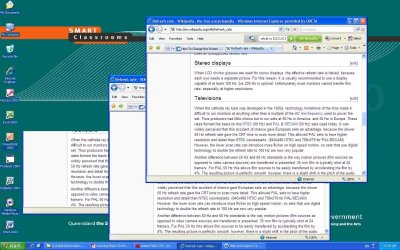
When we move our windows around and even scroll down we get this flickering effect. We require assistance to fix this as it is really annoying! We can ask for administrative privliges if required, all we know at the moment is the screen resolution 1440x900. Will provite more if needed, thanks!
 

Attachments
  • Bitmap.JPG
    Bitmap.JPG
    229.1 KB · Views: 170

My Computer

OS
Windows 7 64-bit
CPU
Intel Pentium Dualcore E5200 @ 2.5GHz
Motherboard
Gigabyte EG31M-S2
Memory
4gb
Graphics Card(s)
Radeon HD4670
Sound Card
ATI HDMI Audio
Monitor(s) Displays
24" Benq G2411HD
Screen Resolution
1920x1080
Hard Drives
WDC WD5000AACS-00G8B1 ATA Device 500Gb
External WD 1TB
Case
CoolerMaster
Keyboard
Razer Lycosa
Mouse
Razer Deathadder
Internet Speed
8000k bits p/s
Is this a single computer or a network? If singular, it would be either the video driver, or a bad video card. Install the latest manufacturer's driver in Safe Mode, after uninstalling the current driver with Driver Sweeper, or it's equivalent, if ATI.

If it is a network, I'm not so sure, because I imagine that each computer has it's own video card and driver, therefore the problem should be isolated to a single terminal, and not across the network.
 

My Computer

Computer Manufacturer/Model Number
DIY
OS
W7x64 Pro, SuSe 12.1/** W7 x64 Pro, XP MCE
CPU
Phenom II 1090T w/Noctua NH-D14 /**4400+ X2 w/CM Hyper TX 3
Motherboard
ASRock 890FX Deluxe 4/**A8N-SLI
Memory
2 x 2GB Patriot PGS34g1600LLKA/**4x1GB Corsair VS
Graphics Card(s)
EVGA GTX460 SC/**EVGA 8800GTS
Sound Card
Asus Xonar D2X/**Xonar D1
Monitor(s) Displays
Acer X233H, Dell E152FPc /**LG M237-WD
Screen Resolution
1920x1080 & 1024x768/**1980x1080
Hard Drives
WDC 2TB, 1.5TB, 1TB, 500GB,Seagate 500GB , Maxtor 80GB /**500GB Seagate & WDC 1TB Black
PSU
CM RS600 w/ APC BX1000G/**Antec 500 TP w/ APC BX1000
Case
HAF922/**Antec 1040IIB
Cooling
3x200mm, 1x140 and 1x120mm/**5x80mm fans
Keyboard
Logitech Media USB/**Saitek Eclipse
Mouse
Cordless Trackman Wheel/**Ditto
Internet Speed
3.3Mbps
Other Info
SB 560 5.1 w/ Sennheiser RS140/**Creative T20 speakers, Dvico FusionHDTV7 Gold RT, Cisco E3000, HP 5510V AIO, Linksys E3000, Belkin F5U237 hub and **F5D8055 adapter
(** = 2nd rig)
Is this a single computer or a network? If singular, it would be either the video driver, or a bad video card. Install the latest manufacturer's driver in Safe Mode, after uninstalling the current driver with Driver Sweeper, or it's equivalent, if ATI.

If it is a network, I'm not so sure, because I imagine that each computer has it's own video card and driver, therefore the problem should be isolated to a single terminal, and not across the network.

The computers (25 in a class room or so) are conenct to a client/server network, they all have the same problem. The particular computer this was taken on is not the server but is a client, we as students do not have access to the server computers. We cannot install new drivers either, not sure what manufacturer makes the graphics card either. Its happening over about 25 computers that they just installed into a new classroom, they are using a DVI input for the screen, maybe trying to change the refresh rate will help or to a VGA cord. Also changing the resolution doesn't help.

Thanks.
 

My Computer

OS
Windows 7 64-bit
CPU
Intel Pentium Dualcore E5200 @ 2.5GHz
Motherboard
Gigabyte EG31M-S2
Memory
4gb
Graphics Card(s)
Radeon HD4670
Sound Card
ATI HDMI Audio
Monitor(s) Displays
24" Benq G2411HD
Screen Resolution
1920x1080
Hard Drives
WDC WD5000AACS-00G8B1 ATA Device 500Gb
External WD 1TB
Case
CoolerMaster
Keyboard
Razer Lycosa
Mouse
Razer Deathadder
Internet Speed
8000k bits p/s
The problem must be with either the server or something between the server and clients. Generally, a DVI connection is superior to VGA, so I doubt that would be a solution, besides, the best that I understand the situation, each client has it's own monitor and therefore each has it's own video cable. 25 going bad at the same time is astromical odds. Are the clients and server hardwired together, or via WiFi?

EDIT: Isn't there a real administrator that is responsible for handling problems like this?
 

My Computer

Computer Manufacturer/Model Number
DIY
OS
W7x64 Pro, SuSe 12.1/** W7 x64 Pro, XP MCE
CPU
Phenom II 1090T w/Noctua NH-D14 /**4400+ X2 w/CM Hyper TX 3
Motherboard
ASRock 890FX Deluxe 4/**A8N-SLI
Memory
2 x 2GB Patriot PGS34g1600LLKA/**4x1GB Corsair VS
Graphics Card(s)
EVGA GTX460 SC/**EVGA 8800GTS
Sound Card
Asus Xonar D2X/**Xonar D1
Monitor(s) Displays
Acer X233H, Dell E152FPc /**LG M237-WD
Screen Resolution
1920x1080 & 1024x768/**1980x1080
Hard Drives
WDC 2TB, 1.5TB, 1TB, 500GB,Seagate 500GB , Maxtor 80GB /**500GB Seagate & WDC 1TB Black
PSU
CM RS600 w/ APC BX1000G/**Antec 500 TP w/ APC BX1000
Case
HAF922/**Antec 1040IIB
Cooling
3x200mm, 1x140 and 1x120mm/**5x80mm fans
Keyboard
Logitech Media USB/**Saitek Eclipse
Mouse
Cordless Trackman Wheel/**Ditto
Internet Speed
3.3Mbps
Other Info
SB 560 5.1 w/ Sennheiser RS140/**Creative T20 speakers, Dvico FusionHDTV7 Gold RT, Cisco E3000, HP 5510V AIO, Linksys E3000, Belkin F5U237 hub and **F5D8055 adapter
(** = 2nd rig)
When we move our windows around and even scroll down we get this flickering effect. We require assistance to fix this as it is really annoying! We can ask for administrative privliges if required, all we know at the moment is the screen resolution 1440x900. Will provite more if needed, thanks!

Are you using RDP to connect to a server?? If so there are settings on the server that can be set to reduce flickering.
 

My Computer

Computer type
PC/Desktop
Computer Manufacturer/Model Number
Dell OP7010
OS
Windows 7 Enterprise (x64); Windows Server 2008 R2 (x64)
Memory
16GB
Monitor(s) Displays
4 Dell 24" LCD
Screen Resolution
1280x1024
Keyboard
Dell
Mouse
Dell Optical
Internet Speed
40meg
The problem must be with either the server or something between the server and clients. Generally, a DVI connection is superior to VGA, so I doubt that would be a solution, besides, the best that I understand the situation, each client has it's own monitor and therefore each has it's own video cable. 25 going bad at the same time is astromical odds. Are the clients and server hardwired together, or via WiFi?

EDIT: Isn't there a real administrator that is responsible for handling problems like this?

How the school newtworks work. You have a classroom full of computers/whole building full of computers, all these computers are connected to that bulings server or hub I'm not sure, then all those hubs/mini servers (all bulinging with computers have one) are connected to the main server in the library. We access the computers/server from a login given to us. Each client (all computers in the school) have their own monitor, I presume they all have their own GFX card too. There is a Head of ITS... though she Isn't someone I'd ask about this... (she uses right+copy) I have asked my ITS teacher about trying to fix it but he hasn't gotten the time to check the computers at this point in time.

When we move our windows around and even scroll down we get this flickering effect. We require assistance to fix this as it is really annoying! We can ask for administrative privliges if required, all we know at the moment is the screen resolution 1440x900. Will provite more if needed, thanks!

Are you using RDP to connect to a server?? If so there are settings on the server that can be set to reduce flickering.

I'm not sure what "RDP" is so I cannot tell you if thats the type of server.
 

My Computer

OS
Windows 7 64-bit
CPU
Intel Pentium Dualcore E5200 @ 2.5GHz
Motherboard
Gigabyte EG31M-S2
Memory
4gb
Graphics Card(s)
Radeon HD4670
Sound Card
ATI HDMI Audio
Monitor(s) Displays
24" Benq G2411HD
Screen Resolution
1920x1080
Hard Drives
WDC WD5000AACS-00G8B1 ATA Device 500Gb
External WD 1TB
Case
CoolerMaster
Keyboard
Razer Lycosa
Mouse
Razer Deathadder
Internet Speed
8000k bits p/s
The problem must be with either the server or something between the server and clients. Generally, a DVI connection is superior to VGA, so I doubt that would be a solution, besides, the best that I understand the situation, each client has it's own monitor and therefore each has it's own video cable. 25 going bad at the same time is astromical odds. Are the clients and server hardwired together, or via WiFi?

EDIT: Isn't there a real administrator that is responsible for handling problems like this?

When we move our windows around and even scroll down we get this flickering effect. We require assistance to fix this as it is really annoying! We can ask for administrative privliges if required, all we know at the moment is the screen resolution 1440x900. Will provite more if needed, thanks!

Are you using RDP to connect to a server?? If so there are settings on the server that can be set to reduce flickering.


Guys I'll just talk to someone in the school, I wanted to try to fix it but its turning out to be a pain in the ass.
 

My Computer

OS
Windows 7 64-bit
CPU
Intel Pentium Dualcore E5200 @ 2.5GHz
Motherboard
Gigabyte EG31M-S2
Memory
4gb
Graphics Card(s)
Radeon HD4670
Sound Card
ATI HDMI Audio
Monitor(s) Displays
24" Benq G2411HD
Screen Resolution
1920x1080
Hard Drives
WDC WD5000AACS-00G8B1 ATA Device 500Gb
External WD 1TB
Case
CoolerMaster
Keyboard
Razer Lycosa
Mouse
Razer Deathadder
Internet Speed
8000k bits p/s
Back
Top