Solved Windows xp & Windows 7 headache

jenny

New member
Local time
12:11 PM
Messages
13
Hello everybody,
I really need some help before taking hammer to computer.
I had windows xp installed, and 3 partitions, C D E, windows xp was loaded on c drive, after a few problems i decided to give try windows 7 a go. Im no expert but normally muddle through ok, so if this all sound very muddled its because i am totally.
I loaded the disc, and i really wanted to delete the C & D partition to make larger and keep E for the kids, somehow it would only let me load onto D, well i clicked ok and windows 7 was loaded onto D but renamed itself C, so my old C is now G and the drive id left as E is now D ?.
When starting up i have the option to load windows xp or windows 7, if i click windows xp, all i get is totally blank screen and nothing happens, but windows 7 works ok just a few hitches.
Now i have found that i cannot format any of the 2 drives and would love to completely flatten the 2 drives and start a fresh with just windows xp or even just to remove windows 7 would be great.
Please please help
Thanks jenny
 

My Computer

OS
windows xp windows 7 32 bit
Hello jenny, welcome to Seven Forums!


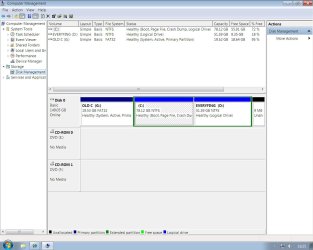
Before we make any specific recommendations will you please post a snip/screen-shot of the entire disk management drive map with a full description as to which drive/partition is which, so we can see what you have going on as there may be a fairly simple way to resolve the situation.

In the Windows start menu right click computer and click manage, in the left pane of the "Computer Management" window that opens click disk management and post a snip of that.


How to Upload and Post a Screenshot and File in Seven Forums
 

My Computer

Computer Manufacturer/Model Number
* BFK Customs *
OS
W 7 64-bit Ultimate
CPU
Intel Q9550 Yorkfield
Motherboard
ASUS P5Q Pro
Memory
8GB Dominator 8500C5D
Graphics Card(s)
ATI : XFX 5870
Sound Card
Realtek HD Audio 7-1
Monitor(s) Displays
1x 47" LCD HDMI & 3x 26" LCD HDMI
Screen Resolution
1920x1080P & 1920x1200
Hard Drives
1x 80GB Intel X25-M G2 SSD : 1x 500GB & 1x 640GB WD Caviar Black(s)
PSU
Corsair 620HX
Case
Cooler Master RC-690
Cooling
Tuniq Tower 120, 2x 140mm and 3x 120mm case fans
Keyboard
Microsoft 500
Mouse
Razer Diamondback 3G
Internet Speed
14 Mb/s
Other Info
1x Koutech 3Gb/s SATA HDD Hot Swap Rack
Thankyou i hope this is ok. Jenny
 

Attachments

  • screen shot.jpg
    screen shot.jpg
    103.6 KB · Views: 26

My Computer

OS
windows xp windows 7 32 bit
You have Windows 7 on an Extended partition / Logical drive and Windows will not/is not able to boot independently from a Logical drive; it can be converted to a Primary partition but all data on "Everything D:" would be lost; what exactly is the issue you are trying to correct.
 

My Computer

Computer Manufacturer/Model Number
* BFK Customs *
OS
W 7 64-bit Ultimate
CPU
Intel Q9550 Yorkfield
Motherboard
ASUS P5Q Pro
Memory
8GB Dominator 8500C5D
Graphics Card(s)
ATI : XFX 5870
Sound Card
Realtek HD Audio 7-1
Monitor(s) Displays
1x 47" LCD HDMI & 3x 26" LCD HDMI
Screen Resolution
1920x1080P & 1920x1200
Hard Drives
1x 80GB Intel X25-M G2 SSD : 1x 500GB & 1x 640GB WD Caviar Black(s)
PSU
Corsair 620HX
Case
Cooler Master RC-690
Cooling
Tuniq Tower 120, 2x 140mm and 3x 120mm case fans
Keyboard
Microsoft 500
Mouse
Razer Diamondback 3G
Internet Speed
14 Mb/s
Other Info
1x Koutech 3Gb/s SATA HDD Hot Swap Rack
Thankyou, well i think before i can do anything il need to get a portable hard drive and save everything from the D drive as this has a lot of important stuff on. Once this is done i would like to completely flatten the lot and just make into two partitions C & D and reload windows xp, as i have a dinosaur of a computer, Mesh, AMD Athlon (tm) 64 processor 3200+2.00 Ghz with 1.00 GB Ram, she's about 7/8 yrs old and theres a few things on windows 7 that just dont seem to work, without alot of upgrades.
So i would still like to know how to start all over again.
Thankyou so much, Jenny
 

My Computer

OS
windows xp windows 7 32 bit
Before (after you have backed-up everything you need to save) do you have access to all the XP drivers needed to run your PC, if not you may not be able to reinstall XP at all and may have to use Windows 7.


Chipset
Video
Sound
I assume the Hard Disk Drive is IDE/PATA
Internet
 

My Computer

Computer Manufacturer/Model Number
* BFK Customs *
OS
W 7 64-bit Ultimate
CPU
Intel Q9550 Yorkfield
Motherboard
ASUS P5Q Pro
Memory
8GB Dominator 8500C5D
Graphics Card(s)
ATI : XFX 5870
Sound Card
Realtek HD Audio 7-1
Monitor(s) Displays
1x 47" LCD HDMI & 3x 26" LCD HDMI
Screen Resolution
1920x1080P & 1920x1200
Hard Drives
1x 80GB Intel X25-M G2 SSD : 1x 500GB & 1x 640GB WD Caviar Black(s)
PSU
Corsair 620HX
Case
Cooler Master RC-690
Cooling
Tuniq Tower 120, 2x 140mm and 3x 120mm case fans
Keyboard
Microsoft 500
Mouse
Razer Diamondback 3G
Internet Speed
14 Mb/s
Other Info
1x Koutech 3Gb/s SATA HDD Hot Swap Rack
Good idea on the external to back up your files. Use it for regular backups and storage as well.

If you want to try Win7 for your clean reinstall, we can help you try to overcome any problems by using Compatibility Mode which makes a program think it is installing in the older OS it was made for: http://www.sevenforums.com/tutorials/316-compatibility-mode.html

Once you're all backed up, wipe your HD of all code before reinstall: http://www.sevenforums.com/tutorials/91339-ssd-hdd-optimize-windows-reinstallation.html
http://www.sevenforums.com/tutorials/1649-clean-install-windows-7-a.html

If you have Upgrade version, you'll need to do one of the workarounds here when installing to a cleaned HD: http://www.sevenforums.com/tutorials/31402-clean-install-upgrade-windows-7-version.html

XP is nearly XPired so now is the time to migrate to the future.
 
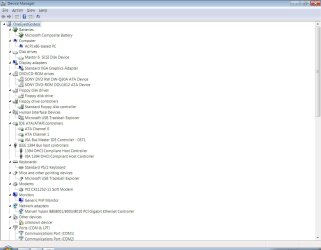
Hello, i think ive attached a quick rundown on my old girl, i do have the original Mesh recovery disc, and all the necessary drivers for the sound ect, im still in a bit of a pickle as i do like windows 7, but due to her age ???? i use creative sound blaster Audigy2ZS and Nvidia FX5600 personal cinema which work fine in XP but a few probs with win 7, i do have 2 laptops with win 7 on, so i think xp might have to stay ??
 

My Computer

OS
windows xp windows 7 32 bit
This might be the attachment :confused:
 

Attachments

  • screen shot 2.jpg
    screen shot 2.jpg
    87.5 KB · Views: 13

My Computer

OS
windows xp windows 7 32 bit
See if you can determine the Unknown Device using this method: http://www.sevenforums.com/tutorials/73420-hardware-identification.html

Google for Win7 drivers for your Creative and Nvidia devices to see if they are avaiable. If not, try installing their Applications in Compatibility Mode using the tutorial I linked before.

Are you noticing any performance issues that might reveal what the Unknown Device is which is missing driver?
 
Thankyou so much everything is working great, and ive learned a lot. Ive decided to keep using windows 7, and would totally like to remove window xp, as this dosent seem to be working at all, just a blank screen, so its a waste of space, and im not sure how to do this.
Thanks again Jenny
 

My Computer

OS
windows xp windows 7 32 bit
PS, the driver that was missing was the Creative Game Port, i corrected this by deleting it :D and all works great ???
 

My Computer

OS
windows xp windows 7 32 bit
Hello again Jenny.


Have you backed-up everything from the "D: Every ... " drive yet as we can't proceed until you do; to convert the C: to a Primary partition will destroy everything on D: so you have to make backups to external media of that data if you don't want to lose it.
 

My Computer

Computer Manufacturer/Model Number
* BFK Customs *
OS
W 7 64-bit Ultimate
CPU
Intel Q9550 Yorkfield
Motherboard
ASUS P5Q Pro
Memory
8GB Dominator 8500C5D
Graphics Card(s)
ATI : XFX 5870
Sound Card
Realtek HD Audio 7-1
Monitor(s) Displays
1x 47" LCD HDMI & 3x 26" LCD HDMI
Screen Resolution
1920x1080P & 1920x1200
Hard Drives
1x 80GB Intel X25-M G2 SSD : 1x 500GB & 1x 640GB WD Caviar Black(s)
PSU
Corsair 620HX
Case
Cooler Master RC-690
Cooling
Tuniq Tower 120, 2x 140mm and 3x 120mm case fans
Keyboard
Microsoft 500
Mouse
Razer Diamondback 3G
Internet Speed
14 Mb/s
Other Info
1x Koutech 3Gb/s SATA HDD Hot Swap Rack
Thankyou, and il get bk as soon as all backed up and ready to go.
Thanks again Jenny, catch you all soon.
 

My Computer

OS
windows xp windows 7 32 bit
Be sure to post back, we'll be right here.
 

My Computer

Computer Manufacturer/Model Number
* BFK Customs *
OS
W 7 64-bit Ultimate
CPU
Intel Q9550 Yorkfield
Motherboard
ASUS P5Q Pro
Memory
8GB Dominator 8500C5D
Graphics Card(s)
ATI : XFX 5870
Sound Card
Realtek HD Audio 7-1
Monitor(s) Displays
1x 47" LCD HDMI & 3x 26" LCD HDMI
Screen Resolution
1920x1080P & 1920x1200
Hard Drives
1x 80GB Intel X25-M G2 SSD : 1x 500GB & 1x 640GB WD Caviar Black(s)
PSU
Corsair 620HX
Case
Cooler Master RC-690
Cooling
Tuniq Tower 120, 2x 140mm and 3x 120mm case fans
Keyboard
Microsoft 500
Mouse
Razer Diamondback 3G
Internet Speed
14 Mb/s
Other Info
1x Koutech 3Gb/s SATA HDD Hot Swap Rack
All backed up

Hello again, well ive completely backed up everything onto me new 1TB portable HD, and ready to completely flatten the lot and start a fresh install with windows 7 from the beggining.
Dont no where to begin, but id like just one partition, C & D no dual booting, no crap no nowt :D, and in nice easy english language + easy follow instructions, pretty please lol.
Thanks Jenny
 

My Computer

OS
windows xp windows 7 32 bit
Hello again Jenny.


If there's nothing left on the Hard Disk Drive you care about; have a look at this first tutorial at the link below; do the clean all (secure erase) that will over-write everything on the HDD and then use Step Two #2 to create a single 100GB partition to install Windows 7 to then after the install completes you can create a second partition to use as storage from the additional unallocated space.


SSD / HDD : Optimize for Windows Reinstallation

How to Create a New Partition or Volume in Windows 7
 

My Computer

Computer Manufacturer/Model Number
* BFK Customs *
OS
W 7 64-bit Ultimate
CPU
Intel Q9550 Yorkfield
Motherboard
ASUS P5Q Pro
Memory
8GB Dominator 8500C5D
Graphics Card(s)
ATI : XFX 5870
Sound Card
Realtek HD Audio 7-1
Monitor(s) Displays
1x 47" LCD HDMI & 3x 26" LCD HDMI
Screen Resolution
1920x1080P & 1920x1200
Hard Drives
1x 80GB Intel X25-M G2 SSD : 1x 500GB & 1x 640GB WD Caviar Black(s)
PSU
Corsair 620HX
Case
Cooler Master RC-690
Cooling
Tuniq Tower 120, 2x 140mm and 3x 120mm case fans
Keyboard
Microsoft 500
Mouse
Razer Diamondback 3G
Internet Speed
14 Mb/s
Other Info
1x Koutech 3Gb/s SATA HDD Hot Swap Rack
Thankyou, here goes, :sarc: catch you again soon i hope.
JENNY
 

My Computer

OS
windows xp windows 7 32 bit
You'll be alright, just relax, take your time and have fun, there's no hurry. ;)
 

My Computer

Computer Manufacturer/Model Number
* BFK Customs *
OS
W 7 64-bit Ultimate
CPU
Intel Q9550 Yorkfield
Motherboard
ASUS P5Q Pro
Memory
8GB Dominator 8500C5D
Graphics Card(s)
ATI : XFX 5870
Sound Card
Realtek HD Audio 7-1
Monitor(s) Displays
1x 47" LCD HDMI & 3x 26" LCD HDMI
Screen Resolution
1920x1080P & 1920x1200
Hard Drives
1x 80GB Intel X25-M G2 SSD : 1x 500GB & 1x 640GB WD Caviar Black(s)
PSU
Corsair 620HX
Case
Cooler Master RC-690
Cooling
Tuniq Tower 120, 2x 140mm and 3x 120mm case fans
Keyboard
Microsoft 500
Mouse
Razer Diamondback 3G
Internet Speed
14 Mb/s
Other Info
1x Koutech 3Gb/s SATA HDD Hot Swap Rack
Back
Top