I purchased windows7 for when it comes out in Oct. My question is this
I have vista 32-bit and can do an inplace upgrade to windows7 32-bit.
Can I also do a dual boot and run windows7 64-bit on a second hdd? On the same machine!
Will I have to purchase a second key or would the same key work for both
32-bit and 64-bit?
If I install the 32-bit win7 can I upgrade to 64-bit using the same key or
do I have to purchase a second key to do This?
To the best of current thinking says the same key will work both 32 & 64 bit. you can dual boot both and should be able to use the same key.
Good luck and welcome to 7 Forum.
I purchased windows7 for when it comes out in Oct. My question is this
I have vista 32-bit and can do an inplace upgrade to windows7 32-bit.
Can I also do a dual boot and run windows7 64-bit on a second hdd? On the same machine!
Will I have to purchase a second key or would the same key work for both
32-bit and 64-bit?
If I install the 32-bit win7 can I upgrade to 64-bit using the same key or
do I have to purchase a second key to do This?
ken9122 has that correct there. With the retail purchase you will see two dvds included one for the 32bit and the other for the 64bit 7 edition you preordered. Both will use the same product key included. For purchasing oem disks where the two flavors are sold separately then you would need a separate key for each there once 7 is out just as seen with previous versions.
Two drives or simply two primary partitions on one drive alone can see a working dual boot of the 32bit Windows along with the 64bit. They both would use the same boot loader while kernel in Windows itself is different.
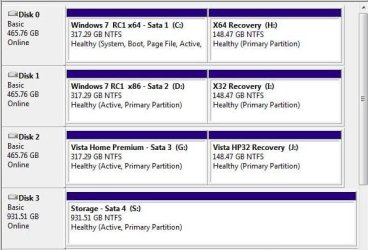
Here it was first the beta builds and then the Release Candidates that were dual booted along with XP and Vista as well across multiple drives here. Have a look at the old partitioning layout to see where XP was gone following the release of the RCs.
W7 Ultimate x64/W10 Pro x64/W11 Pro Triple Boot - Main PC W7 Remote PC Micro ATX W7 Pro x64/W11 Pro
CPU
AMD Phenom II X4 975 Deneb 3.6ghz - 965 2nd remote pc
Motherboard
Gigabyte GA-790XTA-UD4-Gigabyte GA-880GM-D2H remote pc
Memory
Kingston Hyper X DDR3 1600 1.5v 16gb - Hyper X Fury 8gb 2nd
Graphics Card(s)
MSI HD Radeon 5750 1gb - MSI HD Radeon 6450 on mini tower
Sound Card
Creative Labs X-Fi Xtreme Audio P - Realtek onooard 2nd case
Monitor(s) Displays
ASUS VW199T-P 19" HP 2082a Main-HP 2082a 20" remote pc
Screen Resolution
Asus 1440x900 - HP 1600x900
Hard Drives
WD Black 1TB HD per OS W7, W10, and pending W11 presently on 500gb OS Drive - Pending Triple 1TB HDs for Spanned Storage/backup volume
Single 2TB external USB enclosure, single 1TB System 7 Host/Boot drive, Pending 8TB external HD for system image b
PSU
Corsair 750TX - primary / Corsair CX600 - second
Case
Antec 900-2 - SSD compatible / NZXT Vulcan mini tower
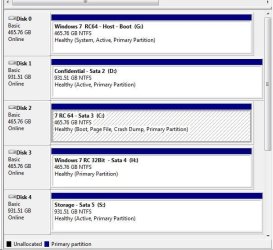
As you look at the image posted following the RCs being released the second partition on each of two of those drives seen there was originally used for 7(Disk #1, Disk #2). For testing other configurations Disk #1 was added in for a being a host boot drive along with a second storage drive not shown there.
XP had been on Disk #1 with the Vista drive set as default before some large changes to come later. I would say!
W7 Ultimate x64/W10 Pro x64/W11 Pro Triple Boot - Main PC W7 Remote PC Micro ATX W7 Pro x64/W11 Pro
CPU
AMD Phenom II X4 975 Deneb 3.6ghz - 965 2nd remote pc
Motherboard
Gigabyte GA-790XTA-UD4-Gigabyte GA-880GM-D2H remote pc
Memory
Kingston Hyper X DDR3 1600 1.5v 16gb - Hyper X Fury 8gb 2nd
Graphics Card(s)
MSI HD Radeon 5750 1gb - MSI HD Radeon 6450 on mini tower
Sound Card
Creative Labs X-Fi Xtreme Audio P - Realtek onooard 2nd case
Monitor(s) Displays
ASUS VW199T-P 19" HP 2082a Main-HP 2082a 20" remote pc
Screen Resolution
Asus 1440x900 - HP 1600x900
Hard Drives
WD Black 1TB HD per OS W7, W10, and pending W11 presently on 500gb OS Drive - Pending Triple 1TB HDs for Spanned Storage/backup volume
Single 2TB external USB enclosure, single 1TB System 7 Host/Boot drive, Pending 8TB external HD for system image b
PSU
Corsair 750TX - primary / Corsair CX600 - second
Case
Antec 900-2 - SSD compatible / NZXT Vulcan mini tower