Windows7-Autorun

rjmach

New member
Member
Local time
4:42 PM
Messages
67
Location
GA.
Hello

I would like to know how to set the Autorun on TSSTcorp DVD+-RW TS-H653G Drive.

When i put in the CD or DVD i want it to run. I have to click on my computer and then go to the set up folder to make it run.

Thanks for your help:geek:
 

Attachments

  • System Information.PNG
    System Information.PNG
    12.5 KB · Views: 26

My Computer

Computer Manufacturer/Model Number
Studio XPS 435T
OS
Windows 7 Home Premium
CPU
Dell/435T/9000/ i7
Motherboard
Dell Inc .0x501H
Memory
12gb 1066MHZ DDR3 4DIMM
Graphics Card(s)
ADM Radeon HD 6850 Series
Sound Card
High Definition Audio Device
Monitor(s) Displays
HP w2207h
Screen Resolution
1680-1050
Hard Drives
WD 500gb 7200RPM SERIAL
ST31000528AS ATA Device 1 TB
Case
DELL 9000
Cooling
Freezer 7 Pro Rev.2
Keyboard
Logitech Wireless Illuminated keyboard K800
Mouse
G9
Internet Speed
Cable

My Computer

OS
Win7U 64 RTM
CPU
Q9550
Motherboard
GA-EP45-UD3R
Memory
8GB Gskill
Graphics Card(s)
ASUS|EAH4850/HTDI/1GD3/A
Sound Card
xfi Plat
Monitor(s) Displays
Dell 2405fpw
Screen Resolution
1920x1200
Hard Drives
Seagate & WD sata Drives
PSU
Antec
Case
Antec
Keyboard
MS Natural Ergonomic 4000
Mouse
Logitech MX610 USB Cordless

My Computer

Computer Manufacturer/Model Number
Studio XPS 435T
OS
Windows 7 Home Premium
CPU
Dell/435T/9000/ i7
Motherboard
Dell Inc .0x501H
Memory
12gb 1066MHZ DDR3 4DIMM
Graphics Card(s)
ADM Radeon HD 6850 Series
Sound Card
High Definition Audio Device
Monitor(s) Displays
HP w2207h
Screen Resolution
1680-1050
Hard Drives
WD 500gb 7200RPM SERIAL
ST31000528AS ATA Device 1 TB
Case
DELL 9000
Cooling
Freezer 7 Pro Rev.2
Keyboard
Logitech Wireless Illuminated keyboard K800
Mouse
G9
Internet Speed
Cable

My Computer

OS
Win7U 64 RTM
CPU
Q9550
Motherboard
GA-EP45-UD3R
Memory
8GB Gskill
Graphics Card(s)
ASUS|EAH4850/HTDI/1GD3/A
Sound Card
xfi Plat
Monitor(s) Displays
Dell 2405fpw
Screen Resolution
1920x1200
Hard Drives
Seagate & WD sata Drives
PSU
Antec
Case
Antec
Keyboard
MS Natural Ergonomic 4000
Mouse
Logitech MX610 USB Cordless

Attachments

  • Choose what happens.PNG
    Choose what happens.PNG
    12.3 KB · Views: 13

My Computer

Computer Manufacturer/Model Number
Studio XPS 435T
OS
Windows 7 Home Premium
CPU
Dell/435T/9000/ i7
Motherboard
Dell Inc .0x501H
Memory
12gb 1066MHZ DDR3 4DIMM
Graphics Card(s)
ADM Radeon HD 6850 Series
Sound Card
High Definition Audio Device
Monitor(s) Displays
HP w2207h
Screen Resolution
1680-1050
Hard Drives
WD 500gb 7200RPM SERIAL
ST31000528AS ATA Device 1 TB
Case
DELL 9000
Cooling
Freezer 7 Pro Rev.2
Keyboard
Logitech Wireless Illuminated keyboard K800
Mouse
G9
Internet Speed
Cable
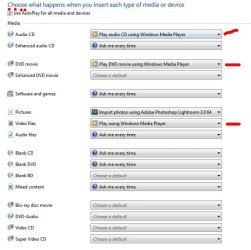
Wherever your DVD (or CD) is mentioned, use the drop down arrow to select the auto play function you desire. For instance, I wish for the auto play dialog to appear so that I can choose what I want to happen, thus the screenshot. You may want a movie to play when you put in the disc, therefore, you choose the play movie option, etc.:
 

Attachments

  • Autoplay.JPG
    Autoplay.JPG
    54.8 KB · Views: 8

My Computer

OS
Win7U 64 RTM
CPU
Q9550
Motherboard
GA-EP45-UD3R
Memory
8GB Gskill
Graphics Card(s)
ASUS|EAH4850/HTDI/1GD3/A
Sound Card
xfi Plat
Monitor(s) Displays
Dell 2405fpw
Screen Resolution
1920x1200
Hard Drives
Seagate & WD sata Drives
PSU
Antec
Case
Antec
Keyboard
MS Natural Ergonomic 4000
Mouse
Logitech MX610 USB Cordless
Windows7-Autorum

Wherever your DVD (or CD) is mentioned, use the drop down arrow to select the auto play function you desire. For instance, I wish for the auto play dialog to appear so that I can choose what I want to happen, thus the screenshot. You may want a movie to play when you put in the disc, therefore, you choose the play movie option, etc.:

I think we are missing something here. What i am trying to do is when i put in a CD/DVD i want it to run! When i put the cd/dvd it dose not run.

I think problem i am having is in the 'REGISTRY'-Setting.:o
 

My Computer

Computer Manufacturer/Model Number
Studio XPS 435T
OS
Windows 7 Home Premium
CPU
Dell/435T/9000/ i7
Motherboard
Dell Inc .0x501H
Memory
12gb 1066MHZ DDR3 4DIMM
Graphics Card(s)
ADM Radeon HD 6850 Series
Sound Card
High Definition Audio Device
Monitor(s) Displays
HP w2207h
Screen Resolution
1680-1050
Hard Drives
WD 500gb 7200RPM SERIAL
ST31000528AS ATA Device 1 TB
Case
DELL 9000
Cooling
Freezer 7 Pro Rev.2
Keyboard
Logitech Wireless Illuminated keyboard K800
Mouse
G9
Internet Speed
Cable
Wherever your DVD (or CD) is mentioned, use the drop down arrow to select the auto play function you desire. For instance, I wish for the auto play dialog to appear so that I can choose what I want to happen, thus the screenshot. You may want a movie to play when you put in the disc, therefore, you choose the play movie option, etc.:

I think we are missing something here. What i am trying to do is when i put in a CD/DVD i want it to run! When i put the cd/dvd it dose not run.

I think problem i am having is in the 'REGISTRY'-Setting.:o

I'm not sure how to explain it any clearer...or perhaps I'm misunderstanding somehow. At any rate, based on your stated desire for a 'DVD/CD to run', the instructions are correct. Here is another screenshot with different settings selected that may clarify:
 

Attachments

  • Autoplay2.JPG
    Autoplay2.JPG
    56.6 KB · Views: 15

My Computer

OS
Win7U 64 RTM
CPU
Q9550
Motherboard
GA-EP45-UD3R
Memory
8GB Gskill
Graphics Card(s)
ASUS|EAH4850/HTDI/1GD3/A
Sound Card
xfi Plat
Monitor(s) Displays
Dell 2405fpw
Screen Resolution
1920x1200
Hard Drives
Seagate & WD sata Drives
PSU
Antec
Case
Antec
Keyboard
MS Natural Ergonomic 4000
Mouse
Logitech MX610 USB Cordless
You may have other 'programs' and functions listed in your drop down list (accessed via the arrow on the right).
 
Last edited:

My Computer

OS
Win7U 64 RTM
CPU
Q9550
Motherboard
GA-EP45-UD3R
Memory
8GB Gskill
Graphics Card(s)
ASUS|EAH4850/HTDI/1GD3/A
Sound Card
xfi Plat
Monitor(s) Displays
Dell 2405fpw
Screen Resolution
1920x1200
Hard Drives
Seagate & WD sata Drives
PSU
Antec
Case
Antec
Keyboard
MS Natural Ergonomic 4000
Mouse
Logitech MX610 USB Cordless
Wherever your DVD (or CD) is mentioned, use the drop down arrow to select the auto play function you desire. For instance, I wish for the auto play dialog to appear so that I can choose what I want to happen, thus the screenshot. You may want a movie to play when you put in the disc, therefore, you choose the play movie option, etc.:

I think we are missing something here. What i am trying to do is when i put in a CD/DVD i want it to run! When i put the cd/dvd it dose not run.

I think problem i am having is in the 'REGISTRY'-Setting.:o

I'm not sure how to explain it any clearer...or perhaps I'm misunderstanding somehow. At any rate, based on your stated desire for a 'DVD/CD to run', the instructions are correct. Here is another screenshot with different settings selected that may clarify:

I did what you said, still don't work.
I have to go to my computer then to my (E) drive to open the setup file, that's the only way it will work!
 

My Computer

Computer Manufacturer/Model Number
Studio XPS 435T
OS
Windows 7 Home Premium
CPU
Dell/435T/9000/ i7
Motherboard
Dell Inc .0x501H
Memory
12gb 1066MHZ DDR3 4DIMM
Graphics Card(s)
ADM Radeon HD 6850 Series
Sound Card
High Definition Audio Device
Monitor(s) Displays
HP w2207h
Screen Resolution
1680-1050
Hard Drives
WD 500gb 7200RPM SERIAL
ST31000528AS ATA Device 1 TB
Case
DELL 9000
Cooling
Freezer 7 Pro Rev.2
Keyboard
Logitech Wireless Illuminated keyboard K800
Mouse
G9
Internet Speed
Cable
OK, if you can’t do it via the control panel, as you suspected, a registry fix may indeed be called for. Before editing the registry, it is recommended that you back up your registry and create a system restore point as shown here:

http://www.sevenforums.com/tutorials/697-system-restore-point-create.html

http://www.sevenforums.com/tutorials/4230-registry-backup-restore.html

The first key you need to check is:
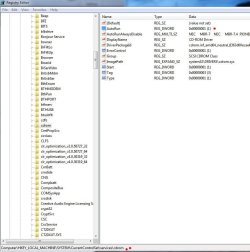
HKEY_LOCAL_MACHINE\SYSTEM\CurrentControlSet\services\cdrom
Make sure that the AutoRun key is set to a value of 1 as seen in screenshot (note red dots). If not, double click on the key name (AutoRun), and in the editable field, replace 0 with 1. Click OK, close out the registry, log off and back on.
Does this help, or was the value already set to 1? If so, are you using any 3rd party burning software (ie, Nero, etc.)?
 

Attachments

  • Screenshot1.JPG
    Screenshot1.JPG
    81.5 KB · Views: 26
Last edited:

My Computer

OS
Win7U 64 RTM
CPU
Q9550
Motherboard
GA-EP45-UD3R
Memory
8GB Gskill
Graphics Card(s)
ASUS|EAH4850/HTDI/1GD3/A
Sound Card
xfi Plat
Monitor(s) Displays
Dell 2405fpw
Screen Resolution
1920x1200
Hard Drives
Seagate & WD sata Drives
PSU
Antec
Case
Antec
Keyboard
MS Natural Ergonomic 4000
Mouse
Logitech MX610 USB Cordless
My previous post has been edited to include the left-out key name. Re-read for correction.
 

My Computer

OS
Win7U 64 RTM
CPU
Q9550
Motherboard
GA-EP45-UD3R
Memory
8GB Gskill
Graphics Card(s)
ASUS|EAH4850/HTDI/1GD3/A
Sound Card
xfi Plat
Monitor(s) Displays
Dell 2405fpw
Screen Resolution
1920x1200
Hard Drives
Seagate & WD sata Drives
PSU
Antec
Case
Antec
Keyboard
MS Natural Ergonomic 4000
Mouse
Logitech MX610 USB Cordless
Windows7-Autorum

OK, if you can’t do it via the control panel, as you suspected, a registry fix may indeed be called for. Before editing the registry, it is recommended that you back up your registry and perform a system restore as shown here:
http://www.sevenforums.com/tutorials/700-system-restore.html
http://www.sevenforums.com/tutorials/4230-registry-backup-restore.html

The first key you need to check is:
HKEY_LOCAL_MACHINE\SYSTEM\CurrentControlSet\services\cdrom
Make sure that the AutoRun key is set to a value of 1 as seen in screenshot (note red dots). If not, double click on the key name (AutoRun), and in the editable field, replace 0 with 1. Click OK, close out the registry, log off and back on.
Does this help, or was the value already set to 1? If so, are you using any 3rd party burning software (ie, Nero, etc.)?

Yes it is set to-(1)
I have Roxio Creator Home that came with my Dell i7/435t 9000 8G/Ram.
IT was working find when i got my Dell.
 

My Computer

Computer Manufacturer/Model Number
Studio XPS 435T
OS
Windows 7 Home Premium
CPU
Dell/435T/9000/ i7
Motherboard
Dell Inc .0x501H
Memory
12gb 1066MHZ DDR3 4DIMM
Graphics Card(s)
ADM Radeon HD 6850 Series
Sound Card
High Definition Audio Device
Monitor(s) Displays
HP w2207h
Screen Resolution
1680-1050
Hard Drives
WD 500gb 7200RPM SERIAL
ST31000528AS ATA Device 1 TB
Case
DELL 9000
Cooling
Freezer 7 Pro Rev.2
Keyboard
Logitech Wireless Illuminated keyboard K800
Mouse
G9
Internet Speed
Cable
You state that it was working previously…let’s backtrack for a moment. If this is a recent development, you could perform a System Restore using a restore point that pre-dates the problem:

http://www.sevenforums.com/tutorials/700-system-restore.html?ltr=S

No restore points pre-dating or doesn’t fix the problem?

Try:

Winkey|type ‘services.msc’ (w/o quotes)
Ctrl+shift+enter (type in admin password if asked)
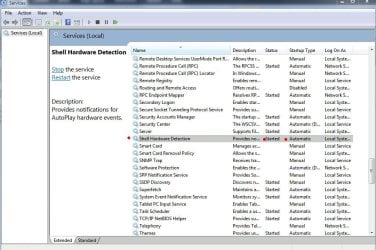
Scroll down to ‘Shell Hardware Detection’
Looking at the coluimn headers:
Under status, it should say ‘Started’,
Under startup Type, it should say ‘Automatic'.
If not, double click on the name (Shell Hardware Detection) and change the settings to the above, as in screenshot.

If all is well there:

Again, open regedit (assuming you’ve backed it up) and navigate to:
HKEY_LOCAL_MACHINE\Software\Microsoft\Windows\CurrentVersion\Policies\Explorer
Check that the value of NoDriveTypeAutoRun (if it exists) is 0×00000091
If you you find the key: NoDriveAutoRun, you can delete it.
 

Attachments

  • Services.JPG
    Services.JPG
    99.7 KB · Views: 19

My Computer

OS
Win7U 64 RTM
CPU
Q9550
Motherboard
GA-EP45-UD3R
Memory
8GB Gskill
Graphics Card(s)
ASUS|EAH4850/HTDI/1GD3/A
Sound Card
xfi Plat
Monitor(s) Displays
Dell 2405fpw
Screen Resolution
1920x1200
Hard Drives
Seagate & WD sata Drives
PSU
Antec
Case
Antec
Keyboard
MS Natural Ergonomic 4000
Mouse
Logitech MX610 USB Cordless
Windows7-Autorum

You state that it was working previously…let’s backtrack for a moment. If this is a recent development, you could perform a System Restore using a restore point that pre-dates the problem:

http://www.sevenforums.com/tutorials/700-system-restore.html?ltr=S

No restore points pre-dating or doesn’t fix the problem?

Try:


Winkey|type ‘services.msc’ (w/o quotes)
Ctrl+shift+enter (type in admin password if asked)
Scroll down to ‘Shell Hardware Detection’
Looking at the coluimn headers:
Under status, it should say ‘Started’,
Under startup Type, it should say ‘Automatic'.
If not, double click on the name (Shell Hardware Detection) and change the settings to the above, as in screenshot.

If all is well there:

Again, open regedit (assuming you’ve backed it up) and navigate to:
HKEY_LOCAL_MACHINE\Software\Microsoft\Windows\CurrentVersion\Policies\Explorer
Check that the value of NoDriveTypeAutoRun (if it exists) is 0×00000091
If you you find the key: NoDriveAutoRun, you can delete it.

I did try all those setting. The only way i can open a CD/DVD is to go to my computer.
 

Attachments

  • Registry keys.PNG
    Registry keys.PNG
    5.2 KB · Views: 14

My Computer

Computer Manufacturer/Model Number
Studio XPS 435T
OS
Windows 7 Home Premium
CPU
Dell/435T/9000/ i7
Motherboard
Dell Inc .0x501H
Memory
12gb 1066MHZ DDR3 4DIMM
Graphics Card(s)
ADM Radeon HD 6850 Series
Sound Card
High Definition Audio Device
Monitor(s) Displays
HP w2207h
Screen Resolution
1680-1050
Hard Drives
WD 500gb 7200RPM SERIAL
ST31000528AS ATA Device 1 TB
Case
DELL 9000
Cooling
Freezer 7 Pro Rev.2
Keyboard
Logitech Wireless Illuminated keyboard K800
Mouse
G9
Internet Speed
Cable
Check that the value of NoDriveTypeAutoRun (if it exists) is 0×00000091
If you you find the key: NoDriveAutoRun, you can delete it.

I did try all those setting. The only way i can open a CD/DVD is to go to my computer.

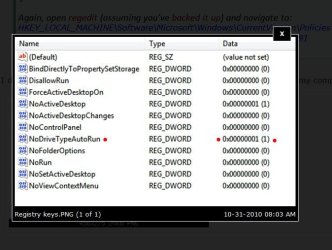
Your NoDrivetypeAutoRun entry is likely the problem here (see screenshot of your screenshot, note the red dots) . Change it to the value stated above (0×00000091). You will only have to enter the term 91, not the whole string. Log off, log back on and see what happens. If that doesn't resolve the problem, navigate back to the same key and change the value to '0', then log off and on again.

James
 

Attachments

  • RegNoDrive.JPG
    RegNoDrive.JPG
    53.8 KB · Views: 17
Last edited:

My Computer

OS
Win7U 64 RTM
CPU
Q9550
Motherboard
GA-EP45-UD3R
Memory
8GB Gskill
Graphics Card(s)
ASUS|EAH4850/HTDI/1GD3/A
Sound Card
xfi Plat
Monitor(s) Displays
Dell 2405fpw
Screen Resolution
1920x1200
Hard Drives
Seagate & WD sata Drives
PSU
Antec
Case
Antec
Keyboard
MS Natural Ergonomic 4000
Mouse
Logitech MX610 USB Cordless
Windows7-Autorum

Check that the value of NoDriveTypeAutoRun (if it exists) is 0×00000091
If you you find the key: NoDriveAutoRun, you can delete it.

I did try all those setting. The only way i can open a CD/DVD is to go to my computer.

Your NoDriveAutoRun entry is likely the problem here (see screenshot of your screenshot, note the red dots) . Change it to the value stated above (0×00000091). You will only have to enter the term 91, not the whole string. Log off, log back on and see what happens. If that doesn't resolve the problem, navigate back to the same key and change the value to '0', then log off and on again.

James

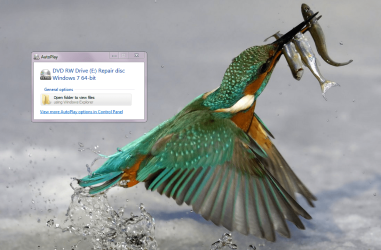
Ok so far so good, :) i like to know if there is a way that 'Repair disc' well run autorun! i need auto run when i put the repair disc in.???!:what:
Thanks James for all your help!
 

Attachments

  • Repair disc.PNG
    Repair disc.PNG
    320 KB · Views: 13

My Computer

Computer Manufacturer/Model Number
Studio XPS 435T
OS
Windows 7 Home Premium
CPU
Dell/435T/9000/ i7
Motherboard
Dell Inc .0x501H
Memory
12gb 1066MHZ DDR3 4DIMM
Graphics Card(s)
ADM Radeon HD 6850 Series
Sound Card
High Definition Audio Device
Monitor(s) Displays
HP w2207h
Screen Resolution
1680-1050
Hard Drives
WD 500gb 7200RPM SERIAL
ST31000528AS ATA Device 1 TB
Case
DELL 9000
Cooling
Freezer 7 Pro Rev.2
Keyboard
Logitech Wireless Illuminated keyboard K800
Mouse
G9
Internet Speed
Cable
Ok so far so good, :) i like to know if there is a way that 'Repair disc' well run autorun! i need auto run when i put the repair disc in.???!:what:

Now that auto run is finally working, it should present you the option to run the executable (as it is in your screenshot...), or you can boot from it, but you don't really "need" autorun, as you can just access the disc via Windows Explorer, as you have done already. Is your system in need of a repair install, startup repair or are you just being prepared?


Thanks James for all your help!

You're quite welcome. Glad that the problem is solved. :party:

James
 

My Computer

OS
Win7U 64 RTM
CPU
Q9550
Motherboard
GA-EP45-UD3R
Memory
8GB Gskill
Graphics Card(s)
ASUS|EAH4850/HTDI/1GD3/A
Sound Card
xfi Plat
Monitor(s) Displays
Dell 2405fpw
Screen Resolution
1920x1200
Hard Drives
Seagate & WD sata Drives
PSU
Antec
Case
Antec
Keyboard
MS Natural Ergonomic 4000
Mouse
Logitech MX610 USB Cordless
Back
Top