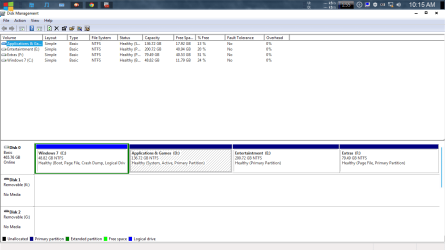
windows7 has made my 136GB partition as system reseved and boot!!!!

nightmare2100

New member
Local time
1:19 AM
Messages
4
I have Dell inspiron 15R N5110,with 500 GB HDD,3GB RAM and core-i3 processor.
My harddisk has 4 partitions 1) drive C logical 48GB
2) drive D primary 136GB
3) drive E primary 200GB
4) drive F primary 79GB

when i installed windows 7 ultimate 32bit on my C drive,i found that win7 has made my D drive as system reserved and it has also installed the MBR on my D drive.it has not made an extra 100MB partition.now what should i do.i want to move it to c drive without affecting the windows7 installtion and without affecting the data on my D drive.
 

My Computer My Computer

At a glance

Windows 7 ultimate 32bit
OS
Windows 7 ultimate 32bit
Windows 7 can't make a logical partition active, thus the D: partition was used.

Any chance you might want to reinstall to the D: partition?

What is the Reserved Partition, your system recovery?
 

My Computer My Computer

At a glance

Windows 7 x64i7-2600K8 GGTX 480
Computer Manufacturer/Model Number
Homebuilt
OS
Windows 7 x64
CPU
i7-2600K
Motherboard
Asus P8Z77-v Pro
Memory
8 G
Graphics Card(s)
GTX 480
Sound Card
Onboard
Monitor(s) Displays
LG W2753V
Screen Resolution
1920x1080
Hard Drives
Crucial M4 128 G SSD
When you Clean Reinstall - Factory OEM Windows 7 you should weigh if you need to keep the Dell Recovery and Diagnostic Tools partitions or delete them. Run Diagnostics from F12 at boot to assure it works - it is also available to run from disk or stick at Dell DIagnostics downoad. Then cue up Recovery. If you don't want either delete its partition during install.

Data should be backed up externally at all times. Move the Data off of D to delete it and C, create and format new partitions in that space and direct install to C.

Please post back a screenshot of your maximized Disk Management drive map and listings:

1. Type Disk Management in Start Search box.
2. Open Disk Mgmt. window and maximize it.
3. Type Snipping Tool in Start Search box.
4. Open Snipping Tool, choose Rectangular Snip, draw a box around full map and all listings.
5, Save Snip, attach using paper clip in Reply Box.

Tell us what is on each partition.
 
I don't have any recovery partition.My c drive contains windows 7, my D drive contain games and softwares installer files,my E drive contains mp3,video,and images, on my F drive i have installed ubuntu 12.04.
 

My Computer My Computer

At a glance

Windows 7 ultimate 32bit
OS
Windows 7 ultimate 32bit
I don't have any recovery partition.My c drive contains windows 7, my D drive contain games and softwares installer files,my E drive contains mp3,video,and images, on my F drive i have installed ubuntu 12.04.

You said in the title, Reserved Partition. Is that your 100 MB partition?
 

My Computer My Computer

At a glance

Windows 7 Home Premium 32-Bit - Build 7600 SP1Intel Core i3-2120 3.30GhzKingston 4 GB DDR3 1333 mhzAMD Radeon HD6670
Computer type
PC/Desktop
Computer Manufacturer/Model Number
Custom Build
OS
Windows 7 Home Premium 32-Bit - Build 7600 SP1
CPU
Intel Core i3-2120 3.30Ghz
Motherboard
Asus P8Z68-V LX Intel Z68 Socket H2 ATX
Memory
Kingston 4 GB DDR3 1333 mhz
Graphics Card(s)
AMD Radeon HD6670
Sound Card
Sound Blaster Audigy SE 24-Bit
Monitor(s) Displays
Asus VE228
Screen Resolution
1440 X 900
Hard Drives
OCZ Vertex 3 120 GB Sata 3 SSD ==
Kingston SH103/S3 120 G Hyper X 120 GB SSD ==
Western Digital 500 GB Caviar Green 7200 RPM ==
PSU
Corsair CX600M == 600 Watt
Case
NZXT Apollo - Silver with Clear Side Panel
Cooling
Three 120 mm Fans
Keyboard
Microsoft Natural 4000
Mouse
Microsoft Custom Optical 3000
Internet Speed
AT&T Fiber Optic Wireless Network
Antivirus
Microsoft Security Essentials
Browser
Chrome
Other Info
120 mm Blue LED Fan -- Three Blue LED Lazer Light Sticks
Actually instead of making a separate 100MB partition,windows7 is using my D drive.
 

Attachments

  • disk management.PNG
    disk management.PNG
    26.6 KB · Views: 15

My Computer My Computer

At a glance

Windows 7 ultimate 32bit
OS
Windows 7 ultimate 32bit
That's not a competent configuration.

Boot free Partition Wizard bootable CD to convert C to Primary partition: How to set partition as Primary or Logical.

Then rightclick C again to Set to Active, click on HD # to highlight it, from Disk tab select Rebuild MBR: How to Set Active/Inactive partition -Partition Wizard Video Help.
Partition Wizard Rebuild MBR Video Help.

If Win7 doesn't boot with the System boot files now on C, boot into installer or System Repair Disk
to run Startup Repair - Run 3 Separate Times
 
Sir i did what u said,but now as i start my pc windows7 starts and i m unable to boot ubuntu 12.04 which i had installed using wubi on my f Drive. pls help sir i don't want to loose it.
 

My Computer My Computer

At a glance

Windows 7 ultimate 32bit
OS
Windows 7 ultimate 32bit
Back
Top